
Denon AVR-2308CI Av Surround Receiver User Manual
Content
Denon AVR-2308CI AV Surround Receiver Review and Product Manual
Introduction
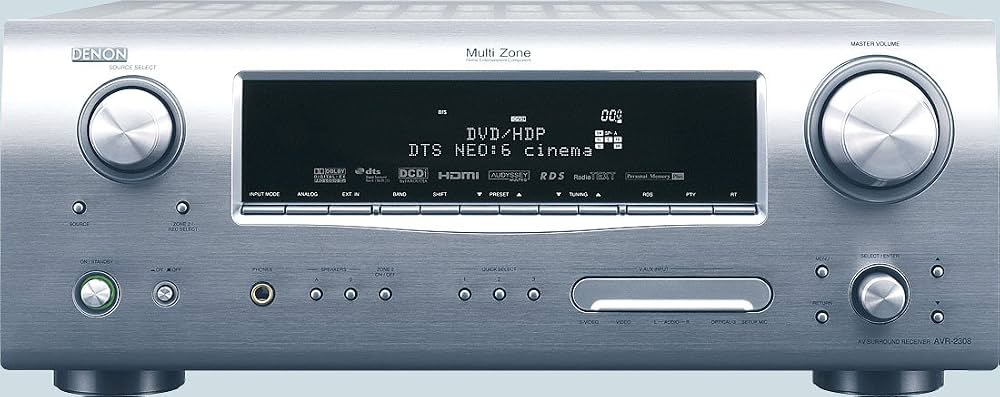
The Denon AVR-2308CI AV Surround Receiver is a feature-rich 7.1-channel home theater receiver designed for users who want reliable surround sound, flexible connectivity, and strong video processing in one component. Built for serious movie lovers, gaming setups, and multi-room audio installations, this Denon receiver delivers a balanced mix of power, practicality, and classic AV receiver versatility. It is especially appealing to home theater enthusiasts who need HDMI switching, legacy input support, and automated calibration without moving into premium-priced separates.
At its core, the denon AVR-2308CI Av Surround Receiver combines 7.1-channel amplification with advanced decoding for Dolby and DTS formats, making it suitable for immersive movie playback and everyday TV audio. It also includes room calibration features and video conversion capabilities that help simplify system setup. This makes it a strong fit for users upgrading from older receivers or building a mid-range entertainment system with multiple source devices such as Blu-ray players, game consoles, cable boxes, and turntables.
In today’s market, the Denon AVR-2308CI is typically available mainly through used, refurbished, or legacy-stock channels rather than standard retail stores. Estimated pricing usually falls in the budget-to-midrange secondary market, depending on condition, accessories, and whether the unit has been tested. For buyers seeking a dependable older AV receiver with robust connectivity and full surround support, the denon AVR-2308CI Av Surround Receiver remains a practical value option.
Specifications for Denon AVR-2308CI AV Surround Receiver
- Channels: 7.1-channel surround sound receiver
- Rated output: 100 watts per channel into 8 ohms, 20 Hz to 20 kHz, with low distortion
- Higher-power mode: 135 watts per channel into 6 ohms at 1 kHz
- Frequency response: approximately 10 Hz to 100 kHz
- Total harmonic distortion: 0.08% rated output performance
- Signal-to-noise ratio: 100 dB line level, with dedicated phono support
- HDMI connectivity: multiple HDMI inputs with HDMI output and switching support
- Video processing: analog-to-HDMI conversion and upscaling to higher resolutions
- Audio decoding: Dolby Digital, Dolby Pro Logic IIx, DTS, DTS Neo:6, and other surround formats
- DAC support: 24-bit/192 kHz digital-to-analog conversion
- Control and integration: RS-232C support for automation systems
- Physical size: full-size AV receiver chassis with a substantial, rack-friendly footprint
Compared with many basic 7.1 receivers of its era, the denon AVR-2308CI Av Surround Receiver stands out for its stronger room integration, better format support, and more flexible input selection. It is most comparable to other mid-tier home theater receivers that emphasize both audio processing and video switching rather than pure amplification alone.
Detailed Description of the Denon AVR-2308CI AV Surround Receiver
The denon AVR-2308CI Av Surround Receiver is built around a traditional AV receiver design that routes audio from multiple sources, decodes surround formats, powers speakers, and switches video signals for a simplified home theater experience. The unit supports front, center, surround, and surround back speaker channels, allowing users to create a full 7.1 setup for cinematic playback. Its integrated processing is designed to preserve detail while delivering the dynamic impact needed for movies, sports, and music.
In real-world use, this receiver works well in living rooms, media rooms, and multi-source entertainment systems. Users can connect a turntable, disc player, cable box, streaming device, and game console while managing everything through one central interface. Its build quality reflects Denon’s longstanding emphasis on sturdy construction, with a heavy chassis and a layout intended for dependable long-term operation. The front-panel controls and on-screen setup tools make day-to-day use straightforward, while the surround processing helps newer and older content sound fuller and more immersive.
For listeners who value both music and movies, the denon AVR-2308CI Av Surround Receiver offers a satisfying mix of warmth, clarity, and channel separation. It is especially useful for users who need legacy connectivity alongside HDMI support, making it a versatile bridge between older AV components and newer display setups.
Setup Guide for Denon AVR-2308CI AV Surround Receiver
Start by placing the receiver in a well-ventilated area with at least a few inches of clearance on the top and sides. Connect the front, center, surround, and subwoofer speakers before applying power. Match speaker polarity carefully to avoid thin sound or phase issues. Next, connect source devices using HDMI, component, composite, optical, coaxial, or analog inputs depending on each component’s available outputs.
After wiring is complete, connect the receiver to your television or projector using the HDMI output or the best available video connection. Run the initial setup menu to configure speaker size, crossover, distance, and channel levels. If available, use the automated calibration microphone to help balance the system for your room. For multi-zone or advanced installations, review the assignable input and output options before finalizing the configuration.
During setup, keep power off while connecting or disconnecting cables to protect the receiver and speakers. Do not block ventilation openings or stack heat-producing devices directly on top of the unit. If the display shows no signal, confirm the selected input, HDMI handshaking, and source output resolution. If sound is missing, verify speaker wiring, mute status, and audio format settings. For best results, use quality cables and keep firmware or source device settings aligned with the receiver’s supported formats.
Troubleshooting Denon AVR-2308CI AV Surround Receiver Problems
One common issue is no audio output. Check that the correct input is selected, the speakers are wired properly, and the receiver is not muted or set to an incorrect listening mode. If using HDMI, confirm that the source device is outputting compatible audio and that the TV or display is not interfering with the signal path.
Another frequent problem is distorted or weak sound. This can result from incorrect speaker impedance, damaged cables, or an improper crossover setting. If the unit shuts down unexpectedly, improve ventilation and make sure no speaker wire strands are touching each other. Overheating protection can activate if airflow is restricted or if the receiver is driven too hard for long periods.
Display or video issues are often related to source compatibility, loose HDMI connections, or resolution mismatches. Power-cycle the receiver and source devices, then reconnect the chain from source to receiver to display. The denon AVR-2308CI Av Surround Receiver does not typically rely on modern app-based error messaging, so troubleshooting usually focuses on signal routing, speaker setup, and input configuration. If problems persist, consult the owner’s manual or contact Denon support through the company’s official customer service channels. For older units, warranty coverage may be limited or expired, making a reputable AV repair shop a practical option.
Pros and Cons of the Denon AVR-2308CI AV Surround Receiver
Pros
- Strong 7.1-channel surround performance for movies and TV
- Flexible connectivity with HDMI, optical, coaxial, analog, and phono support
- Useful video conversion and upscaling features for mixed-source systems
- Good fit for legacy and modern AV equipment in one setup
- Solid build quality and dependable Denon engineering
- Good value on the used market for buyers needing classic receiver functionality
Cons
- Older HDMI and video standards compared with modern receivers
- No built-in network streaming or wireless features
- Best value depends heavily on used-condition quality
- May require careful setup for older and newer devices together
- Not ideal for users who want the latest smart-home integrations
Overall, the denon AVR-2308CI Av Surround Receiver offers strong value for buyers who prioritize sound quality and input flexibility over modern networking extras. Compared with newer alternatives, it is less advanced in smart features but still competitive for straightforward home theater use.
Customer Reviews of Denon AVR-2308CI AV Surround Receiver
Typical user feedback is positive, with many owners giving it around 4 out of 5 stars for sound quality, reliability, and input flexibility. Praise often centers on clean surround performance, solid bass management, and the convenience of connecting multiple devices through a single receiver. Many users also like its ability to handle both older analog gear and HDMI-based sources.
Common complaints usually involve its age, lack of modern streaming features, and the learning curve for advanced setup menus. Some buyers note that performance depends on the condition of used units and whether the original remote or calibration microphone is included. For shoppers looking for an affordable classic receiver, the denon AVR-2308CI Av Surround Receiver is often recommended as a sensible purchase when tested carefully before buying.
Faqs
How do I set up the denon AVR-2308CI Av Surround Receiver for the first time?
What should I do if the denon AVR-2308CI Av Surround Receiver has no sound from one or more speakers?
Which speakers and subwoofer work best with the denon AVR-2308CI Av Surround Receiver?
How do I optimize surround sound settings on the denon AVR-2308CI Av Surround Receiver?
Why is the denon AVR-2308CI Av Surround Receiver overheating, and how can I prevent it?
Can I connect modern HDMI devices to the denon AVR-2308CI Av Surround Receiver?
How do I fix distorted sound on the denon AVR-2308CI Av Surround Receiver?
What routine maintenance does the denon AVR-2308CI Av Surround Receiver need to stay reliable?
More denon manuals
- Denon AVR-2809CI Av Surround Receiver User Manual
- Denon AVR-1604 Av Surround Receiver User Manual
- Denon AVR-X1700H Integrated Network Av Receiver User Manual
- Denon AVR-S770H Integrated Network Av Receiver User Manual
- Denon HS2 HomeCinema Soundbar and Subwoofer System User Manual
- Denon AVR-1911 Av Surround Receiver User Manual
Leave a Comment