
Denon AVR-1911 Av Surround Receiver User Manual
Content
Introduction to the Denon AVR-1911 AV Surround Receiver
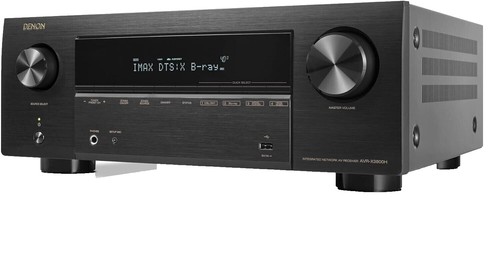
The Denon AVR-1911 AV Surround Receiver is a 7.1-channel home theater receiver designed for users who want reliable surround sound, modern HDMI connectivity, and easy room calibration in a single component. It delivers 90 watts per channel into 8 ohms, supports advanced audio formats such as Dolby TrueHD and DTS-HD Master Audio, and includes HDMI 1.4a features like 3D pass-through and Audio Return Channel. For movie lovers, gamers, and music listeners, this receiver offers a strong balance of performance and convenience.
One of its biggest strengths is its versatility. The denon AVR-1911 Av Surround Receiver works well in compact to medium-sized home theater setups, especially for users upgrading from older AV receivers or basic stereo amplifiers. Features such as Audyssey MultEQ room calibration, video upscaling, and multiple HDMI inputs help simplify system setup while improving sound and picture integration. It is also a practical choice for users who want to connect Blu-ray players, gaming consoles, streaming devices, and televisions through one hub.
At the time of release, its estimated price range typically fell in the mid-range AV receiver category, and today it is most commonly found through used, refurbished, or archived stock channels. For budget-conscious buyers who want a capable surround receiver with strong legacy feature support, the denon AVR-1911 Av Surround Receiver remains an appealing option. Its combination of power, audio format compatibility, and user-friendly setup keeps it relevant for many classic home theater systems.
Specifications for Denon AVR-1911 AV Surround Receiver
- 7.1-channel AV receiver with discrete amplification
- Rated output: 90 W + 90 W per channel into 8 ohms, 20 Hz to 20 kHz, 0.08% THD
- Power output at 6 ohms: 125 W + 125 W at 1 kHz, 0.7% THD
- Frequency response: 10 Hz to 100 kHz in Direct mode
- Signal-to-noise ratio: 100 dB, IHF-A weighted
- Input sensitivity / impedance: 200 mV / 47 kΩ
- Speaker impedance range: 6 to 16 ohms
- HDMI 1.4a support with 3D pass-through and Audio Return Channel
- Dolby TrueHD, Dolby Digital Plus, DTS-HD Master Audio, and other surround formats
- Audyssey MultEQ room correction and automatic speaker calibration
- AM/FM tuner with traditional broadcast support
- Power consumption: 460 W; standby power: 0.1 W
- Dimensions: 434 x 171 x 381 mm
- Weight: 10.2 kg
Compared with similar entry-to-mid-range AV receivers from the same era, the denon AVR-1911 Av Surround Receiver stands out for its strong feature set, especially HDMI 1.4a, 7.1-channel processing, and room correction. Many competing models offered similar wattage, but fewer combined the same level of audio decoding, video support, and calibration tools in one unit.
Detailed Description of the Denon AVR-1911 AV Surround Receiver
The Denon AVR-1911 is built as a central hub for home entertainment systems, routing audio and video from multiple sources to your speakers and display. It accepts HDMI, optical, coaxial, and analog connections, allowing it to manage Blu-ray players, cable boxes, game consoles, and media players with ease. Its surround processing creates immersive sound across up to 7.1 channels, making it suitable for movies, sports, and gaming.
This receiver uses Denon's discrete amplifier design, which helps provide cleaner channel separation and balanced output across the front, center, surround, and rear channels. The chassis is solid and functional, with a straightforward front-panel layout and a durable metal enclosure designed for long-term use. The build quality reflects Denon's focus on practical home theater performance rather than flashy styling.
In real-world use, the AVR-1911 is especially effective in a living room setup where users want clear dialogue, dynamic action scenes, and flexible source switching. The denon AVR-1911 Av Surround Receiver also works well for older speaker packages because it supports a wide impedance range. User experience is generally positive for those who value simple operation, strong decoding support, and dependable sound without unnecessary complexity.
Setup Guide for Denon AVR-1911 AV Surround Receiver
Start by placing the receiver in a well-ventilated cabinet or shelf with enough space around the top and sides for heat dissipation. Connect your speakers to the correct terminals, making sure polarity is consistent across all channels. Then attach your display using an HDMI cable and connect source devices such as a Blu-ray player, streaming box, or game console to the HDMI inputs.
After powering on the unit, run the Audyssey MultEQ setup with the included calibration microphone. Place the microphone at ear level in your main listening position and follow the on-screen prompts for speaker detection and distance measurement. Configure speaker size, crossover, and channel levels if you want to fine-tune the sound manually.
If you experience no picture or no sound, confirm that the input source is selected correctly and that HDMI cables are firmly seated. For safety, disconnect the receiver before making wiring changes, avoid blocking ventilation openings, and never connect speakers with damaged cables. The denon AVR-1911 Av Surround Receiver performs best when all connections are made carefully and tested one source at a time.
Troubleshooting the Denon AVR-1911 AV Surround Receiver
Common issues include no audio output, HDMI handshake problems, and speaker channels sounding unbalanced. If there is no sound, check the selected input, speaker assignments, mute status, and volume level. For HDMI issues, power cycle both the receiver and the connected source device, then reconnect the cable and test another HDMI port if available.
If audio sounds distorted, verify that the speaker impedance matches the receiver's supported range and that no speaker wire strands are touching adjacent terminals. If the unit enters protection mode, turn it off, inspect all speaker connections, and make sure ventilation is adequate. There are no widely used user-facing error codes for most basic problems; instead, the receiver typically indicates issues through display messages or standby behavior.
Preventive care includes keeping the unit dust-free, avoiding overload on the speaker outputs, and using quality HDMI cables. For support, owners should refer to Denon's archived product support materials and owner’s manual resources, which are the best starting points for warranty history, service guidance, and parts information. If additional help is needed, contact Denon customer support through the official support channels for archived AVR products.
Pros and Cons of the Denon AVR-1911 AV Surround Receiver
Pros
- Powerful 7.1-channel amplification for immersive home theater sound
- Support for Dolby TrueHD and DTS-HD Master Audio
- HDMI 1.4a with 3D pass-through and Audio Return Channel
- Audyssey MultEQ improves speaker balance and room response
- Flexible connectivity for multiple legacy and modern devices
- Good value for buyers seeking a used or refurbished AV receiver
Cons
- No support for newer HDMI standards or advanced streaming features
- Lacks built-in Wi-Fi, Bluetooth, and network music services
- Older design means it is less suitable for modern smart-home ecosystems
- Menu and setup experience may feel dated compared with newer models
- Best value is in the used market, where condition can vary
For buyers comparing alternatives, the denon AVR-1911 Av Surround Receiver offers strong classic AV performance, but newer receivers will provide more wireless features and higher-resolution HDMI support. It remains a smart buy when price, sound quality, and dependable decoding matter more than modern smart features.
Customer Reviews for Denon AVR-1911 AV Surround Receiver
Average user sentiment for the Denon AVR-1911 is generally positive, especially among home theater enthusiasts who appreciate its sound quality and easy calibration. Many owners praise its clean surround imaging, reliable HDMI switching, and solid performance with movies and TV.
Common complaints include the lack of modern wireless connectivity and the age of the interface, which can feel outdated compared with current receivers. Users also mention that setup is easiest when all speaker wires and HDMI sources are labeled before installation.
Typical rating: 4.3 out of 5 stars. A frequent testimonial theme is that the receiver “delivers big sound for the money” and “works great with older speaker systems.” For shoppers considering the denon AVR-1911 Av Surround Receiver, it is a strong recommendation if the goal is affordable surround sound rather than the latest smart features.
Faqs
How do I set up the denon AVR-1911 AV Surround Receiver for the first time?
What speaker configuration works best with the denon AVR-1911 AV Surround Receiver?
Why is my denon AVR-1911 AV Surround Receiver not producing sound from HDMI devices?
Does the denon AVR-1911 AV Surround Receiver support Dolby TrueHD and DTS-HD Master Audio?
Which devices are compatible with the denon AVR-1911 AV Surround Receiver?
How can I improve sound quality on the denon AVR-1911 AV Surround Receiver?
What should I do if the denon AVR-1911 AV Surround Receiver overheats or shuts down?
How do I maintain the denon AVR-1911 AV Surround Receiver for long-term reliability?
More denon manuals
Leave a Comment