
Denon AVR-787 Av Surround Receiver User Manual
Content
Denon AVR-787 AV Surround Receiver: Complete Product Manual
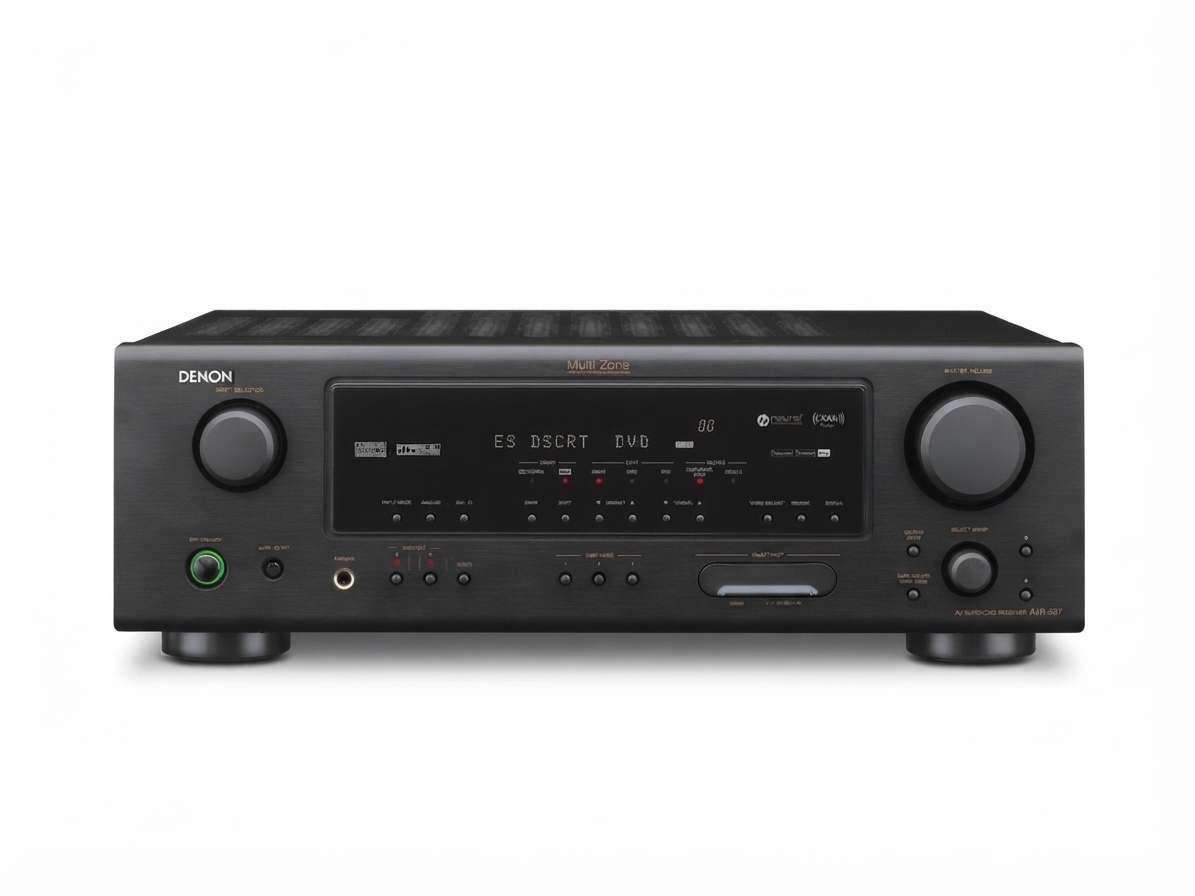
The Denon AVR-787 AV Surround Receiver is a classic 7.1-channel home theater receiver designed for users who want dependable surround sound, strong amplification, and flexible connectivity in a single component. It delivers up to 840 watts of total output power, supports Dolby Digital, DTS-ES, Dolby Pro Logic IIx, DTS Neo:6, and other surround formats, making it a practical choice for movie lovers, gamers, and music listeners who want room-filling audio without a complicated setup.
One of the main strengths of the Denon AVR-787 AV Surround Receiver is its balance of power and usability. It offers multiple analog and digital inputs, including coaxial and optical digital connections, plus component, composite, and S-Video video switching for legacy home theater systems. The receiver also includes AM/FM tuning, direct and stereo listening modes, tone controls, and a setup process intended to simplify speaker configuration. For many users, it serves as a reliable centerpiece for a mid-sized home theater or living room entertainment system.
This model is best suited to buyers who need a versatile receiver for DVD players, game consoles, satellite boxes, older displays, and multi-speaker surround systems. As an older archived product, new retail availability is limited, but used and refurbished units commonly appear on the secondary market. Estimated pricing typically falls in the budget-to-affordable range depending on condition, with many listings varying based on included accessories, cosmetic wear, and whether the unit has been serviced.
Specifications
- Channel configuration: 7.1 channels for surround sound expansion and flexible speaker layouts.
- Power output: 85 W + 85 W at 8 ohms, 20 Hz–20 kHz, 0.08% THD; 120 W + 120 W at 6 ohms, 1 kHz, 0.7% THD.
- Total output rating: 840 watts, suited for home theater use in small to medium rooms.
- Frequency response: 10 Hz to 100 kHz in Direct mode for wide-band audio reproduction.
- Signal-to-noise ratio: 98 dB in Direct mode for cleaner playback and lower background noise.
- Input sensitivity: 200 mV with 47 k-ohm impedance.
- Tone control: Bass and treble adjustment at ±12 dB.
- Tuner range: FM 87.5–107.9 MHz and AM 520–1710 kHz.
- Speaker compatibility: Designed for 6-ohm to 16-ohm loads depending on configuration.
- Connections: Analog audio, coaxial digital, optical digital, composite video, S-Video, and component video.
- Comparison: Compared with newer HDMI-based receivers, the Denon AVR-787 AV Surround Receiver is more limited in modern video switching but remains practical for legacy systems and straightforward surround setups.
Detailed Description
The Denon AVR-787 AV Surround Receiver is built as a traditional AV hub that connects source devices, processes audio, and sends amplified signals to a surround speaker system. Its core role is to decode multi-channel sound formats and distribute power across front, center, surround, and surround back speakers. This makes it especially effective for film soundtracks, console gaming, and multi-source entertainment systems where spatial audio matters.
In real-world use, the receiver works well with DVD players, cable boxes, older gaming consoles, and CD players. The direct listening mode supports clean, unprocessed audio for music playback, while surround modes improve immersion for movies and TV. The chassis design reflects Denon’s usual emphasis on practical build quality, with a solid enclosure and straightforward front-panel controls that make daily operation simple. The included remote and on-screen setup flow help users configure speaker distance, size, and channel balance without excessive complexity.
Users often appreciate the AVR-787 for its dependable soundstage, stable power delivery, and compatibility with legacy audio-video gear. It is not a modern streaming receiver, but it remains a strong choice for anyone who wants reliable home theater performance in a classic AV format.
Setup Guide
Setting up the Denon AVR-787 AV Surround Receiver begins with placing the unit on a stable, well-ventilated surface. Leave enough space around the top and sides to prevent overheating. Connect your front, center, surround, and optional surround back speakers to the correct terminals, making sure polarity is matched carefully to avoid phase issues.
- Step 1: Connect the speakers before powering on the receiver.
- Step 2: Attach your source devices using optical, coaxial, component, composite, or analog inputs.
- Step 3: Connect the display output to your television or projector.
- Step 4: Enter the setup menu and configure speaker size, distance, and channel levels.
- Step 5: Select the appropriate surround mode for movies, music, or direct playback.
- Step 6: Test each channel with a calibration tone or manual audio check.
For best results, use quality speaker wire and keep power cables separated from audio cables where possible. If there is no sound, confirm the correct input source is selected and the speaker cables are secure. If the receiver seems to distort, lower the volume and verify that the speakers match the recommended impedance. Always unplug the unit before making wiring changes, and never block ventilation openings during operation.
Troubleshooting
Most issues with the Denon AVR-787 AV Surround Receiver are related to wiring, input selection, or speaker configuration rather than hardware failure. If there is no sound, check whether the receiver is set to the correct source and ensure the mute function is off. If one speaker is silent, inspect the wiring at both the receiver and speaker end for loose or reversed connections.
- No power: Check the power cord, outlet, and standby mode.
- No audio: Verify input selection, digital cable connection, and speaker assignment.
- Distorted sound: Reduce volume, confirm speaker impedance, and inspect damaged cables.
- Video problems: Make sure the correct video input and output type are matched.
- Channel imbalance: Re-enter speaker level settings and review distance calibration.
The receiver does not rely on modern on-screen error codes in the same way newer network receivers do, so troubleshooting is usually manual and connection-based. Preventive care includes keeping vents clear, avoiding shorted speaker wires, and powering the system down during lightning storms or extended inactivity. For support, contact Denon service through the official customer support channels or consult an authorized repair center. Warranty coverage depends on the unit’s original sale status and current ownership history, so used buyers should verify seller policies before purchase.
Pros & Cons
Pros
- Strong 7.1-channel surround support for immersive home theater playback.
- Good amplification for its class, with 840 watts total output.
- Compatible with many older audio and video devices.
- Simple operation and practical setup for everyday users.
- Excellent value on the used market for legacy systems.
Cons
- No modern HDMI switching or current streaming features.
- Best suited to older equipment rather than today’s 4K and networked systems.
- Limited convenience compared with newer receivers that include automatic room correction and wireless connectivity.
- Used-condition pricing can vary widely depending on maintenance and accessories.
Overall, the Denon AVR-787 AV Surround Receiver offers strong value for buyers who need a reliable traditional AV receiver rather than a modern smart home theater hub. Compared with newer alternatives, it trades advanced features for simplicity, legacy compatibility, and solid surround performance.
Customer Reviews
Typical customer feedback for the Denon AVR-787 AV Surround Receiver is positive, especially from owners who value dependable sound and easy operation. Many users rate it around 4 out of 5 stars for its strong surround performance, clean audio, and durable build. A common testimonial theme is that it works well with older DVD players, game consoles, and speaker packages without requiring complicated configuration.
Frequent praise includes “great sound for the price,” “easy to set up,” and “excellent for a first home theater system.” Common complaints focus on the lack of HDMI, limited modern features, and the challenges of buying a used unit in good condition. Buyers looking for a straightforward AV receiver with classic connections tend to be most satisfied, while users wanting wireless streaming or 4K passthrough often prefer newer models.
For shoppers comparing older receivers, the Denon AVR-787 remains a sensible purchase if legacy compatibility and surround sound quality are top priorities.
Faqs
How do I set up denon AVR-787 Av Surround Receiver for the first time?
What speaker wire gauge and impedance work best with denon AVR-787 Av Surround Receiver?
Why is there no sound from my denon AVR-787 Av Surround Receiver even though the display is on?
How do I get the best surround sound calibration from denon AVR-787 Av Surround Receiver?
Which devices are compatible with denon AVR-787 Av Surround Receiver for home theater use?
How do I fix overheating problems with denon AVR-787 Av Surround Receiver?
Can denon AVR-787 Av Surround Receiver be used with a modern TV or streaming device?
How should I clean and maintain denon AVR-787 Av Surround Receiver for long-term reliability?
More denon manuals
Leave a Comment