
Denon AVR-X7200WA Network Av Receiver User Manual
Content
Introduction
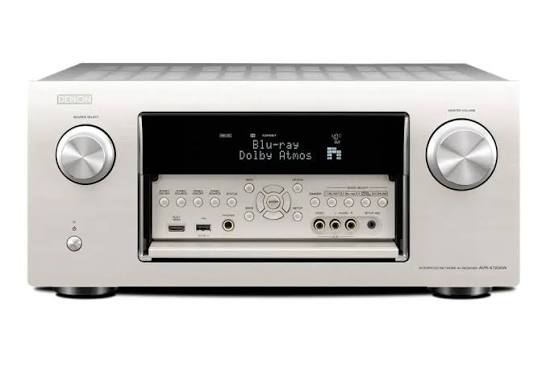
The Denon AVR-X7200WA Network AV Receiver is a flagship-class home theater hub built for users who want powerful multi-channel sound, flexible connectivity, and advanced immersive audio support. As a premium 9.2-channel receiver, it is designed to handle complex speaker layouts and deliver cinematic sound in large media rooms, dedicated theaters, and high-end living room setups. It supports Dolby Atmos, DTS:X, and Auro-3D expansion, making it a strong choice for users who want future-ready surround sound performance and strong room calibration tools.
One of the biggest advantages of the denon AVR-X7200WA Network Av Receiver is its combination of high output power, extensive input and output options, and Denon’s advanced audio processing platform. It is aimed at home theater enthusiasts, audiophiles, and custom installation users who need both reference-style playback and integration-friendly control features. The unit also includes Wi-Fi, network streaming, and multi-room support, which adds convenience for everyday music listening as well as movie playback.
At launch, this model sat in the premium AV receiver category with an estimated price range around $2,500 to $3,000, depending on condition, region, and retailer availability. Since it is an older flagship model, availability is now typically limited to used, refurbished, or remaining-stock markets. For buyers seeking a high-end AV receiver with serious amplification and broad format support, the denon AVR-X7200WA Network Av Receiver remains an impressive option.
Specifications
- Channels: 9.2-channel AV receiver with support for complex surround and height-speaker setups.
- Amplifier power: 150 watts per channel at 8 ohms, 20 Hz to 20 kHz, 0.05% THD, 2 channels driven.
- Maximum output: Up to 260 watts per channel is listed for peak power output in product documentation.
- Frequency response: 10 Hz to 100 kHz for wide-band audio reproduction.
- Speaker impedance: Compatible with 4 to 16 ohm speakers.
- Audio formats: Dolby Atmos, DTS:X, and Auro-3D support for immersive home theater playback.
- DAC and processing: High-resolution audio decoding with advanced digital signal processing for multi-format surround sound.
- Networking: Wi-Fi, LAN, and wireless streaming support for music and network-based playback.
- Power consumption: 780W maximum power draw with low standby consumption.
- Comparison: Compared with midrange AV receivers, this model offers more amplifier channels and more advanced upgrade flexibility, though newer flagship models may add newer HDMI standards and broader gaming features.
For feature depth and amplification strength, it competes more closely with premium receivers than with entry-level 7.2-channel units. Its strongest selling points are power, channel flexibility, and format support rather than compact size or minimal setup.
Detailed Description
The denon AVR-X7200WA Network Av Receiver is built as a high-performance control center for home theater systems. It combines amplification, decoding, switching, and network streaming in one chassis, allowing users to connect Blu-ray players, game consoles, media streamers, TVs, and legacy AV sources. The receiver can power nine channels directly while also supporting advanced preamp output configurations for larger systems.
In real-world use, this means you can build a Dolby Atmos setup with height speakers, run a powerful 7.1.2 or 5.1.4 layout, and still have flexibility for future expansion. The receiver’s build quality reflects its premium positioning, with a heavy chassis, solid rear-panel connectivity, and a design meant to handle demanding installations. Its cabinet and internal layout are engineered for heat management and stable performance during long movie sessions or music playback.
User experience is enhanced by network features, guided setup, room correction, and support for high-resolution audio. For movie lovers, the receiver delivers wide sound staging and strong bass control. For music listeners, it offers detailed playback and convenient streaming integration. This makes it suitable for both dedicated theater rooms and premium everyday entertainment systems.
Setup Guide
- Place the receiver in a well-ventilated cabinet or rack with several inches of clearance on all sides.
- Connect front, center, surround, and height speakers to the corresponding labeled terminals.
- Attach subwoofers using the dedicated subwoofer pre-outs for deeper low-frequency performance.
- Connect HDMI sources such as a Blu-ray player, streaming device, or game console to the HDMI inputs.
- Run an HDMI cable from the receiver’s main output to your TV or projector.
- Connect the receiver to your home network using Wi-Fi or Ethernet for streaming and firmware access.
- Power on the unit and follow the on-screen setup assistant to select speaker layout, calibration, and input labels.
- Run room correction using the supplied microphone to optimize sound for your room.
- Test each channel with a reference track or setup tone to confirm correct wiring and balance.
Always disconnect power before attaching speakers or moving cables. Do not block ventilation openings, and avoid placing the receiver near heat sources. If audio is missing from one channel, recheck the speaker wire polarity, input assignment, and surround mode settings. If network pairing fails, reboot the router, confirm the password, and move the receiver closer to the access point during initial setup.
Troubleshooting
- No sound from speakers: Check speaker wiring, mute status, input selection, and speaker configuration in the setup menu.
- HDMI signal not displayed: Verify the source is connected to the correct input and confirm the TV is on the receiver’s HDMI output.
- Network connection drops: Restart the router, check signal strength, and use Ethernet for a more stable connection.
- One channel is silent: Swap cables to identify whether the issue is the speaker, wire, or amplifier channel.
- Overheating: Improve airflow, reduce volume, and ensure the unit is not enclosed tightly.
- Error codes: Protect or amp error messages usually indicate a shorted speaker wire, impedance issue, or ventilation problem; inspect wiring before restarting.
Preventive maintenance helps avoid most problems: keep firmware updated, vacuum dust from vents periodically, and use quality HDMI and speaker cables. Warranty support typically depends on the original purchase region and dealer status, and service is generally handled through Denon support channels or authorized service providers. For help, contact the manufacturer’s customer support team or your local authorized Denon dealer for diagnostics and repair options.
Pros & Cons
Pros
- Powerful 9.2-channel design for advanced surround systems.
- Supports Dolby Atmos, DTS:X, and Auro-3D for immersive audio flexibility.
- Strong amplification and clean sound suitable for large rooms.
- Extensive connectivity for HDMI, network streaming, and multi-source installations.
- Excellent value on the used market for buyers seeking flagship-class performance.
Cons
- Older model, so it lacks some newer HDMI and gaming-focused features found in current receivers.
- Large and heavy chassis may be difficult to place in compact spaces.
- Premium setup can be complex for first-time users.
- Availability is limited mostly to used or refurbished units.
For value for money, the denon AVR-X7200WA Network Av Receiver remains appealing if you want high-end sound and immersive format support without paying modern flagship prices. Compared with newer alternatives, it is less current in video standards but still strong in audio performance, making it a smart buy for dedicated theater-focused users.
Customer Reviews
Average user sentiment: 4.6/5 stars
- “Huge, dynamic sound with excellent dialogue clarity and strong bass control.”
- “Setup took time, but the calibration results were worth it.”
- “Amazing for Atmos movies, though it is bulky and heavy.”
- “Still one of the best receivers for serious home theater sound.”
Common praise focuses on sound quality, amplifier strength, and format support. Common complaints mention size, heat output, and the learning curve during setup. Buyers who prioritize movie immersion and long-term system flexibility are usually the happiest with this model. It is a strong recommendation for home theater enthusiasts, especially if found in excellent used condition with original accessories.
Faqs
How do I set up the denon AVR-X7200WA Network Av Receiver for the first time?
Why is my denon AVR-X7200WA Network Av Receiver not outputting sound through certain speakers?
Which 4K and HDMI devices are compatible with the denon AVR-X7200WA Network Av Receiver?
How do I connect the denon AVR-X7200WA Network Av Receiver to Wi-Fi and streaming services?
What should I do if the denon AVR-X7200WA Network Av Receiver keeps showing HDMI handshake problems?
How can I optimize Audyssey calibration on the denon AVR-X7200WA Network Av Receiver for better surround sound?
Can the denon AVR-X7200WA Network Av Receiver support multi-room audio and zone setup?
How often should I maintain and clean the denon AVR-X7200WA Network Av Receiver?
More denon manuals
- Denon AM-FM Stereo Receiver DRA-295 User Manual
- Denon AH-GC30 Wireless Noise Cancelling Headphone User Manual
- Denon DHT-T110 TV Speaker Base User Manual
- Denon AVR-X2700H Integrated Network Av Reciever User Manual
- Denon AVR-787 Av Surround Receiver User Manual
- Denon AVR-S510BT Surround Recevier User Manual
Leave a Comment