
Denon AH-GC30 Wireless Noise Cancelling Headphone User Manual
Content
Denon AH-GC30 Wireless Noise Cancelling Headphone: Overview, Features, and Buyer Guide
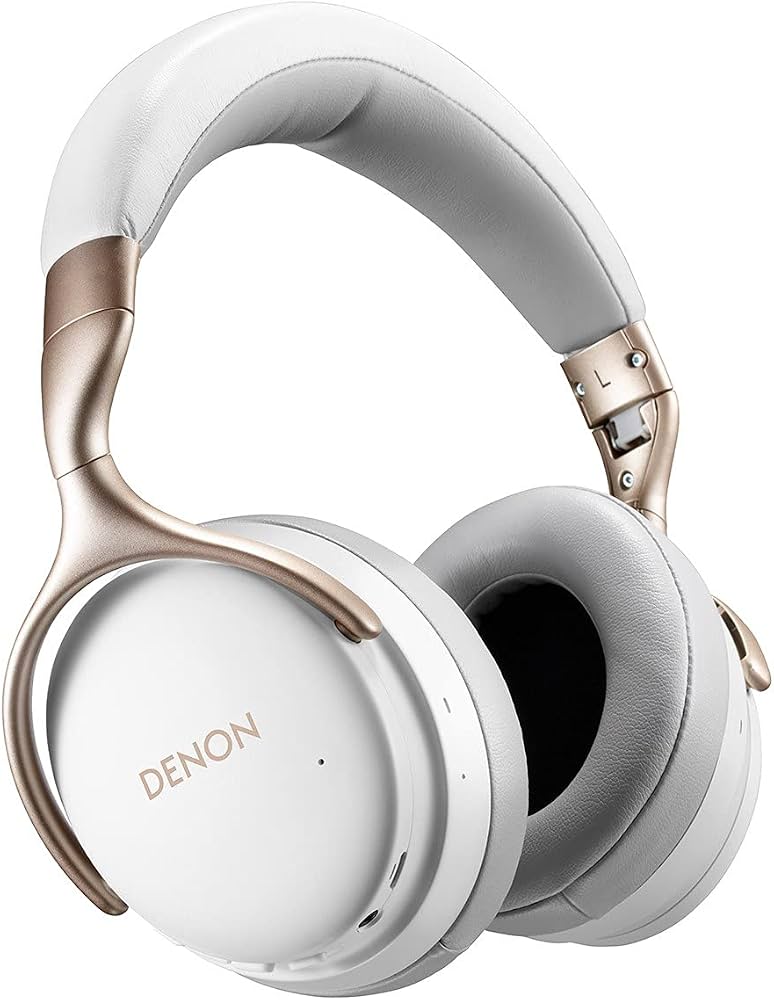
The denon AH-GC30 Wireless Noise Cancelling Headphone is a premium over-ear model built for listeners who want detailed sound, dependable wireless performance, and effective active noise cancelling in a travel-friendly design. It combines Bluetooth 5.0 connectivity, aptX HD support, and a lightweight 287 g frame for comfortable long sessions at home, in the office, or on the move. With up to 20 hours of playback when Bluetooth and noise cancelling are both enabled, it is designed for commuters, frequent flyers, remote workers, and anyone who values a balanced, refined listening experience.
One of the key strengths of the AH-GC30 is its versatility. It supports wireless listening, wired playback via the included audio cable, and voice calls through its integrated microphone setup. The 40 mm drivers and Denon’s premium tuning deliver clean, spacious audio with strong mids and controlled bass, making this model a solid choice for music, podcasts, video calls, and streaming. The folding design and included carrying case also improve portability, which adds to its appeal for everyday use.
As of 2026, the estimated price range is typically around $250 to $350 depending on retailer, stock status, and regional availability. The denon AH-GC30 Wireless Noise Cancelling Headphone is still available through select online retailers and Denon archive or product pages, though availability may vary by country. For buyers who want premium sound, active noise cancelling, and wired fallback support in one package, it remains a compelling option in the mid-to-upper headphone category.
Troubleshooting the Denon AH-GC30 Wireless Noise Cancelling Headphone
If the headset will not power on, fully recharge it with the supplied USB cable and confirm the battery is not completely drained. If Bluetooth pairing fails, delete the headset from your phone or laptop, restart both devices, and pair again in close range. If sound is distorted, noisy, or cuts in and out, move the source device closer, reduce wireless interference, and power cycle both devices before reconnecting.
Common user issues usually involve Bluetooth instability, low battery, weak ANC performance, or audio dropouts during calls. There are no widely published error codes specific to this model, but the practical fix for most connection problems is to reset the pairing list and reconnect from scratch. If ANC seems weak, check that the ear pads seal properly around the ears and that ambient noise is within normal operating expectations.
To prevent repeat issues, keep the firmware-ready source device updated, store the headphones in a cool dry place, and avoid exposing them to moisture or temperatures outside the recommended 5°C to 40°C range. For warranty or support, contact Denon through its official customer support channels or product support pages for your region. Retailers may also offer return or exchange service depending on purchase terms.
Pros and Cons of the Denon AH-GC30 Wireless Noise Cancelling Headphone
Pros
- Comfortable over-ear design with a light 287 g build for extended listening sessions.
- Bluetooth 5.0 with aptX HD, aptX, AAC, and SBC support for broad device compatibility.
- Effective active noise cancelling for commuting, travel, and office use.
- Up to 20 hours of battery life with ANC enabled, plus wired listening as a backup.
- Foldable design and carrying case improve portability and everyday convenience.
- Strong all-round sound quality with clear mids and detailed treble.
Cons
- Battery life is respectable, but some alternatives in the same price bracket offer longer runtime.
- ANC is good rather than class-leading compared with top-tier competitors.
- Older model status means newer headphones may provide more modern app features and smarter controls.
- Value for money depends on sale price; it is stronger at a discount than at full retail.
For shoppers comparing alternatives, models from Sony, Bose, and Sennheiser may offer stronger noise cancellation or longer battery life, while the denon AH-GC30 Wireless Noise Cancelling Headphone stands out for balanced sound and flexible wired/wireless use.
Customer Reviews for Denon AH-GC30 Wireless Noise Cancelling Headphone
Customer feedback is generally positive, with many owners praising the comfortable fit, clean audio tuning, and reliable Bluetooth performance. A typical rating pattern is around 4.2 out of 5 stars, especially from users who prioritize sound quality over app-heavy smart features.
- “Great sound and very comfortable for long flights.” Users frequently highlight the lightweight feel and balanced audio.
- “Battery life is decent, but not amazing.” The most common complaint is the 20-hour runtime, which some buyers consider average.
- “Noise cancelling works well for office and travel.” Many owners describe the ANC as effective for steady background noise.
- “Worth buying on sale.” Several reviews recommend the headset as a strong value when discounted.
Frequent praise centers on comfort, sound clarity, and the included accessories, while recurring complaints focus on battery life and competition from newer ANC headphones. The denon AH-GC30 Wireless Noise Cancelling Headphone is a smart purchase for buyers who want premium audio and practical everyday usability without paying flagship prices.
Faqs
How do I set up denon AH-GC30 Wireless Noise Cancelling Headphone for the first time?
Why is my denon AH-GC30 Wireless Noise Cancelling Headphone not pairing with my phone or laptop?
How does the noise cancelling feature on denon AH-GC30 Wireless Noise Cancelling Headphone work in real life?
Can I use denon AH-GC30 Wireless Noise Cancelling Headphone with Android, iPhone, Windows, and Mac devices?
What should I do if the sound is quiet, unbalanced, or cutting out on denon AH-GC30 Wireless Noise Cancelling Headphone?
How do I get the best battery life from denon AH-GC30 Wireless Noise Cancelling Headphone?
What are the most useful features of denon AH-GC30 Wireless Noise Cancelling Headphone for travel and daily commuting?
How should I clean and maintain denon AH-GC30 Wireless Noise Cancelling Headphone without damaging them?
More denon manuals
- Denon AVR-X7200WA Network Av Receiver User Manual
- Denon AVR-X2700H Integrated Network Av Reciever User Manual
- Denon AM-FM Stereo Receiver DRA-295 User Manual
- Denon AVR-S510BT Surround Recevier User Manual
- Denon DHT-T110 TV Speaker Base User Manual
- Denon AVR-S970H Integrated Network AV Receiver User Manual
Leave a Comment