
Denon AVR-S510BT Surround Recevier User Manual
Content
Denon AVR-S510BT Surround Receiver Review and User Manual
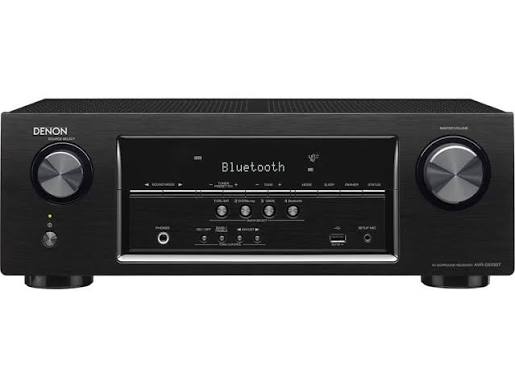
The Denon AVR-S510BT Surround Recevier is a budget-friendly 5.2-channel home theater receiver built for users who want reliable surround sound, simple setup, and modern HDMI connectivity without paying flagship prices. It delivers 4K Ultra HD passthrough, Bluetooth music streaming, and enough power for compact to mid-sized living rooms, making it a practical choice for TVs, Blu-ray players, gaming consoles, and basic home cinema systems. With support for five HDMI inputs and one HDMI output, it works well as a central hub for everyday entertainment.
This model is aimed at first-time AV receiver buyers, apartment dwellers, casual movie fans, and anyone upgrading from a soundbar to a true surround sound system. The Denon AVR-S510BT Surround Recevier is especially appealing if you want a straightforward receiver with no complicated networking features, yet still need solid audio performance and broad device compatibility. Typical pricing for used or older-stock units has often fallen in the budget range, generally around $200 to $400 depending on condition, retailer, and availability. Because it is an older archive model, new retail availability can be limited, so shoppers may need to check authorized resellers, refurbished listings, or secondary markets.
For users who value simplicity, the Denon AVR-S510BT Surround Recevier offers a balanced mix of power, connectivity, and ease of use. It is a good fit for basic home theater setups, HDMI-based gaming systems, and Bluetooth audio playback from phones or tablets.
Technical Specifications of the Denon AVR-S510BT Surround Receiver
- Channel configuration: 5.2-channel AV receiver
- Power output: 70 W + 70 W per channel at 8 ohms, 20 Hz to 20 kHz, 0.08% THD
- Power output: 90 W + 90 W per channel at 6 ohms, 1 kHz, 0.7% THD
- Speaker impedance support: 6 to 16 ohms
- Frequency response: 10 Hz to 100 kHz in Direct mode
- Signal-to-noise ratio: 98 dB
- Total harmonic distortion: 0.08%
- HDMI inputs/outputs: 5 HDMI inputs, 1 HDMI output
- Video support: 4K Ultra HD passthrough, 3D compatibility, 4:4:4 color subsampling support, multi-format HDMI support
- Bluetooth: Version 2.1 + EDR with A2DP and AVRCP support
- Bluetooth range: Approximately 10 m line of sight
- Power consumption: 310 W
- Standby power: 0.1 W
- Bluetooth standby power: 1 W
- Weight: 7.5 kg
Compared with many entry-level surround receivers, the Denon AVR-S510BT Surround Recevier offers strong HDMI flexibility and respectable power output, though it lacks newer network streaming features, voice assistant integration, and advanced room correction found in newer models. It is closer in spirit to other basic 5.1 and 5.2 receivers from Yamaha and Sony than to premium Denon models with HEOS, Wi-Fi, or Atmos support.
Troubleshooting the Denon AVR-S510BT Surround Receiver
Common issues with the Denon AVR-S510BT Surround Recevier usually involve HDMI handshakes, no sound output, Bluetooth pairing problems, or speaker wiring mistakes. If the receiver shows no picture, check that the TV is on the correct HDMI input, the source device is set to output video, and the HDMI cable is fully seated. If audio is missing, confirm the speaker setup menu, speaker impedance, and mute status, then test another source.
Bluetooth problems are often solved by clearing old pairings on the phone and re-pairing the receiver within the 10-meter range. If the unit behaves unexpectedly, power-cycle it by unplugging it for a minute and reconnecting it. There are no commonly used public error codes for normal consumer troubleshooting on this model, so most fixes are menu-based or connection-based rather than code-based.
Preventive care includes using high-quality HDMI cables, avoiding blocked ventilation, and keeping speaker wires secure to prevent short circuits. For support, Denon products typically include a limited warranty through authorized sellers, and help is usually available through the official Denon customer support channels, the product manual, and retailer service departments. If the unit was purchased used, verify whether the original warranty still applies before requesting service.
Pros and Cons of the Denon AVR-S510BT Surround Receiver
Pros
- Easy setup for basic home theater users
- Five HDMI inputs make it convenient for TVs, consoles, and Blu-ray players
- 4K Ultra HD passthrough supports modern video sources
- Bluetooth streaming adds simple wireless music playback
- Solid value for money for buyers who do not need networking features
- Good power delivery for small to medium room systems
Cons
- No Wi-Fi, HEOS, or built-in streaming apps
- No Dolby Atmos or advanced immersive audio formats
- Older design compared with newer 8K-ready receivers
- Best suited to casual users rather than home theater enthusiasts
- Availability is limited because it is an archive model
For budget buyers, the Denon AVR-S510BT Surround Recevier remains a practical option, especially if you mainly need HDMI switching and clean surround sound. Compared with newer alternatives, it is less feature-rich but can still be a smart purchase when found at a good used or refurbished price.
Customer Reviews and Real-World Feedback
Typical user feedback for the Denon AVR-S510BT Surround Recevier trends positive for ease of use, reliable HDMI switching, and overall sound quality. Many owners rate it around 4 out of 5 stars for value and straightforward setup. Common praise includes clear dialogue, dependable Bluetooth pairing, and enough power for everyday movie and gaming use.
Frequent complaints focus on the lack of modern streaming features, limited channel count, and the absence of advanced calibration tools. Some users also note that the receiver is best for simple systems rather than large, premium theater rooms. One common testimonial is that it is “an easy upgrade from a soundbar,” while another recurring comment is that it “does the basics very well.”
If the goal is a simple, affordable home theater receiver, the Denon AVR-S510BT Surround Recevier is a strong recommendation. Buyers looking for Atmos, Wi-Fi, or multi-room audio should consider a newer Denon model instead.
Faqs
How do I set up denon AVR-S510BT Surround Recevier for the first time?
Why is my denon AVR-S510BT Surround Recevier not producing sound from all speakers?
Which devices are compatible with denon AVR-S510BT Surround Recevier for HDMI and Bluetooth connections?
How can I improve the sound quality of denon AVR-S510BT Surround Recevier in a small room?
What should I do if denon AVR-S510BT Surround Recevier keeps disconnecting from Bluetooth?
How do I know if denon AVR-S510BT Surround Recevier is using the correct surround mode?
Can denon AVR-S510BT Surround Recevier work with a soundbar or does it require passive speakers?
How should I clean and maintain denon AVR-S510BT Surround Recevier for long-term reliability?
Tags
More denon manuals
- Denon AVR-X2700H Integrated Network Av Reciever User Manual
- Denon AVR-S970H Integrated Network AV Receiver User Manual
- Denon AH-GC30 Wireless Noise Cancelling Headphone User Manual
- Denon AVR-588 AV Surround Receiver User Manual
- Denon AVR-X7200WA Network Av Receiver User Manual
- Denon AVR-3808CI AV Surround Recevier User Manual
Leave a Comment