
Denon AVR-3808CI AV Surround Recevier User Manual
Content
Denon AVR-3808CI AV Surround Recevier Product Manual
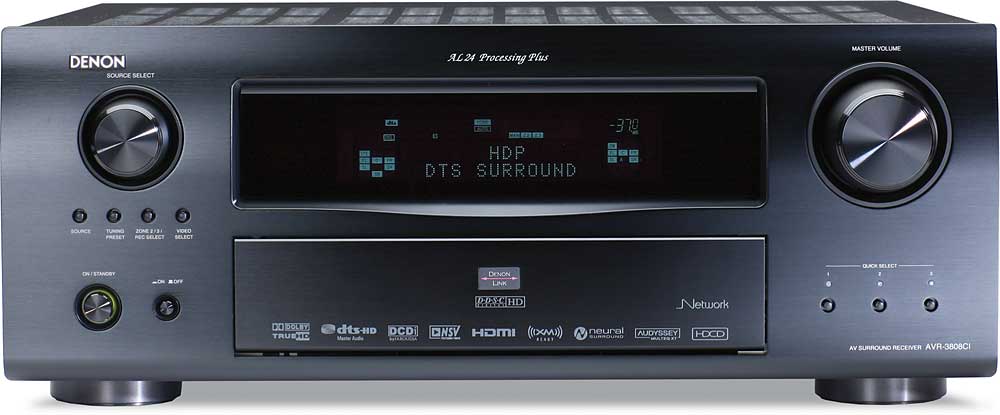
The Denon AVR-3808CI AV Surround Recevier is a feature-rich 7.1-channel home theater receiver designed for serious movie fans, music listeners, and custom installation setups. It combines high-current amplification, HDMI 1.3a connectivity, and advanced surround processing in a single component, making it a strong choice for users who want a capable centerpiece for a living room theater or dedicated media room. With support for formats such as Dolby TrueHD and DTS-HD Master Audio, it delivers detailed, immersive sound for Blu-ray playback, streaming devices, game consoles, and legacy analog sources.
One of its biggest strengths is versatility. The receiver includes multiple HDMI inputs, component and composite video support, Ethernet networking, and multi-zone functionality, allowing it to integrate easily with both modern and older AV gear. Audyssey MultEQ room correction helps improve speaker balance and acoustics, while Denon’s 130-watt-per-channel amplification gives it enough power for medium to large rooms. The Denon AVR-3808CI AV Surround Recevier is especially well suited for home theater enthusiasts who value connectivity, system flexibility, and dependable performance over compact size or ultra-modern streaming features.
Because this is an older, discontinued model, availability is typically limited to used, refurbished, or resale markets. Current market pricing generally falls in the mid-range used category, often around $150 to $400 depending on condition, accessories, and seller reputation. Buyers looking for a dependable legacy receiver with strong HDMI switching and full surround support may still find it attractive, especially when compared with newer budget receivers that may offer fewer inputs or less robust build quality.
Pros and Cons of the Denon AVR-3808CI AV Surround Recevier
Pros
- Strong 7.1-channel performance with 130 watts per channel, making it suitable for demanding home theater speaker setups.
- Excellent connectivity, including HDMI 1.3a, Ethernet, component video, optical, coaxial, and analog inputs for legacy and modern devices.
- Supports advanced audio formats such as Dolby TrueHD and DTS-HD Master Audio for high-definition surround sound.
- Audyssey MultEQ room calibration improves speaker integration and helps reduce acoustic issues in real rooms.
- Multi-zone capability makes it useful for whole-home audio or separate listening areas.
- Good value on the used market for buyers who need a feature-dense AV receiver rather than the latest streaming platform.
Cons
- It lacks modern features found in newer receivers, such as built-in app ecosystems, AirPlay 2, Bluetooth, and 4K HDMI passthrough.
- Setup and menu navigation can feel dated compared with current AV receivers.
- The unit is physically large and heavy, so it requires sufficient cabinet space and ventilation.
- Because it is discontinued, long-term support and replacement parts may be harder to find.
- Compared with newer midrange alternatives, it may be less convenient for users focused on wireless streaming and latest-generation video formats.
For value for money, the Denon AVR-3808CI AV Surround Recevier is strongest for users who want a well-built legacy receiver with premium connectivity rather than a compact modern model. Compared with newer entry-level AV receivers, it often offers more inputs and better integration flexibility, but it is not the best choice for buyers who prioritize 4K video, HDR, or wireless music features.
Customer Reviews for the Denon AVR-3808CI AV Surround Recevier
Average user sentiment is generally positive, with many owners giving it around 4.5 out of 5 stars for sound quality, connectivity, and reliability. Praise often centers on its powerful output, clean surround decoding, and the convenience of multiple HDMI and legacy connections. One common testimonial is that it "still sounds bigger and fuller than many newer receivers in the same price range."
Frequent complaints usually involve the age of the platform, including dated on-screen menus, limited modern streaming support, and occasional setup complexity. Some users also mention that the receiver runs warm and benefits from open-air ventilation. For buyers searching for a dependable home theater receiver with strong audio performance, the Denon AVR-3808CI AV Surround Recevier remains a solid purchase if found in good condition with the remote, calibration mic, and original accessories.
Common buyer recommendation: choose this model if you want a high-powered 7.1-channel receiver for movies, music, and mixed-format systems; skip it if you need modern wireless streaming, 4K switching, or voice assistant integration.
Key Features and Technical Highlights
- 7.1-channel surround sound receiver with high-current amplification
- 130 watts per channel into 8 ohms for robust speaker driving
- HDMI 1.3a connectivity with support for Deep Color and xvYCC
- Support for Dolby TrueHD, DTS-HD Master Audio, Dolby Pro Logic IIx, and DTS Neo:6
- Audyssey MultEQ automatic room calibration
- Multi-zone audio support for flexible whole-home use
- Network connection for compatible digital music playback
- Multiple analog, optical, coaxial, and component video inputs for broad compatibility
Who Should Buy the Denon AVR-3808CI AV Surround Recevier?
This receiver is best for home theater owners, audio enthusiasts, and custom installers who need a flexible, feature-packed unit for mixed analog and HDMI-based systems. It is a strong match for users with Blu-ray players, older game consoles, CD players, and legacy source components. It is less suitable for buyers who want the newest streaming conveniences or 4K video support.
Final Verdict
The Denon AVR-3808CI AV Surround Recevier remains an impressive legacy AV receiver with strong amplification, deep connectivity, and quality surround sound decoding. If you are shopping on the used market and want a capable, flexible home theater hub, it can still be a worthwhile choice. For modern buyers focused on current video standards and wireless streaming, a newer AV receiver will be a better fit.
Faqs
How do I set up the denon AVR-3808CI AV Surround Recevier for the first time without missing key audio settings?
Why is my denon AVR-3808CI AV Surround Recevier not producing sound from HDMI or optical inputs?
Which speaker configurations work best with the denon AVR-3808CI AV Surround Recevier for a home theater setup?
Can the denon AVR-3808CI AV Surround Recevier handle modern 4K TVs and current streaming devices?
How do I calibrate the denon AVR-3808CI AV Surround Recevier for better sound quality in my room?
What should I do if the denon AVR-3808CI AV Surround Recevier overheats or shuts down during use?
How do I connect a Blu-ray player, game console, and TV to the denon AVR-3808CI AV Surround Recevier correctly?
How should I maintain the denon AVR-3808CI AV Surround Recevier to keep it reliable for years?
Tags
More denon manuals
Leave a Comment