
Denon AVR-S270BT Av Surround Receiver User Manual
Content
Denon AVR-S270BT AV Surround Receiver: Complete Product Manual and Buying Guide
Introduction
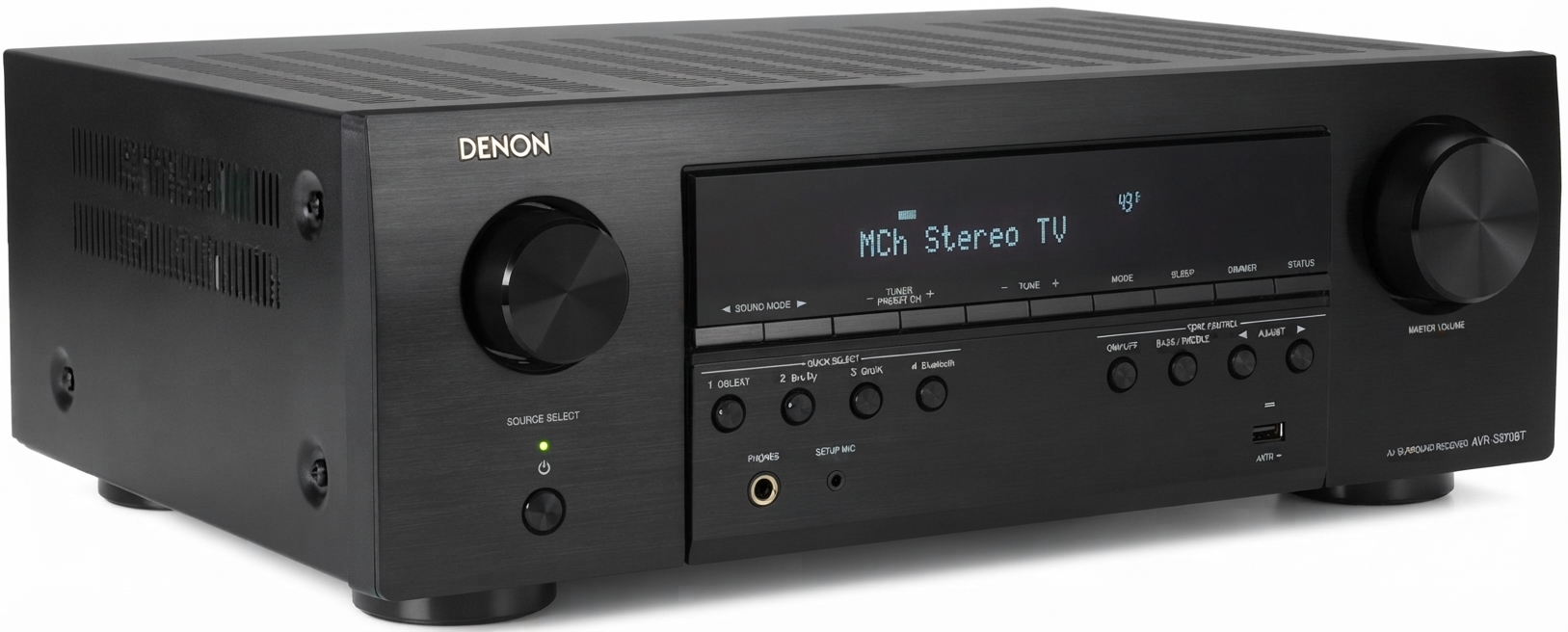
The Denon AVR-S270BT AV Surround Receiver is an entry-level home theater receiver designed for users who want a simple upgrade from a soundbar to a true multi-channel audio system. This 5.1-channel AV receiver combines Denon’s familiar reliability with practical features such as 4K HDMI passthrough, Bluetooth wireless streaming, and straightforward setup for everyday entertainment. For movies, TV shows, gaming, and music listening, it offers a balanced mix of ease of use and home-theater flexibility.
One of the biggest advantages of the Denon AVR-S270BT AV Surround Receiver is its accessibility. It is ideal for first-time AV receiver buyers, apartment theaters, bedroom setups, and family rooms where users want cleaner dialogue, more immersive surround sound, and support for modern source devices. Its five HDMI inputs and one HDMI output make it easy to connect Blu-ray players, streaming boxes, and game consoles, while ARC support simplifies TV audio integration. Bluetooth adds convenient playback from smartphones and tablets without extra cables.
As of 2026, the estimated price range is typically around $300 to $400 USD, depending on retailer availability and promotions. It is commonly available through Denon’s official store, major electronics retailers, and warehouse clubs. For shoppers searching for an affordable AV receiver with real surround sound capability, the Denon AVR-S270BT AV Surround Receiver remains a strong value-focused choice.
Specifications
- Type: 5.1-channel AV receiver for home theater systems
- Power output: 70W per channel into 8 ohms, 20 Hz–20 kHz, 0.08% THD, 2 channels driven
- Power output: 90W per channel into 6 ohms, 1 kHz, 0.7% THD, 2 channels driven
- Peak output: Up to 140W per channel into 6 ohms, 1 kHz, 10% THD, 1 channel driven
- HDMI: 5 inputs and 1 output
- Video support: 4K passthrough with HDR-compatible signal handling for modern TVs and players
- Audio formats: Dolby Digital, Dolby TrueHD, DTS-HD Master Audio
- Wireless: Bluetooth streaming support
- Speaker impedance range: 6 to 16 ohms
- Frequency response: 10 Hz to 100 kHz in Direct mode
- Signal-to-noise ratio: 98 dB in Direct mode
- Power consumption: 300W; standby as low as 0.1W
Compared with soundbar systems, this receiver offers far more flexibility, stronger channel separation, and better upgrade potential. Compared with higher-end Denon models, it is simpler, less expensive, and more focused on essential AV receiver features rather than advanced room correction or immersive object-based formats.
Detailed Description
The Denon AVR-S270BT AV Surround Receiver works as the central hub of a home entertainment setup. It receives audio and video signals from connected devices, processes the sound for up to 5.1 channels, and sends video to your television while powering passive speakers through its built-in amplification. This makes it a practical solution for users who want theater-style sound without complicated installation.
In real-world use, the receiver performs well in living rooms, media spaces, and starter home theaters. A typical setup may include a TV, game console, streaming device, and Blu-ray player connected through HDMI, with a pair of front speakers, a center channel, surround speakers, and a subwoofer delivering fuller sound than TV speakers or compact soundbars. Bluetooth makes it easy to play podcasts, playlists, or casual background music from a phone.
Build quality is consistent with Denon’s entry-level receiver design: a compact black chassis, clear front-panel layout, and practical rear connections that support straightforward cable management. The user experience is focused on simplicity, which is helpful for beginners who want reliable performance without a steep learning curve.
Setup Guide
Setting up the Denon AVR-S270BT AV Surround Receiver is straightforward and can usually be completed in a short session. Start by placing the receiver in a well-ventilated location, leaving space around the top and sides for airflow. Next, connect your front left, center, front right, surround left, and surround right speakers, plus a powered subwoofer if available.
- Connect the TV to the HDMI output, preferably using ARC-compatible HDMI if supported by the television.
- Attach source devices such as a streaming box, game console, or disc player to the HDMI inputs.
- Run speaker wire carefully, matching positive and negative terminals on each speaker.
- Use the on-screen setup or front-panel controls to confirm input assignments and speaker configuration.
- Pair Bluetooth by selecting the Bluetooth input and enabling pairing mode on your phone or tablet.
If there is no sound, check the TV audio setting, HDMI cable seating, and speaker wiring polarity. For safety, never block ventilation openings, avoid overloading circuits, and power off the receiver before changing speaker connections.
Troubleshooting
Most common issues with the Denon AVR-S270BT AV Surround Receiver are easy to resolve. If there is no audio, verify that the correct input is selected and that the TV is set to send sound through the receiver rather than internal speakers. If Bluetooth will not connect, clear the pairing list and try reconnecting from nearby with fewer wireless obstructions.
- No sound: Check speaker wire connections, HDMI input selection, and mute status.
- Weak bass: Confirm the subwoofer is powered on and the crossover or volume is adjusted properly.
- Picture but no audio: Recheck ARC settings and HDMI cable quality.
- Distortion at high volume: Lower the level and confirm speaker impedance is within the supported range.
- Bluetooth drops out: Move the source device closer and reduce interference from other 2.4 GHz devices.
Preventive care includes keeping the receiver dust-free, using quality speaker wire, and avoiding overheating. Warranty and support are typically handled through Denon’s customer service and authorized retailers, with product documentation and setup guidance available through official support channels.
Pros & Cons
Pros
- Affordable way to build a real 5.1 home theater system
- Easy setup for beginners and first-time AV receiver owners
- Five HDMI inputs provide flexible device connectivity
- Bluetooth support adds convenient wireless streaming
- Clear, balanced sound for movies, TV, and gaming
- Strong value for users upgrading from a soundbar
Cons
- No advanced immersive audio formats such as Dolby Atmos
- Lacks premium tuning features found on higher-end models
- Best suited for small to medium rooms rather than large theater spaces
- Not ideal for users seeking extensive smart-home integration
- Limited appeal for enthusiasts who want advanced calibration and networking
Overall, the Denon AVR-S270BT AV Surround Receiver is a smart budget purchase for users who want dependable surround sound without paying for features they may never use. Compared with more advanced receivers, it sacrifices premium processing in exchange for simplicity and lower cost.
Customer Reviews
Customer feedback for the Denon AVR-S270BT AV Surround Receiver is generally positive, with many users praising its easy setup, clear sound, and strong value for money. Typical ratings cluster around 4 out of 5 stars, especially among buyers replacing older receivers or upgrading from TV speakers.
Common praise includes better dialogue clarity, reliable HDMI switching, and a noticeable improvement in movie soundtracks. Common complaints usually focus on the lack of advanced features, limited networking, and the fact that it is not designed for audiophile-level customization.
- “Great starter receiver.” Users often recommend it for small living rooms and basic 5.1 setups.
- “Simple and reliable.” Buyers like the straightforward controls and fast setup process.
- “Missing premium extras.” Some users wish it included newer immersive formats and more advanced calibration tools.
For shoppers who want a budget-friendly AV receiver with dependable performance, this model is easy to recommend. For users expecting flagship features, a higher-tier Denon model may be a better fit.
Faqs
How do I set up the denon AVR-S270BT Av Surround Receiver for the first time with a TV and speakers?
Why is there no sound from my denon AVR-S270BT Av Surround Receiver after setup?
Can the denon AVR-S270BT Av Surround Receiver work with a smart TV, gaming console, and streaming device at the same time?
How can I improve the sound quality on the denon AVR-S270BT Av Surround Receiver for movies and music?
What speaker types and impedance should I use with the denon AVR-S270BT Av Surround Receiver?
Why does my denon AVR-S270BT Av Surround Receiver keep switching inputs or showing the wrong source?
How do I connect a subwoofer to the denon AVR-S270BT Av Surround Receiver for stronger bass?
How should I clean and maintain the denon AVR-S270BT Av Surround Receiver to keep it working reliably?
More denon manuals
Leave a Comment