
Denon AVR-S770H Integrated Network Av Receiver User Manual
Content
Introduction to the Denon AVR-S770H Integrated Network AV Receiver
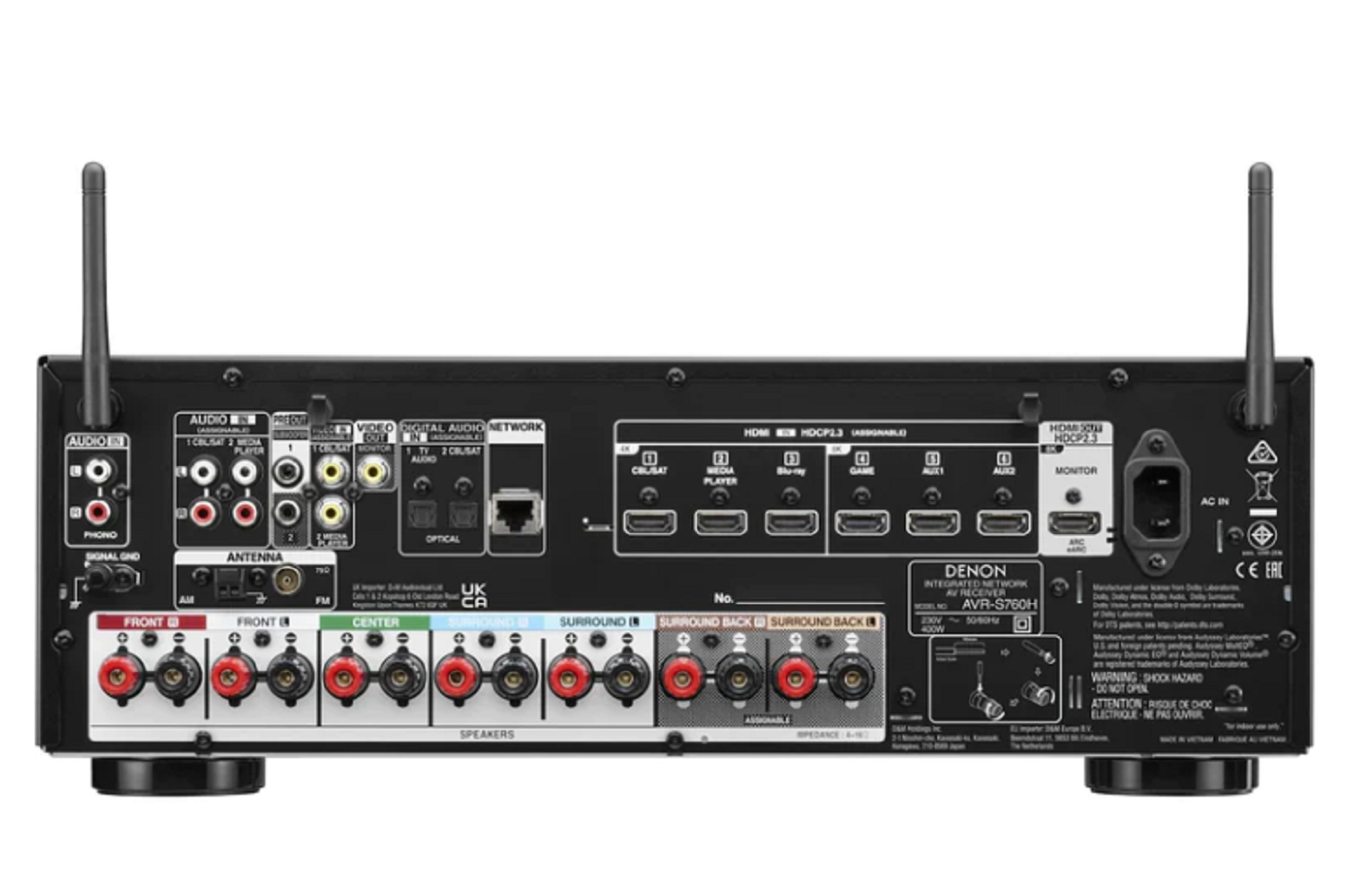
The Denon AVR-S770H Integrated Network AV Receiver is a feature-rich 7.2-channel home theater receiver designed for users who want modern HDMI 2.1 connectivity, immersive surround sound, and easy streaming in one compact component. It supports 8K/60Hz and 4K/120Hz passthrough, Dolby Atmos, DTS:X, HEOS built-in wireless audio, and Alexa voice compatibility, making it a strong choice for movie lovers, gamers, and music fans who want a versatile AV hub for a living room or dedicated media space.
This model is especially appealing to first-time home theater builders and upgrade shoppers looking for an affordable entry into premium surround sound without stepping into the higher cost of flagship receivers. It is also a practical fit for users with a 5.1.2 or 7.2 speaker setup, thanks to its flexible amplification, dual subwoofer outputs, and broad HDMI support. The denon AVR-S770H Integrated Network AV Receiver typically sits in the midrange category, with an estimated street price of about $500 to $650 depending on retailer promotions and seasonal discounts, and it is widely available through major electronics retailers and Denon’s official sales channels.
For users who want a reliable network AV receiver that balances performance, setup simplicity, and future-ready video features, the Denon AVR-S770H offers a compelling combination of value, connectivity, and ease of use.
Specifications for Denon AVR-S770H 7.2 Channel 8K AV Receiver
- Channels: 7.2-channel amplification with support for 5.2.2 Dolby Atmos layouts.
- Power output: 75 W per channel at 8 ohms, 20 Hz–20 kHz, 0.08% THD, two channels driven.
- HDMI: 6 HDMI inputs and 2 HDMI outputs, including 3 inputs with 8K support.
- Video support: 8K/60Hz, 4K/120Hz, HDR10, HDR10+, HLG, and Dolby Vision.
- Audio formats: Dolby Atmos, DTS:X, Dolby TrueHD, DTS-HD Master Audio, and DTS Neural:X.
- Wireless features: HEOS built-in, Bluetooth, Wi-Fi, and Ethernet networking.
- Inputs: Analog stereo, phono input for turntables, optical digital, coaxial digital, USB, and AM/FM tuner.
- Outputs: Dual subwoofer pre-outs and HDMI eARC support for TV audio return.
- Calibration: Audyssey room correction for speaker optimization.
- Comparison: Compared with similar midrange AV receivers, the AVR-S770H stands out for its 8K-ready HDMI count and strong streaming features, while some alternatives may offer more channels or higher wattage at a higher price.
Detailed Description of the Denon AVR-S770H Integrated Network AV Receiver
The denon AVR-S770H Integrated Network AV Receiver functions as the central control unit for a modern home entertainment system. It receives audio and video from source devices such as game consoles, Blu-ray players, set-top boxes, and streaming devices, then sends processed audio to your speakers and video to your television or projector. Its built-in HEOS platform lets users stream music from compatible services and control multiroom playback through the app.
In real-world use, this receiver performs well in home theaters that need a clean, organized connection hub for several HDMI devices. Gamers benefit from 4K/120Hz support and low-latency features, while movie fans can build immersive surround systems with height channels for Dolby Atmos playback. The dual subwoofer outputs help create smoother bass distribution across the room.
Build quality is typical of Denon’s midrange lineup, with a sturdy black chassis, clearly labeled rear panel connections, and a user-friendly front interface. The setup assistant and on-screen menus make it approachable for beginners, while advanced users can adjust speaker levels, crossover settings, and input assignments for a more customized experience.
Setup Guide for Denon AVR-S770H 7.2 Channel Home Theater Receiver
- Place the receiver in a well-ventilated cabinet or open shelf to prevent overheating.
- Connect speakers to the correct binding posts, matching polarity for each channel.
- Attach your TV to the HDMI output labeled for eARC if you want full TV audio return support.
- Connect gaming consoles, streaming boxes, and disc players to the HDMI inputs, using the 8K-capable ports for compatible sources.
- Plug in the supplied calibration microphone and run the setup assistant to configure speaker size, distance, and levels.
- Pair Wi-Fi or Ethernet for network streaming, then sign in to the HEOS app for wireless music playback.
- Set the receiver input labels and audio modes according to your system layout.
- Troubleshoot by checking HDMI cable certification, speaker wiring, and TV eARC settings if audio or video fails.
Safety precautions include disconnecting power before wiring speakers, avoiding blocked ventilation, and using certified HDMI 2.1 cables for 4K/120Hz or 8K sources.
Troubleshooting Denon AVR-S770H Network AV Receiver Issues
- No sound: Confirm the correct input source, speaker wiring, and mute status. Verify that the speaker channels are enabled in the setup menu.
- No video signal: Use a high-speed HDMI cable and confirm the source device is set to a compatible resolution and refresh rate.
- HDMI handshake problems: Power cycle the TV, receiver, and source device, then reconnect with the receiver turned off and on again.
- Wi-Fi connection issues: Restart the router, re-enter network credentials, or use Ethernet for a more stable connection.
- Calibration errors: Reposition the microphone and keep the room quiet during Audyssey setup.
- Common preventive measures: Keep firmware updated, use quality cables, and maintain proper airflow around the chassis.
If problems persist, check the owner’s manual for reset procedures and support guidance. Denon typically offers standard product warranty coverage through authorized retailers and official support channels, with help available through Denon customer service, regional service centers, and online product documentation.
Pros and Cons of the Denon AVR-S770H Integrated Network AV Receiver
Pros
- Strong value for a 7.2-channel 8K AV receiver with modern HDMI support.
- Excellent streaming flexibility through HEOS, Bluetooth, Wi-Fi, and Ethernet.
- Supports Dolby Atmos and DTS:X for immersive movie playback.
- Includes dual subwoofer outputs for better bass management.
- Easy setup with guided calibration and clear on-screen menus.
- Good fit for users upgrading from basic stereo or older 5.1 receivers.
Cons
- Not ideal for very large rooms or inefficient speakers that need more power headroom.
- Only seven amplified channels, so it is less expandable than higher-tier models.
- Advanced home theater users may want more HDMI outputs or additional pre-outs.
- Price can vary significantly by retailer, so shopping around matters.
Overall, the denon AVR-S770H Integrated Network AV Receiver delivers strong performance for its class and is often a better value than pricier alternatives if the goal is a balanced midrange home theater setup.
Customer Reviews for Denon AVR-S770H 7.2 Channel AV Receiver
Customer feedback is generally positive, with many users praising the simple setup, clean sound, and modern feature set. Average ratings across major retailers commonly hover around 4.5 out of 5 stars, reflecting strong satisfaction among home theater buyers.
- Typical praise: “Easy to install, excellent sound, and great HDMI compatibility.”
- Typical praise: “Perfect for streaming music and movies in a medium-sized room.”
- Common complaint: Some users want more power for demanding speakers or larger spaces.
- Common complaint: A few buyers mention occasional HDMI setup confusion during first-time installation.
Most reviewers recommend it for buyers seeking a dependable all-in-one receiver with 8K support, Dolby Atmos, and strong app-based streaming. If the priority is ease of use, feature depth, and solid value, the denon AVR-S770H Integrated Network AV Receiver remains a popular choice.
Faqs
How do I set up the denon AVR-S770H Integrated Network Av Receiver for the first time?
Why is my denon AVR-S770H Integrated Network Av Receiver not producing sound from all speakers?
What HDMI settings should I use with the denon AVR-S770H Integrated Network Av Receiver for 4K and gaming?
How do I connect the denon AVR-S770H Integrated Network Av Receiver to Wi-Fi and streaming apps?
Can the denon AVR-S770H Integrated Network Av Receiver work with a 5.1.2 home theater setup?
What should I do if the denon AVR-S770H Integrated Network Av Receiver keeps losing network connection?
How do I optimize sound quality on the denon AVR-S770H Integrated Network Av Receiver after room calibration?
How should I maintain and care for the denon AVR-S770H Integrated Network Av Receiver?
More denon manuals
Leave a Comment