
Dreo PTC Fan Heater Solaris 617 User Manual
Content
Dreo PTC Fan Heater Solaris 617: Comprehensive Product Manual and Review
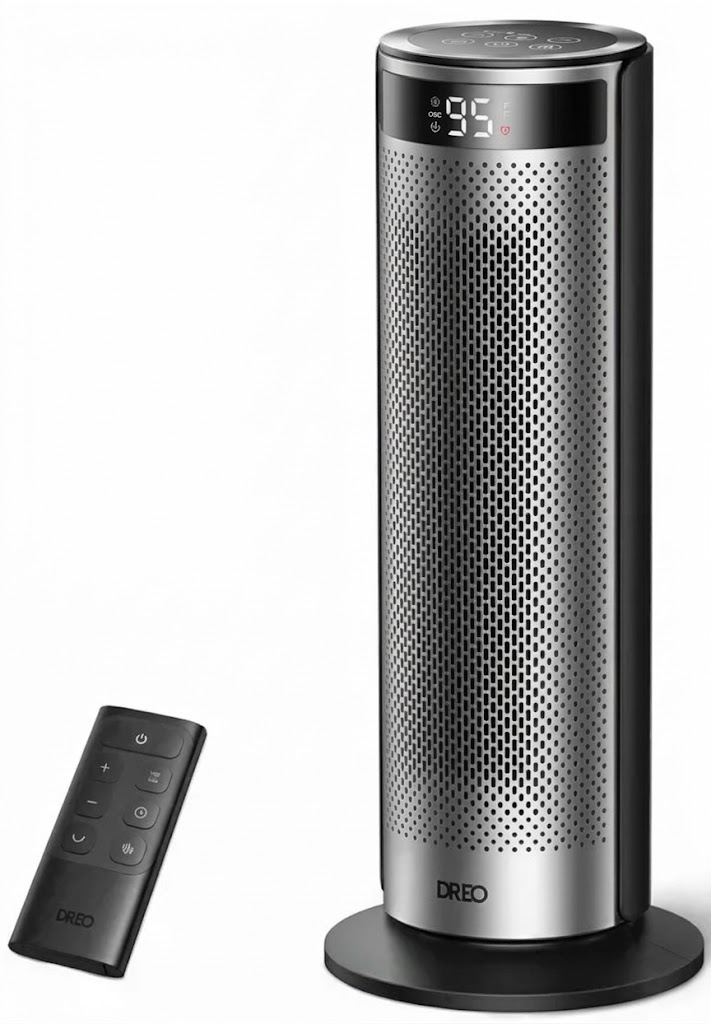
Introduction to the Dreo PTC Fan Heater Solaris 617
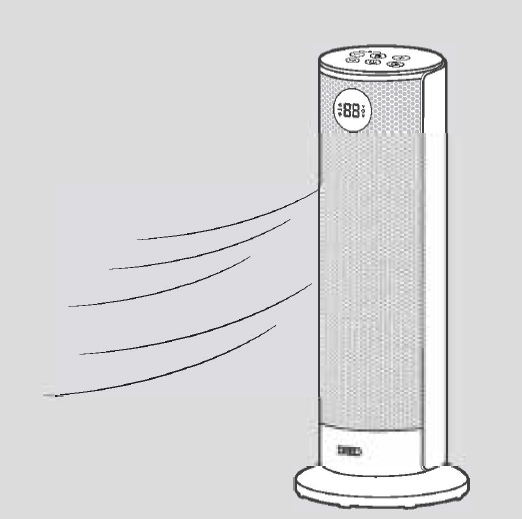
The Dreo PTC Fan Heater Solaris 617 is a high-performance portable space heater designed for fast, efficient warming in homes and offices. Featuring advanced PTC ceramic heating technology combined with dual DC motors, this Dreo PTC Fan Heater Solaris 617 delivers powerful 1500W heat output that rapidly warms rooms up to 300 sq ft, making it ideal for bedrooms, living rooms, home offices, and basements during cold winters. Its standout features include whisper-quiet operation at just 32-34 dB, quieter than a library, 70° oscillation for even heat distribution, and precise temperature control from 41-95°F in 1°F increments.
Key benefits of the Dreo PTC Fan Heater Solaris 617 include energy-saving ECO mode that auto-adjusts output to maintain your set temperature, a 12-hour timer for safe overnight use, and a remote control for effortless operation. Safety is paramount with an 8-layer system featuring tip-over protection, overheat safeguards, child lock, and flame-retardant materials, earning ETL certification. Perfect for families, remote workers, or anyone seeking reliable PTC fan heater performance without noise or hassle, this model excels in quick heat-up times and uniform coverage.
Target users include homeowners in chilly climates needing a portable oscillating space heater for targeted warmth. Use cases range from daily office heating to cozy bedroom nights. Currently available at major retailers like Target and Best Buy, the Dreo PTC Fan Heater Solaris 617 retails in the $80-90 price range, offering excellent value compared to pricier competitors.
Dreo PTC Fan Heater Solaris 617 Specifications and Key Features
The Dreo PTC Fan Heater Solaris 617 boasts robust specs tailored for efficient, safe heating. This ceramic PTC space heater uses cutting-edge technology for superior performance.
- Power and Heating: 1500W PTC ceramic heating with dual DC motors; 1000-1500W adjustable range; 5118 BTU/hour max output; heats 100-300 sq ft.
- Modes: H1/H2/H3 heat levels, ECO mode, Fan Only; precise thermostat 41-95°F (1°F increments).
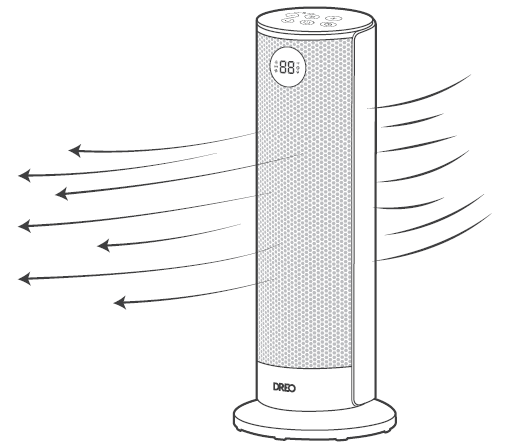
- Oscillation and Coverage: 70° wide-angle oscillation for uniform heat distribution.
- Noise Level: Ultra-quiet 32-34 dB operation, ideal for sleep or work.
- Controls and Timer: Remote control, 1-12 hour timer, auto LED dimming, child lock.
- Safety: 8-layer protection (tip-over, overheat, flame-retardant); ETL certified; no Teflon.
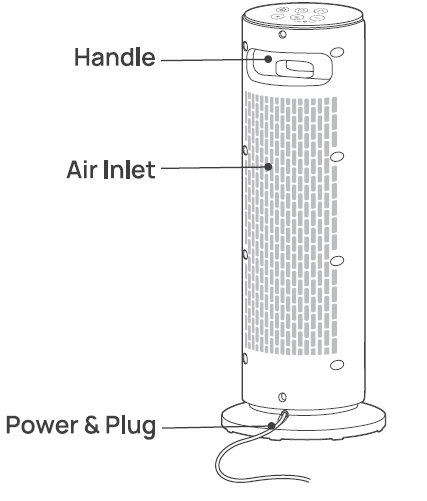
- Design: Dimensions approx. 8.66 x 8.66 x 26.77 inches; 8.83 lbs; carrying handle, cord storage; 120V/60Hz AC power.
Compared to similar products like Honeywell or Lasko heaters, the Dreo PTC Fan Heater Solaris 617 offers quieter operation and wider oscillation, with faster heat-up (seconds vs. minutes) and better energy efficiency via ECO mode.
ASSEMBLING YOUR APPLIANCE
Assembly Instructions
When using the appliance for the first time. remove the wraps and attach the parts by following the steps below.
Base Installation
Match the rectangular cutout with the rectangular support on the base.
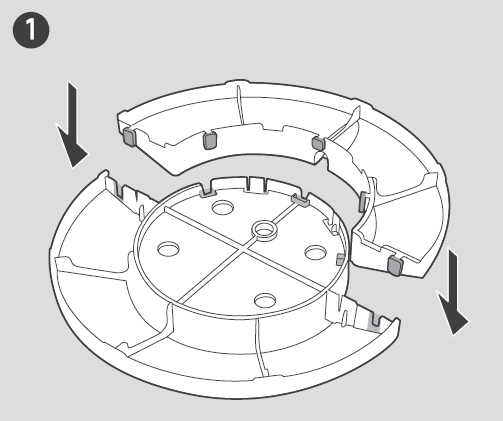
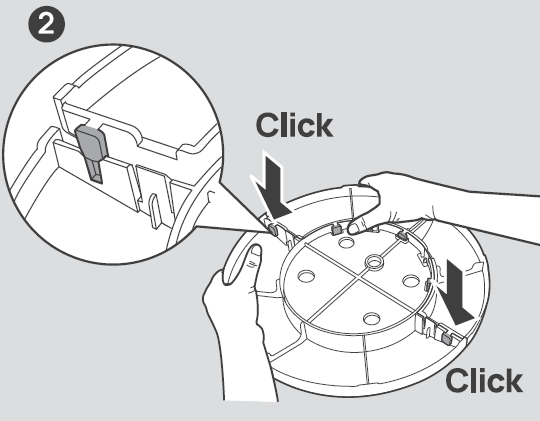
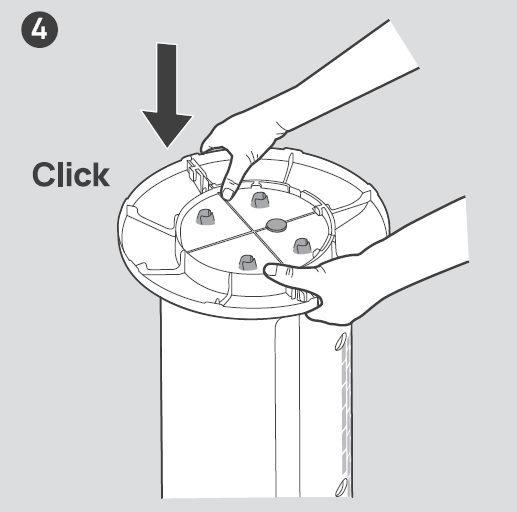
Press down on the edge until you hear a click to securely snap the two base halves together.
Align the center column with the center hole on the base. Make sure it is placed on the protective cardboard on the ground.
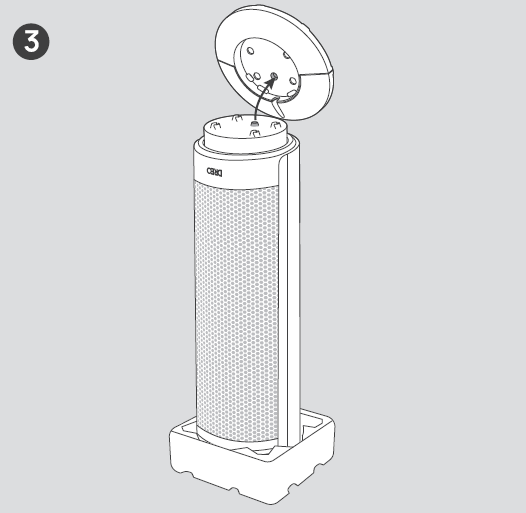
Attach the base to the heater bottom. Press the base until you hear a click to lock it in place.
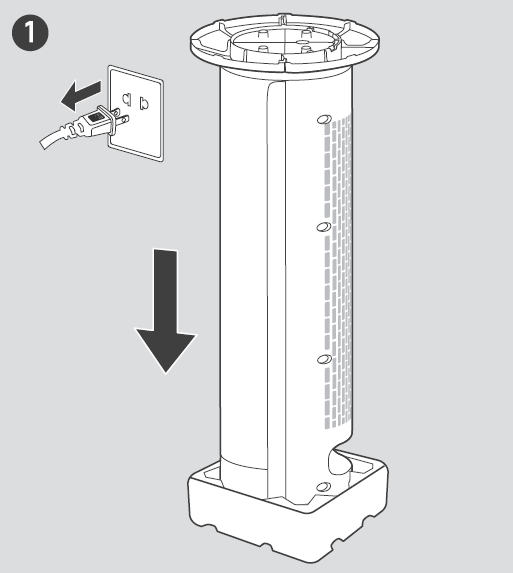
Detaching the Base
Unplug the heater, then turn it upside down. Make sure it is placed on the protective cardboard on the ground.
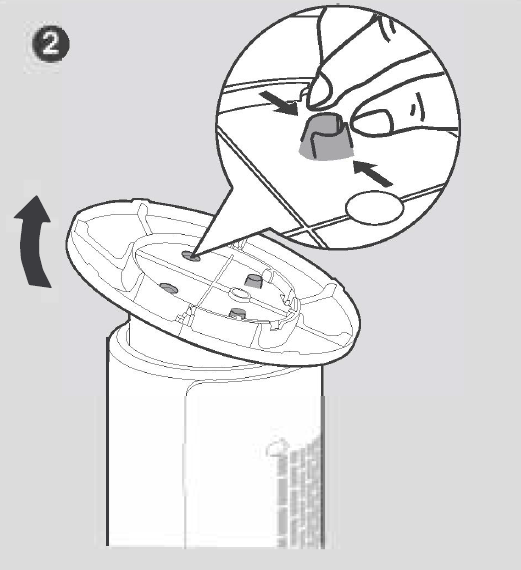
Pinch each of the 4 columns while manually detaching the base from them.
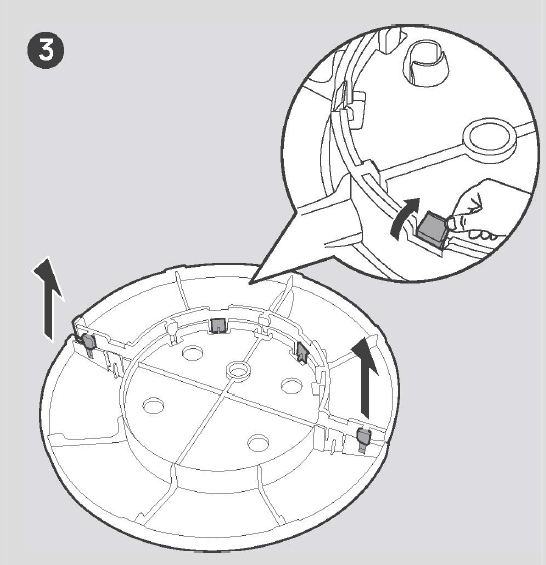
Gently pull the 4 triangular locks open and separate the two base halves.
CAUTION: Do not operate the Heater if the base has not been installed.
Package Contents
USING YOUR APPLIANCE
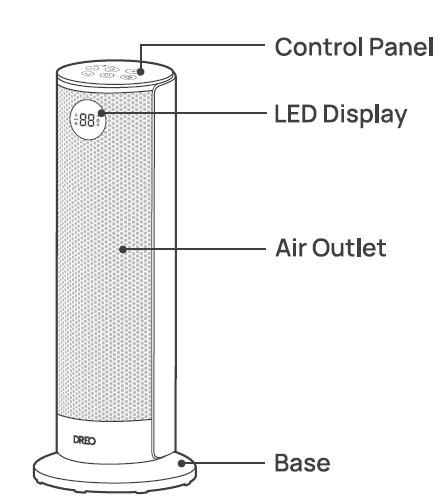
Control Panel
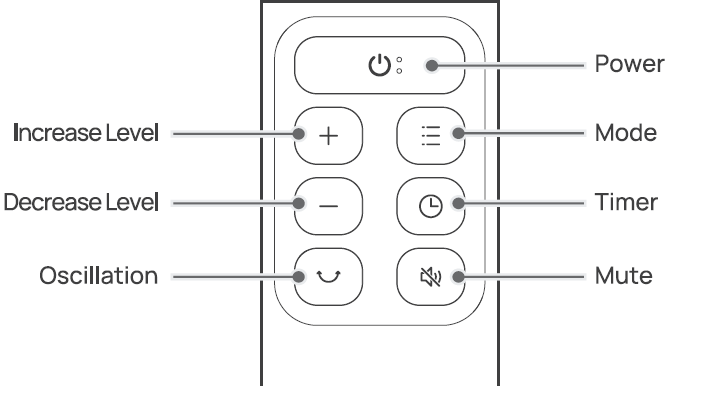
 Power Button: Touch to turn the heater on or off.
Note:
- When the heater is plugged into the electric outlet, the power indicator
 will light in red.
 - Once turned off, a 30-second countdown will show up on the display, as the fan will continue to run for 30 seconds to blow out the remaining heat.\
- When the heater is plugged into the electric outlet, the power indicator
 Mode Button
- Touch to switch between

- Power heat with three heating levels: H1 (1000W), H2 (1300W), H3(1500W).
ECO: The heater will automatically select its optimal heating power, depending on the difference between the set temperature (41-95°F) and ambient temperature.
Note:
- When the ambient temperature reaches the set temperature, the heater will turn off automatically in 30 seconds.
- When the ambient temperature drops below the set temperature, the heater will operate on low or high power (1000W or 1500W), depending on the difference between the two temperatures.
- Touch to switch between
- Mute/Unmute: To turn on/off the button sounds, long-press the Mode button on the panel for 3 seconds.
 Timer Button:
 - When the heater is on, touch to set a timer (0-12h). After the timer ends, the heater will turn off automatically.
- To cancel, set the timer to 0 hours.
- Heat Level/Temperature Buttons
- In Power Heat Mode, touch + or - to adjust the heating level.
In ECO mode, touch + or - to adjust the set temperature.
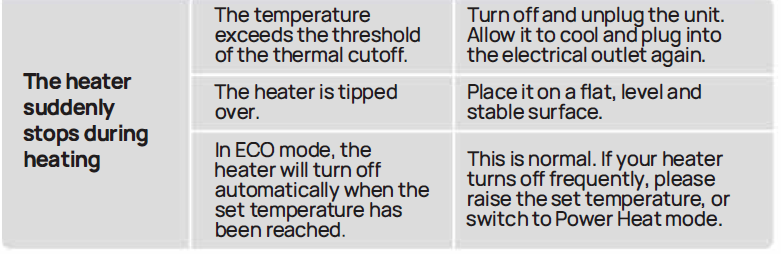
Note: In ECO mode, the heater will turn off automatically when the set temperature has been reached. If your heater turns off frequently, please raise the set temperature, or switch to Power Heat mode.
 Child Lock: Long press for 3s to activate/deactivate the Child Lock function. When activated, the display will show "LC", and all the buttons on the space heater will be locked.
 Oscillation: Touch to turn oscillation on or off.
LED Display
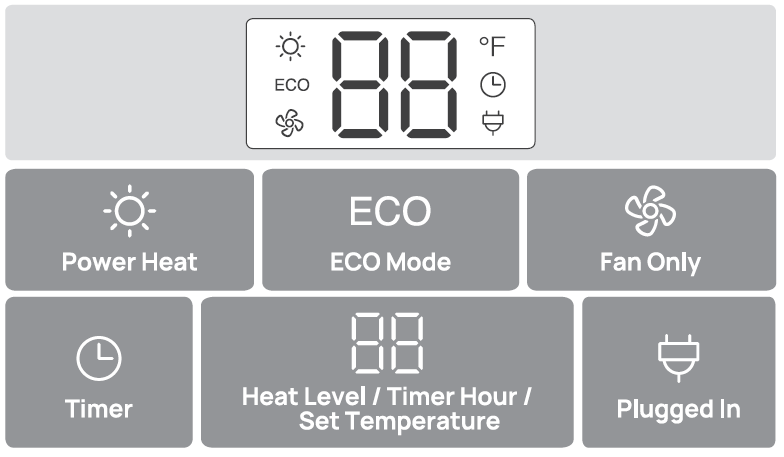
Features
Display auto-turns off after 1 minute.
- Memory
If the heater is turned OFF or disconnected from power, it will operate under the previous settings (except the Timer setting) when it is turned ON again. - Tip-over Protection
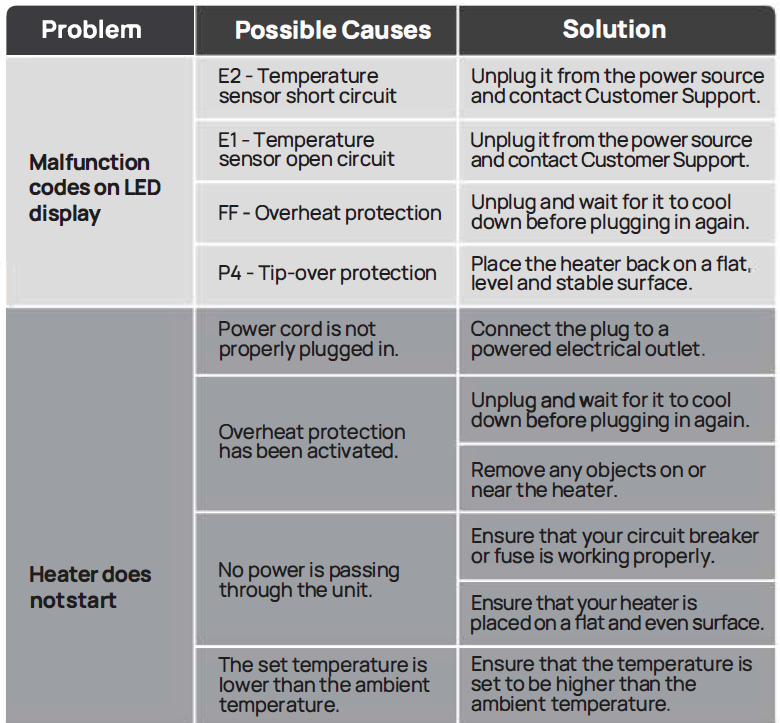
When the heater is tipped over, it will shut off automatically with the error code "P4" on the display. - 24-Hour Auto Off
- This feature is not ON by default.
- When this feature is ON, the heater will shut off automatically after continuously running for 24 hours.
- Long-press the Timer button for 3 seconds to turn this feature ON/OFF when this heater is on standby. The display will show "On" and "OF" respectively.
- Overheat Protection
When the heater overheats, it will shut off automatically with the error code "FF" on the display.
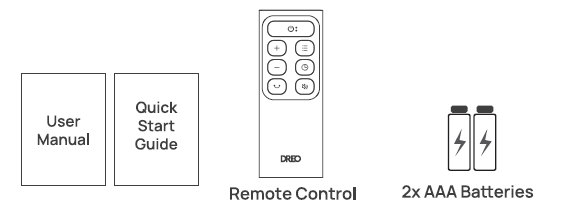
Remote Control
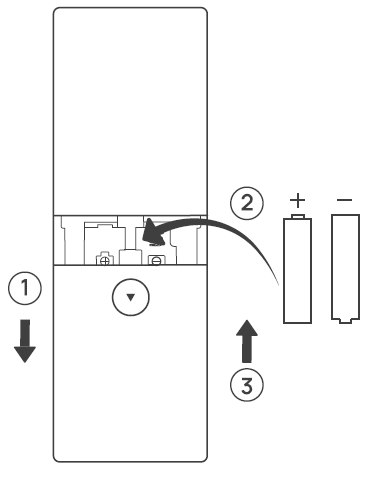
Battery Replacement
- Remove the battery cover in the direction indicated by the arrow.
- Replace with two new AAA 1 .5V batteries. Make sure that the positive(+) and negative(-) terminals are positioned correctly.
- Push the battery cover back into place.
WARNING:
- Replace with new batteries of the same type when replacement is required.
- Remove the batteries when the remote control is unused for a long period of time.
- Do not attempt to dismantle the batteries.
- Do not dispose of the batteries in fire; batteries may explode or leak.
- Chemical burn hazard. Keep batteries away from children.
- Do not mix old and new batteries, and do not mix alkaline, standard (carbon-zinc), or rechargeable (Ni-Cad, Ni-MH, etc.) batteries.
CLEANING AND MAINTENANCE
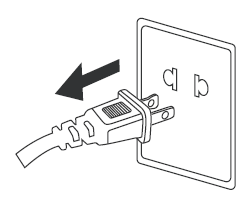
Always turn off and unplug before cleaning.
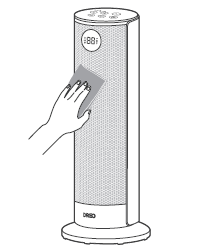
Outer Surface: Use a soft, dry cloth to gently wipe clean the outer surface.
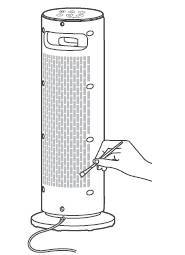
- Air Inlet: Use a soft, dry cloth or a cotton-tipped swab to remove any dust from the air inlet.
TROUBLESHOOTING
DREO CUSTOMER CARE
12-MONTH LIMITED WARRANTY
What is Covered
OREO warrants to you that your product will be free from original defects in materials and workmanship for a period of twelve (12) months from the date of your purchase, when you use your product for intended purposes in accordance with this User Manual.
Please retain your proof of purchase. If you do not retain your proof of purchase, your warranty will start two (2) months from the date of manufacture printed on your product label.
What is Not Covered
This limited warranty only applies to the original purchaser of your product and is non-transferable. This warranty is only valid if your product is used in the country in which you originally purchased it. In addition, this warranty will not apply, and OREO will not be liable for any costs, damages, or repairs, in connection with any of the following,
- Accidents or use of your product with inappropriate force.
- Damage or destruction caused by wrong voltage or unstable electric current.
- Normal wear and tear.
- Careless operation or handling, misuse, abuse, neglect, and/or failure to maintain or use your product in accordance with this User Manual.
- Any partially or completely altered, modified, and/or dismantled products.
- Reduction in battery discharge time due to battery age or use (as applicable).
- Products with altered or removed serial numbers.
- Clearing any blockages from the product.
- Purchases from retailers and distributors not authorized by OREO to sell this product.
- Defects caused by or resulting from damage from shipping or handling by any third party not authorized by OREO to ship or handle your product.
- Defects caused by or resulting from repairs, service, improper maintenance, or alteration to your product or any of its components by anyone other than a repair person authorized by OREO.
Any service and customer support that OREO provides to you under this limited warranty will not extend the duration of this limited warranty.
Warranty Limitations and Exclusions
ANY IMPLIED WARRANTIES RELATING TO YOUR PRODUCT, INCLUDING BUT NOT LIMITED TO THE WARRANTY OF MERCHANTABILITY AND THE WARRANTY OF FITNESS FOR A PARTICULAR PURPOSE, ARE LIMITED TO THE DURATION OF THE LIMITED WARRANTY SET FORTH ABOVE AND ARE OTHERWISE DISCLAIMED.
THIS LIMITED WARRANTY SHALL BE THE SOLE REMEDY OF THE PURCHASER OR USER OF THE PRODUCT, AND OREO SHALL NOT BE LIABLE FOR AN ALLEGEDLY DEFECTIVE OR DAMAGED PRODUCT EXCEPT TO REPAIR OR REPLACE IT IN ACCORDANCE WITH THIS LIMITED WARRANTY. OREO WILL NOT BE LIABLE FOR SPECIAL, INCIDENTAL, INDIRECT, CONTINGENT, OR CONSEQUENTIAL DAMAGES OR LOSSES OF ANY NATURE THAT YOU MAY INCUR IN CONNECTION WITH YOUR PURCHASE OR USE OF YOUR PRODUCT.
Pros and Cons of the Dreo PTC Fan Heater Solaris 617
Pros
- Exceptional quietness at 32 dB allows undisturbed sleep or focus, outperforming noisier rivals.
- Rapid heating with PTC tech warms large areas quickly; ECO mode saves energy by auto-adjusting.
- Comprehensive safety features like child lock and tip-over protection make it family-friendly.
- Convenient remote, timer, and oscillation provide effortless, even warmth up to 300 sq ft.
- Great value at $80-90, delivering premium features like precise 1°F controls at a budget price.
Cons
- Higher heat settings (H3) produce slightly more noise, though still low; lower modes recommended for quiet needs.
- Not cordless or battery-powered; requires a standard outlet, limiting portability in outages.
- LED screen may blink if voltage mismatches; check manual for troubleshooting.
- Remote signal weakens if unit faces away, per user tests.
Overall, the Dreo PTC Fan Heater Solaris 617 offers superior value over alternatives like Vornado, balancing power, silence, and safety effectively.
Customer Reviews and Feedback on Dreo PTC Fan Heater Solaris 617
Customers rave about the Dreo PTC Fan Heater Solaris 617, averaging 4.7/5 stars across retailers. Praises highlight its "instant heat" and "library-quiet" performance: "Heats my 250 sq ft office in seconds without noise perfect for WFH!" (Best Buy reviewer). Safety features earn acclaim, with one parent noting, “Child lock and tip-over protection give total peace of mind.”
Common complaints include minor noise on high settings and remote range issues, but most resolve by using ECO mode. "ECO keeps my room at 72°F efficiently, saving on bills," says a Target user. Frequently mentioned perks: reliable thermostat and easy setup. 90% recommend it for winter use, positioning it as a top portable PTC fan heater choice.
More dreo manuals
- Setup: Dreo PTC Fan Heater Atom 322 User Manual
- Setup: Dreo PTC Fan Heater Atom 316 User Manual
- Setup: Dreo Whole-room Heater & Circulator 714 User Manual
- Dreo Evaporative Air Cooler DR-HEC001 User Manual
- Setup: Dreo Smart Whole-room Heater & Circulator User Manual
- Dreo Pedestal Air Circulator Fan DR-HAF003S User Guide
Leave a Comment