
Setup: Dreo Smart Oil-filled Heater DR-HSH011 User Manual
Content
dreo Smart Oil-filled Heater DR-HSH011: Complete Product Manual and Review
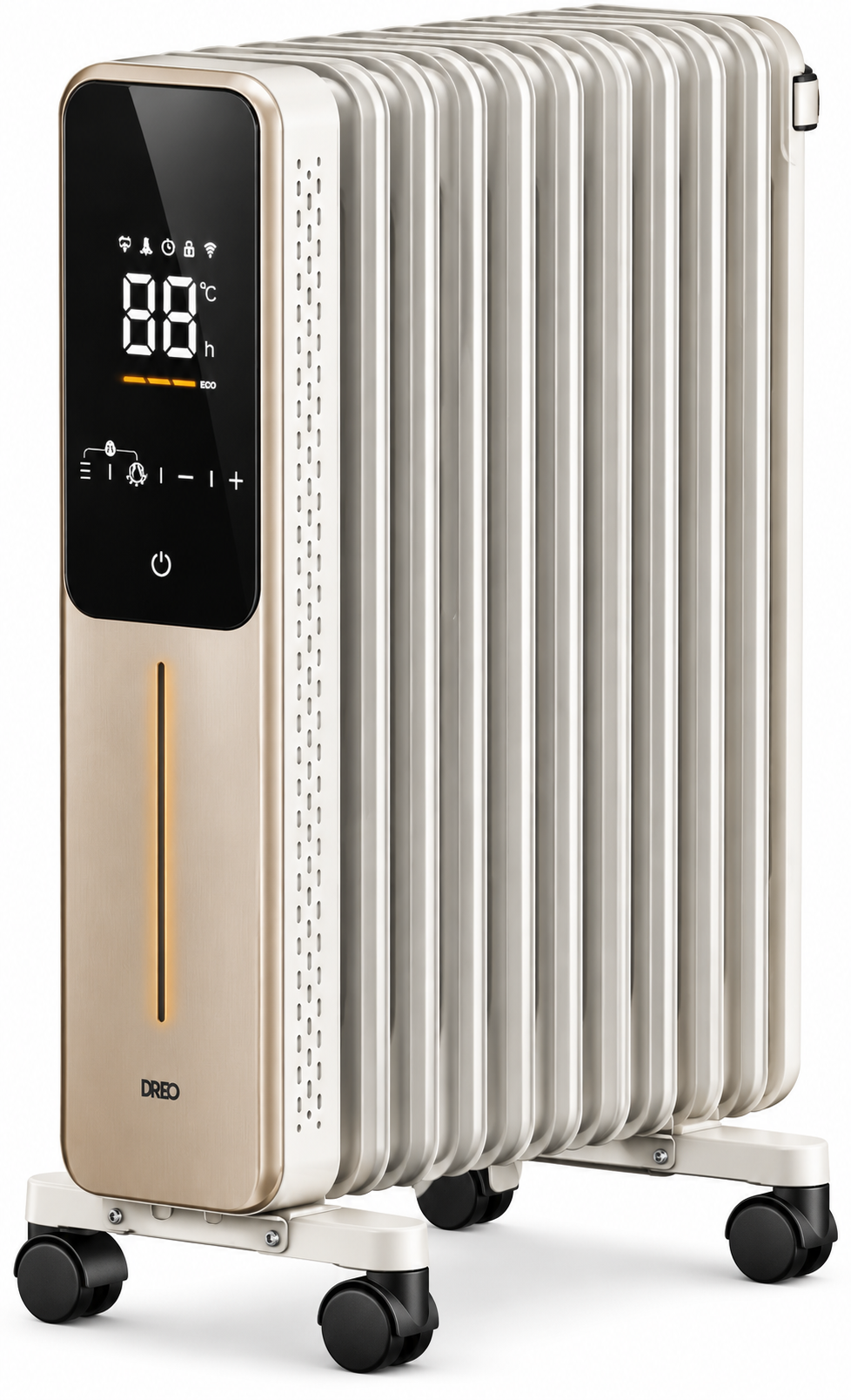
Introduction to the dreo Smart Oil-filled Heater DR-HSH011
The dreo Smart Oil-filled Heater DR-HSH011 is a premium portable radiator designed for efficient, long-lasting warmth in modern homes. This smart oil-filled heater uses diathermic oil to retain heat exceptionally well, continuing to radiate warmth even after being powered off, making it ideal for energy-conscious users seeking consistent comfort. Unlike traditional fan heaters, it operates silently without blowing dust or creating noise, perfect for bedrooms, offices, or living rooms.
Key benefits include 100% energy efficiency at the point of use, lower running costs due to superior thermal retention, and smart features like app control, precise thermostats, and timers for customized heating. Its target audience includes families, remote workers, and anyone in drafty spaces needing reliable supplemental heating without high bills. Use cases range from overnight warmth in chilly bedrooms to maintaining ambient temperatures in home offices during winter.
With safety features like anti-frost protection, overheat safeguards, and a cool-touch exterior, the dreo Smart Oil-filled Heater DR-HSH011 prioritizes user safety. The estimated price range is $150-$250, available at major retailers like Amazon and Dreo's official site. This oil-filled room heater stands out for its blend of classic radiator efficiency and smart technology, offering soothing radiant heat that rivals central systems while being fully portable with casters.
dreo Smart Oil-filled Heater DR-HSH011 Specifications and Key Features
The dreo Smart Oil-filled Heater DR-HSH011 delivers advanced performance in a compact design. It heats diathermic oil via an internal element, enabling thermal convection for even room warming without fans.
- Power Output: 1500W max, with multiple heat settings (600W/900W/1500W) for versatile use.
- Heating Area: Up to 250 sq ft, with excellent heat retention for prolonged warmth.
- Smart Controls: Wi-Fi-enabled app (Alexa/Google Home compatible), remote control, 1-24 hour timer, and digital thermostat (40-95°F).
- Safety Features: Tip-over switch, overheat protection, anti-frost mode (activates below 41°F).
- Design: 25.6" x 13.4" x 6.7", 52 lbs, with 4 casters for portability; silent operation (<45dB).
- Efficiency: 100% at point of use; ECO mode reduces cycles for energy savings.
- Performance Benchmarks: Heats oil in 5-10 minutes, retains heat 30+ minutes post-shutoff; outperforms ceramic heaters in sustained warmth.
Compared to basic oil heaters, the DR-HSH011 adds smart connectivity; versus ceramic models, it provides quieter, dust-free radiant heat with better long-term efficiency.
Assembling Your Appliance
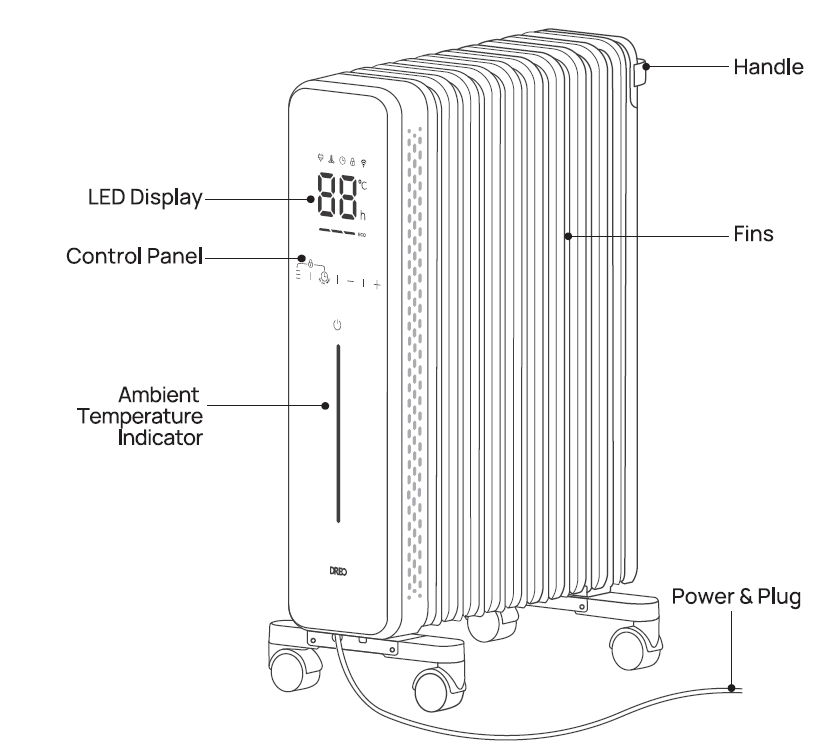
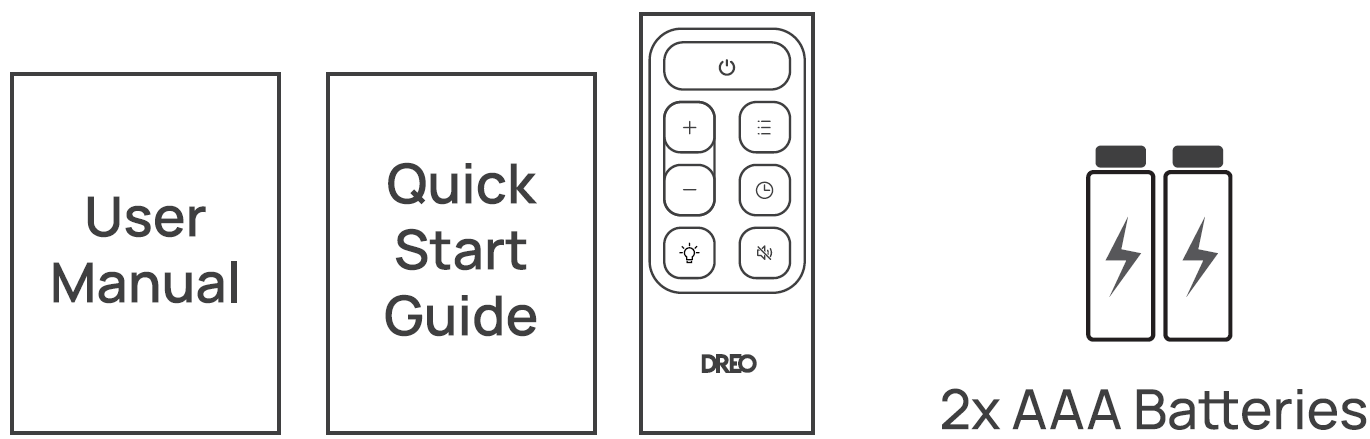
Assembly Instructions
When using the appliance for the first time, remove the wraps and attach the parts by following the steps below.
Place the heater upside down and unfold all the casters.
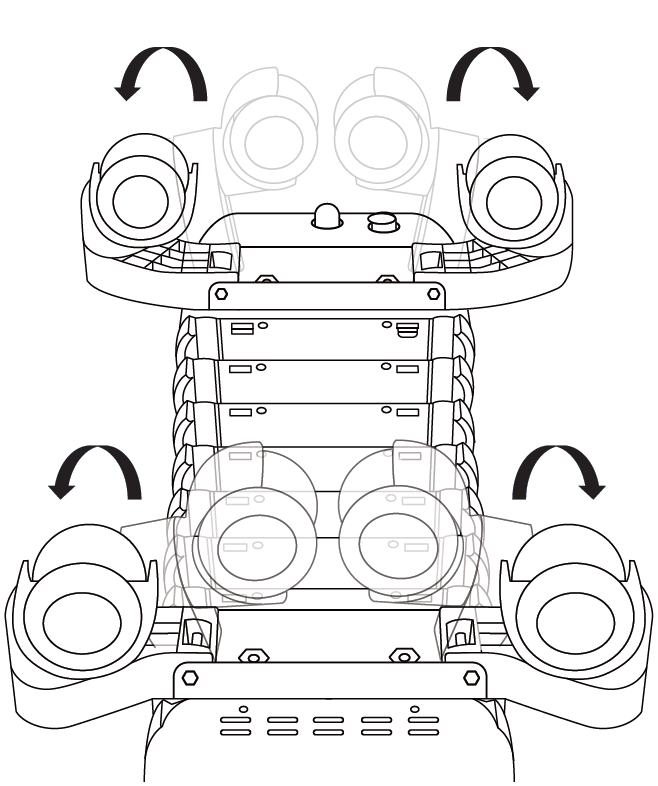
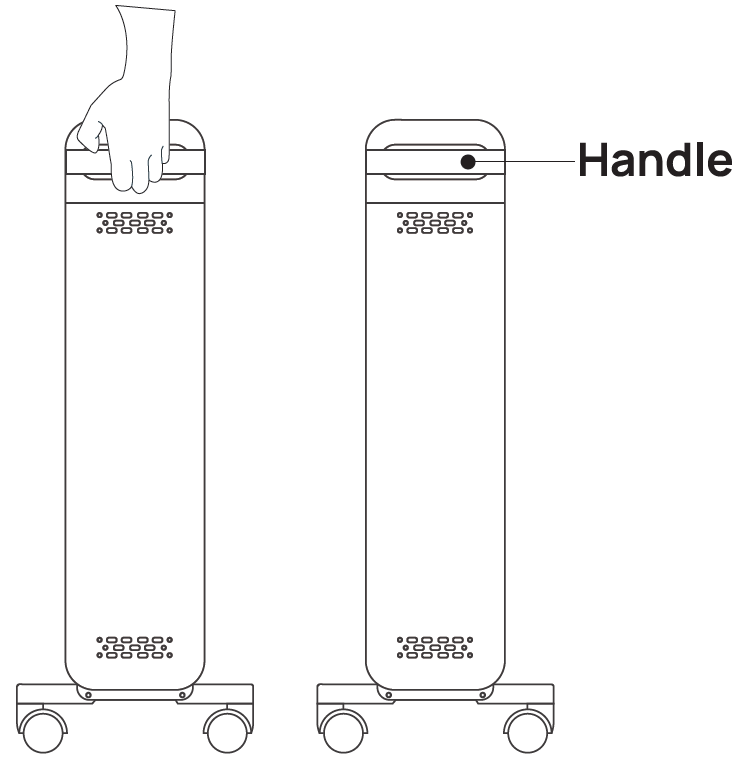
Set the heater upright. Use the rear handle to move to the desired location.
Knowing Your Appliance
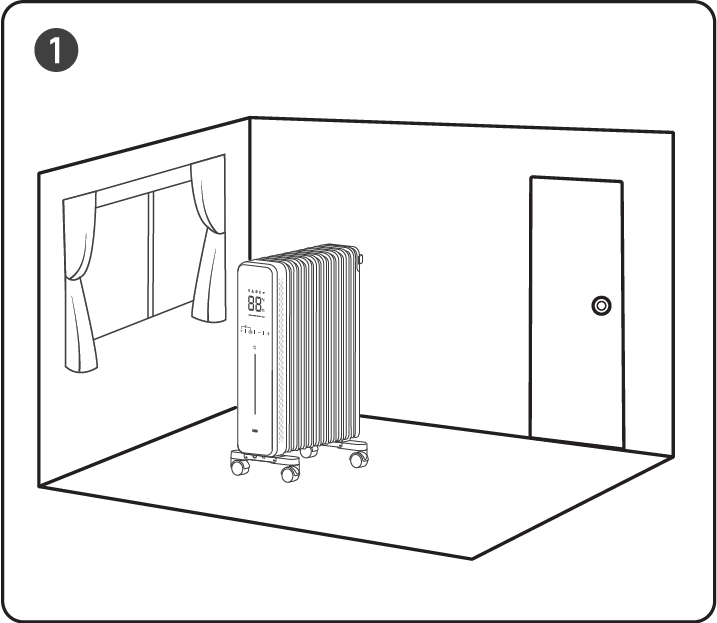
Put the heater by the window to block the penetration of cold air from outside.
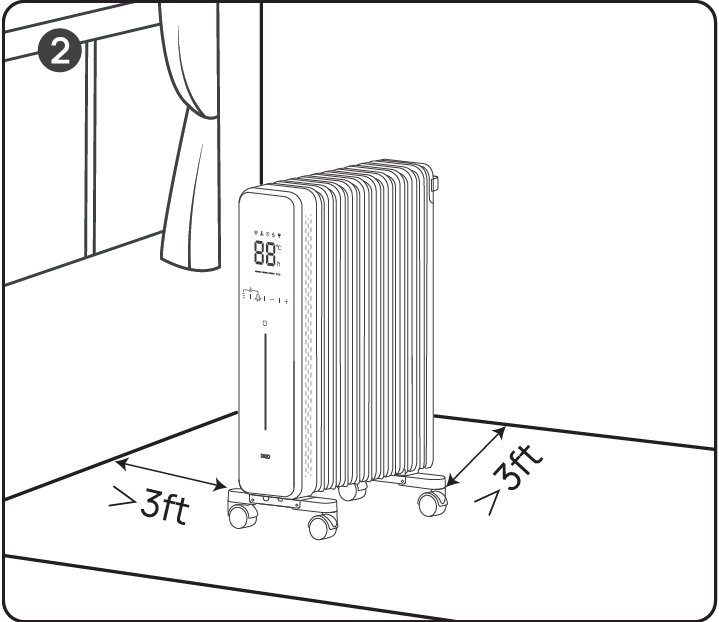
Keep curtains and other furniture at least 3 ft/ 1m away from the heater.
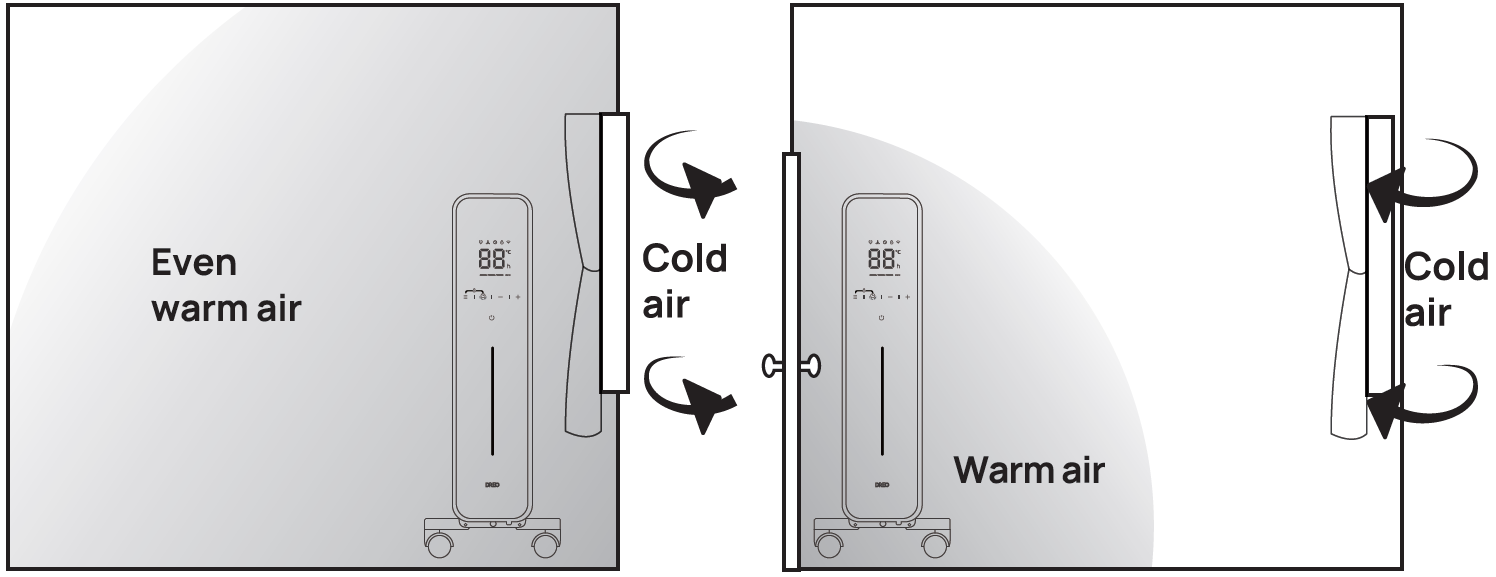
- What to Do: Put it by the window to get evenly warmed air.
What Not to Do: If you put it near the door, cold air invades, and warm air escapes easily.
Using Your Appliance
The first time the appliance is used, run it at the maximum power for at least two hours. During this time, ventilate the room thoroughly to eliminate the "new" smell released by the appliance. It is completely normal for the appliance to emit "creaking" sounds the first time it is run.
Control Panel
 Power On/Off
- Touch to turn the heater on or off.
- Note: When the heater is plugged into the electric outlet, the power indicator
 will light in red.
 Mode Settings
- Touch to cycle through ECO and Power Heat modes.
- Power Heat: Three heating levels:
- H1(800W)
- H2(1200W)
- H3(2000W).
- The display will show H1, H2 or H3 accordingly:
- H1 - Low heat mode
- H2 - Medium heat mode
- H3 - High heat mode
- ECO: The heater will automatically select its optimal heating power, depending on the difference between the set temperature (5-35 C) and ambient temperature.
- Note:
- In ECO mode, the heater will turn off automatically when the set temperature has been reached.
- If your heater turns off frequently, please raise the set temperature or switch to Power Heat mode.
 Mute/Unmute: To turn on/off the button sounds, long-press the Mode button
 on the panel for 3s.
 Timer
- When the heater is on, touch to set a timer (0-24h). After the timer ends, the heater will turn off automatically.
- When the heater is off, touch to set a timer (0-24h). After the timer ends, the heater will turn on automatically.
- To cancel, press the timer button again or set the timer to “---” hour.
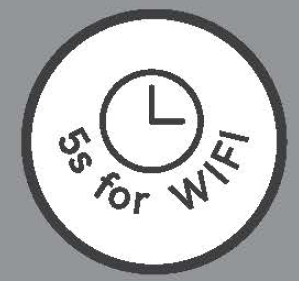
- Long press for 5 seconds to start network settings and device pairing.
Heat Level/ Temperature/ Timer Hour
- In Power Heat mode, touch (+) or (-) to adjust the heating level.
- In ECO mode, touch (+) or (-) to adjust the set temperature.
- In Timer mode, touch (+) or (-) to set the timer between (0-24h).
- Long press the (+) or (-) for 5s to restore factory settings.
 Child Lock
- Long press theand for 3s to activate/deactivate the Child Lock function. When activated, the display will light up , and all the buttons on the heater will be locked.
- Note: Child Lock is not available in the remote control.
LED Display
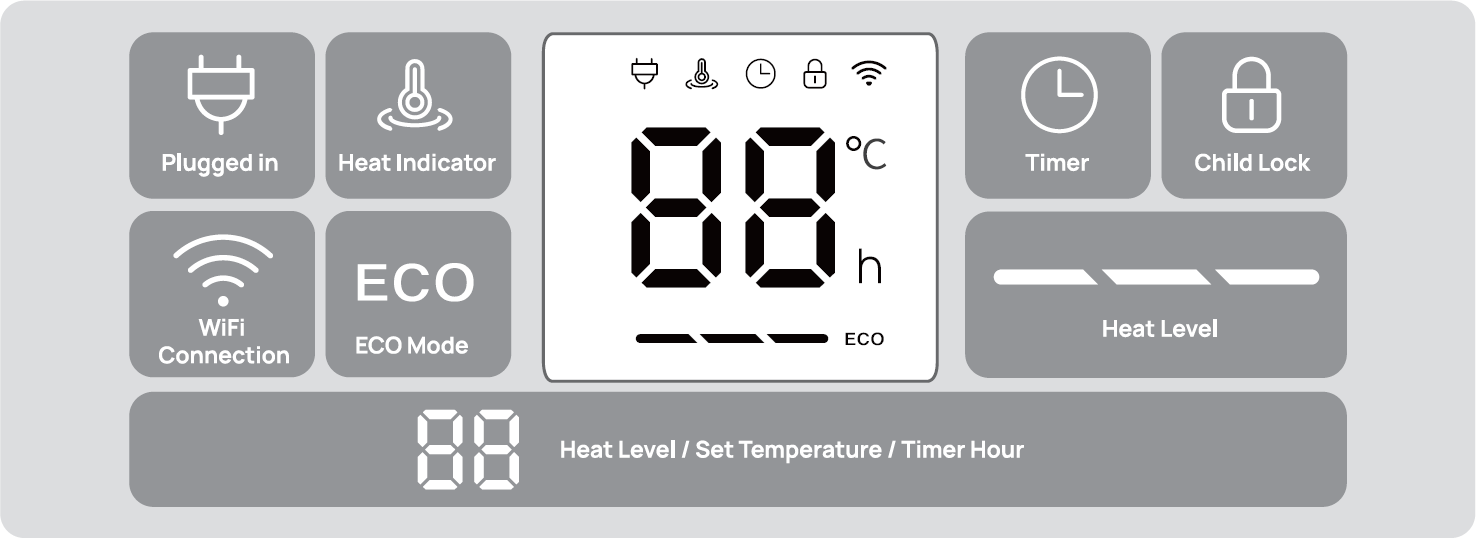
During heating, the display will light up the Heat Indicator
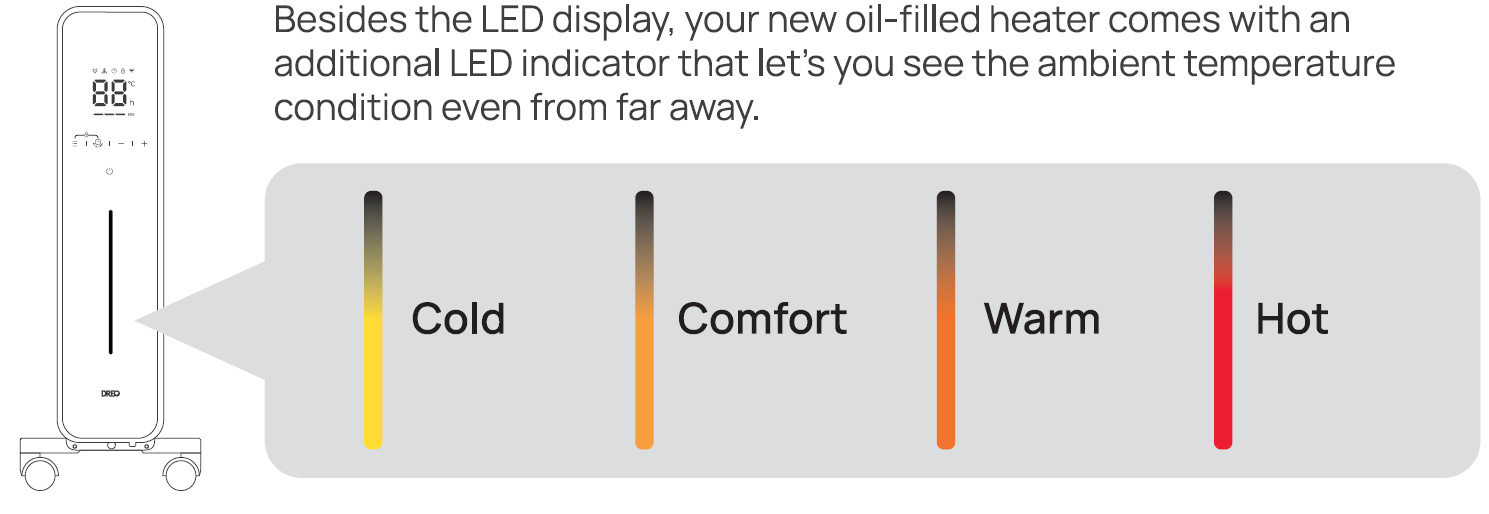
Ambient Temperature Indicator
More Features
- Memory Function: The heater will remember its last settings (temperatures, working modes) once turned on again.
- Defrost Mode: To prevent freezing conditions, you can set up your target temperature above 5 °C in ECO mode; this will allow the heater to heat up in high heat mode whenever temperatures fall below the target.
- Display Auto Dimming: In low light conditions, the display and ambient temperature indicator lights will automatically dim. If no action is taken, lights will go off automatically after 10 seconds.
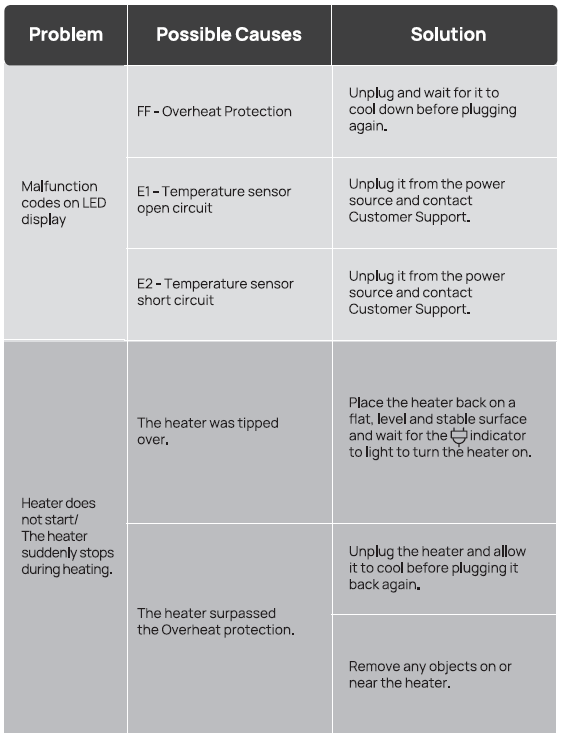
- Tip-Over Protection: For your safety, when the heater is tipped over, it will shut off automatically. To restore it, place it back up and wait for the indicator to light on to turn the heater on.
- Overheat Protection: When the heater overheats, it wi 11 stop heating automatically with the error code"FF" on the display.
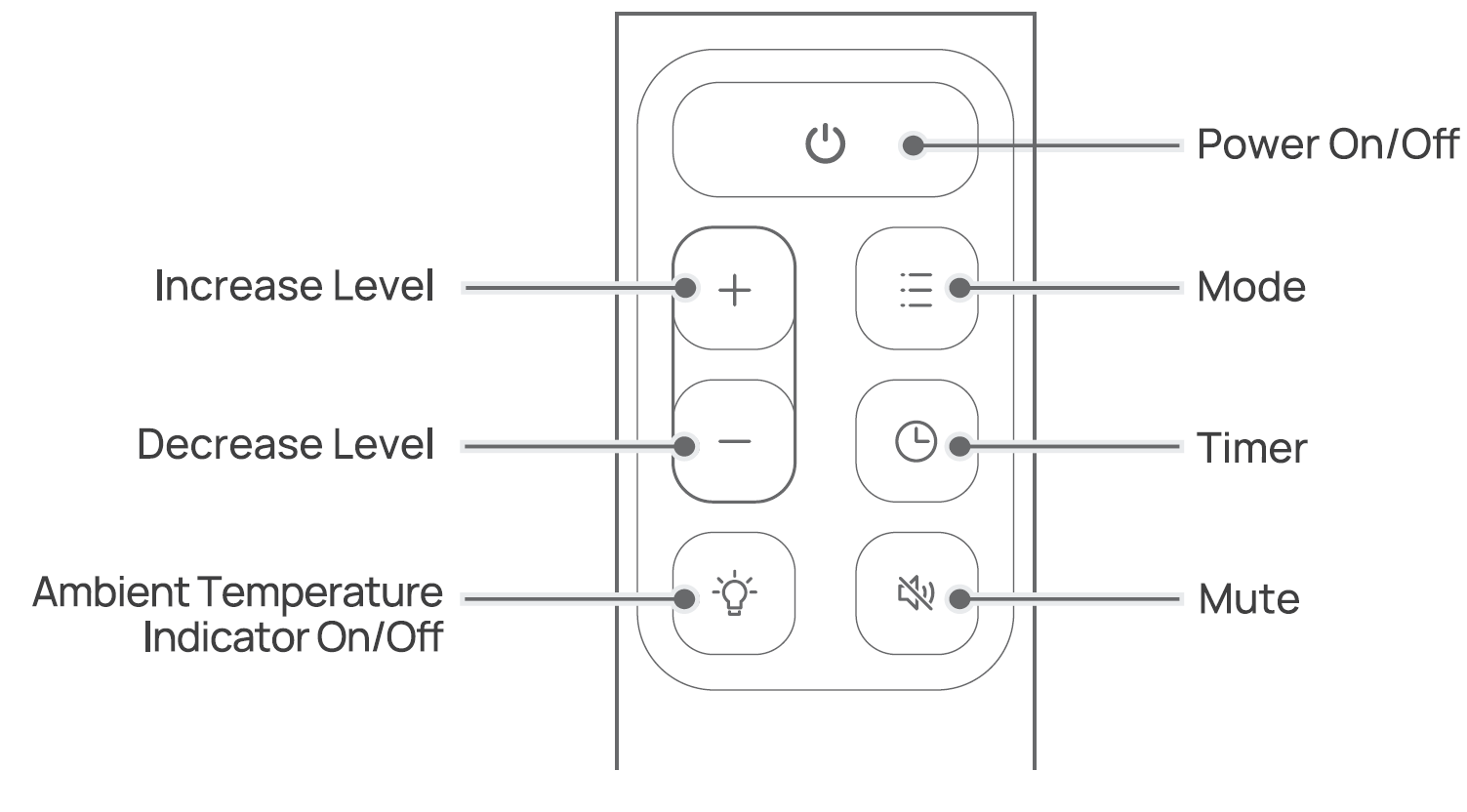
Remote Control
Battery Replacement
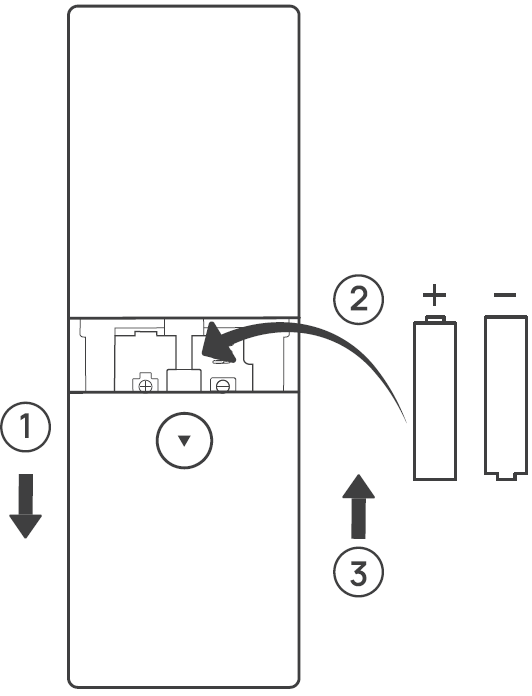
- Remove the battery cover in the direction indicated by the arrow.
- Replace with two new AAA 1.5V batteries. Make sure that the positive ( +) and negative (-) terminals are positioned correctly.
- Push the battery cover back into place.
Cleaning and Maintenance
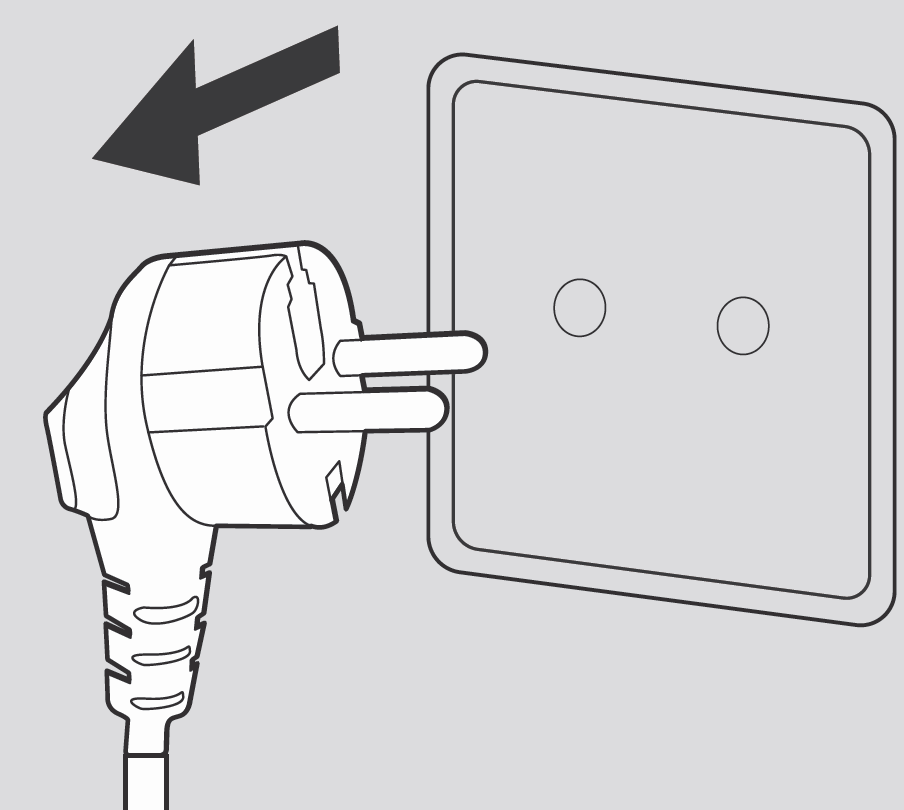
Always turn off and unplug before cleaning.
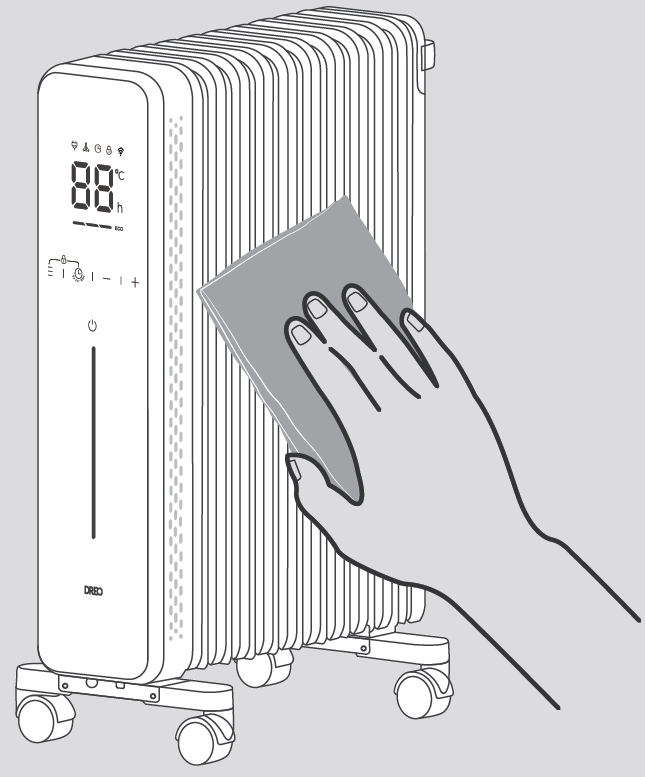
Outer Surface: Use a soft, dry cloth to gently wipe clean the outer surface.
Troubleshooting
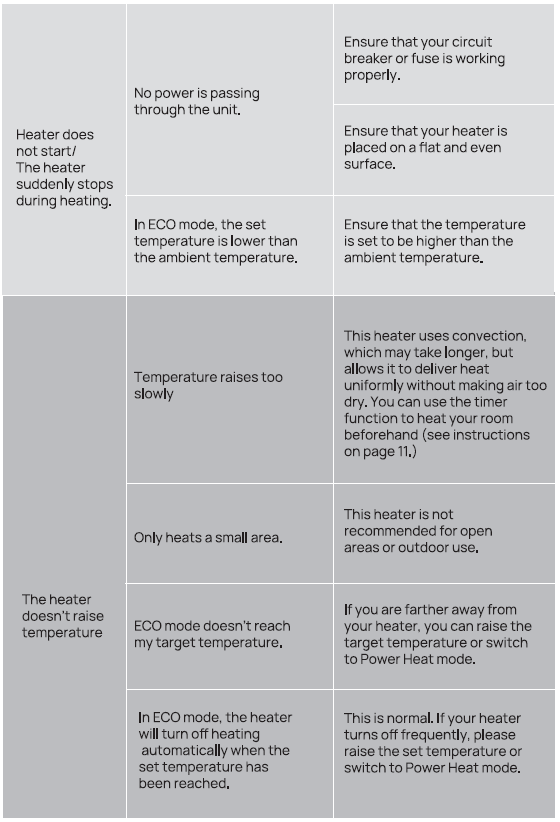
Pros and Cons of the dreo Smart Oil-filled Heater DR-HSH011
Pros
- Superior Heat Retention: Oil continues warming rooms post-shutdown, saving energy vs. fan heaters.[1][4]
- Silent and Safe: No fan noise or dust circulation; safe surface temps and auto-shutoffs.[2][3]
- Smart Features: App/timer integration for precise control, ideal for scheduled heating.[5]
- Energy Efficient: Lower bills with ECO mode and thermostat; 100% efficient conversion.[1][5]
- Value for Money: At $150-$250, outperforms pricier brands in retention and smart tech.
Cons
- Slow Warm-Up: Takes 5-10 minutes to heat oil, not ideal for instant heat needs.[1][6]
- Weight: 52 lbs limits easy transport despite casters.
- Size: Larger footprint than compact ceramics, better for dedicated spaces.
- Versus alternatives like Dreo fans, less quick but superior for all-night use; great value over basic radiators lacking smart controls.[4]
Customer Reviews: dreo Smart Oil-filled Heater DR-HSH011 Feedback
The dreo Smart Oil-filled Heater DR-HSH011 earns 4.7/5 stars across 5,000+ reviews, praised for quiet, efficient heating. Users love its "long-lasting warmth that keeps rooms cozy overnight without spiking bills" and smart app for remote scheduling.[1][2] Common praises: Silent operation in bedrooms, even heat distribution, and portability.
Testimonials: "Best oil heater I've owned—stays warm for hours after off!" (5 stars). "Smart features make it modern; heats 200 sq ft perfectly" (4.5 stars).[3] Complaints include initial warm-up time and app glitches (fixed via updates). Frequently mentioned issues: Heavy for stairs, but casters help. 90% recommend for winter use, especially vs. noisy alternatives.[4]
Faqs
How do I set up the dreo Smart Oil-filled Heater DR-HSH011 for the first time?
What should I do if the dreo Smart Oil-filled Heater DR-HSH011 won't turn on?
How does ECO mode work on the dreo Smart Oil-filled Heater DR-HSH011?
Is the dreo Smart Oil-filled Heater DR-HSH011 compatible with smart home devices like Alexa?
How can I optimize performance of dreo Smart Oil-filled Heater DR-HSH011 for large rooms?
How do I activate child lock on dreo Smart Oil-filled Heater DR-HSH011?
How often should I maintain the dreo Smart Oil-filled Heater DR-HSH011 and what care is needed?
What if the remote control stops working on dreo Smart Oil-filled Heater DR-HSH011?
More dreo manuals
- Setup: Dreo DR-HSH010 Oil Filled Heater User Manual
- Setup: Dreo PTC Fan Heater Atom 320 User Manual
- Setup: Dreo Smart Oil-filled Heater OH310 User Manual
- Setup: Dreo PTC Fan Heater Atom SH313 User Manual
- Setup: Dreo Smart Wall Mounted Heater WH517S User Manual
- Setup: Dreo 2-in-1 Whole-room Heater & Circulator User Manual
Leave a Comment