
Setup: Dreo Smart Oil-filled Heater OH310 User Manual
Content
dreo Smart Oil-filled Heater OH310: Comprehensive Product Manual and Review
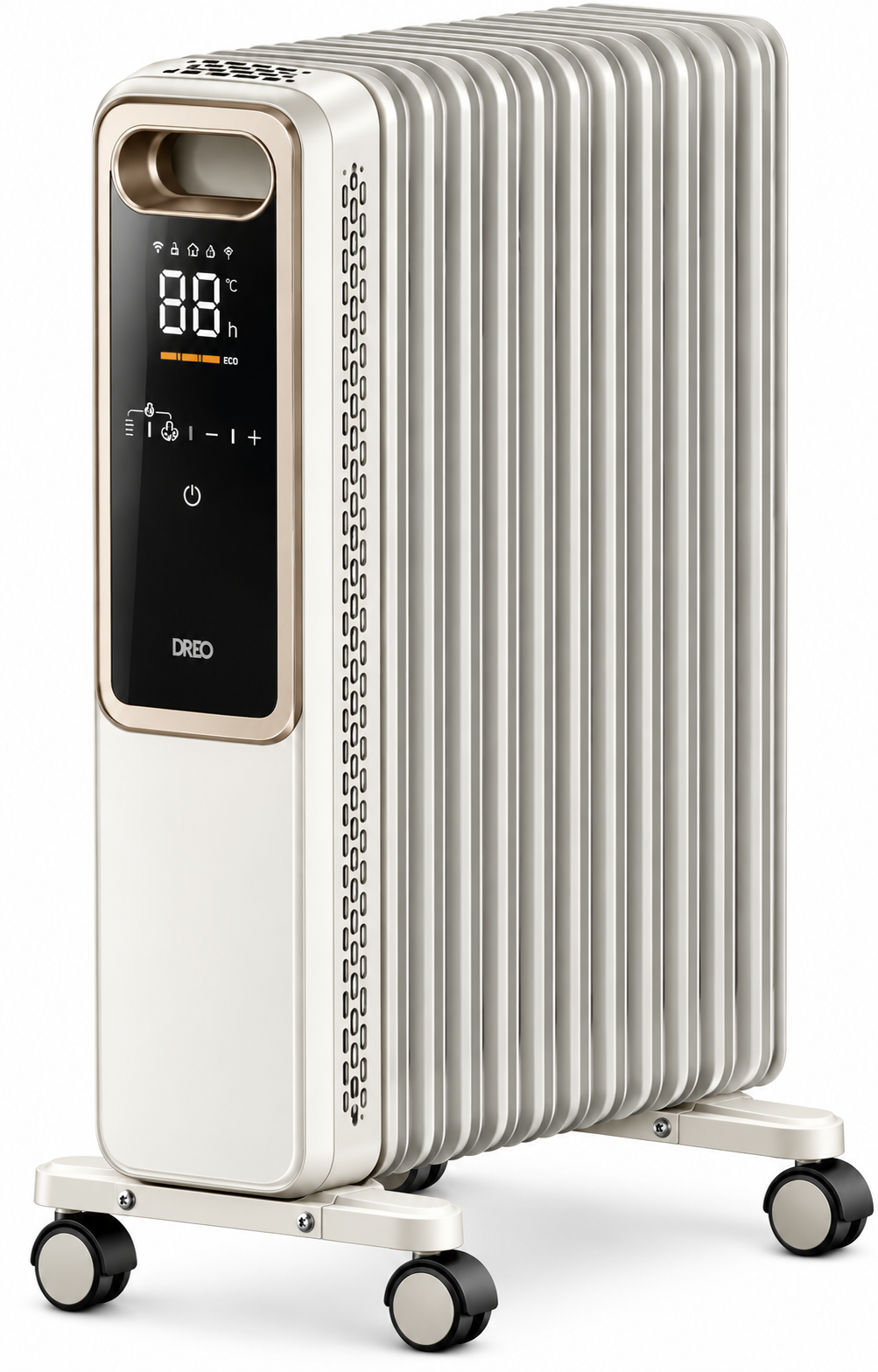
Introduction to the dreo Smart Oil-filled Heater OH310
The dreo Smart Oil-filled Heater OH310 is a premium electric radiator heater designed for efficient, whole-room warming with advanced smart features. This 1500W oil-filled radiator utilizes seven M-shaped heating fins for 360-degree heat distribution and an impressive 92.3% heat dispersion efficiency, delivering rapid, silent warmth without fans. Ideal for bedrooms, living rooms, offices, or any space up to medium size, it targets families, remote workers, and anyone seeking energy-efficient heating solutions during winter.
Key benefits include customizable modes (600W, 900W, 1500W, and ECO), an adjustable thermostat from 41-95°F in 1°F increments, and smart algorithms that maintain steady temperatures to cut energy bills. Safety features like triple overheat protection, tilt switch, fire-resistant materials, and ETL listing ensure peace of mind, especially in homes with children or pets. User-friendly elements such as a large LED touchscreen, remote control (CR2025 battery), 1-24 hour timer, child lock, mute mode, and mobility wheels with handle make it effortless to use.
Perfect for supplemental heating in apartments or homes, the Dreo Smart Oil-filled Heater OH310 outperforms basic radiators by retaining heat longer for sustained comfort. Available on Dreo.com and major retailers like Amazon, it typically retails in the $80-$120 range, offering excellent value as a smart oil heater with timer control and eco-friendly operation.
dreo Smart Oil-filled Heater OH310 Specifications and Key Features
The dreo Smart Oil-filled Heater OH310 combines powerful performance with smart technology. Here's a detailed breakdown:
- Power and Heating: 1500W max (600W/900W/1500W modes + ECO); 7 M-shaped fins for 360° heat dispersion at 92.3% efficiency; heats rooms evenly, raising temperature by ~5.5°F in 3 hours (e.g., 57.8°F to 63.3°F).
- Thermostat and Controls: Adjustable 41-95°F (1°F increments); modes: H1/H2/H3/ECO; large LED touchscreen, remote control.
- Dimensions and Mobility: 12.2 x 9.84 x 26.06 inches; 4 wheels and handle for easy room-to-room transport.
- Timer and Smart Features: 1-24 hour built-in timer; precise sensors and algorithms for steady warmth; child lock, mute, screen-off modes.
- Safety and Build: Triple overheat protection, tilt protection, fire-resistant materials, ETL listed, burn-proof plug; silent operation (no fan).
- Power Specs: 120V/60Hz AC; sound level: silent.
Compared to similar oil heaters like 8-fin models, the OH310 excels in smart ECO mode and 92.3% efficiency, providing better energy savings and faster, even heating than basic 1500W radiators.
Assembling Your Appliance
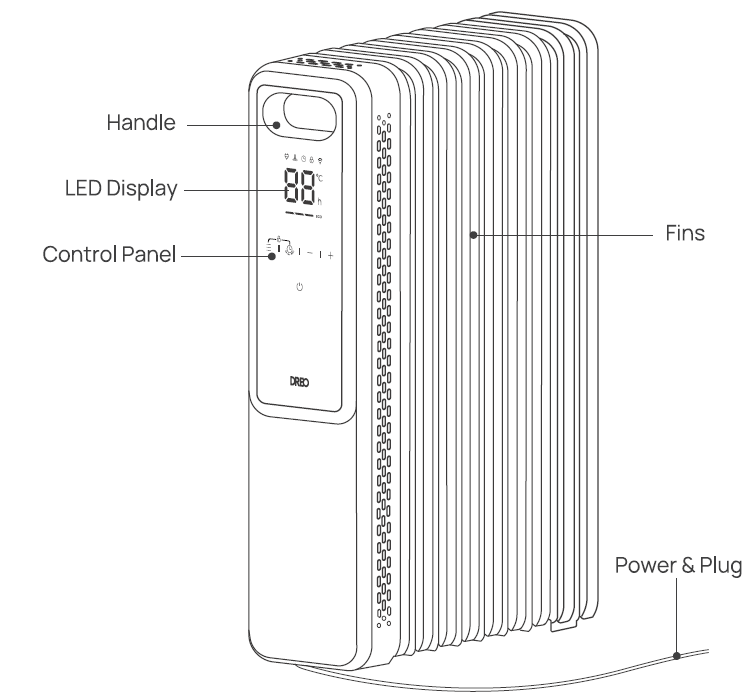
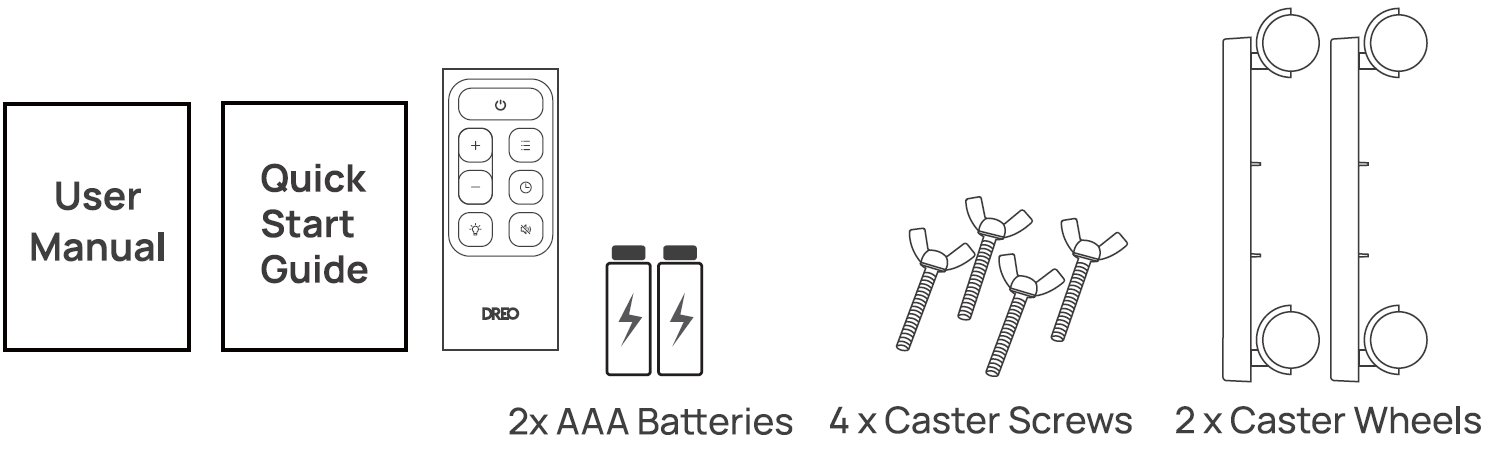
Assembly Instructions
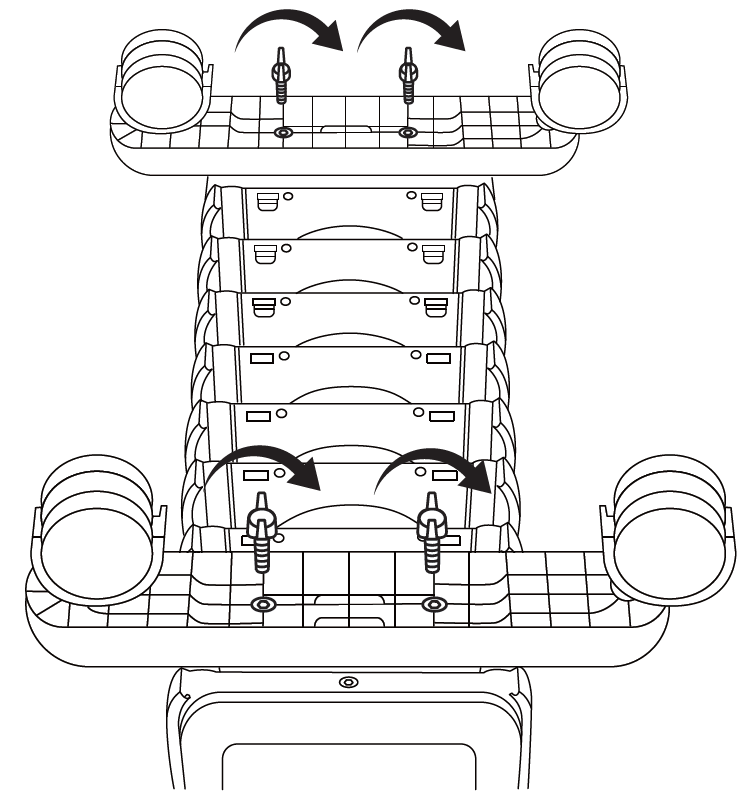
Place the heater upside down and align the casters with the holes on the base.
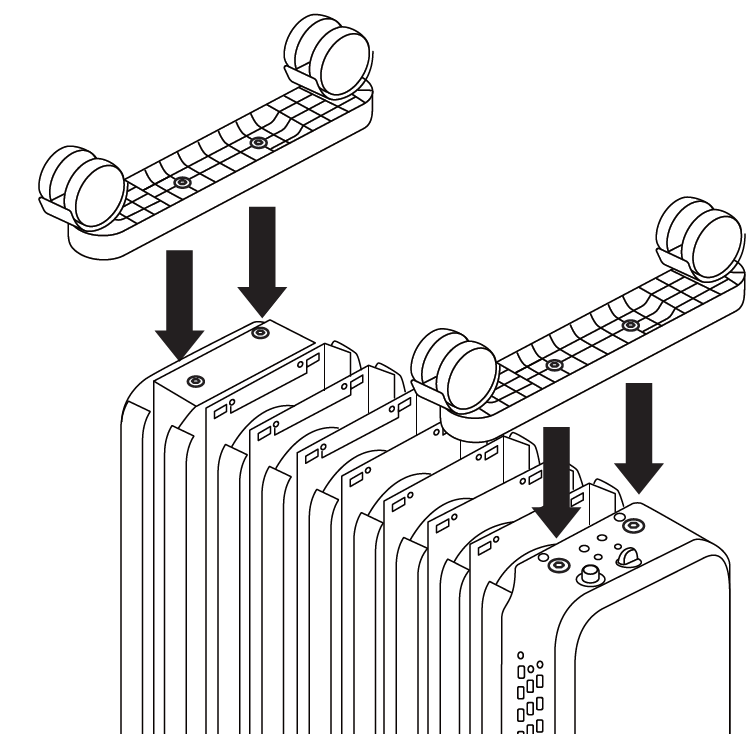
Screw through the holes in the casters; make sure the base and the casters are firmly fixed.
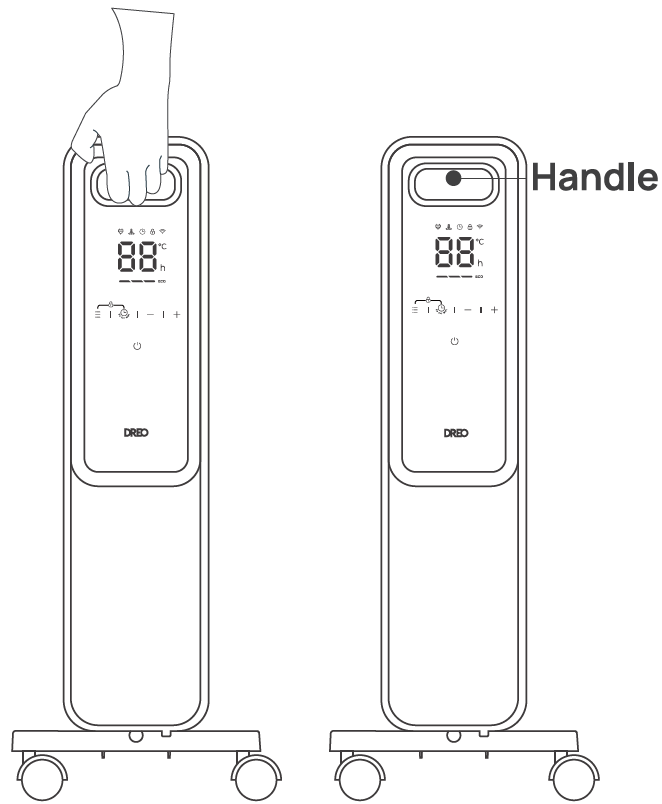
Set the heater upright. Use the front handle to move to the desired location.
Knowing Your Appliance
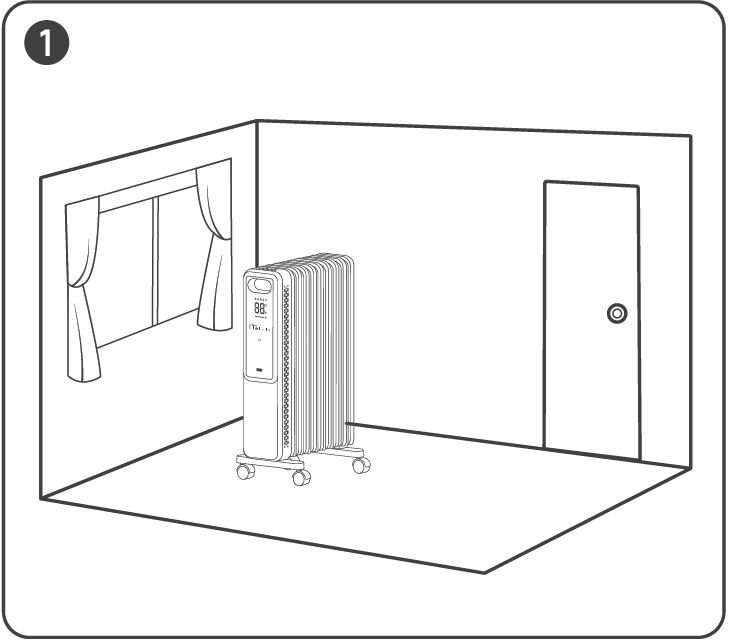
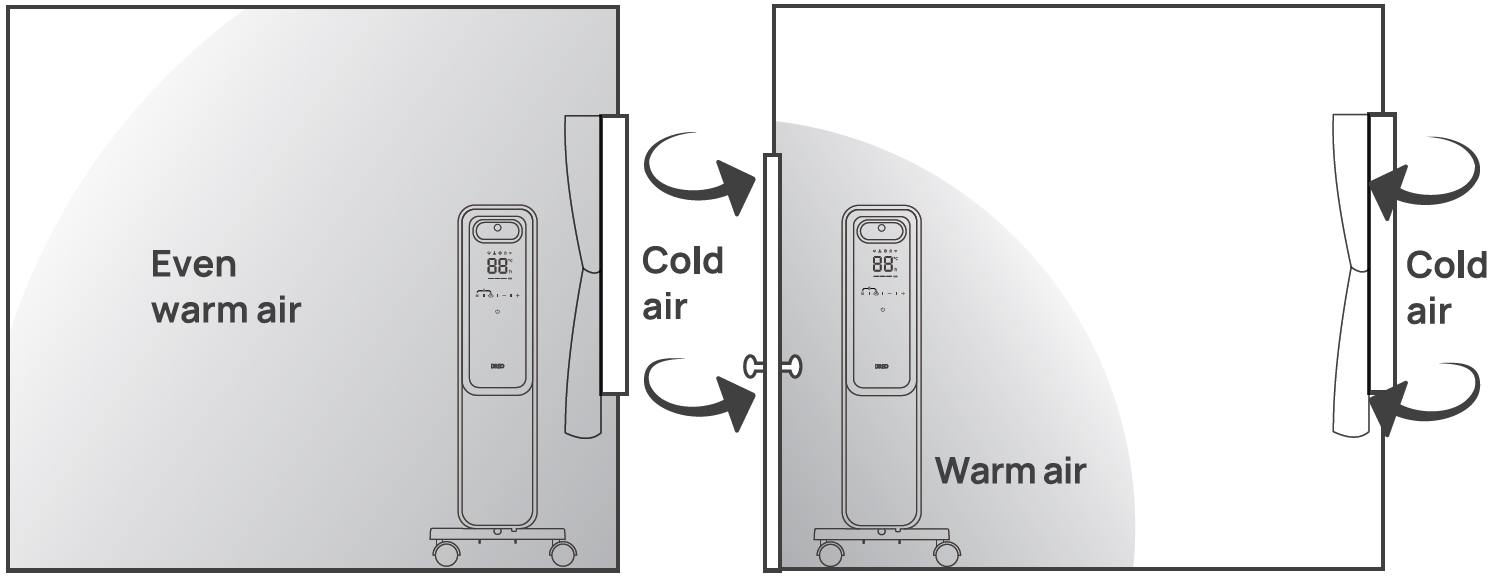
Put the heater by the window to block the penetration of cold air from outside.
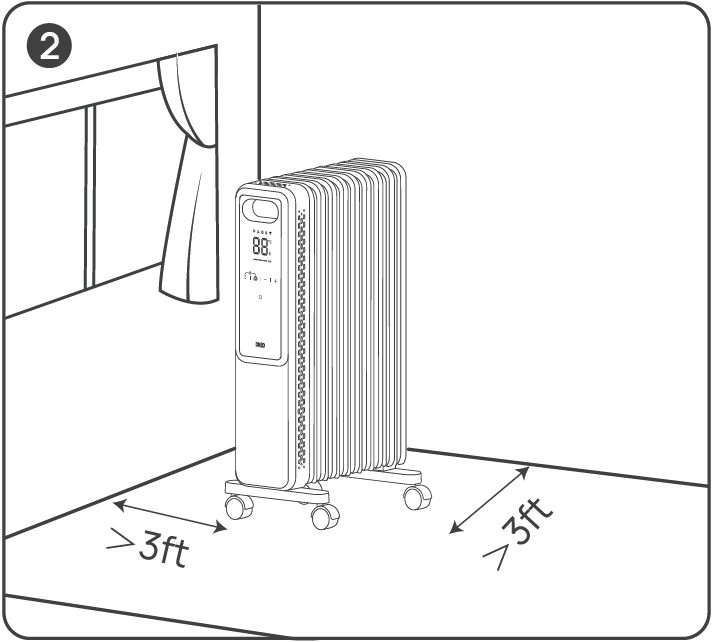
Keep curtains and other furniture at least 3 ft/ 1m away from the heater.
- What to Do: Put it by the window to get even warm air.
What Not to Do: If you put it near the door, cold air invades, and warm air escapes easily.
Using Your Appliance
The first time the appliance is used, run it at the maximum power for at least two hours. During this time, ventilate the room thoroughly to eliminate the "new" smell released by the appliance. It is completely normal for the appliance to emit creaking sounds the first time it is run.
 Power On/Off
- Touch to turn the heater on or off.
- Note: When the heater is plugged into the electric outlet, the power indicator
 will light in red.
 Mode Settings
- Touch to cycle through ECO and Power Heat modes.
- Power Heat: Three heating levels:
- H1(800W)
- H2(1200W)
- H3(2000W)
- The display will show H1, H2 or H3 accordingly:
- H1 - Low heat mode
- H2 - Medium heat mode
- H3 - High heat mode
- ECO: The heater will automatically select its optimal heating power, depending on the difference between the set temperature (5-35°C) and ambient temperature.
- Note: When the ambient temperature drops below the set temperature, the heater will adjust the power depending on the difference between the two temperatures.
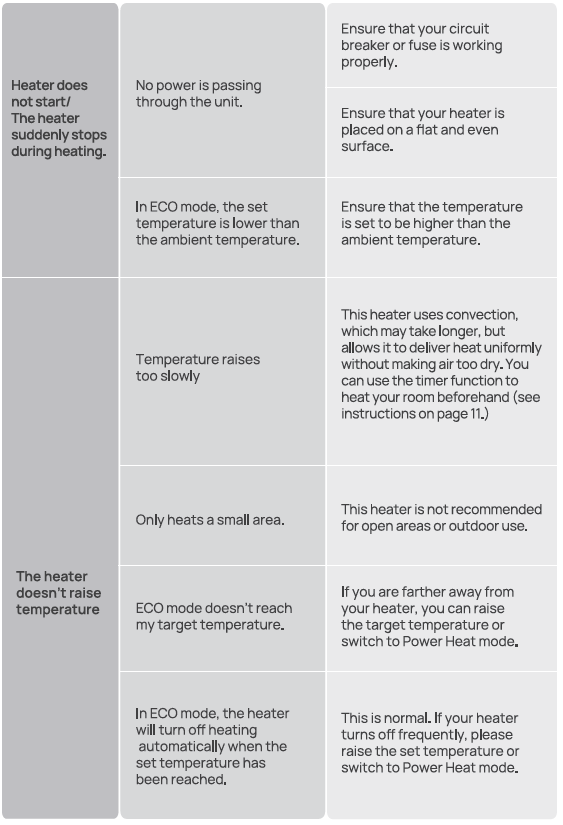
- In ECO mode, the heater will turn off automatically when the set temperature has been reached. If your heater turns off frequently, please raise the set temperature or switch to Power Heat mode.
 Mute/Unmute: To turn on/off the button sounds, long-press the Mode button on the panel for 3s.
 Timer
- When the heater is on, touch to set a timer (0-24h). After the timer ends, the heater will turn off automatically.
- When the heater is off, touch to set a timer (0-24h). After the timer ends, the heater will turn on automatically.
- To cancel, press the timer button again or set the timer to “----" hours.
- Long-press press 5 seconds to start network settings and device pairing.
Heat Level/ Temperature / Timer Hour
- In Power Heat mode, touch + or - to adjust the heating level.
- In ECO mode, touch + or - to adjust the set temperature.
- In Timer mode, touch + or - to set the timer between (0-24h).
- Long press the + or - for 5s to restore factory settings.
 Child Lock
- Long press the
 and
 for 3s to activate/deactivate the Child Lock function, when activated, the display will light up, and all the buttons on the heater will be locked.
- Note: Child Lock is not available in the remote control.
LED Display
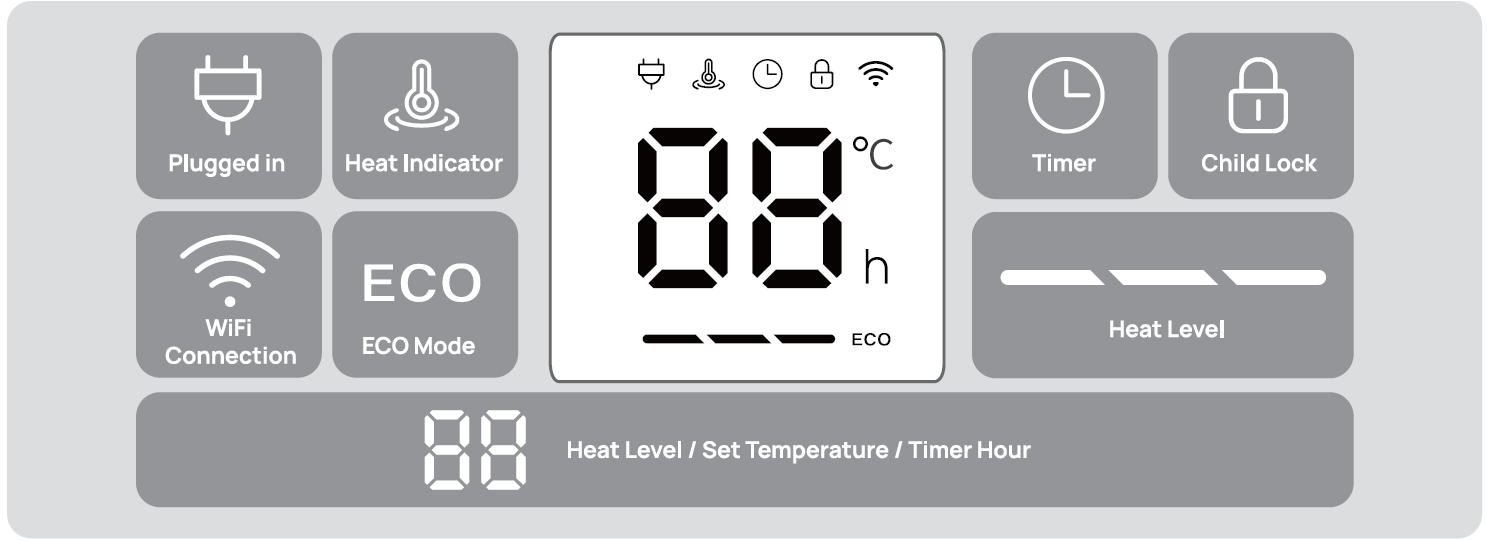
Note: During heating, the display will light up the Heat Indicator
More Features
- Memory Function: The heater will remember its last settings (temperatures, working modes) once turned on again.
- Defrost Mode: To prevent freezing conditions, you can set up your target temperature above 5°C in ECO mode; this will allow the heater to heat up in high heat mode whenever temperatures fall below the target.
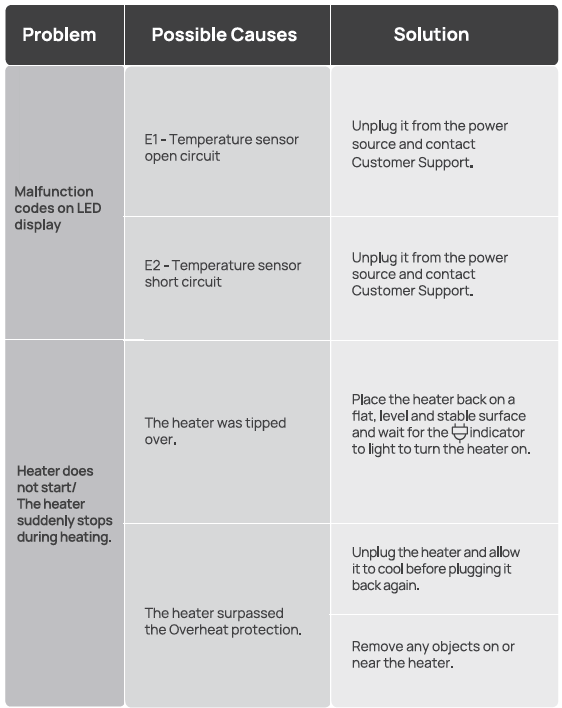
- Tip-Over Protection: For your safety, when the heater is tipped over, it will shut off automatically. To restore it, place it back up and wait for the indicator to light on to turn the heater on.
- Overheat Protection: When the heater overheats, it will stop heating automatically.
Remote Control
Battery Replacement
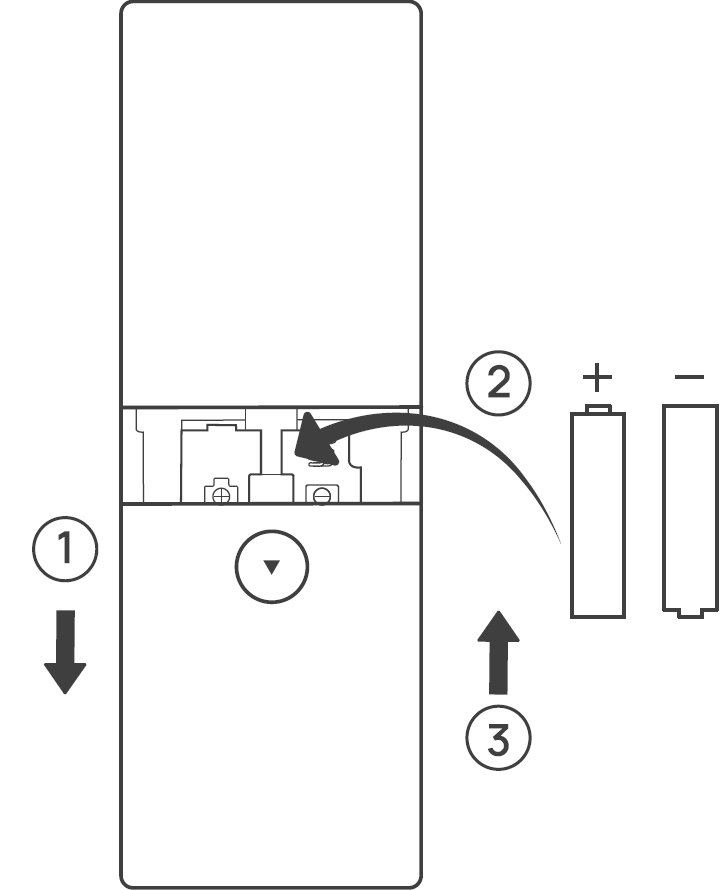
- Remove the battery cover in the direction indicated by the arrow.
- Replace with two new AAA 1.5V batteries. Make sure that the positive (+) and negative (-) terminals are positioned correctly.
- Push the battery cover back into place.
Cleaning and Maintenance
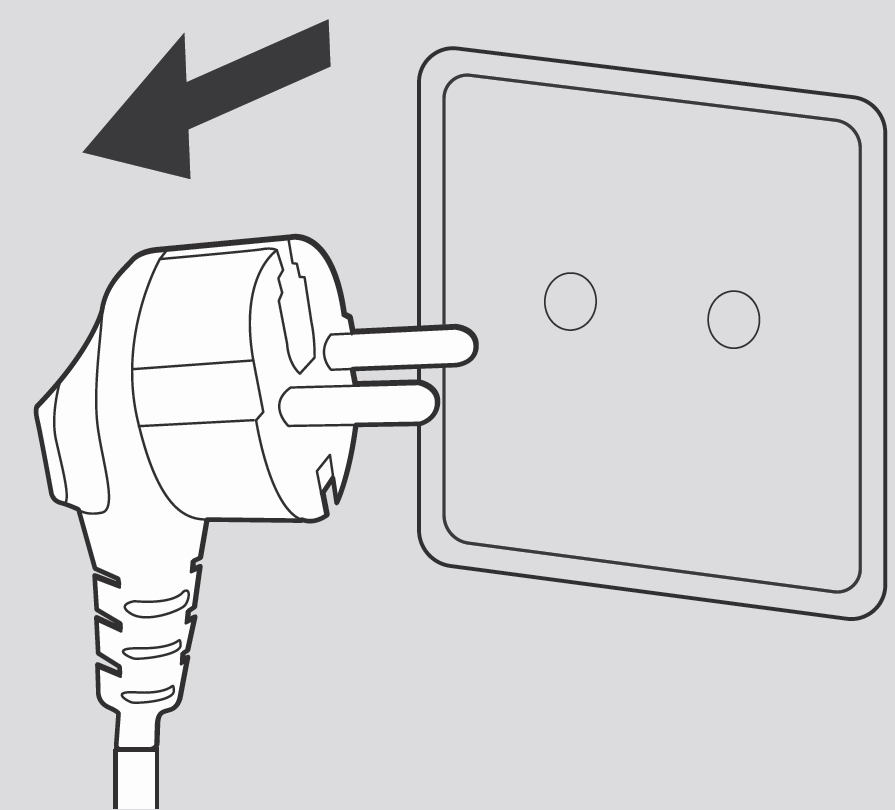
Always turn off and unplug before cleaning.
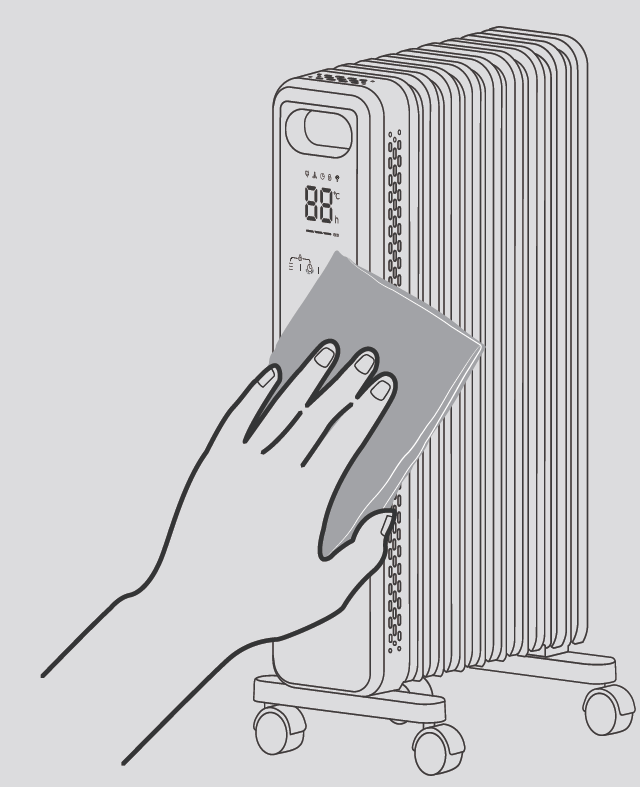
Outer Surface: Use a soft, dry cloth to gently wipe clean the outer surface.
Troubleshooting
Pros and Cons of the dreo Smart Oil-filled Heater OH310
Pros
- Exceptional 360° heat distribution and 92.3% efficiency for quick, even room warming without cold spots, ideal for large areas.
- Energy-efficient ECO mode optimizes power (600-1500W), reducing bills; retains heat longer than fan heaters.
- Silent operation and user-friendly design (touchscreen, remote, wheels) make it perfect for bedrooms or offices.
- Robust safety features (overheat/tilt protection, ETL listed) ensure family-friendly use.
- Great value at $80-$120; outperforms pricier competitors in heat retention and smart controls
Cons
- Slower initial warm-up (3+ hours for full effect) compared to ceramic heaters, though superior long-term retention.
- Larger footprint (26 inches tall) may not suit very small spaces.
- No app connectivity, relying on remote/timer—less "smart home" integrated than Wi-Fi models.
- Some users note wheels could be sturdier for heavy use on carpets.
Overall, the pros dominate for whole-room, efficient heating, offering strong value over alternatives like basic De'Longhi radiators.
Customer Reviews and Feedback on dreo Smart Oil-filled Heater OH310
The dreo Smart Oil-filled Heater OH310 earns high praise, averaging 4.7/5 stars across reviews for its quiet efficiency and reliability.[1][7] Customers love the "rapid, even warmth" from 360° fins and ECO mode savings: "Heated my 200 sq ft living room silently—bills dropped noticeably!" (TechWalls tester).[1][7] Safety features and easy controls get frequent shoutouts: "Child lock and remote are game-changers for families."[1]
Common praises include durable build and timer convenience for pre-heating. Complaints are minor: initial warmup time ("Takes 30-60 mins to feel," per YouTube reviews) and occasional remote battery issues.[7] Most recommend it over fan heaters for "steady, no-dry-air comfort," especially at its price point.[1][2]
Faqs
How do I set up the dreo Smart Oil-filled Heater OH310 for the first time?
Why is my dreo Smart Oil-filled Heater OH310 not turning on and how to fix it?
How does ECO mode work on the dreo Smart Oil-filled Heater OH310?
What should I do if the dreo Smart Oil-filled Heater OH310 heats up slowly?
Why does my dreo Smart Oil-filled Heater OH310 shut off randomly?
How do I clean and maintain the dreo Smart Oil-filled Heater OH310?
How do I use the timer on dreo Smart Oil-filled Heater OH310 for scheduling?
Is the dreo Smart Oil-filled Heater OH310 compatible with smart home devices or specific rooms?
Tags
More dreo manuals
- Setup: Dreo Smart Wall Mounted Heater WH517S User Manual
- Setup: Dreo DR-HSH010 Oil Filled Heater User Manual
- Setup: Dreo Smart Wall Mounted Heater DR-HSH009S User Manual
- Setup: Dreo Smart Oil-filled Heater DR-HSH011 User Manual
- Setup: Dreo Ceramic Heater Atom 424 Owner Manual
- Setup: Dreo PTC Fan Heater Atom 320 User Manual
Leave a Comment