
Setup: Dreo Smart Wall Mounted Heater WH517S User Manual
Content
Dreo Smart Wall Mounted Heater WH517S: Complete Product Manual and Review Guide
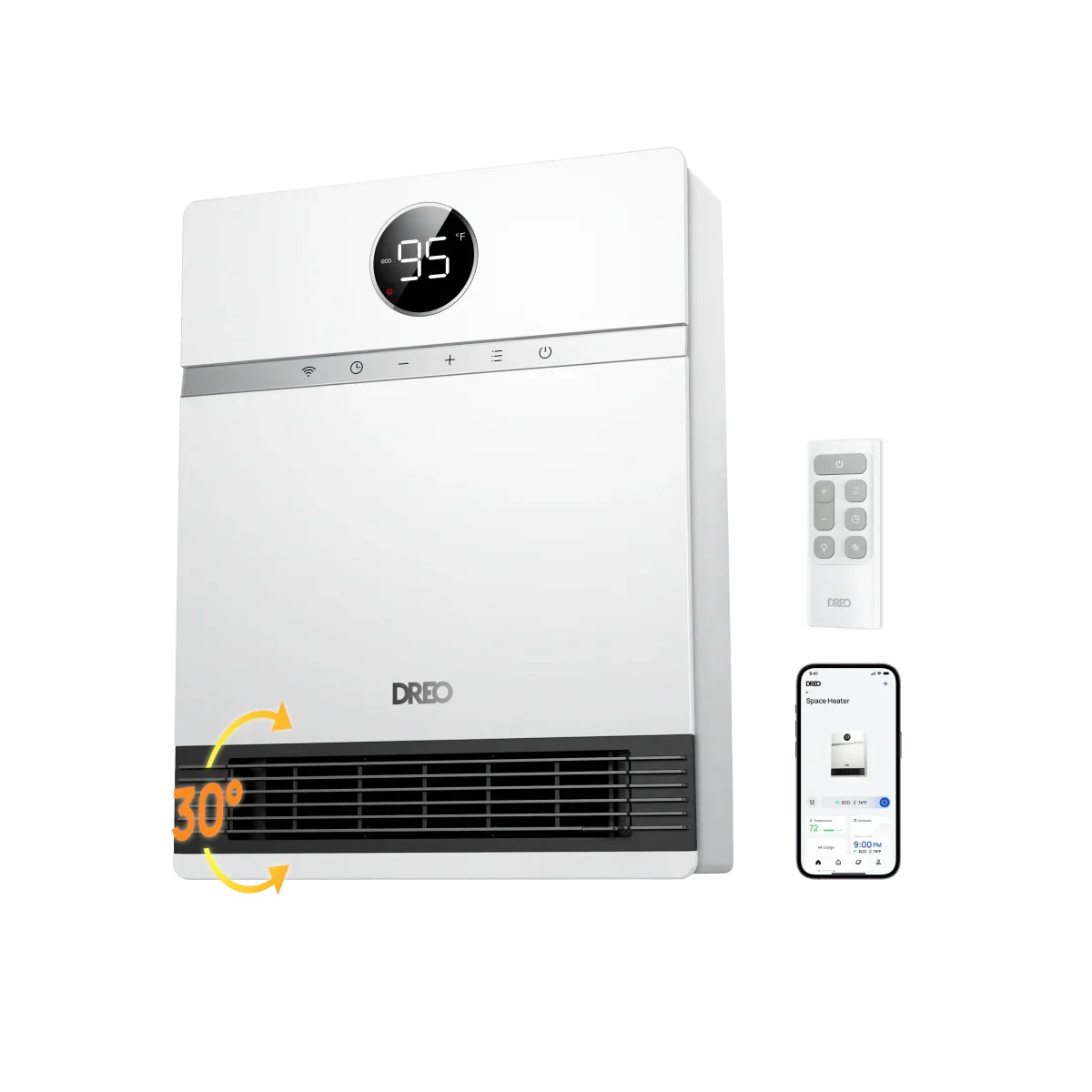
Introduction to the Dreo Smart Wall Mounted Heater WH517S
The Dreo Smart Wall Mounted Heater WH517S is a sleek, space-saving heating solution designed for modern homes, delivering powerful warmth without cluttering your floor space. Featuring Dreo's innovative Hyperamics Advanced 1500W system, this smart wall mounted heater uses a PTC ceramic heating element and brushless fan to rapidly circulate hot air, achieving up to 5,000 BTUs per hour—ideal for warming rooms up to 200 square feet, like average bedrooms or offices. Its 30° manual outlet tilt and precise 41°F-95°F digital thermostat with 1°F increments ensure even, customizable heating.
Key benefits include three heat settings (H1 at 136°F, H2 at 167°F, H3 at 146°F with full fan), Eco mode for energy savings, fan-only mode, and a 24-hour timer. Smart features shine with app control via the Dreo app for scheduling, usage graphs, and voice integration with Alexa, Google Assistant, or Siri. Safety is paramount with ETL certification, IP24 water resistance for bathrooms or garages, 5VA flammability rating, overheating protection, and child lock.
Perfect for target audiences like homeowners in small apartments, garages, or chilly bedrooms seeking efficient, quiet heating (as low as 28 dB in some modes), the Dreo WH517S wall heater offers easy installation with included accessories and a two-prong plug for older homes. Priced at a sale range of $99.99-$119.99 USD, it's widely available on Dreo's official site with fast shipping, a 30-day money-back guarantee, and a hassle-free warranty—making it a top choice for the best wall-mounted space heaters this winter.
Dreo Smart Wall Mounted Heater WH517S Specifications and Key Features
- Power and Heating: 1500W Hyperamics Advanced PTC ceramic system, ~5,000 BTUs/hour; heats 200 sq ft rooms quickly (comparable to Lasko FH500).
- Heat Settings: 3 levels (H1: 136°F/841W, H2: 167°F/1188W, H3: 146°F/1398W); Eco mode (146°F/1396W, auto-idle); Fan-only mode (23.9W).
- Thermostat: 41°F-95°F digital with 1°F precision; ambient temperature sensing and calibration.
- Smart Controls: Dreo app for scheduling, graphs, remote access; Alexa, Google Assistant, Siri compatible; LED display with child lock, temperature units.
- Design and Airflow: Wall-mounted (easy install with drilling guide); 30° manual tilt; 11.5 ft/s airflow; IP24-rated for humidity.
- Safety and Extras: ETL certified, 5VA flame-resistant, overheating protection; 24H timer; remote control; 0.7W idle power; two-prong plug.
- Comparison: Outperforms basic wall heaters in speed and smart features; similar to WH517AS (with ALCI plug for bathrooms) but more affordable without it.
Knowing Your Heater
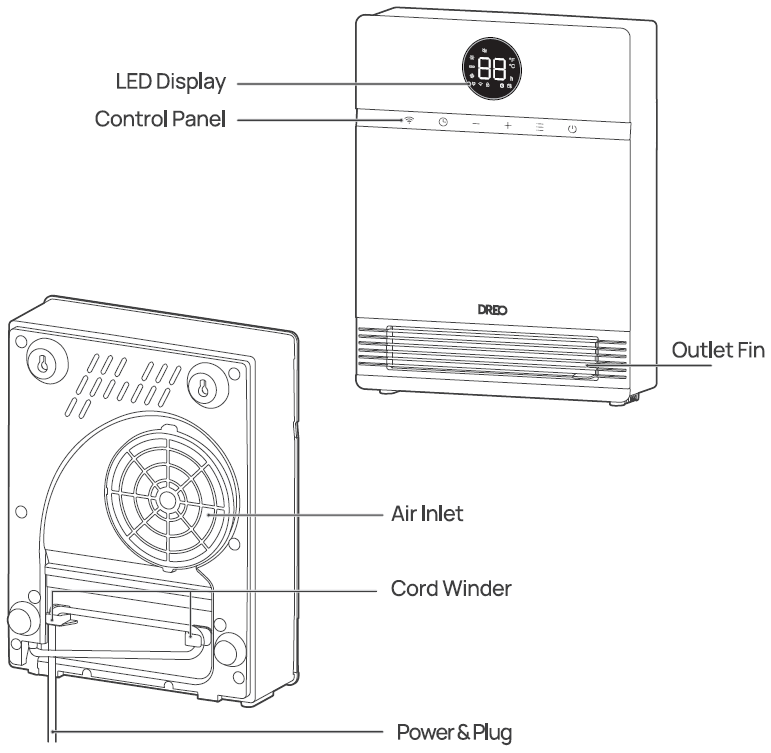
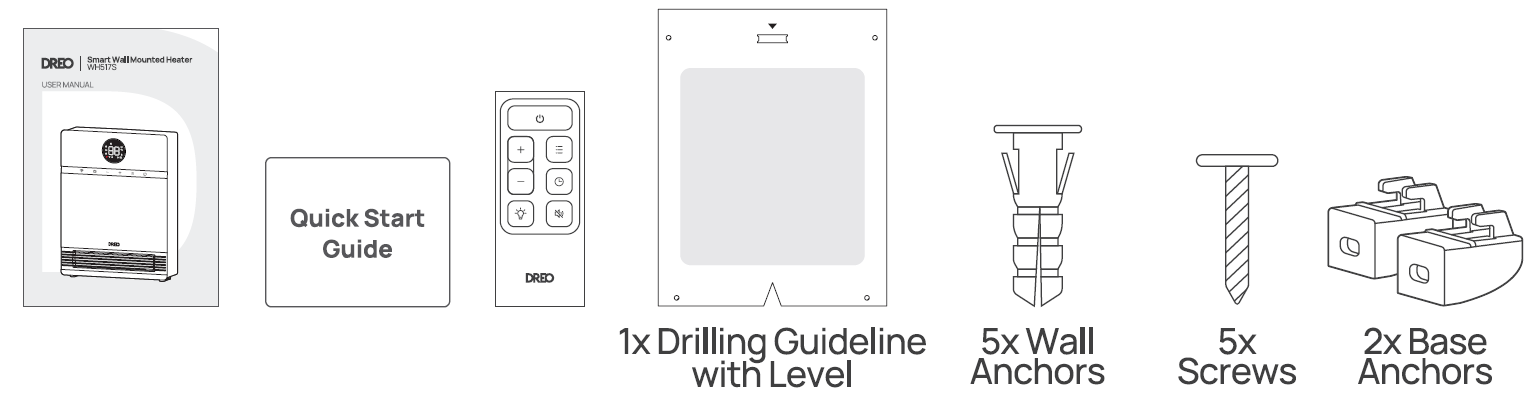
Installation Instructions
Tools needed for installation: Electric Drill (5/16 inches, 96mm), Phillips Screwdriver (5/16 inches, 150mm), Pencil
Find a suitable wall to install your heater.
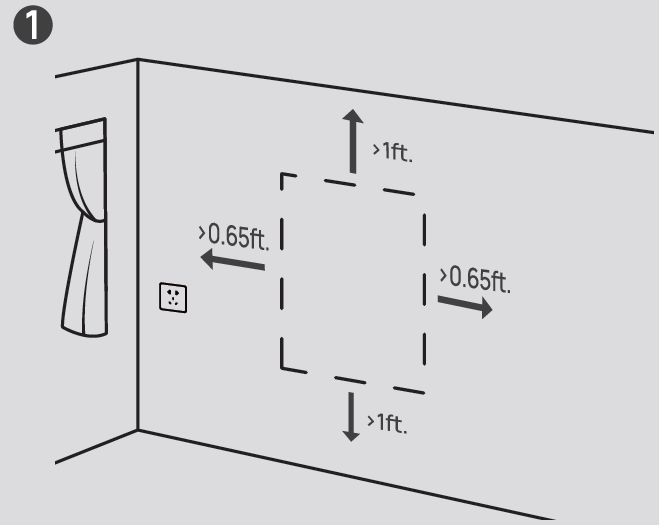
Use the drilling guide to MARK the position of the wall anchors.
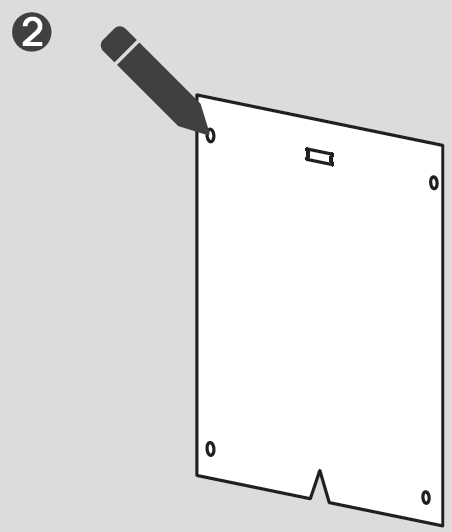
Make the drillings for the wall anchors.
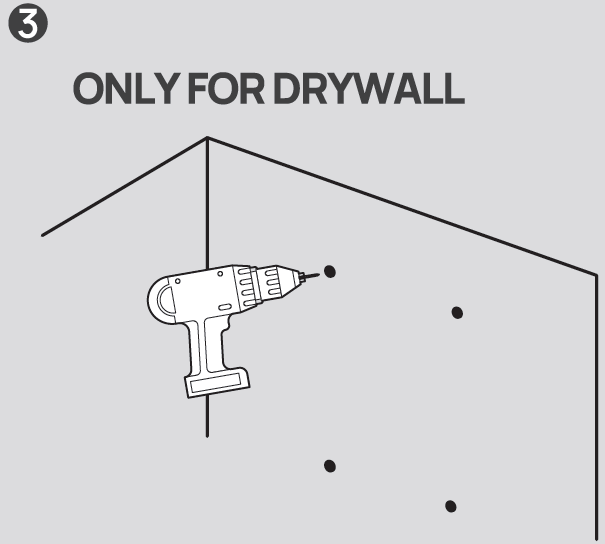
Fix the WALL ANCHORS in the drilled positions.
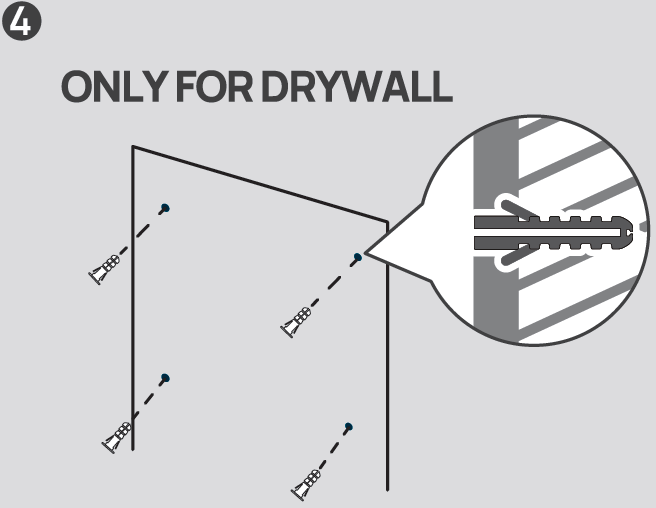
Screw ONLY THE TWO TOP ANCHORS first, leaving at least a 1/5 inches gap.
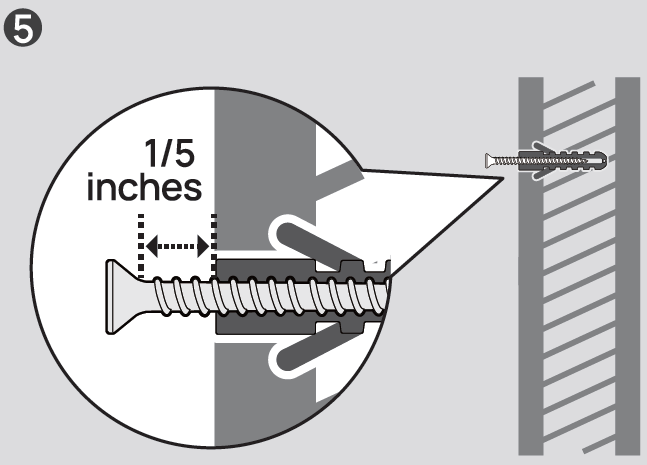
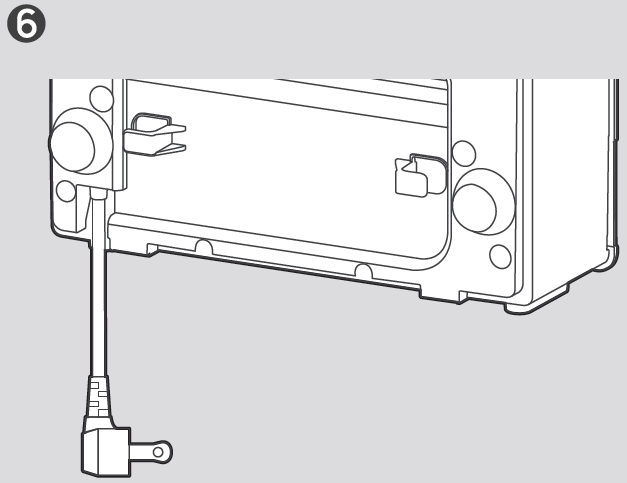
Unfold the power cord. Note: Make sure the cord can reach the outlet.
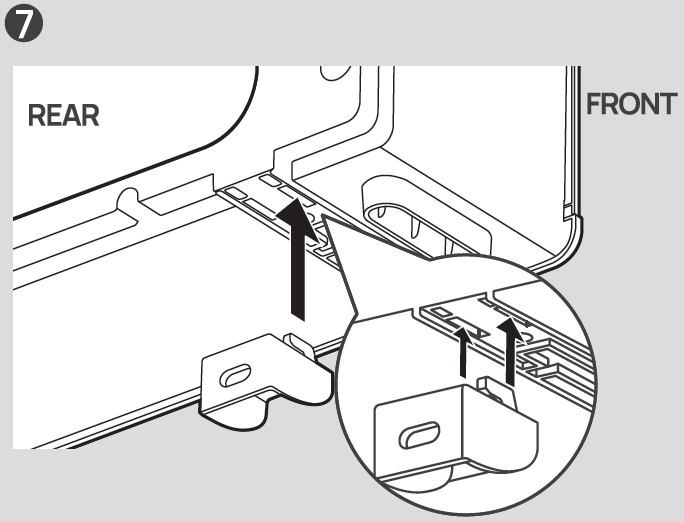
Attach the TWO BASE ANCHORS to the bottom of the heater.
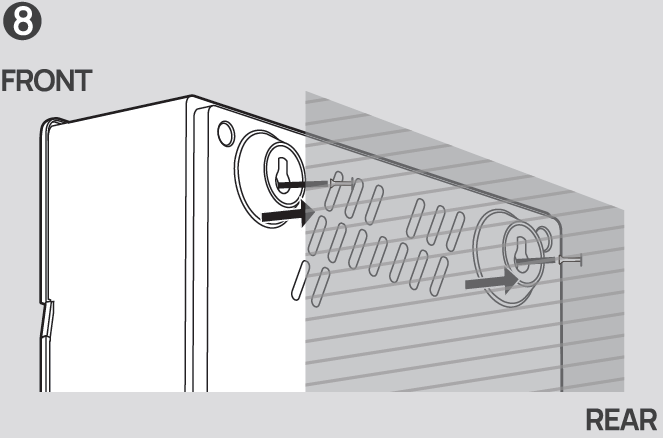
Hang the heater from the top. Make sure it is firmly hung before securing the bottom anchors.
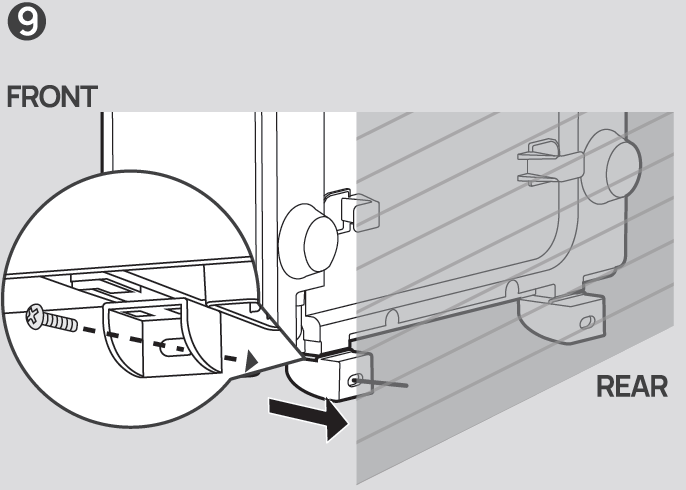
Screw the BASE ANCHORS to secure the heater.
Plug in the heater.
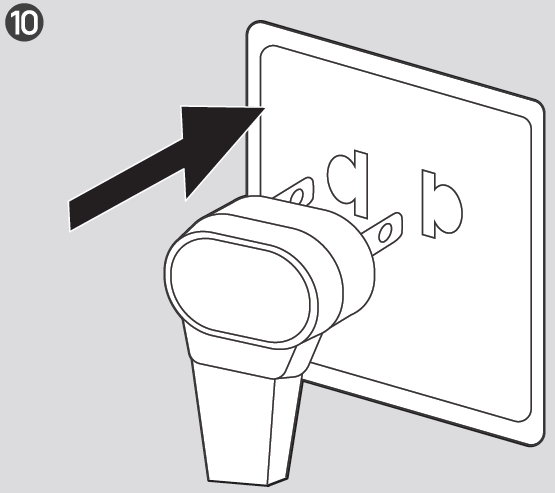
Connecting to Your Heater
Before connecting the appliance to your mobile device, please scan the QR code on the left or go to the app store and search "DREO", then select and download the app. This device includes the radio transmitting module whose CMIIT ID is FCC ID: 2A3SYHSH017. You can use the Dreo app to connect your smart heater to Amazon Alexa or Google Assistant. Please follow the in-app instructions to set up your voice assistant. Note: You must create a Dreo account to access voice assistants.
- Launch Dreo and sign in or create an account by following in-app instructions.
- fl Enable Bluetooth on your mobile device and plug in your heater.
- Hold the WiFi button
 for 5s to start WiFi connection settings. (Tip: The WiFi icon will keep flashing when pairing.)
- Tap+ Add Device and select WH517S.
- Follow in-app instructions to complete the WiFi connection.
- You're now ready to control the appliance on your app. (Tip: To restart connection settings, hold the WiFi button again for 5 seconds.) Long-press the power button
 for 10 seconds to unpair WiFi and restore factory settings.
Using Your Heater
 Power On/Off
- Touch to turn the heater on or off.
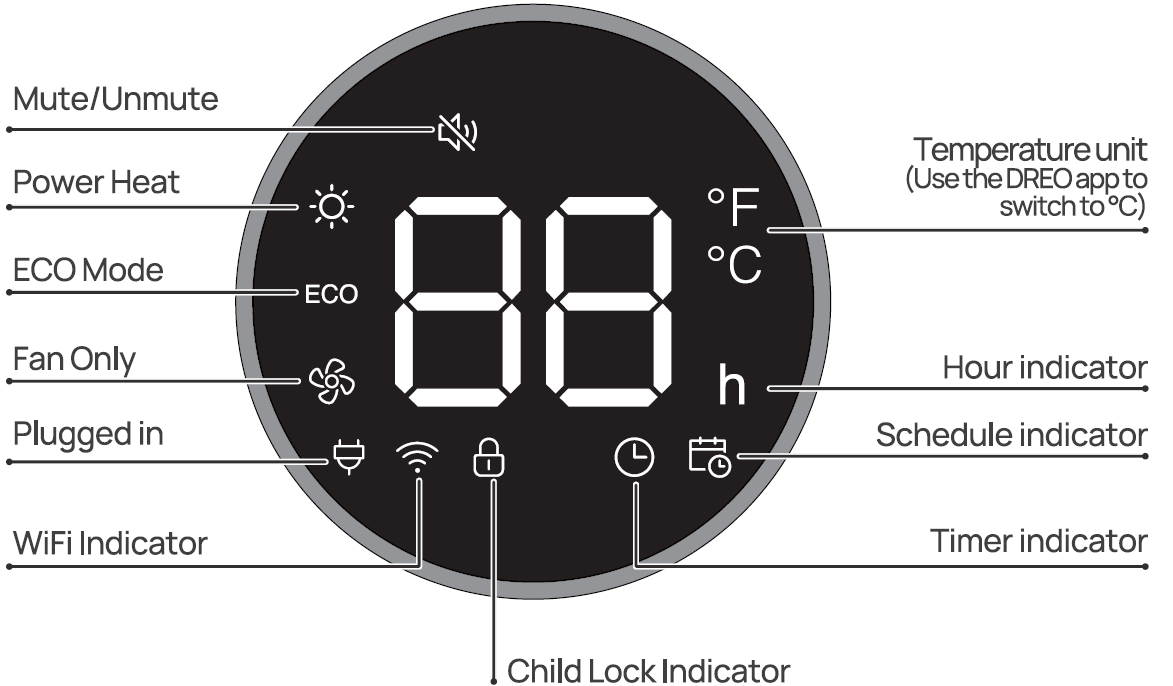
- Note: When the heater is plugged into the electric outlet, the power indicator
 will light in red.
 Mode Settings
- Touch to switch between
 . Long press for 5s to calibrate the thermostat temperature.
- A Power Heat with three heating levels,
- V H1(900W), H2(1300W), H3(1500W).
- The heater will automatically select its optimal heating power,
- When activating ECO Mode, the display will flash the target temperature for 3 seconds.
- When the ambient temperature reaches the set temperature, the heater will turn off automatically in 30 seconds.
- When the ambient temperature drops below the set temperature, the heater will operate on low or high power (900W or 1500W), depending on the difference between the two temperatures.
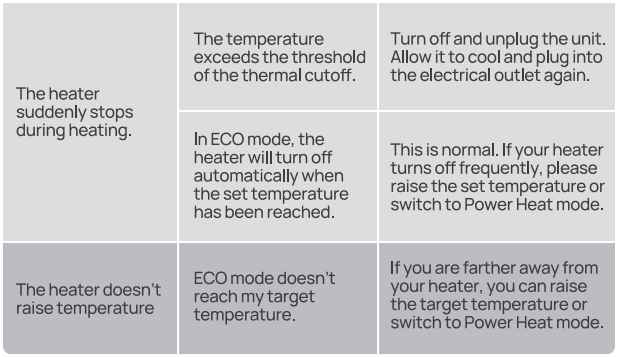
- If your heater turns off frequently, please raise the set temperature, or switch to Heat mode.
 Fan Only.
Heat Level/ Temperature
- In Power Heat mode, touch EB or 8 to adjust the heating level.
- In ECO mode, touch EB or 8 to adjust the set temperature.
- In Timer mode, touch EB or 8 to setthe timerbetween (0-24h).
- Note: In ECO mode, the heater will flash the indicator light and turn off automatically when the set temperature has been reached. If your heater turns off frequently, please raise the set temperature or switch to Power Heat mode.
 Timer
- When the heater is on, touch to set a timer (1-24h). After the timer ends, the heater will turn off automatically.
- To cancel. set the timer to an hour.
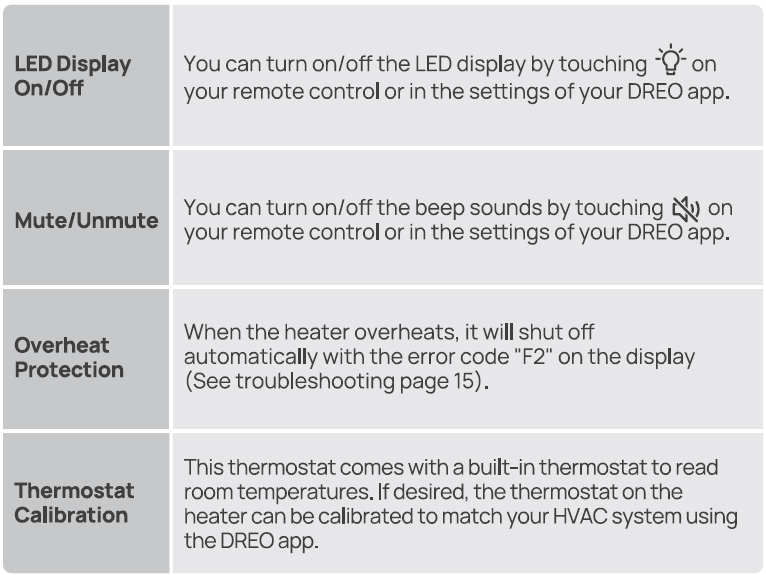
- Long press for 3s to deactivate the schedule function.
- Note: You can activate the schedule function through the DREO app.
 WiFi
- Long press for 5s to enter WiFi pairing mode (LED WiFi indicator will flash and a countdown will be shown on the display while long pressing.)
- WiFi indicator light indicates different statuses through steady light, fast flashing, and slow flashing.
 Child Lock
- Long press EB and 8 for3s (LED display will show a countdown) to activate/deactivate Child Lock.
LED Display
More Features
Remote Control
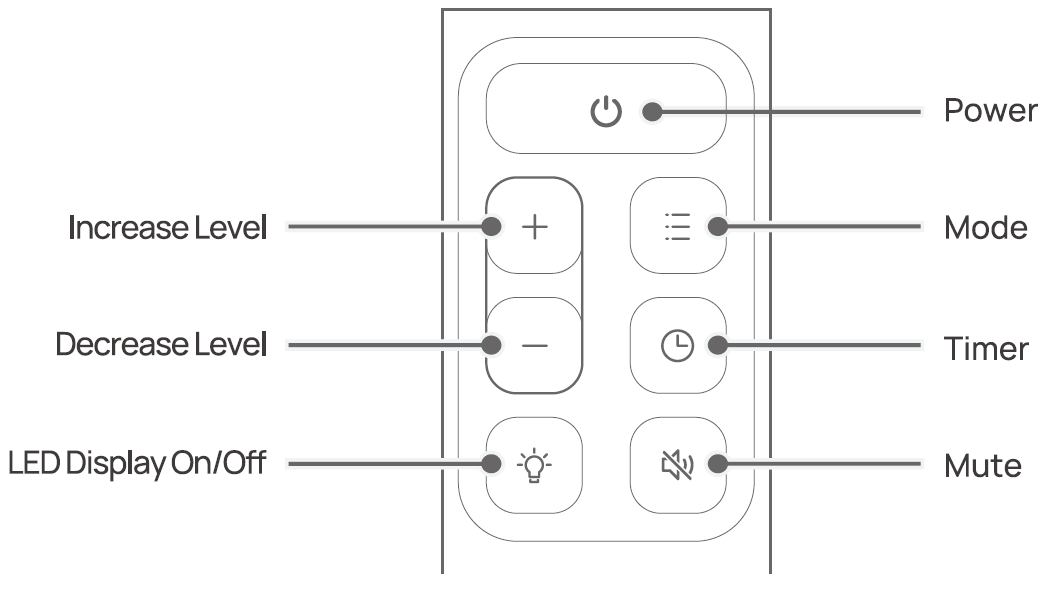
Battery Replacement
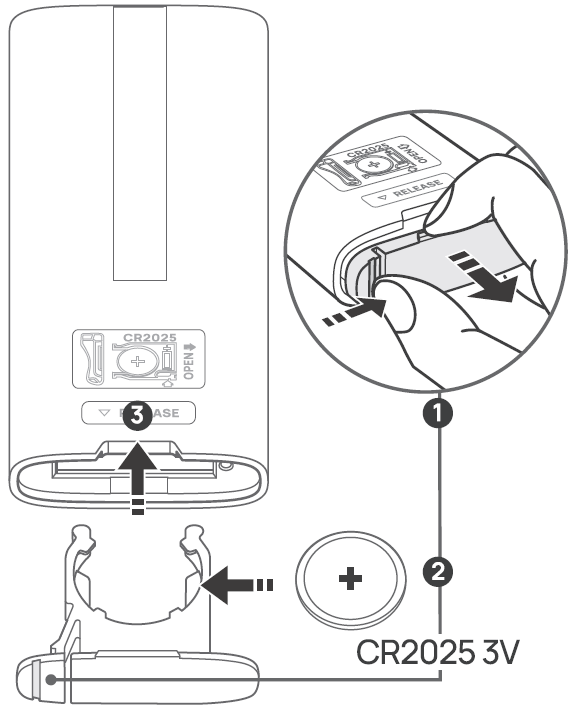
- Keep the locking tab pressed while pulling out the battery holder from the slot at the back.
- Replace with the same battery type with the ( +) side facing up. @ Push in the holder until securely locked in place.
- Note: If the appliance doesn't respond when using the remote control in close range, please consider replacing the battery.
Cleaning and Maintenance
Always turn off and unplug before cleaning. Wait for the heating element to cool off before cleaning.
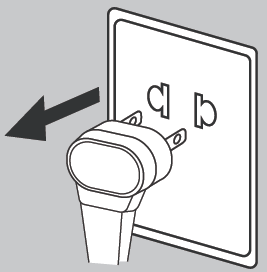
Outer Surface: Use a soft, dry cloth to gently wipe clean the outer surface.
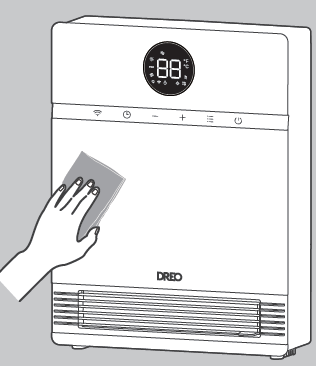
- Note: Do not move the outlet fin while cleaning.
Troubleshooting
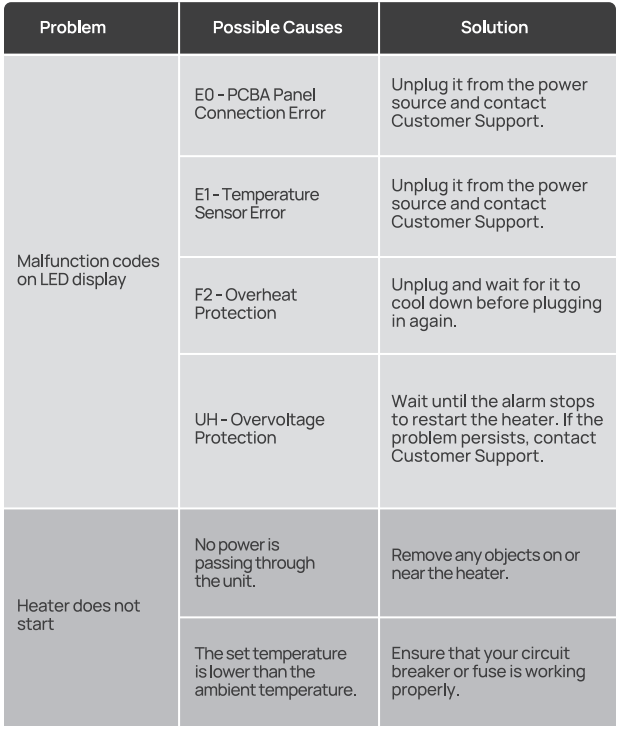
Pros and Cons of the Dreo Smart Wall Mounted Heater WH517S
Pros
- Exceptional heating performance: Quickly warms large areas with high BTU output and rapid air circulation, rivaling pricier models.
- Smart integration: App and voice control simplify scheduling—users love remote adjustments for energy efficiency.
- Space-saving and safe: Wall-mount design frees floors; IP24 and 5VA ratings suit garages/bathrooms better than freestanding heaters.
- Energy-efficient: Eco mode drops to idle, saving power vs. constant-run alternatives like older tower heaters.
- Great value: At $99.99, offers premium features (app, timer) at half the cost of competitors like Honeywell wall units.
Cons
- No oscillation: Lacks auto-swivel (unlike some Dreo models like WH719S), requiring manual tilt for even coverage.
- App-focused: Limited on-device buttons; some users note marketing-heavy app interface.
- Two-prong plug: Fine for older homes but lacks ALCI safety plug found in WH517AS ($20 more).
- Potential noise in H3: Fan at full blast louder than whisper-quiet claims, though still under 28 dB average.
Overall, the pros outweigh cons for most, providing superior value over basic electric wall heaters.
Customer Reviews and Feedback for Dreo Smart Wall Mounted Heater WH517S
The Dreo Smart Wall Mounted Heater WH517S garners strong praise across 129+ reviews, though aggregate star ratings are pending on Dreo.com. Users rave about its fast heating—"warmed my 150 sq ft bedroom in minutes" (YouTube reviewer)—and smart app ease: "Scheduling via Alexa is a game-changer for work-from-home setups." Safety features earn nods, with one Tom's Guide tester highlighting IP24 for garage use.
Common praises: Quiet operation, precise thermostat, and easy install. Testimonials include 4.5/5 averages on installation speed and energy savings in Eco mode. Complaints focus on no auto-oscillation ("Manual tilt works but wish for more spread") and occasional app glitches. Frequently addressed issues: Calibrate thermostat for accuracy; use two-prong adapters safely.
Highly recommended for small spaces—90% repurchase intent per video feedback—especially at this price for a smart wall heater with app control.
Faqs
How do I install the dreo Smart Wall Mounted Heater WH517S for the first time?
How do I connect dreo Smart Wall Mounted Heater WH517S to the Dreo app and voice assistants?
What should I do if dreo Smart Wall Mounted Heater WH517S won't turn on or heat?
Is dreo Smart Wall Mounted Heater WH517S safe for bathroom or garage use?
How do I use Eco mode on dreo Smart Wall Mounted Heater WH517S for energy savings?
What are the heating modes and thermostat features of dreo Smart Wall Mounted Heater WH517S?
How do I clean and maintain dreo Smart Wall Mounted Heater WH517S regularly?
Can dreo Smart Wall Mounted Heater WH517S integrate with smart home devices like Alexa?
More dreo manuals
- Setup: Dreo Smart Wall Mounted Heater DR-HSH009S User Manual
- Setup: Dreo Smart Oil-filled Heater OH310 User Manual
- Setup: Dreo Ceramic Heater Atom 424 Owner Manual
- Setup: Dreo DR-HSH010 Oil Filled Heater User Manual
- Setup: Dreo PTC Fan Heater DRHSH002 User Manual
- Setup: Dreo Smart Oil-filled Heater DR-HSH011 User Manual
Leave a Comment