
How to Use: Eaton 3S Uninterruptible Power Supply User Manual
Content
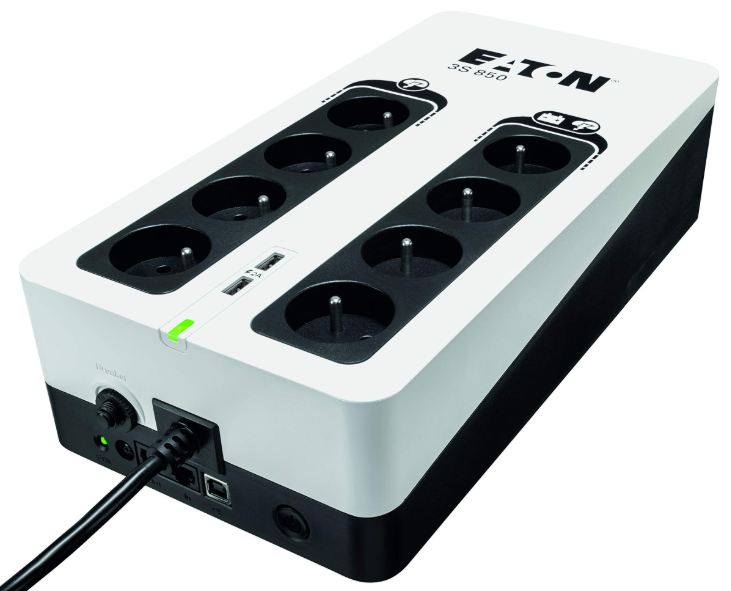
Eaton 3S Uninterruptible Power Supply
Introduction
Thank you for selecting an Eaton product to protect your equipment.
The Eaton 3S range has been designed with the utmost care. We recommend that you take the time to read this advanced user guide and the documentation provided to take full advantage of the many features of your UPS (Uninterruptible Power System).
Before installing your Eaton 3S, please read the information and safety instructions provided. Follow the instructions in the quick start guide and, if necessary, refer to this advanced user guide.
To discover the entire range of Eaton products, we invite you to visit our website at eaton.com or contact your Eaton representative.
The Eaton 3S Uninterruptible Power System (UPS) is designed for computers and their peripherals, NAS, televisions, internet gateways, etc... It must not be used to supply other electrical equipment (lighting, heating, household appliances, etc.). It prevents your critical equipment from power problems such as power failures and power surges.
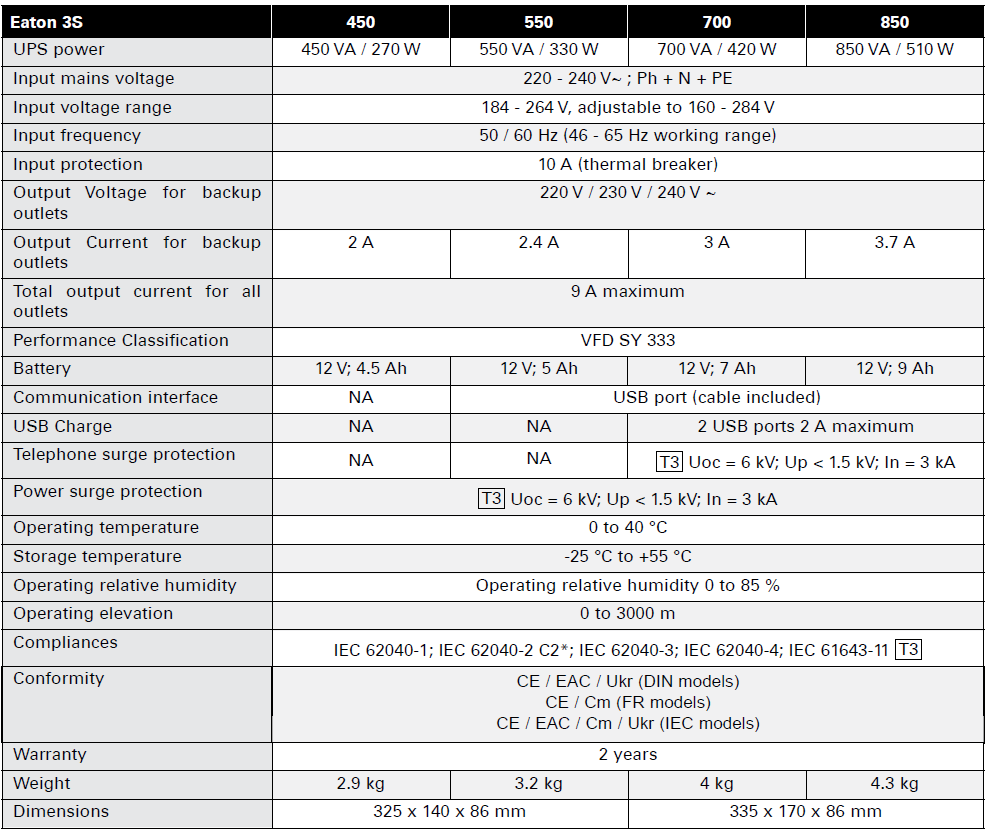
Specification and technical characteristics
Presentation
Features
- Protected outlets
- Backup & Protected outlets
- UPS status LED
- Protection circuit breaker
- Power supply cord/socket
- Surge protection LED
- Tel / xDSL surge protection (optional)
- USB COM port (optional)
- ON/OFF button
USB charging port (optional)
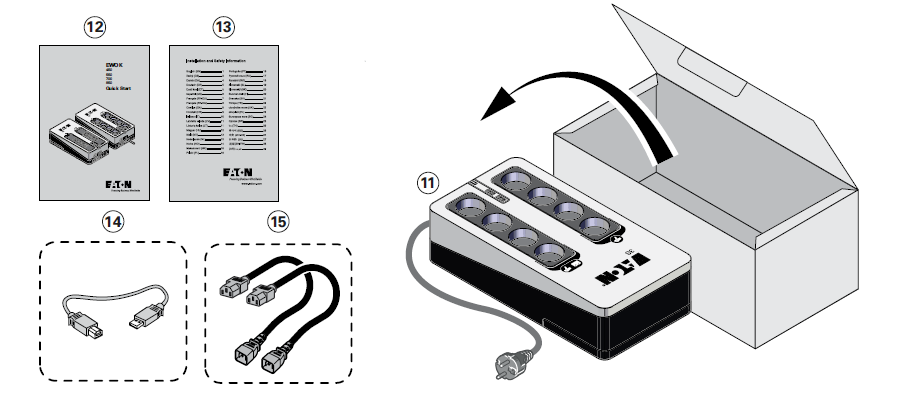
Package contents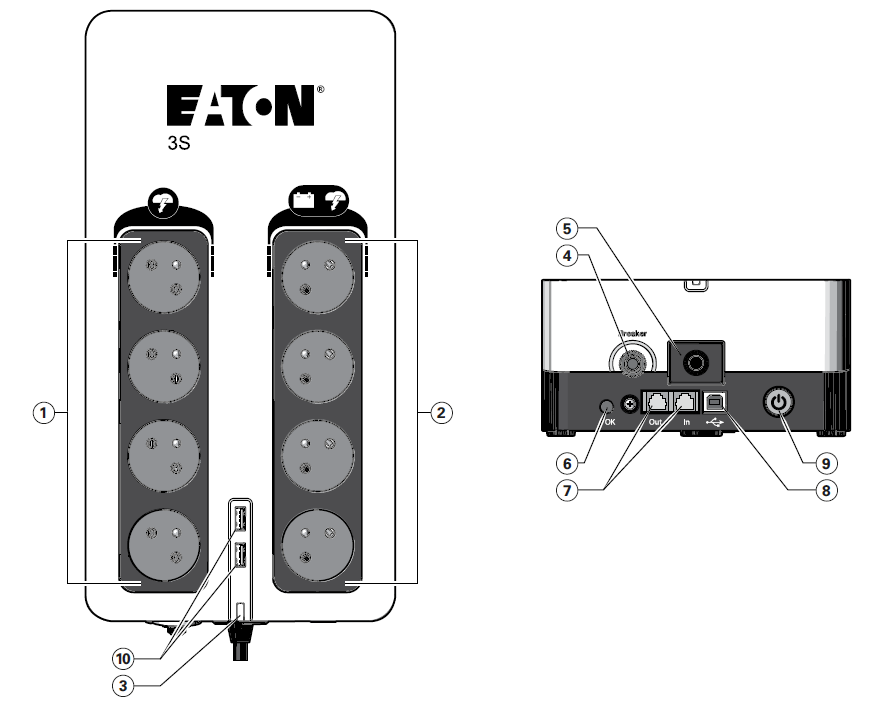
- Eaton 3S UPS
- Quick start
- Information and safety instruction
USB cable (for Eaton 3S with communication feature: 3S550, 3S700 and 3S850) 15 2 x Output cables (IEC models only)
Battery charge
The UPS charges the battery as soon as it is connected to the AC outlet, whether the ON/OFF button 9 is pressed or not. When used for the first time, the battery will only provide its maximum autonomy after it has been charged for 8 hours. It is recommended that the UPS be permanently connected to the AC power supply to ensure the best possible autonomy.
AC-power disturbance
- If AC power is disturbed or fails, the UPS continues to operate on battery power. UPS status LED 3 flashes green. In normal mode, the audio alarm beeps every five seconds, then every two seconds when the end of battery backup time is near.
- If the power outage lasts longer than the battery backup time, the UPS shuts down and automatically restarts when power is restored. Following a complete discharge, 10 hours are required to recharge the battery back to full backup time.
- To save battery power, it is possible to press the ON/OFF button 9 times to cut the supply of power to the devices connected to the battery backup outlets.
Protected outlets
- All protected outlets 1 provide surge protection, whatever the position of the ON/OFF button 9 . The Surge protection LED 6 provides the status of the protection. When the Surge Protection LED 6 is OFF, your protection is defective. Please contact after-sales services or the local representative.
Equipment Care
- For full battery life, keep the equipment at an ambient temperature of 25 °C (77 °F). Battery service life is reduced by 50 % for every ten degrees above 25 °C.
- If the UPS requires any type of transportation, verify that the UPS is turned off.
Battery replacement
For battery replacement, follow the Eaton instructions provided on www.eaton.eu/BatteryServices. The following precautions should be observed when working on batteries:
- shut down the UPS (ON/OFF button 9 ),
- disconnect the source before connecting or disconnecting battery terminals,
- do not wear any metal objects, including watches and rings,
- Do not lay tools or metal parts on top of batteries;
- It is imperative to use the same battery type and number.
CAUTION: Batteries present a risk of electrical shock or burn from high short circuit current. Observe proper precautions. Batteries may contain HIGH VOLTAGE and CORROSIVE, TOXIC , C, and EXPLOSIVE substances. Because of the battery,ry the output receptacles may carry high voltages even when the AC supply is not connected to the UPS. Do not dispose of batteries in a fire. When exposed to flame, batteries may explode. Do not open or mutilate the battery or batteries. Released electrolytes are harmful to the skin and eyes and may be extremely toxic.
Operation
Battery change :
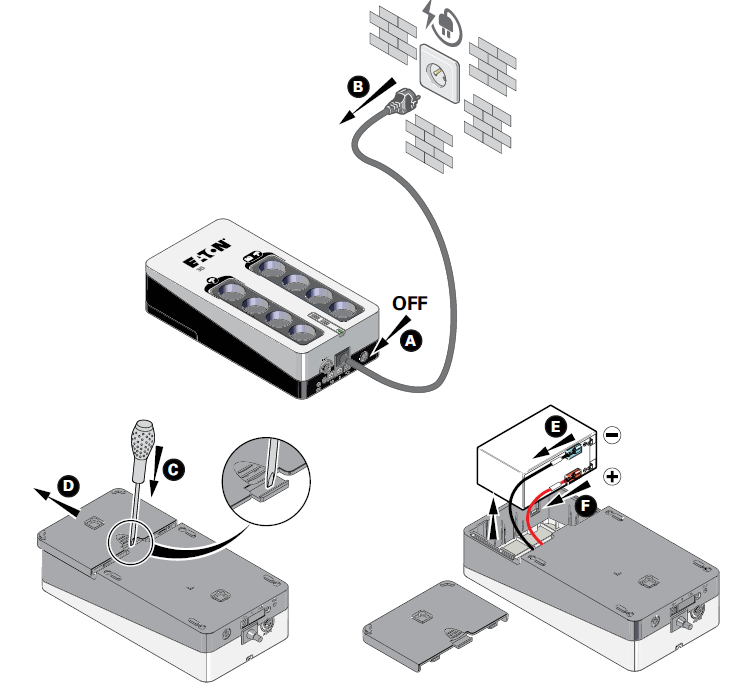
Warning: take care not to reverse the polarity + (red) and - (black) when connecting the battery, es as this will destroy the device.
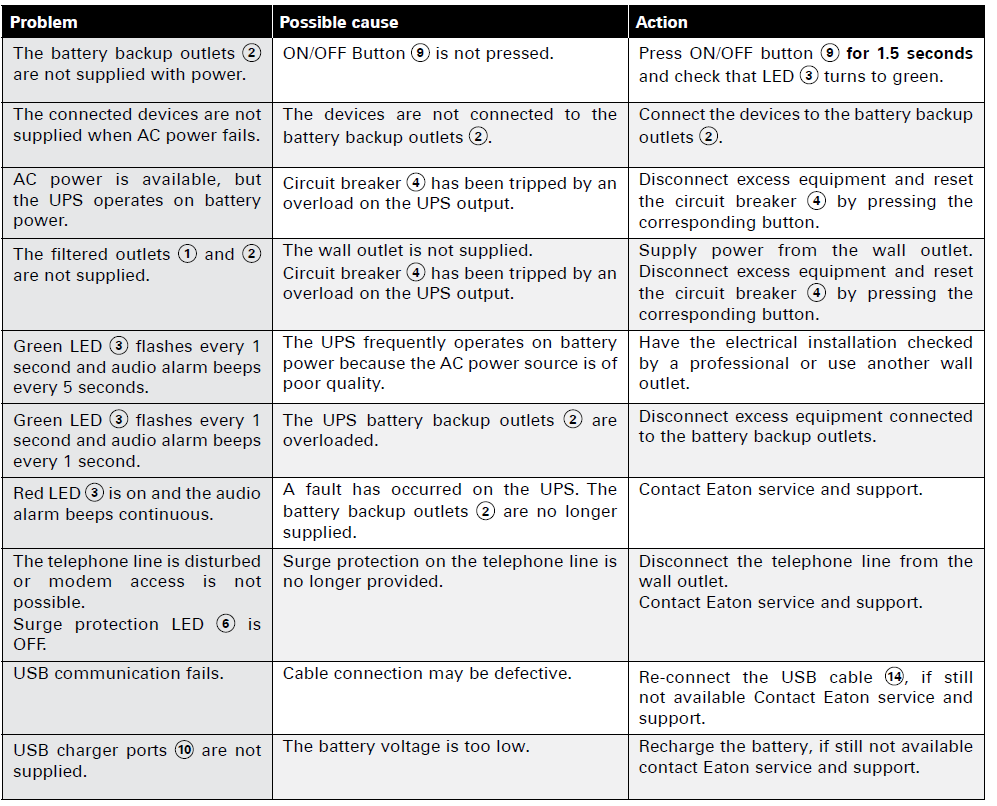
Troubleshooting
Service and support
If you have any questions or problems with the UPS, call Eaton or your local service representative in your country region. Please have the following information ready when you call for service:
- model number,
- serial number,
- date of failure or problem,
- Symptoms of failure or problem,
- customer return address and contact information,
- description of the installation.
Glossary
- Backup time: Time during which the load can be supplied by the UPS operating on battery power.
- UPS: Uninterruptible Power Supply.
Pros and Cons of the Eaton 3S UPS
Pros:
- Efficient Design: The Eaton 3S offers high efficiency and energy-saving features, making it a cost-effective choice for long-term use.
- Compact and Versatile: Its compact design fits well in most environments, and it provides multiple outlets for both battery backup and surge protection.
- Replaceable Battery: The sealed lead-acid battery is user-replaceable, extending the lifespan of the UPS.
- Advanced Features: Models like the 3S750 include EcoControl for automated energy savings.
Cons:
- Limited Runtime: Backup times can be short at full load, typically ranging from 6 to 10 minutes.
- Noisy Operation: Some users report audible noise during operation, although it is generally within acceptable limits (less than 50 dBA).
- Dependence on USB Software for Full Functionality: Some advanced features require software installation for full utilization.
Customer Reviews and Ratings
Users generally praise the Eaton 3S UPS for its reliability and ease of use. Many appreciate the compact design and the ability to automatically power down devices when not in use, thanks to EcoControl. However, some users note that the runtime could be longer, especially at full load. Overall, the Eaton 3S has a solid reputation for providing essential backup power and surge protection, earning it a rating of around 4.5 out of 5 stars.
For those seeking a reliable and efficient UPS for their home or office equipment, the Eaton 3S is a solid choice. It offers good value for money, especially considering its energy-saving features and durable design.
Faqs
How do I set up the Eaton 3S Uninterruptible Power Supply for the first time?
What should I do if the Eaton 3S Uninterruptible Power Supply does not power on?
Can I use Eaton 3S Uninterruptible Power Supply with laser printers or surge strips?
How does the EcoControl feature work on the Eaton 3S Uninterruptible Power Supply?
What maintenance is required to keep the Eaton 3S Uninterruptible Power Supply in good condition?
What are the recommended installation positions for the Eaton 3S Uninterruptible Power Supply?
How do I configure the voltage output on the Eaton 3S Mini UPS model?
What troubleshooting steps can resolve common Eaton 3S Uninterruptible Power Supply problems?
More eaton manuals
- Setup: Eaton Green Motion DC 22 EV charger User Manual
- Eaton Ellipse Eco 1600 USBIEC UPS User Manual
- How to Use: Eaton Green Motion Building EV charger User Manual
- How to Use: Eaton Green Motion DC EV chargers User Manual
- Eaton ES4P Control Relay User Manual
- Eaton Crouse-Hinds Series Xenon Beacons XB15 User Manual
Leave a Comment