
Pairing & Setup: Edifier NeoDots True Wireless Earbuds User Manual
Content
edifier NeoDots True Wireless Earbuds
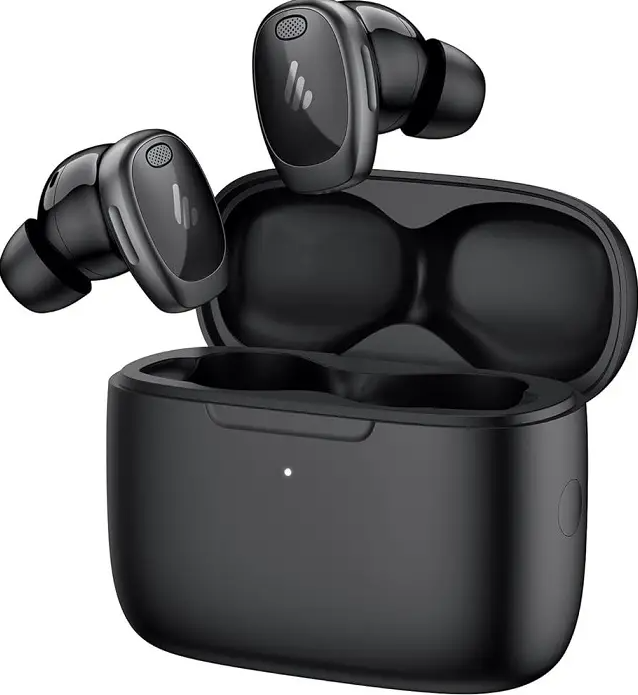
Introduction
The edifier NeoDots True Wireless Earbuds are premium, feature-rich wireless earbuds designed for audiophiles and everyday users who demand both high-fidelity sound and advanced noise-canceling technology. These earbuds stand out in the crowded wireless audio market thanks to their hybrid driver design, combining a dynamic driver and a balanced armature with digital signal processing for exceptional clarity, deep bass, and natural mids. Certified for Hi-Res Audio Wireless and supporting the LDAC codec, the NeoDots deliver three times the music detail of standard Bluetooth earbuds, making them ideal for music lovers who crave studio-quality sound on the go.
Active Noise Cancellation (ANC) is a highlight, with up to -48dB noise reduction and multiple adjustable modes—including wind reduction and ambient sound—for versatile use in noisy commutes, busy offices, or while exercising outdoors. Battery life is impressive, offering up to 17 hours of playback on a single charge and 56 hours with the charging case, plus convenient wireless charging. The NeoDots are also water-resistant (IP55), ensuring durability against rain and sweat.
Targeted at tech-savvy consumers, commuters, fitness enthusiasts, and remote workers, the Edifier NeoDots True Wireless Earbuds are especially appealing to Android users who can take full advantage of LDAC, though iPhone users will still enjoy excellent sound quality. Priced competitively in the under-$150 range, they offer a compelling alternative to more expensive options like AirPods Pro, with broader feature support and customizable controls via the Edifier ConneX app. Available in black and white, the NeoDots are widely accessible through electronics retailers and online stores.
Technical Specifications
- Drivers: Hybrid (10mm dynamic + balanced armature) with DSP and active crossover
- Audio Codecs: LDAC (Android only), AAC, SBC
- Noise Cancellation: Hybrid ANC up to -48dB, multiple modes (ANC, wind reduction, ambient sound)
- Battery Life: Up to 17 hours (earbuds), 56 hours total with case
- Charging: USB-C, wireless charging supported
- Bluetooth: 5.4 with multipoint connection and Google Fast Pair
- Water Resistance: IP55 (splash and sweat proof)
- Microphones: 6-mic array for clear calls and voice assistant support
- Controls: Haptic touch buttons (programmable), automatic play/pause
- App Support: Edifier ConneX app for EQ, ANC modes, and firmware updates
- Included Accessories: Charging case, USB-C cable, three ear tip sizes
Performance Benchmarks: The NeoDots deliver a warm, detailed sound signature with punchy bass and crisp highs, suitable for a wide range of music genres. Noise cancellation is effective for low-frequency sounds, though very high-pitched noises may still be audible. Battery performance is among the best in class, especially when combined with wireless charging.
Comparison: Compared to AirPods Pro, the NeoDots offer longer battery life, LDAC support (for Android), and more customizable controls, though they lack some iOS-specific integrations. They outperform many budget ANC earbuds in sound quality and feature set.
First pairing
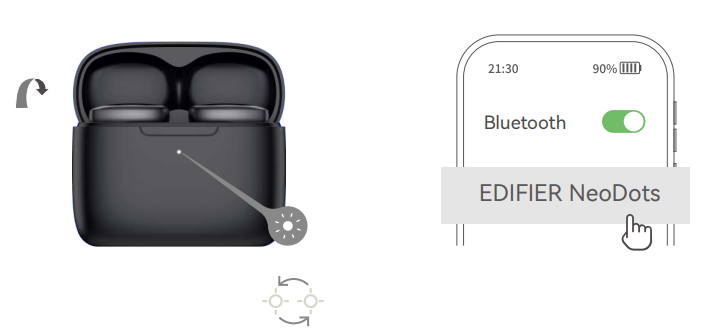
- Once powered on, the earbuds will automatically enter Bluetooth pairing mode.
- Select "EDIFIER NeoDots" in your device settings to connect.
Pairing for a new device
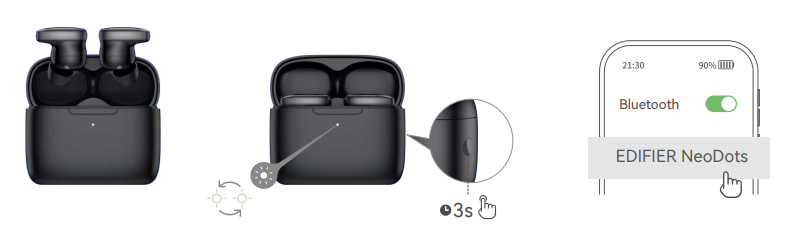
- In the N state, press and hold the button on the case for about 3s.
- Select "EDIFIER NeoDots" in your device settings to connect. Note: For subsequent use, the earbuds will automatically connect to the device used last time.
Multipoint connection
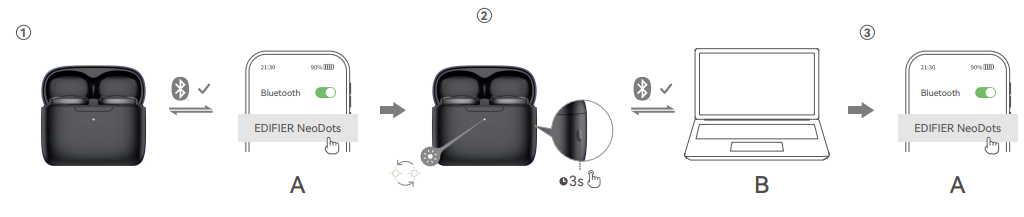
- Pair device A with the earbuds manually and keep the earbuds in the case.
- Re-enter Bluetooth pairing mode and select "EDIFIER NeoDots" in device B settings to connect.
- Select "EDIFIER NeoDots" again in device A settings to connect. Note: For subsequent use, the earbuds will automatically reconnect to the two devices used last time.
Charging
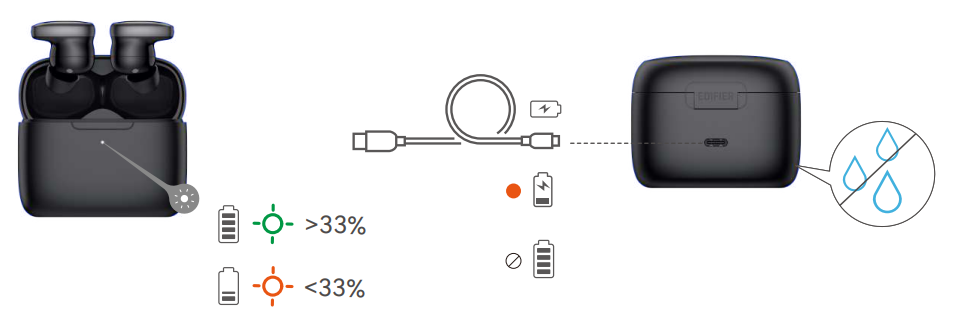
- Input: 5V 200mA(Earbuds)
- 5V1A(Charging case)
- Note: Make sure the USB port is completely dry before charging.
Controls
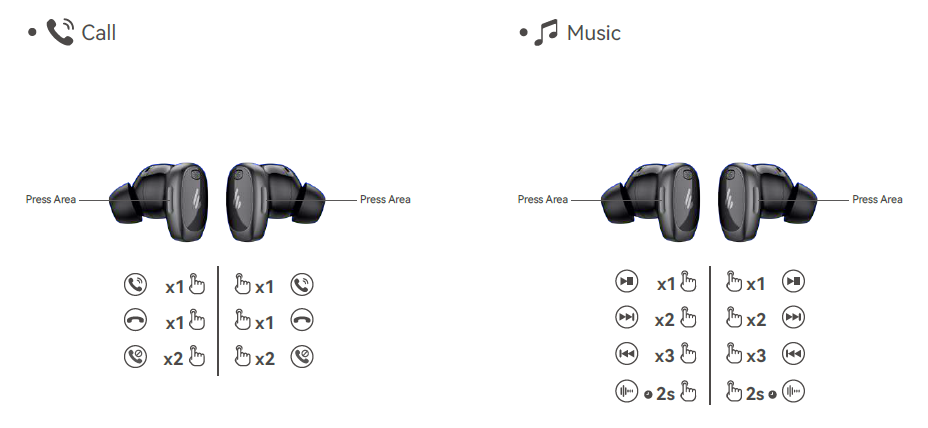
Note:
- Default sound control: High noise cancellation / Ambient sound /Noise cancellation off.
- Download the Ethe DIFIER ConneX App for more customizable control settings.
Troubleshooting Common Issues
Common Problems & Solutions:
- Connection Drops: Ensure Bluetooth 5.4 is enabled on your device. Reset the earbuds by placing them in the case and holding the button for 10 seconds. Update firmware via the Edifier ConneX app.
- One Earbud Not Working: Sometimes, sound may start on one earbud before both sync—wait a moment. If persistent, reset the earbuds and re-pair.
- Charging Issues: Clean charging contacts on the earbuds and case. Use the included USB-C cable or a Qi-certified wireless charger. If the case LED doesn’t light up, try a different power source.
- ANC Not Effective: Select the appropriate ANC mode in the app. Ensure a proper seal with the right ear tip size. ANC is less effective on high-pitched sounds.
- Microphone Problems: Check for obstructions. Test in a quiet environment. Update firmware if issues persist.
Preventive Measures: Regularly clean earbuds and case, avoid submerging in water, and store in the case when not in use. Keep firmware updated for optimal performance.
Warranty & Support: The Edifier NeoDots True Wireless Earbuds come with a standard manufacturer’s warranty. For support, visit the official Edifier website or contact customer service via the details provided in the user manual. Keep your proof of purchase for warranty claims.
Pros & Cons
Advantages
- Superior Sound Quality: Hi-Res Audio Wireless certified, LDAC support, and hybrid drivers deliver rich, detailed audio.
- Effective ANC: Up to -48dB noise reduction with adjustable modes for different environments.
- Exceptional Battery Life: Up to 17 hours on earbuds, 56 hours with case, plus wireless charging.
- Robust Build: IP55 water resistance, durable construction, and comfortable fit.
- Customizable Controls: Programmable haptic buttons, multipoint connection, and comprehensive app support.
- Value for Money: Competitively priced with features rivaling more expensive models.
Disadvantages
- LDAC Limited to Android: iPhone users miss out on the highest-quality codec.
- ANC Less Effective on High Frequencies: Best at blocking low-frequency noise; some high-pitched sounds may still be heard
- Slightly Bulky Design: Larger than some competitors, though still comfortable for most users.
- Bass Depth: Heavy Bass EQ preset emphasizes punch over depth, which may not satisfy bass purists.
- Initial Sync Delay: Minor delay when first putting earbuds in before both play audio.
Compared to Alternatives: The edifier NeoDots True Wireless Earbuds offer better battery life and more advanced ANC than most budget options, while undercutting premium brands on price without sacrificing core features.
Customer Reviews
User feedback for the Edifier NeoDots True Wireless Earbuds is overwhelmingly positive, with many praising the warm, detailed sound signature and effective noise cancellation. Customers highlight the long battery life and convenient wireless charging as major advantages, along with the sturdy, water-resistant build. The customizable EQ and ANC modes via the ConneX app are also frequently mentioned as standout features.
Common complaints include the lack of AptX support, the slight delay in audio sync when first worn, and the fact that LDAC is not available on iOS devices. Some users note that while the bass is punchy, it lacks the deepest sub-bass extension in certain genres. Despite these minor issues, most reviewers recommend the NeoDots as a top choice in their price range, especially for Android users seeking high-resolution audio and reliable ANC performance. Star ratings typically range from 4 to 4.5 out of 5, with particular praise for value and versatility.
If you prioritize sound quality, battery life, and customizable features, the Edifier NeoDots True Wireless Earbuds are a smart purchase—especially for commuters, travelers, and music enthusiasts who want premium performance without the premium price tag.
Faqs
How do I set up edifier NeoDots True Wireless Earbuds for the first time?
What should I do if edifier NeoDots True Wireless Earbuds is not connecting to my device?
Can I use edifier NeoDots True Wireless Earbuds with iPhone and LDAC?
How do I customize noise cancellation and ambient sound on edifier NeoDots True Wireless Earbuds?
What is the battery life of edifier NeoDots True Wireless Earbuds and how can I maximize it?
How do I clean and maintain edifier NeoDots True Wireless Earbuds?
Why does sound only play in one earbud at first with edifier NeoDots True Wireless Earbuds?
Are edifier NeoDots True Wireless Earbuds water-resistant and suitable for workouts?
More edifier manuals
- Edifier R20BT USB-Powered Speaker User Manual
- Edifier NeoBuds S Wireless In-Ear Headphones Pairing Instructions
- Edifier EDF100040 Active Speaker User Manual
- Edifier 7.1 Sound USB Gaming Headset G4 PRO User Guide
- Edifier Earbuds Headphones P180 USB-C User Manual
- Edifier Low Latency Gaming Headset Hecate G33 User Guide
Leave a Comment