
Emerald Wi-Fi Enabled All-In-One Heat Pump User Manual
Content
Emerald Wi-Fi Enabled All-In-One Heat Pump: Product Manual and Buying Guide
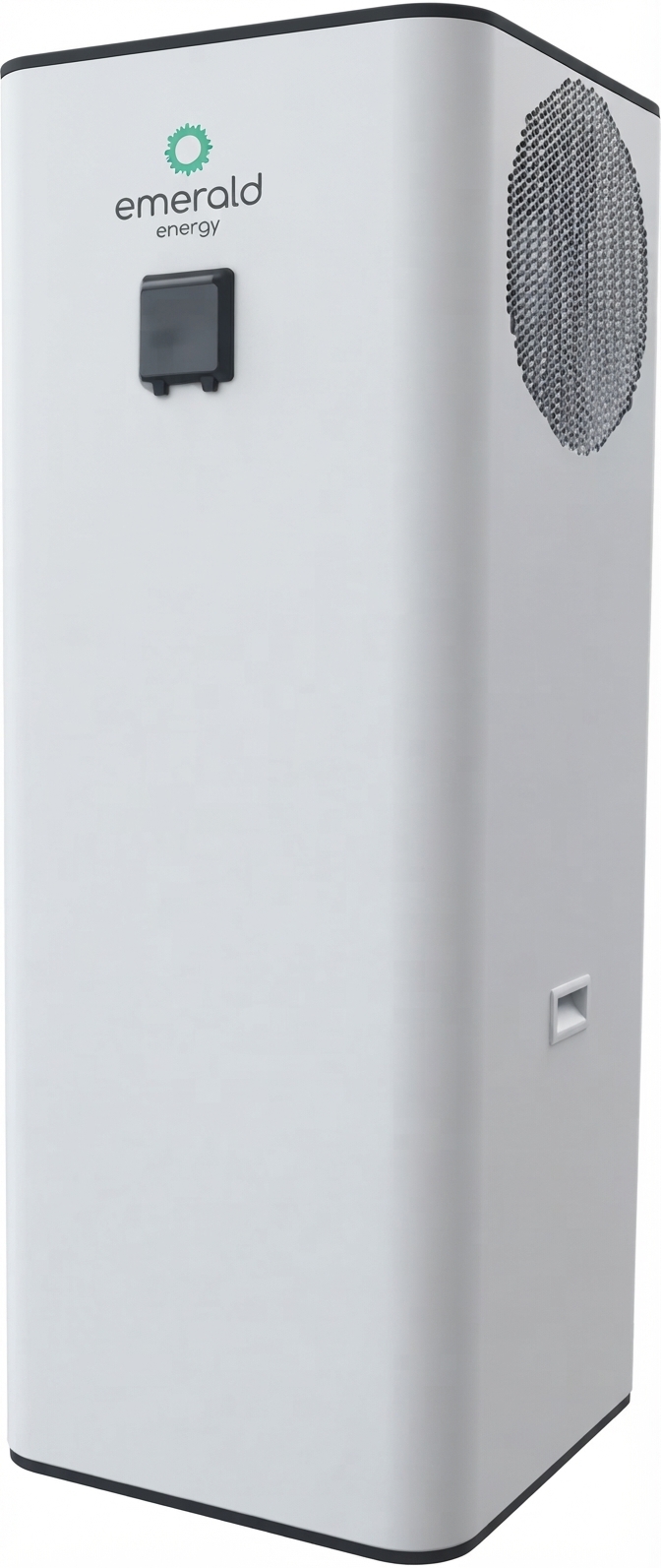
The Emerald Wi-Fi Enabled All-In-One Heat Pump is a smart hot water solution designed for households and small businesses that want efficient water heating with app-based control. It combines an integrated tank and heat pump in a single unit, making it a compact alternative to split-system heat pump water heaters and conventional electric storage systems. Available in 220L, 270L, and 320L capacities, it is built for users who want lower running costs, reliable hot water, and the convenience of remote monitoring through the Emerald app. The system uses R290 refrigerant and is designed to operate in a wide temperature range, making it suitable for year-round domestic use in many climates.
This model is especially appealing to homeowners upgrading from older electric hot water systems, energy-conscious buyers looking for a more efficient replacement, and installers wanting an all-in-one format with smart connectivity. Its built-in Wi-Fi makes it easy to adjust modes, track performance, and manage hot water schedules from a smartphone. The Emerald Wi-Fi Enabled All-In-One Heat Pump is typically positioned in the mid-range to premium category, with estimated pricing often falling around AUD 3,500 to AUD 6,500 depending on tank size, booster configuration, installation, and dealer offers. Availability is generally strongest through Australian plumbing, solar hot water, and specialty HVAC retailers, as well as direct installers.
For buyers comparing heat pump water heaters, the main advantages are its integrated design, app control, low-GWP refrigerant, and strong efficiency ratings. It is a practical choice for families, rental properties, and energy upgrade projects where both performance and convenience matter.
Specifications for the Emerald Wi-Fi Enabled All-In-One Heat Pump
- Available tank sizes: 220L, 270L, 320L
- Power supply: 220V to 240V, 50/60Hz, single phase
- Refrigerant: R290 natural refrigerant with low global warming potential
- Wi-Fi: Built-in smart control via the Emerald app
- Operating temperature range: approximately -7°C to 46°C
- Heating output: around 2.7kW to 2.8kW in standard heat pump mode depending on model
- Input power: approximately 0.53kW to 0.58kW depending on capacity
- Efficiency: reported COP values around 4.8 to 5.2 across models
- Optional electric booster heater: available on selected versions for faster recovery
- Smart functions: remote control, mode selection, monitoring, and scheduling through the app
- Tank format: integrated all-in-one system with built-in storage
Compared with standard electric storage water heaters, this unit is significantly more efficient because it extracts heat from ambient air rather than generating heat directly. Compared with many split heat pump systems, the all-in-one format is simpler to install and often easier to maintain in compact spaces. It is best suited to users who want a balance of efficiency, smart control, and straightforward domestic hot water performance.
How to Set Up the Emerald Wi-Fi Enabled All-In-One Heat Pump
Installation should always be carried out by a licensed professional, especially because the system involves plumbing, electrical connections, and refrigerant-based heating components. Before setup, confirm the location has sufficient airflow, safe clearance around the unit, and stable access for maintenance. The unit should be positioned on a level surface with proper drainage and protection from flooding.
- Power on the heat pump and confirm the controller display is active.
- Download the Emerald app on a compatible smartphone and create or log in to an account.
- Connect the phone to a 2.4GHz Wi-Fi network. The system does not support 5GHz during pairing.
- In the app, tap Add Product and choose Bluetooth mode or AP mode for pairing.
- Follow the on-screen instructions to activate pairing mode on the heat pump.
- Select the correct model number and complete the device registration.
- Set the preferred operating mode, including standard heating, boost, or quiet operation where available.
Safety warnings are essential: do not cover the unit, block airflow, or attempt electrical wiring without proper qualifications. If pairing fails, verify the Wi-Fi password, move closer to the router, and confirm that the phone is on the correct 2.4GHz network. If the app does not detect the unit, restart the heat pump, reset pairing mode, and try Bluetooth-assisted setup again.
Troubleshooting the Emerald All-In-One Heat Pump
Most issues with the Emerald Wi-Fi Enabled All-In-One Heat Pump are related to connectivity, airflow, water supply, or normal protection responses. If the unit is not heating properly, check whether the booster mode is disabled, the ambient temperature is too low, or the tank has reached its target setting. Reduced airflow around the outdoor section can also lower performance.
- Problem: App cannot find the device. Solution: Use a 2.4GHz network, restart the phone and controller, and try Bluetooth pairing first.
- Problem: No hot water. Solution: Confirm the unit has power, check the controller settings, and inspect for tripped breakers or isolated valves.
- Problem: Water is lukewarm. Solution: Increase the temperature setting or use boost mode if installed.
- Problem: Frequent cycling. Solution: Check for blocked airflow, incorrect sizing, or unusually high water demand.
- Problem: Error displayed on controller. Solution: Power cycle the system and consult the installer if the fault persists.
Common protection states usually clear after the underlying issue is resolved, but repeated faults should be inspected by a technician. Preventive maintenance includes cleaning intake and outlet areas, checking for leaks, monitoring water pressure, and keeping the app updated. Warranty terms commonly include multi-year system coverage, but exact support periods vary by model and seller, so buyers should confirm documentation at purchase. For help, contact the installing plumber, the retailer, or Emerald’s customer support team through the official service channel provided with the product paperwork.
Pros and Cons of the Emerald Wi-Fi Enabled All-In-One Heat Pump
Pros
- Built-in Wi-Fi control makes scheduling and monitoring easy from a phone.
- All-in-one construction reduces complexity compared with split systems.
- R290 refrigerant supports lower environmental impact.
- Strong efficiency ratings can lower hot water running costs.
- Available in multiple tank sizes for different household demands.
- Optional booster heater helps when demand is high or recovery needs are faster.
Cons
- Requires 2.4GHz Wi-Fi for setup, which may frustrate some users.
- Upfront cost is higher than a basic electric water heater.
- Performance can vary in colder conditions or poor installation environments.
- May be oversized for small households with very low hot water demand.
Overall, the value for money is strong if the system is replacing an inefficient legacy unit and the household will benefit from lower energy use. Compared with simpler electric tanks, the Emerald Wi-Fi Enabled All-In-One Heat Pump offers far better efficiency and smart features. Compared with other premium heat pump brands, it stands out for its all-in-one convenience and app integration, though installers and buyers should compare warranty terms, noise levels, and available support in their area.
Customer Reviews of the Emerald Wi-Fi Enabled All-In-One Heat Pump
Average customer sentiment trends positive, with many users rating the product around 4 to 4.5 out of 5 stars for efficiency and convenience. Buyers frequently praise the quiet operation, app control, and noticeable reduction in hot water energy bills. One common testimonial is: “Easy to monitor from my phone, and the hot water recovery has been very reliable for a family of four.”
Common complaints usually involve initial Wi-Fi setup, especially when the home network is not set to 2.4GHz, and some users mention that installation quality affects results more than expected. A frequent recommendation is to choose a qualified installer and confirm tank size before purchase. For homeowners seeking a smart, efficient hot water upgrade, the Emerald Wi-Fi Enabled All-In-One Heat Pump is often recommended, particularly when the goal is long-term savings and remote control convenience.
Faqs
How do I set up the emerald Wi-Fi Enabled All-In-One Heat Pump for the first time?
Why is my emerald Wi-Fi Enabled All-In-One Heat Pump not connecting to the Emerald app?
What Wi-Fi network does the emerald Wi-Fi Enabled All-In-One Heat Pump require?
How do I pair the emerald Wi-Fi Enabled All-In-One Heat Pump using Bluetooth or AP mode?
What should I do if the emerald Wi-Fi Enabled All-In-One Heat Pump controller is locked?
What features can I control on the emerald Wi-Fi Enabled All-In-One Heat Pump through the app?
How can I improve the performance of my emerald Wi-Fi Enabled All-In-One Heat Pump?
How often should I maintain the emerald Wi-Fi Enabled All-In-One Heat Pump?
More emerald manuals
- Emerald Air Conditioning Split System ACSS25 User Manual
- Emerald HPRX300E-1 Split System Hot Water Heat Pump User Manual
- Setup & Connection: Emerald LiveLink Smart Wi-Fi Gateway Device User Manual
- Emerald ACV200D Ducted Indoor AC Unit User Manual
- Usage: Emerald ACAV-C Wall Mounted Controller User Manual
- Installation: Emerald LED Battens IP65 Uni-Series Instruction Manual
Leave a Comment