
Emerson 1F87U-42WF Wi-Fi Programmable Thermostat User Manual
Content
Emerson 1F87U-42WF Wi-Fi Programmable Thermostat Review and Manual
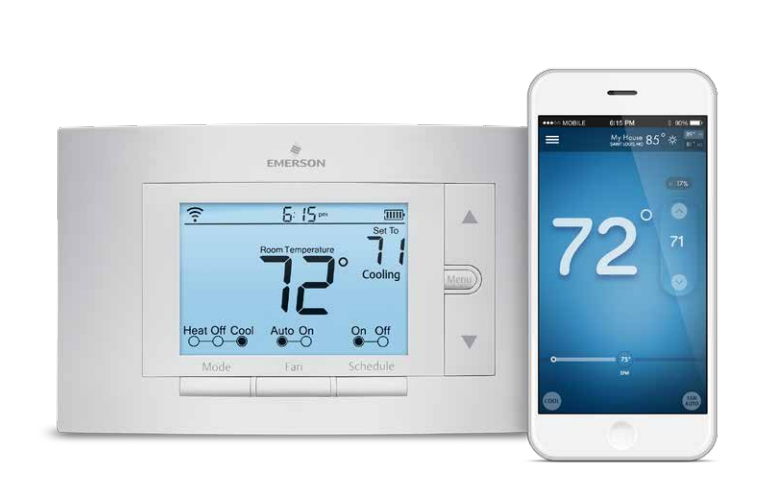
The Emerson 1F87U-42WF Wi-Fi Programmable Thermostat is a smart, 4H/2C programmable thermostat built for homeowners who want reliable comfort control without a steep learning curve. Designed for gas, electric, and heat pump systems, it combines Wi-Fi connectivity, app-based scheduling, and energy-saving automation in one wall-mounted unit. This model is widely recognized for its straightforward interface, making it a strong fit for users who want smart features without the complexity of some premium thermostats.
One of the biggest advantages of the emerson 1F87U-42WF Wi-Fi Programmable Thermostat is its balance of practicality and smart-home convenience. It supports 7-day programming, auto changeover, humidity display, early start, and total keypad lockout, giving it broad appeal for families, landlords, and HVAC installers. It also works with standard HVAC setups and heat pumps, which makes it a versatile option for many homes.
Typical pricing falls in the approximate $125 to $160 range, depending on retailer, stock, and promotions. Availability is generally good through HVAC supply stores, online marketplaces, and home improvement sellers. For buyers comparing smart thermostats, this model often lands below many premium touchscreen competitors while still delivering core Wi-Fi thermostat features and dependable performance.
Homeowners looking for a Wi-Fi programmable thermostat for multi-stage heating and cooling, rental property management, or energy-conscious temperature scheduling will find this model especially useful. It is a practical choice for anyone who wants remote access, stable scheduling, and a familiar thermostat layout.
Emerson 1F87U-42WF Wi-Fi Programmable Thermostat Specifications and Key Features
- System compatibility: Supports 4 heat / 2 cool configurations and heat pump systems.
- Programming: 7-day programmable with up to 8 program periods per day.
- Connectivity: Wi-Fi enabled, with 2.4 GHz network support.
- Voltage: 20–30 VAC, NEC Class II, 50/60 Hz.
- Temperature range: Operates in environments from 32°F to 105°F.
- Humidity range: Handles up to 90% non-condensing humidity.
- Fan control: Auto and On modes.
- Display: Backlit display with continuous backlight when common wire is used.
- Smart features: Early start, auto changeover, humidity display, keypad lockout.
- Compatibility: Works with conventional HVAC systems, heat pumps, and dual-fuel setups.
- Power: Battery or C-wire supported depending on installation setup.
Compared with simpler programmable thermostats, the Emerson 1F87U-42WF offers more advanced HVAC compatibility and smarter scheduling. Compared with premium smart thermostats, it is less focused on touch-first design and more focused on reliable control and installation flexibility. That makes it a strong middle-ground option for users who value function over flashy extras.
Emerson 1F87U-42WF Troubleshooting Guide for Common Problems
If the thermostat does not power on, check the C-wire connection or battery installation and verify the HVAC breaker is on. If Wi-Fi will not connect, confirm that the router is broadcasting on 2.4 GHz, move the thermostat closer to the access point during setup, and restart the router if needed.
If the system is not heating or cooling correctly, inspect wiring terminals such as RC, RH, C, W/E, W2, Y, Y2, O/B, and G to ensure they match the HVAC configuration. Incorrect jumper placement or a loose wire is a common cause of no-heat or no-cool issues. If the thermostat displays an unexpected temperature swing, adjust the differential settings and make sure the unit is not exposed to direct sunlight, drafts, or nearby heat sources.
Common user issues may include blank display, delayed response, or schedule changes not saving. In most cases, these can be fixed by replacing batteries, resetting the thermostat, or rechecking app permissions and network status. Error-code labeling is limited on this model, so troubleshooting usually relies on wiring, power, and Wi-Fi checks rather than detailed fault codes.
Preventive care includes cleaning the thermostat gently, changing batteries as needed, keeping firmware and app settings current, and confirming that the HVAC system is serviced regularly. Emerson support is typically backed by a standard limited warranty, and help is usually available through the product seller, installation documentation, or the manufacturer’s customer support channels. For fastest help, have the model number 1F87U-42WF, HVAC type, and wiring photo ready before contacting support.
Pros and Cons of the Emerson 1F87U-42WF Wi-Fi Programmable Thermostat
Pros
- Flexible HVAC support: Handles 4H/2C and heat pump systems, which is useful for many homes.
- Easy-to-use scheduling: The 7-day programmable interface is practical for busy households.
- Smart-home convenience: Wi-Fi control makes remote temperature management simple.
- Energy-conscious features: Early start and scheduling help reduce wasted heating and cooling.
- Good value: Usually priced below many premium smart thermostat alternatives.
Cons
- Not as flashy as premium competitors: The design is functional rather than high-end.
- 2.4 GHz only: Some users with newer routers may find setup slightly less convenient.
- Limited advanced automation: It is less feature-rich than top-tier learning thermostats.
- Setup can be wiring-sensitive: Incorrect terminal placement may cause HVAC issues during installation.
Overall, the emerson 1F87U-42WF Wi-Fi Programmable Thermostat offers strong value for money if the goal is dependable smart scheduling rather than premium touchscreen features. For buyers comparing alternatives, it is a solid step up from basic programmable thermostats and a more affordable choice than many flagship connected models.
Customer Reviews and Real-World Feedback on the Emerson 1F87U-42WF
Customer feedback is generally positive, with many users giving it around 4 out of 5 stars for ease of use, scheduling, and installation flexibility. Homeowners frequently praise the simple interface, reliable Wi-Fi control, and compatibility with older HVAC systems. One common positive theme is that the thermostat “just works” without requiring constant adjustment.
Frequent complaints focus on Wi-Fi setup, the lack of more advanced smart-home features, and occasional wiring confusion during installation. Some users also mention that the display and controls feel more utilitarian than premium. Despite that, many buyers still recommend it for anyone who wants a dependable Wi-Fi programmable thermostat at a reasonable price.
If you want a practical thermostat with strong everyday performance, the Emerson 1F87U-42WF Wi-Fi Programmable Thermostat is often a worthwhile purchase. It is especially recommended for homeowners, rental property managers, and users upgrading from a standard programmable thermostat.
Faqs
How do I set up the emerson 1F87U-42WF Wi-Fi Programmable Thermostat for the first time?
What should I do if the emerson 1F87U-42WF Wi-Fi Programmable Thermostat is not connecting to Wi-Fi?
Is the emerson 1F87U-42WF Wi-Fi Programmable Thermostat compatible with my HVAC system?
How do I create an energy-saving schedule on the emerson 1F87U-42WF Wi-Fi Programmable Thermostat?
Why is the emerson 1F87U-42WF Wi-Fi Programmable Thermostat blowing the wrong temperature or cycling too often?
How do I use the hold and temporary override features on the emerson 1F87U-42WF Wi-Fi Programmable Thermostat?
What maintenance does the emerson 1F87U-42WF Wi-Fi Programmable Thermostat need to keep working properly?
How can I reset the emerson 1F87U-42WF Wi-Fi Programmable Thermostat without losing my HVAC settings?
More emerson manuals
Leave a Comment