
How to Use: Epson ELPMB75 Ultra-Short-Throw Projector Wall Mount System User Manual
Content
Introduction to the Epson ELPMB75 Ultra-Short-Throw Projector Wall Mount System
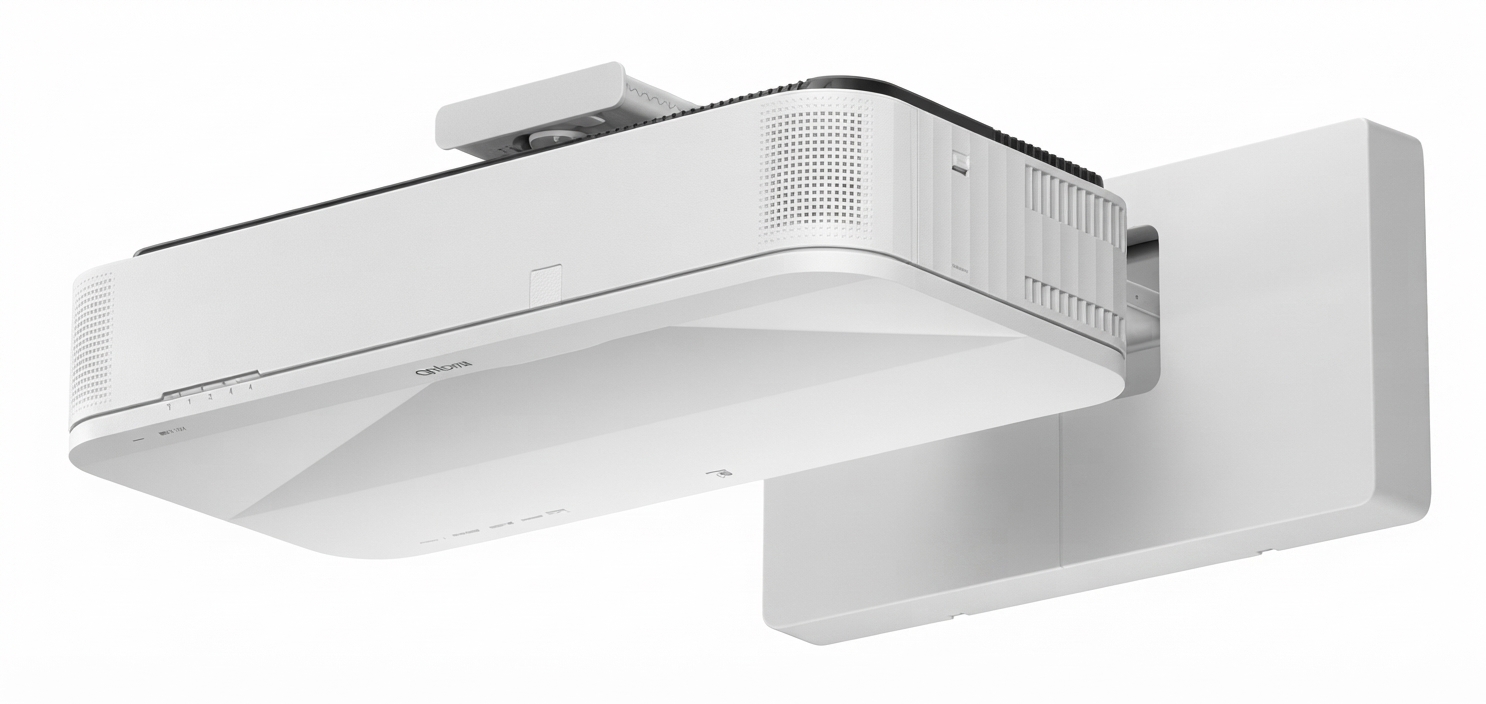
The Epson ELPMB75 Ultra-Short-Throw Projector Wall Mount System is a purpose-built mounting solution designed for select Epson ultra-short-throw laser projectors, including models such as the EB-810E and EB-815E. It is engineered to deliver a stable, precise, and professional wall-mounted installation for classrooms, conference rooms, training spaces, and digital signage environments. By positioning the projector close to the wall, the ELPMB75 helps reduce shadow interference, glare, and cabling clutter, making presentations cleaner and more effective.
One of its main advantages is the telescopic arm design, which supports flexible image sizing and installation distances across supported models. The mount also includes multi-axis adjustment for fine-tuning alignment, which is especially valuable when projector placement must match fixed screen dimensions or room constraints. For organizations looking to create a polished AV setup, the Epson ELPMB75 Ultra-Short-Throw Projector Wall Mount System offers a dependable blend of precision, durability, and convenience.
The estimated price range typically falls around the mid-to-high accessory category, often seen near $179 to $229 depending on the retailer and region. Availability is generally good through Epson dealers, AV resellers, and major online electronics stores. It is a strong fit for education, business, and installation professionals who need a reliable Epson projector wall mount with adjustable setup options.
Specifications for Epson ELPMB75 Ultra-Short-Throw Projector Wall Mount System
- Product type: Ultra-short-throw projector wall mount system
- Compatibility: Select Epson ultra-short-throw laser projectors, including EB-810E and EB-815E
- Mount weight: Approximately 9.5 kg / 20.9 lb
- Maximum load capacity: 15.0 kg / 33.1 lb
- Total combined weight rating: Approximately 22 kg / 48.5 lb for projector and mount together
- Adjustment range: Vertical slide ±40 mm, horizontal slide ±45 mm, forward/backward slide up to 266 mm
- Fine-tuning: Vertical tilt and horizontal roll adjustments for image alignment
- Mount style: Wall-mounted with telescopic extension arm
- Materials: Heavy-duty metal and structural mounting components
- Use case: Ultra-short-throw projection for rooms with limited space
Compared with standard projector brackets, this model is more specialized and offers greater alignment precision. Compared with basic universal wall mounts, the ELPMB75 is better suited to Epson UST projectors because of its model-specific geometry, load rating, and installation ranges.
Detailed Description of the Epson ELPMB75 Projector Wall Mount
The Epson ELPMB75 Ultra-Short-Throw Projector Wall Mount System is built to support Epson’s fixed ultra-short-throw projection approach, where the projector is mounted close to the display surface and aimed at a large screen from a short distance. The telescopic arm lets installers position the projector accurately, while the adjustment controls help correct image placement without needing repeated hardware changes.
This mount is particularly useful in classrooms, huddle rooms, boardrooms, and signage environments where ceiling mounting is impractical or visually disruptive. The wall-mounted design keeps the setup compact and organized, and the integrated cover space can help conceal accessories such as a mini PC in certain installations. The build quality is designed for professional AV use, with a substantial mount structure that supports long-term stability and alignment retention.
In everyday use, the ELPMB75 improves the viewing experience by helping minimize shadows cast by presenters and reducing glare on the projection surface. Users also benefit from the cleaner appearance of a wall-mounted solution, especially when paired with an Epson laser projector that is intended for high-impact, always-on presentations.
Setup Guide: How to Install the Epson ELPMB75 Ultra-Short-Throw Projector Wall Mount System
- Confirm projector compatibility before installation and verify the wall can support the combined weight of the projector and mount.
- Measure the projection area and mark the wall plate position based on the required screen size and projector model.
- Secure the wall plate using appropriate anchors, screws, and hardware for the wall material.
- Attach the arm assembly and setting plate according to the installation guide, keeping all fasteners loose until alignment is complete.
- Mount the projector to the plate, then adjust vertical slide, horizontal slide, and forward/backward position until the image is centered.
- Use tilt and roll adjustments to square the image and eliminate keystone-related misalignment as much as possible.
- Route power, HDMI, and network cables neatly through the installation area and secure them to prevent strain.
- Tighten all hardware after final alignment and test the image at full size.
For safety, two-person handling is recommended because the assembly is heavy. Always ensure the wall material is appropriate for the load, and never exceed the maximum capacity. If the image does not align correctly, recheck the wall plate position, arm extension, and projector seating before making software corrections.
Troubleshooting the Epson ELPMB75 Wall Mount System
- Problem: Image is off-center. Fix: Recheck horizontal slide and wall plate placement, then fine-tune projector position.
- Problem: Image appears tilted. Fix: Adjust vertical tilt and horizontal roll before using digital correction.
- Problem: Mount feels unstable. Fix: Verify that all bolts are tightened and that the wall anchors match the wall type.
- Problem: Projection size is incorrect. Fix: Confirm the arm extension matches the projector model’s recommended throw range.
- Problem: Accessories do not fit inside the cover. Fix: Reduce cable bulk and reposition external devices if necessary.
There are no commonly used user-facing error codes for the mount itself, but installation issues usually relate to alignment, load, or wall support. Preventive maintenance includes periodic tightening checks, cable inspection, and visual inspection for wall movement. Support is typically provided through Epson’s projector accessories support channels and authorized dealers, with warranty terms commonly listed at one year by retailers.
Pros & Cons of the Epson ELPMB75 Ultra-Short-Throw Projector Wall Mount System
Pros
- Purpose-built for select Epson ultra-short-throw projectors, improving fit and alignment.
- Strong adjustment range for precise image placement.
- Wall-mounted design saves space and creates a cleaner presentation area.
- Helps reduce shadows and glare in classrooms and meeting rooms.
- Good value for professional installations where reliability matters more than universal compatibility.
Cons
- Compatible only with specific Epson projector models.
- Installation can be demanding and may require professional setup.
- Heavier than basic universal mounts.
- Not ideal for users who need frequent projector relocation.
Overall, the ELPMB75 delivers strong value for fixed installations. Compared with cheaper universal brackets, it offers better precision and a more polished result, though the trade-off is lower flexibility.
Customer Reviews and User Feedback
Users commonly rate the Epson ELPMB75 Ultra-Short-Throw Projector Wall Mount System around 4 to 5 stars for stability, image alignment, and professional appearance. Many buyers praise its sturdy build and the ease of achieving a clean, low-profile installation once positioned correctly.
Frequent complaints focus on the weight of the mount and the need for careful installation. Some users note that setup is best handled by experienced installers, especially in commercial spaces where precision matters. A typical testimonial is: “Once installed, the mount holds perfectly and makes the display look built-in.” Another common sentiment is: “It is expensive compared with generic mounts, but the fit and adjustability justify the price.”
It is a strong recommendation for schools, offices, and AV integrators that need a reliable Epson projector wall mount with long-term stability and accurate positioning.
Quick Buying Summary
The Epson ELPMB75 Ultra-Short-Throw Projector Wall Mount System is best for users who need a durable, adjustable, and model-specific wall mount for compatible Epson projectors. If the goal is a professional, space-saving installation with minimal shadow interference, this mount is an excellent choice.
Faqs
How do I set up the epson ELPMB75 Ultra-Short-Throw Projector Wall Mount System for the first time?
What projector models are compatible with the epson ELPMB75 Ultra-Short-Throw Projector Wall Mount System?
Why is my image not centered after installing the epson ELPMB75 Ultra-Short-Throw Projector Wall Mount System?
How can I reduce vibration or image movement with the epson ELPMB75 Ultra-Short-Throw Projector Wall Mount System?
What should I check if the epson ELPMB75 Ultra-Short-Throw Projector Wall Mount System does not line up with my screen?
How do I route cables cleanly with the epson ELPMB75 Ultra-Short-Throw Projector Wall Mount System?
What maintenance does the epson ELPMB75 Ultra-Short-Throw Projector Wall Mount System need over time?
How can I optimize picture quality after installing the epson ELPMB75 Ultra-Short-Throw Projector Wall Mount System?
More epson manuals
- Setup: Epson Sure-Color Series Printer P900 User Manual
- How to Use: Epson EX11000 Projector User Manual
- Epson EcoTank Printer L3210 User Manual
- How to Use: Epson VS260 / EB-FH06 / EB-W06 / EB-X06 / EB-E01 / EB-X500 Multimedia Projector User Manual
- Epson CO-W01 Projector User Manual
- How to Setup: Epson Premium XP-8700 Small-in-One Printer User Manual
Leave a Comment