
How to Use: Eufy Security Floodlight Cam E340 User Manual
Content
Eufy Security Floodlight Cam E340
Introduction
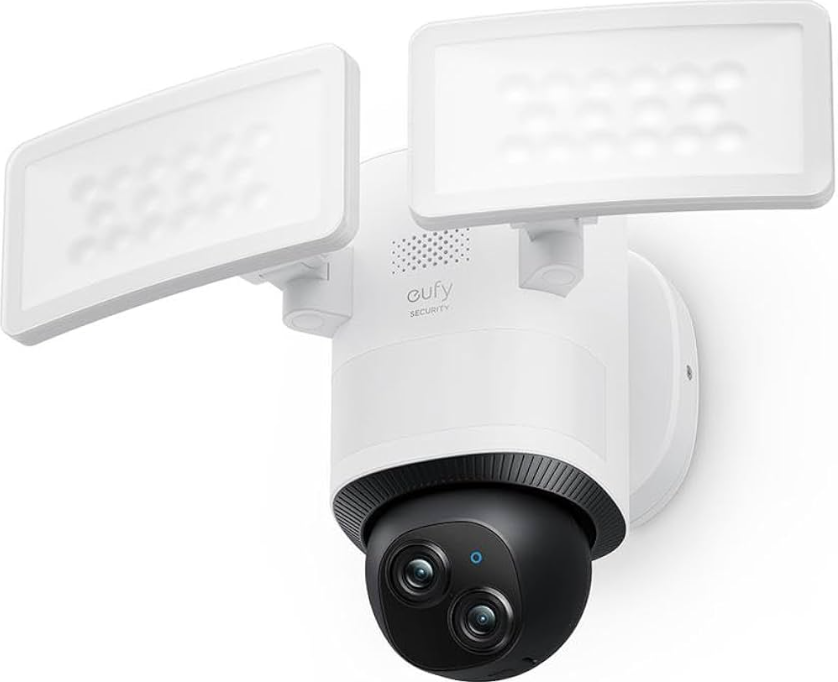
The eufy Security Floodlight Cam E340 is a next-generation outdoor security solution designed to deliver advanced surveillance, smart lighting, and robust protection for homes and businesses. Combining a powerful 2,000-lumen floodlight with a unique dual-camera system, this outdoor wired camera offers both broad scene coverage and detailed close-ups—perfect for monitoring large areas with clarity, day or night. The E340 stands out with its 3K ultra-high-definition video quality, AI-powered person detection, full-color night vision, and 360° pan-and-tilt coverage for complete situational awareness.
Key benefits of the eufy Security Floodlight Cam E340 include customizable motion-activated lighting, two-way audio for real-time communication, and a loud 95dB alarm to deter intruders. Its on-device AI reduces false alerts by focusing on human activity, while local storage options (microSD card up to 128GB or HomeBase S380 up to 16TB) eliminate the need for cloud subscriptions. The camera is IP65 weatherproof, ensuring reliable performance in rain, heat, or cold, and supports Dual-Band Wi-Fi 6 for fast, stable connectivity.
Ideal for homeowners seeking a comprehensive, subscription-free security system, the E340 is also well-suited for small businesses and properties with large outdoor spaces. With an estimated retail price of $200–$300, it is competitively priced for its feature set and widely available through major electronics retailers and eufy’s official website.
WHAT'S IN THE BOX
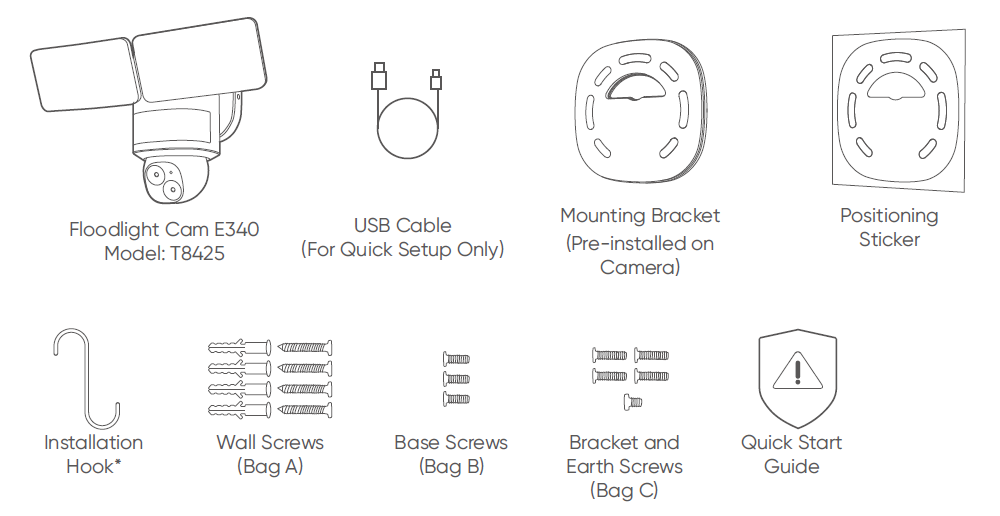
Optional accessory, depending on the package you receive.
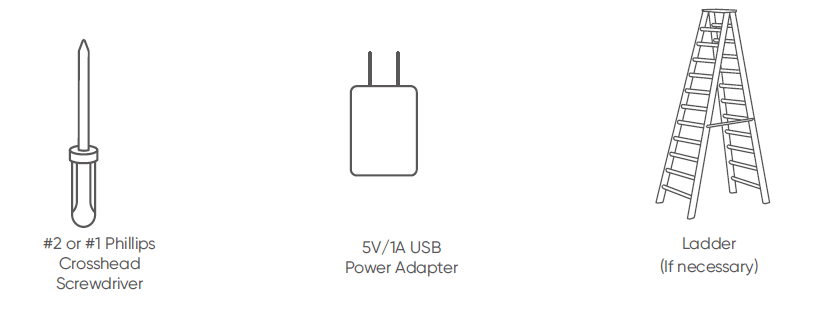
WHAT YOU NEED (Not Provided)
Technical Specifications
Key Features
- Dual-camera system: 3K wide-angle (2880 x 1620, 130° field of view) and 2K telephoto (2560 x 1440, up to 8× digital zoom) cameras provide both panoramic and detailed views.
- 2,000-lumen LED floodlight with motion activation and adjustable brightness for enhanced nighttime security.
- Full-color night vision and infrared illumination for clear images in low-light conditions.
- 360° horizontal and 120° vertical pan-and-tilt for complete area coverage.
- AI-powered person detection reduces false alerts and focuses on relevant activity.
- Two-way audio with a built-in microphone and speaker for real-time communication.
- 95dB alarm with customizable triggers for active deterrence.
- IP65 weatherproof rating for reliable outdoor operation.
- Local storage options: microSD card (up to 128GB, not included) or HomeBase S380 (up to 16TB).
- Dual-Band Wi-Fi 6 (2.4 GHz and 5 GHz) for fast, stable connectivity.
- Hardwired power (AC 100V–240V) for continuous operation.
- Dimensions: 12.6" H x 7.3" W x 8.5" D (32 cm H x 18.5 cm W x 21.6 cm D).
Performance Metrics
- Motion detection range: Up to 40 feet.
- Digital zoom: Up to 8× with dual-camera system.
- Video resolution: 3K (2880 x 1620) for wide-angle, 2K (2560 x 1440) for telephoto.
- 24/7 continuous recording supported with local storage.
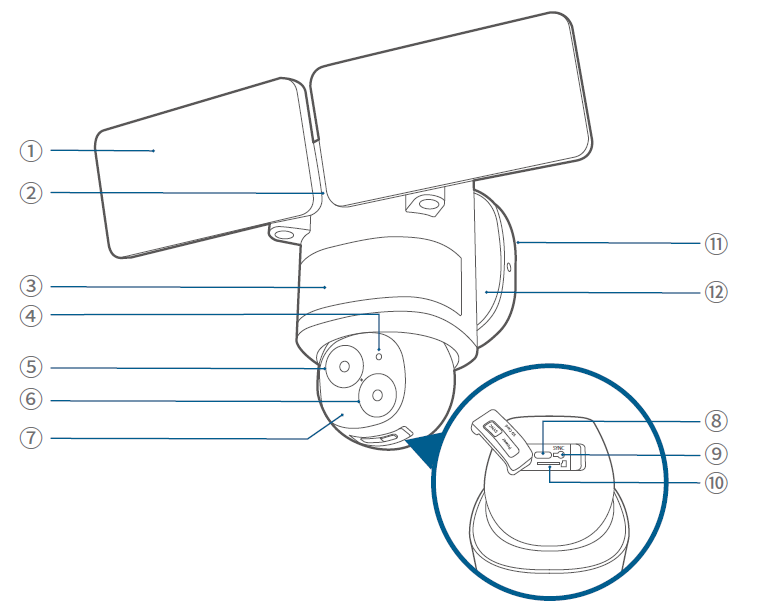
FEATURES
- Floodlight
- Speaker
- Motion Sensor Component
- System Indicator Insert a microSD card (not provided) to store recordings
- Telephoto Camera
- Wide Angle Camera
- Infrared Component
- Power Input (For Quick Setup)
- SYNC Button
- microSD Card Slot
- Mounting Bracket
- Mounting Base
Comparison with Similar Products
The eufy Security Floodlight Cam E340 outperforms many competitors with its dual-camera setup, higher resolution, and advanced AI features. While most floodlight cameras offer a single lens and lower resolution, the E340’s combination of wide-angle and telephoto lenses, along with robust local storage, provides superior coverage and detail. Its Wi-Fi 6 support and subscription-free model also differentiate it from brands that rely on cloud storage and recurring fees.
PREPARING FOR INSTALLATION
(IMPORTANT)
Check local laws for installation
If you are outside of North America, installation and wiring must be performed by a licensed electrician. Always follow code standards when installing wired connections.
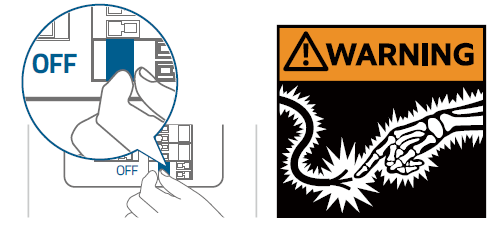
Shut Power Off at the Breaker
Risk of Electrical Shock
- Turn off the power at your circuit breaker or fuse box before continuing, consult with a licensed electrician if needed.
- Switch on/off the lights to make sure the electricity to the installation area is shut off.
- Verify that the power supply is a 100~240 VAC 50/60 Hz power source.
- Keep the breaker off at any time during the installation process.
NOTE: Do not use a dimmer switch or timer for this product.
INSTALLING YOUR FLOODLIGHT CAMERA
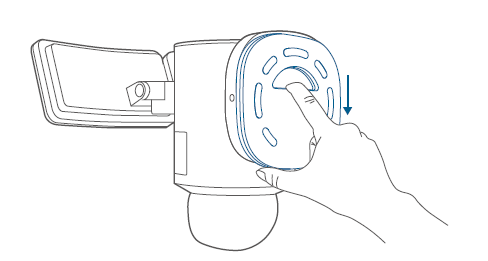
Separate the Mounting Bracket
Separate the mounting bracket from the camera and set it aside for later installation.
Select a Location
You can mount the floodlight camera vertically on a wall or hang it from a ceiling. With the power off at the breaker, remove the existing floodlight if you have one.
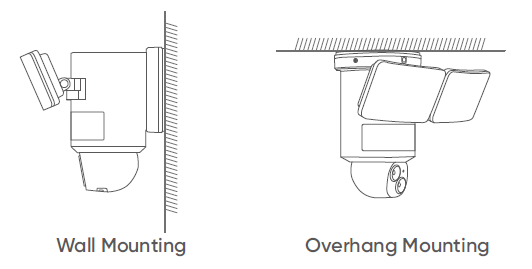
For overhang mounting, reinstall the mounting base first.
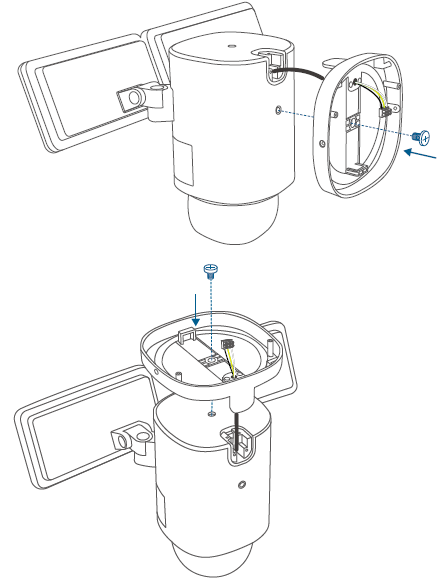
Recommended Height
We recommend mounting the camera 8 ft (2.44 m) above the ground to achieve up to 40 ft (12 m) of motion detection range.
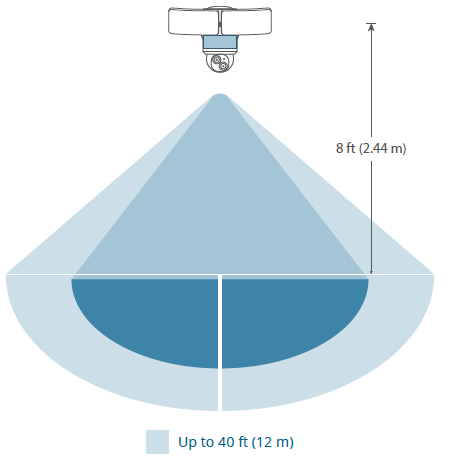
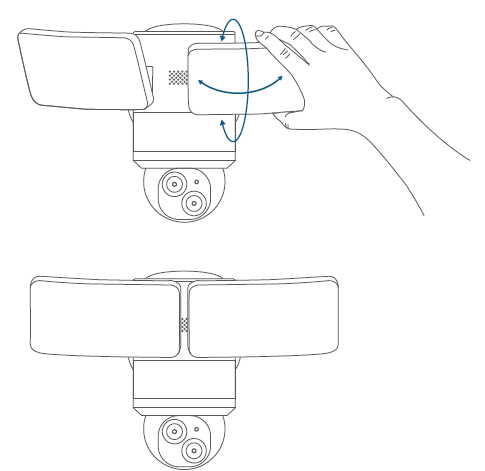
ADJUSTING THE LIGHTING ANGLE
Manually pull up and down or left and right to adjust the floodlight vertically or horizontally.
RESTORING POWER
Switch on the main circuit breaker in the house.
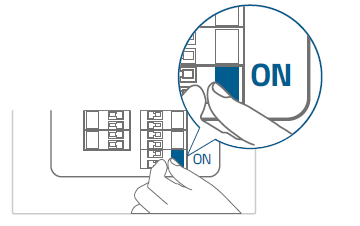
In case the floodlight camera is not powered on, switch off the circuit breaker before checking the wiring of the floodlight camera.
- Now you can access various features and change settings in the eufy Security app.
For troubleshooting, check the Help section in the eufy Security app.
LED LIGHT GUIDE
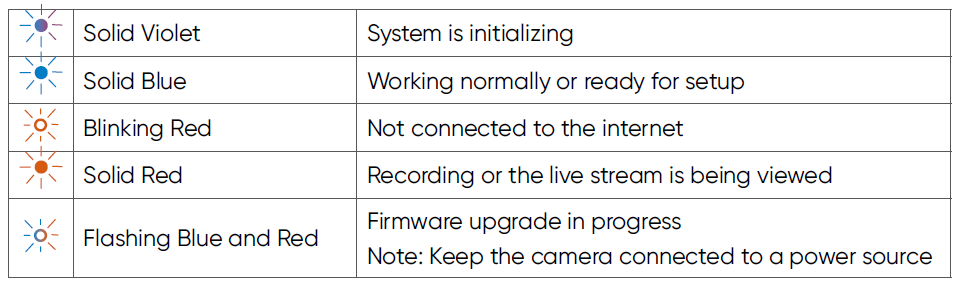
Troubleshooting Common Issues
Common Problems and Solutions
- Camera Not Connecting to Wi-Fi: Ensure your router supports Wi-Fi 6 and is within range. Restart both the camera and router, and check for firmware updates.
- Motion Detection Issues: Adjust sensitivity settings in the eufy Security app. Ensure the camera’s view is unobstructed and clean the lens if necessary.
- Floodlight Not Triggering: Verify power connection and check settings for motion-activated lighting. Reset the device if problems persist.
- Storage Errors: Use a high-quality, Class 10 microSD card (up to 128GB). For larger storage, connect to a HomeBase S380.
- No Night Vision: Check that the infrared component is not blocked and that the camera is set to night mode in the app.
Error Codes and Fixes
While specific error codes are not detailed in available documentation, most issues can be resolved by resetting the device, updating firmware, or contacting eufy Support for advanced troubleshooting.
Preventive Measures
- Regularly clean the camera lens and housing to maintain image quality.
- Ensure stable Wi-Fi connectivity and protect the camera from extreme weather.
- Update the eufy Security app and camera firmware regularly for optimal performance.
Warranty and Support
The eufy Security Floodlight Cam E340 comes with a standard manufacturer’s warranty. For support, visit the official eufy website or contact customer service via the app. Replacement parts and accessories are available through authorized retailers.
Contact Information
For technical support, visit the eufy Support website or use the in-app help feature. Phone and email support options are also listed on the official eufy site.
Pros and Cons
Advantages
- Superior Video Quality: Dual-camera system delivers both wide-angle and detailed close-up views in high resolution.
- Powerful Illumination: 2,000-lumen floodlight with customizable settings enhances nighttime security.
- Advanced AI Features: Person detection and smart alerts reduce false notifications.
- Local Storage Options: No mandatory cloud subscription; footage can be stored locally for privacy and cost savings.
- User-Friendly App: Intuitive interface with easy setup and customization.
- Weatherproof Design: IP65 rating ensures durability in harsh conditions.
Disadvantages
- Installation Complexity: May require custom mounting for non-standard electrical boxes.
- No Cloud Backup by Default: Local storage only unless paired with HomeBase S380.
- Limited Zoom: Digital zoom (up to 8×) may not match optical zoom quality.
- No Battery Option: Hardwired installation only, limiting placement flexibility.
Value for Money
The eufy Security Floodlight Cam E340 offers excellent value for users seeking a feature-rich, subscription-free outdoor security camera. Its dual-camera system, powerful lighting, and advanced AI set it apart from most competitors in its price range.
Customer Reviews and Testimonials
Users consistently praise the eufy Security Floodlight Cam E340 for its sharp video quality, easy setup, and robust build. Many highlight the convenience of local storage and the effectiveness of the motion-activated floodlight. Common compliments include clear night vision, reliable performance in various weather conditions, and the intuitive app interface.
Some users note that installation can be challenging if existing wiring or mounts are non-standard, and a few mention a desire for optical zoom instead of digital. Despite these minor drawbacks, the overall sentiment is highly positive, with most reviewers recommending the E340 for its comprehensive feature set and value.
Star ratings from major retailers and tech review sites average 4.5 out of 5, reflecting strong customer satisfaction. Testimonials frequently mention peace of mind and enhanced security as key benefits.
For those seeking a powerful, versatile, and subscription-free outdoor security camera, the eufy Security Floodlight Cam E340 is a top contender, especially for users prioritizing video quality, smart features, and local storage.
Faqs
How do I set up the eufy Security Floodlight Cam E340 for the first time?
What should I do if my eufy Security Floodlight Cam E340 does not power on after installation?
Can I adjust the lighting angle on the eufy Security Floodlight Cam E340 after installation?
Does the eufy Security Floodlight Cam E340 support expandable storage or microSD cards?
Is a licensed electrician required to install the eufy Security Floodlight Cam E340?
How can I optimize motion detection performance on the eufy Security Floodlight Cam E340?
How do I maintain and clean the eufy Security Floodlight Cam E340 to ensure optimal performance?
Can the eufy Security Floodlight Cam E340 be installed without a junction box?
Tags
More eufy manuals
- Setup: Eufy Omni E28 Cleaning System User Manual
- How to Operate: Eufy Video Baby Monitor 720P User Manual
- Setup & Features: Eufy RoboVac 11S (T2108)/11S Max (T2126)/15C Max (T2128 Owner Manual
- How To Operate: Eufy Cam 2 Pro HD Security Camera Set User Manual
- Setup & Features: Eufy RoboVac (robotic vacuum cleaner) Owner Manual
- Setup: Eufy Motion Sensor User Manual
Leave a Comment