
How to Operate: Eufy Video Baby Monitor 720P User Manual
Content
eufy Video Baby Monitor 720P
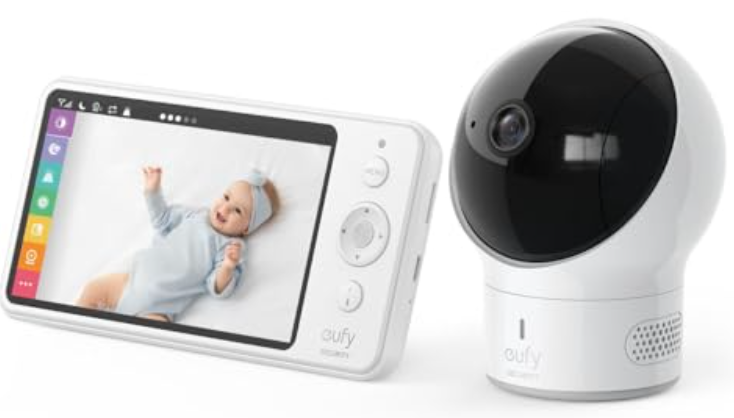
Introduction
Welcome to your essential guide to the eufy Video Baby Monitor 720P, a trusted companion for modern parents seeking peace of mind, clarity, and convenience. Designed with the needs of busy families in mind, this high-definition baby monitor delivers crystal-clear 720p video, day and night, directly to a large 5-inch parent unit display. Whether you’re in the next room or downstairs, you’ll enjoy a sharp, real-time view of your little one—no Wi-Fi required, ensuring privacy and reliability with a secure FHSS connection.
What sets the eufy Video Baby Monitor 720P apart is its robust feature set: pan, tilt, and zoom for full-room coverage, two-way audio to soothe your baby remotely, color night vision for detailed monitoring in low light, and built-in temperature and sound alerts for added reassurance The parent unit boasts an impressive battery life, so you can stay mobile throughout your home without constant recharging. The monitor is ideal for parents who value simplicity, security, and high performance without the complexity of app-based systems or subscription fees.
Priced competitively around the $200 mark, this baby monitor is widely available online and in major retailers. It’s perfect for new parents, caregivers, and anyone prioritizing a dependable, easy-to-use video monitor that works seamlessly right out of the box. Travel-friendly and user-friendly, the eufy Video Baby Monitor 720P is a smart investment for families seeking a traditional yet feature-rich monitoring solution.
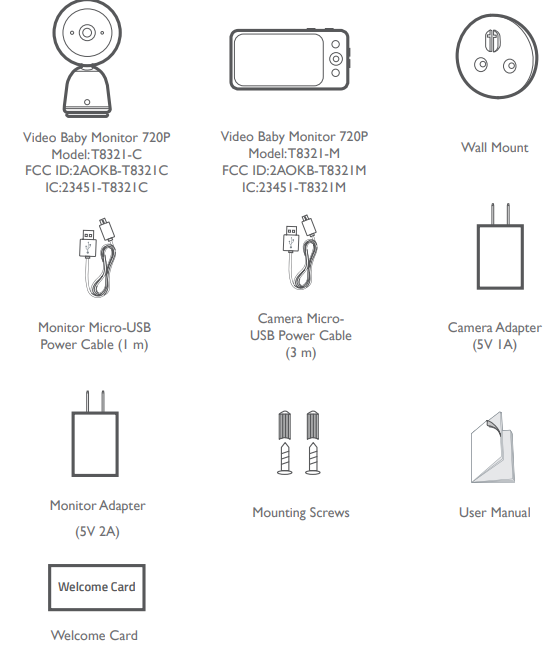
WHAT’S IN THE BOX
ADDING A NEW BABY CAMERA TO THE BABY MONITOR
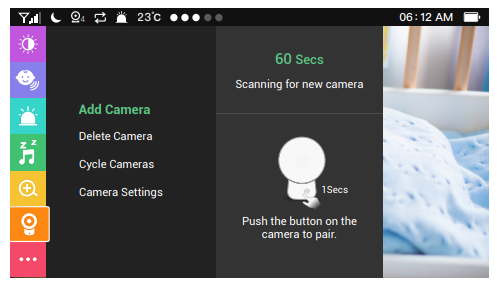
The baby camera and baby monitor are paired and ready to use right out of the box. Refer to the following steps when adding extra baby cameras or after resetting a baby camera.
- Enter menu settings, go to Camera -> Add Camera, then follow the onscreen instructions to start the pairing.
- Press and hold the pairing button on the rear of the camera for 1 second until a notification prompt is heard.
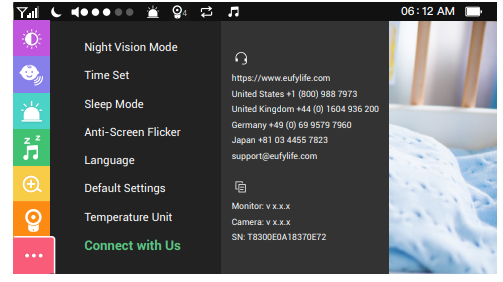
- Check the firmware version of the monitor (see image below) to make sure your baby monitor nd camera are running the same, latest firmware version.
To check whether it is the latest version:
- If the firmware version is lower than the version shown online (highlighted in green), click the firmware version to download. The downloaded file includes firmware for both T8300 and T8321 models, m. Make sure you use the T8321 firmware.
- Follow the steps in the “eufy Security Software Upgrade Guide” video or Firmware Upgrade Manual to complete the firmware upgrade.
Note: The eufy Security Spaceview baby camera can be added to the monitor. Before adding the camera, make sure the SpaceView baby camera is running the same, latest version as the monitor.
- Chrome OS is not supported for firmware upgrade.
- Before you upgrade firmware, use the provided micro USB cable (1m) to connect the device needed to your computer.
MOUNTING THE BABY CAMERA ON THE WALL
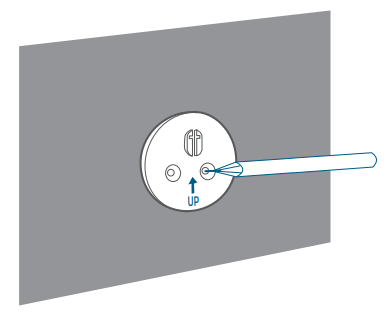
- Place the wall mount against the wall, matching the direction as UP indicates. Mark the screw holes with a pencil.
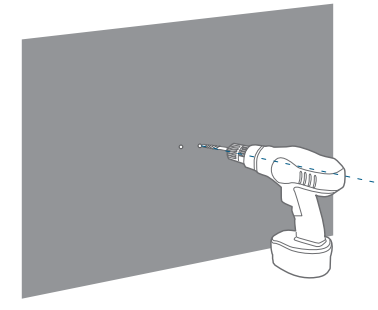
- Drill 1 '' holes into the wall and then insert anchors into the holes. Anchors are not needed for wooden walls.
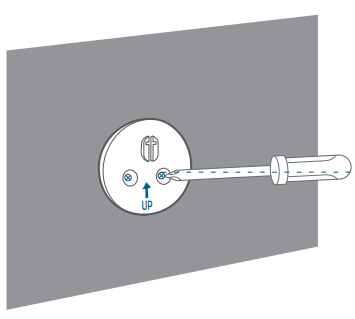
- Insert the screws through the mounting holes of the wall mount and screw into the anchors.
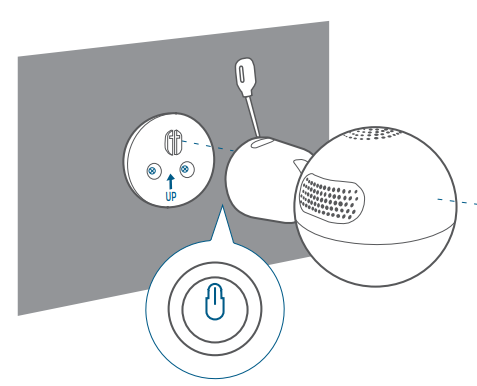
- Snap the baby camera onto the wall mount.
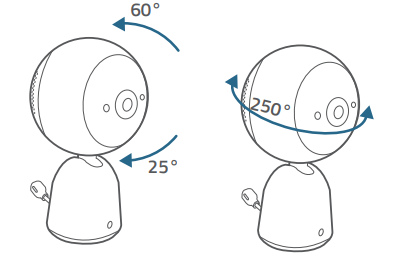
- To get the optimal viewing angle, rotate the camera (25°upwards, 60° backwards, 250° horizontally) manually, as pan and tilt functions are not supported on this model when using the navigation button.
eufy Video Baby Monitor 720P – Specifications
- Video Quality: 720p HD resolution for clear, detailed images
- Display: 5-inch high-definition parent unit screen
- Camera Features: 330° pan, 110° tilt, and zoom for comprehensive room coverage
- Night Vision: Infrared night vision for monitoring in total darkness
- Audio: Two-way communication with noise-canceling technology
- Alerts: Sound and temperature alerts to keep you informed
- Lullabies: Built-in soothing lullabies to help your baby sleep
- Connection: Secure, local FHSS (Frequency Hopping Spread Spectrum) connection—no Wi-Fi needed
- Battery Life: Long-lasting rechargeable battery—up to 8 hours with display on, 15 hours in sleep mode
- Range: Up to 1,000 feet of wireless transmission for whole-home coverage
- Interchangeable Lens: Optional wide-angle lens for expanded viewing (model dependent)
Compared to similar monitors, the eufy Video Baby Monitor 720P stands out for its large, high-quality display, robust local connection, and comprehensive pan/tilt/zoom features—advantages not always found in competitors at this price point. While some app-based monitors offer higher resolution or advanced analytics, eufy excels in simplicity, security, and reliability for everyday use
eufy Video Baby Monitor 720P – Troubleshooting
Even the most reliable devices can encounter issues. Here’s how to resolve common problems with your eufy Video Baby Monitor 720P and keep it running smoothly:
- No Signal/Image: Ensure both units are powered on and within range. Check for interference from other electronic devices.
- Poor Audio Quality: Adjust the volume on the parent unit. Ensure the microphone and speaker are unobstructed.
- Short Battery Life: Fully charge the parent unit before first use. Reduce screen brightness to extend battery life.
- Camera Not Panning/Tilting: Verify the camera is properly connected. Restart both units if necessary.
- Temperature Alerts Not Working: Ensure the temperature sensor is not blocked and the room is within the monitor’s operating range.
For persistent issues, consult the user manual or contact eufy customer support. The eufy Video Baby Monitor 720P typically comes with a limited warranty—check your purchase documentation for details. For additional help, visit the eufy support website for manuals, FAQs, and direct contact options
Preventive Measures: Regularly update firmware (if applicable), keep the units clean and dry, and store them in a safe location away from extreme temperatures.
eufy Video Baby Monitor 720P – Pros & Cons
Pros
- Crystal-Clear Video: 720p HD resolution provides sharp, detailed images of your baby, day and night[
- Large, Easy-to-Use Display: The 5-inch parent unit screen is user-friendly and portable
- Secure, Local Connection: FHSS technology ensures privacy without relying on Wi-Fi.
- Comprehensive Coverage: Pan, tilt, and zoom functions allow you to view every corner of the room.
- Long Battery Life: The parent unit lasts all day on a single charge
- Helpful Alerts: Sound and temperature alerts keep you informed of your baby’s environment
- No Subscription Fees: Unlike some competitors, there are no ongoing costs for basic features
Cons
- No App Connectivity: Cannot access the monitor remotely via smartphone
- Lower Resolution Than Some Rivals: 720p is clear, but some competitors offer 1080p or 2K video
- Limited Smart Features: Lacks advanced analytics like sleep tracking or breathing monitoring found in premium models
- Bulkier Than App-Based Monitors: The dedicated parent unit is less compact than a smartphone app.
For families seeking a straightforward, secure, and reliable baby monitor, the eufy Video Baby Monitor 720P delivers excellent value. It’s especially well-suited for parents who prioritize privacy and ease of use over app-based smart features.
eufy Video Baby Monitor 720P – Customer Reviews
Parents consistently praise the eufy Video Baby Monitor 720P for its easy setup, clear video quality, and reliable performance. Many highlight the large, bright display and long battery life as major advantages, making it convenient for all-day use around the house. The secure, local connection is frequently mentioned as a key benefit for families concerned about privacy and hacking risks associated with Wi-Fi monitors.
Common compliments include the responsive pan/tilt/zoom controls, effective night vision, and helpful sound alerts. Some users note the absence of app connectivity as a drawback, especially for those accustomed to checking in via smartphone. A few mention that while the video is sharp, it’s not quite as detailed as some higher-resolution competitors—though for most, 720p is more than sufficient for peace of mind
Star ratings are generally high, with many users awarding 4.5 out of 5 stars for reliability and value. Testimonials often recommend this monitor for parents who want a no-nonsense, dependable solution for baby monitoring. Frequent issues mentioned are rare, but when they occur, eufy’s customer support is reported to be responsive and helpful.
If you’re looking for a secure, easy-to-use baby monitor with excellent battery life and clear video, the eufy Video Baby Monitor 720P is a top choice—especially for those who prefer a traditional parent unit over app-based alternatives.
Faqs
How do I pair the camera and monitor for my eufy Video Baby Monitor 720P?
Why does my eufy Video Baby Monitor 720P display poor video quality at night?
Can I add multiple cameras to my eufy Video Baby Monitor 720P system?
How do I update the firmware on my eufy Video Baby Monitor 720P?
What should I do if my eufy Video Baby Monitor 720P has a weak signal or disconnects frequently?
How do I use the two-way talk feature on the eufy Video Baby Monitor 720P?
How often should I clean and maintain my eufy Video Baby Monitor 720P for optimal performance?
Is the eufy Video Baby Monitor 720P compatible with other eufy security cameras or smart home systems?
Tags
More eufy manuals
- How to Use: Eufy Security Floodlight Cam E340 User Manual
- How To Operate: Eufy Cam 2 Pro HD Security Camera Set User Manual
- Setup: Eufy Omni E28 Cleaning System User Manual
- Setup: Eufy Motion Sensor User Manual
- Setup & Features: Eufy RoboVac 11S (T2108)/11S Max (T2126)/15C Max (T2128 Owner Manual
- Setup: Eufy Video Doorbell 2K User Manual
Leave a Comment