
Setup: Eufy Motion Sensor User Manual
Content
Eufy Motion Sensor
Introduction
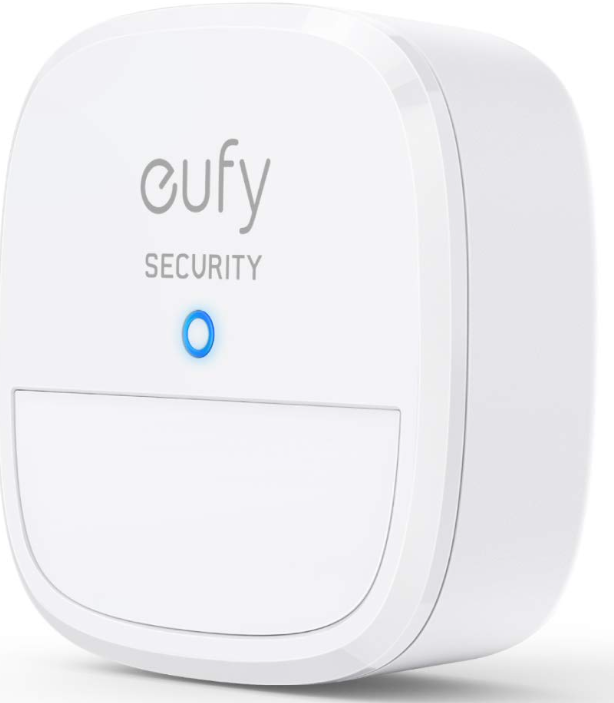
The eufy Motion Sensor is a cutting-edge security device designed to enhance home protection with its advanced features and ease of use. This sensor boasts a detection range of 30 feet and a wide field of view of 100 degrees, ensuring accurate motion detection in various environments. It is particularly beneficial for homeowners seeking to bolster their security systems, especially for those with pets, as it offers adjustable sensitivity to differentiate between human and animal movements.
Key benefits of the eufy Motion Sensor include its long battery life of up to two years, seamless integration with the eufy Security app and HomeBase, and instant app alerts for real-time notifications. The sensor is best suited for indoor use and is not waterproof, making it ideal for monitoring indoor spaces like living rooms, hallways, and bedrooms.
The target audience includes homeowners, renters, and business owners interested in enhancing their security setup. The estimated price range for the eufy Motion Sensor typically falls between $20 and $40, depending on promotions and availability. It is widely available at major retailers and online marketplaces.
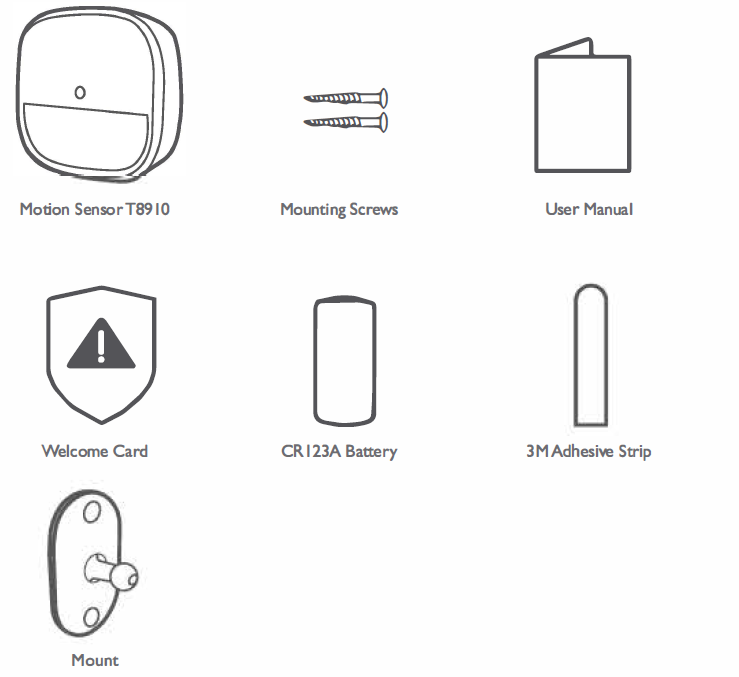
WHAT'S INCLUDED
For Motion Sensor Installation
SPECIFICATIONS
- Battery: Ix CR 123A battery
- SUB-I G Frequency range: 866-866.SMHz (for EU); 920-920.BMHz(for US)
- OperatingTemperature:-I0°C -40°C /l 4°F - 104°F
- Storage Temperature:-20°C - 60°C /-4°F - I 40°F
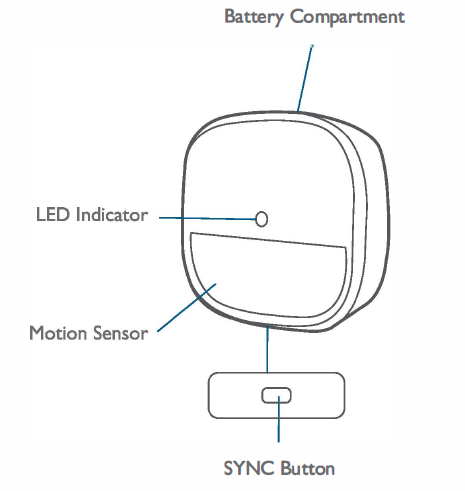
PRODUCT OVERVIEW
INSTALLING BATTERIES
Remove the battery compartment lid on the Motion Sensor and insert the provided CR 123A battery after removing the insulation film on the battery.
ADDING A MOTION SENSOR TO YOUR SYSTEM
Note: Make sure you've first completed the setup of your eufy Security HomeBase : and updated the firmware to the latest version.
Follow the onscreen instructions on the eufy Security app to add your motion sensor.
Choose Add Device, then select Motion Sensor to add it to your system.
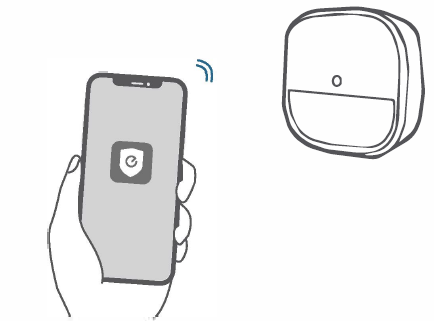
Press and hold the SYNC button for 2 seconds until the LED indicator blinks blue. The Motion Sensor is waiting to pair.
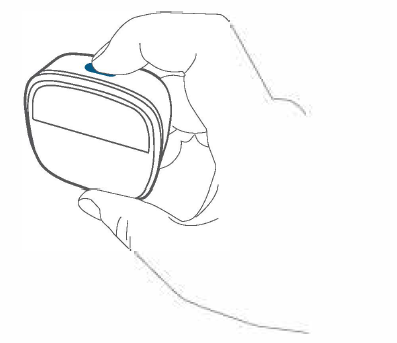
The LED indicator turns solid blue to indicate the pairing is successful.

USING THE MOTION SENSOR
After the motion sensor is installed, the alarm will be triggered once movement is detected within the motion sensor's coverage area.
When the motion sensor is working, its LED indicator shows as below:

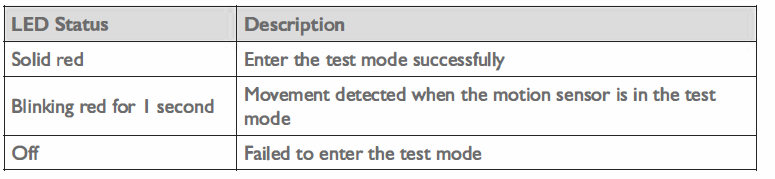
REPLACING THE BATTERY
When the motion sensor's battery is low, the LED indicator shows as below. You should replace the battery to keep the motion sensor working.

Troubleshooting the eufy Motion Sensor
Below are common issues and solutions for the eufy Motion Sensor:
- No Power: Ensure the sensor is properly powered, and batteries are not depleted. Replace batteries if necessary.
- Frequent False Alerts: Adjust the sensitivity settings to reduce false alarms. Check for any obstructions or animals in the detection area.
- Connection Issues: Ensure the sensor is properly linked to the HomeBase and eufy Security app. Restart the HomeBase if necessary.
The eufy Motion Sensor is backed by a warranty. For further assistance, contact the Eufy support team at Eufy Support.
Warranty
12-month limited warranty
Pros and Cons of the eufy Motion Sensor
Pros:
- Long Battery Life: Up to two years of battery life reduces maintenance and hassle.
- Adjustable Sensitivity: Helps differentiate between human and pet movements, reducing false alerts.
- Seamless Integration: Works well with other eufy Security products and the eufy Security app.
Cons:
- Non-Waterproof: Not suitable for outdoor use.
- No Voice Control: Does not support voice assistants like Alexa or Google Assistant.
Customer Reviews and Feedback
Customers praise the eufy Motion Sensor for its ease of setup, long battery life, and effective motion detection. Some users report occasional connectivity issues, but these are generally resolved with device restarts. The sensor often receives a high rating of around 4.5 out of 5 stars, with many users recommending it for its value and performance.
Common testimonials highlight the sensor's ability to provide peace of mind and enhance home security without unnecessary complexity. However, some users wish for waterproofing and more advanced smart home integration features.
Faqs
How do I set up the eufy Motion Sensor with my HomeBase Professional?
What should I do if my eufy Motion Sensor is not detecting motion or sending alerts?
Can the eufy Motion Sensor differentiate between pets and humans?
Is the eufy Motion Sensor compatible with all eufy cameras and security systems?
How can I optimize the detection range and sensitivity of my eufy Motion Sensor?
What is the best way to maintain and care for the eufy Motion Sensor for long-term use?
Can I use multiple eufy Motion Sensors together to cover a larger area?
How do I set up automation rules using the eufy Motion Sensor with other smart devices?
Tags
More eufy manuals
- How To Operate: Eufy Cam 2 Pro HD Security Camera Set User Manual
- Setup: Eufy Video Doorbell 2K User Manual
- How to Operate: Eufy Video Baby Monitor 720P User Manual
- How to Use: Eufy Cam 2C Pro Wire-Free 2K Security Camera Set Instruction Manual
- How to Use: Eufy Security Floodlight Cam E340 User Manual
- Setup & Usage: Eufy X10 Pro Omni Robot Vacuum User Manual
Leave a Comment