
How to Use: Eufy Cam 2C Pro Wire-Free 2K Security Camera Set Instruction Manual
Content
Eufy Cam 2C Pro Wire-Free 2K Security Camera Set
Introduction
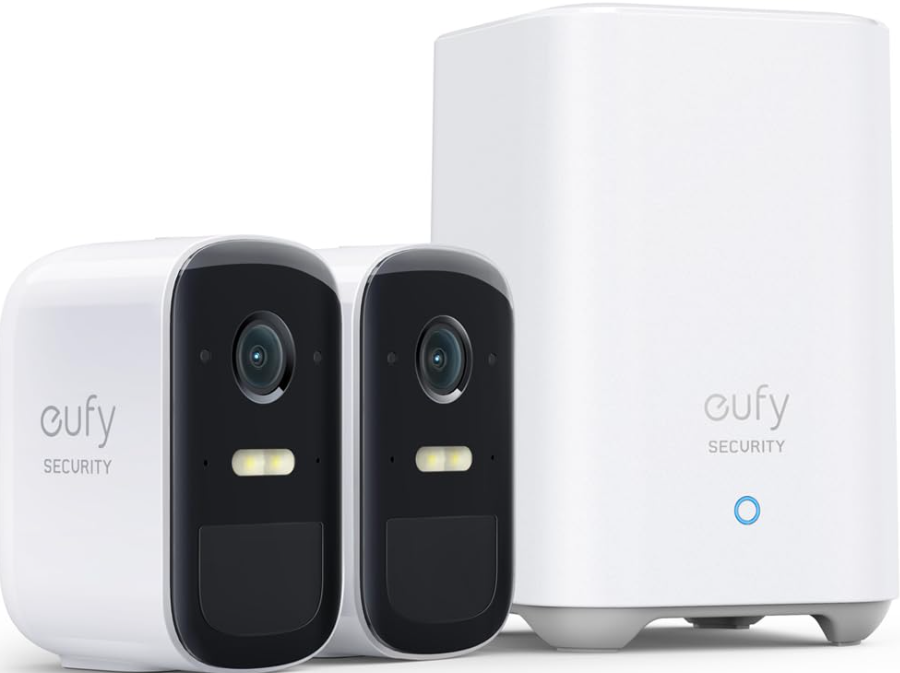
Experience advanced security with the eufy Cam 2C Pro Wire-Free 2K Security Camera Set, designed for comprehensive home surveillance. This kit offers high-resolution 2K video capture, a robust 180-day battery life, and no monthly subscription fees. Key features include a built-in spotlight, two-way audio, and IP67 weatherproofing, making it ideal for both indoor and outdoor use. The eufy Cam 2C Pro is perfect for homeowners seeking reliable, wire-free security solutions.
The target audience includes homeowners looking for easy-to-install, high-quality security cameras. Use cases range from monitoring home entrances to ensuring backyard security. The estimated price range is around $150 to $300, depending on the kit configuration, and it is widely available at major retailers.
Specifications of eufy Cam 2C Pro Wire-Free 2K Security Camera Set
The eufy Cam 2C Pro stands out with its impressive technical specifications:
- Resolution: 2K for clear video quality
- Battery Life: Up to 180 days on a single charge
- Field of View: 135 degrees for wide coverage
- Weatherproofing: IP67 rated for durability
- Connectivity: 2.4GHz Wi-Fi for stable connections
- Additional Features: Built-in spotlight, two-way audio, human detection, facial detection, and smart image enhancement
Compared to similar products, the eufy Cam 2C Pro offers superior resolution and advanced AI features without a monthly fee.
GETTING STARTED
For HomeBase 2 installation

For eufyCam 2C Pro installation

OVERVIEW
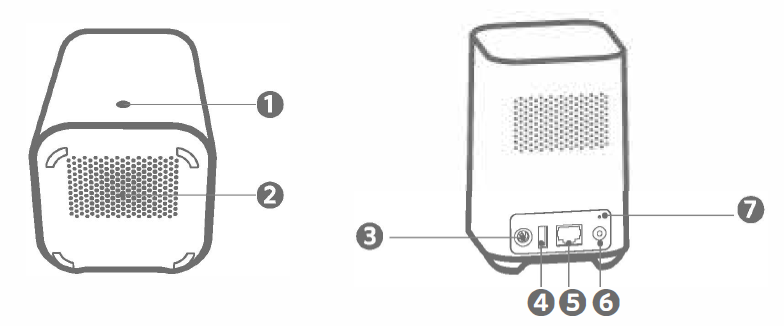
HomeBase 2
- Status LED
- Speaker
- Power port
- USB port
- Ethernet port
- SYNC/ALARM OFF button
- Reset button
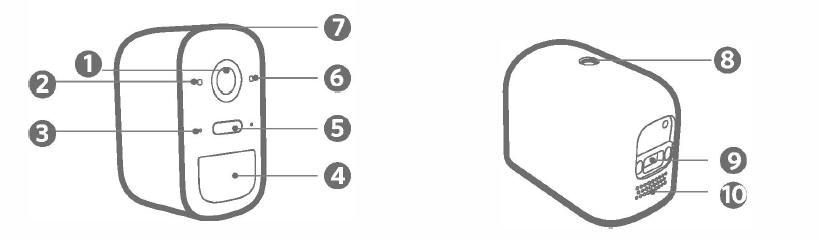
eufyCam 2C Pro
- Lens
- Light sensor
- Microphone
- Motion sensor
- Spotlight
- Status LED
- SYNC button
- Mounting hole
CONNECTING
Connect the HomeBase 2 to the Internet
Power on the HomeBase 2, then use the Ethernet cable provided to connect the HomeBase 2 to your home router.
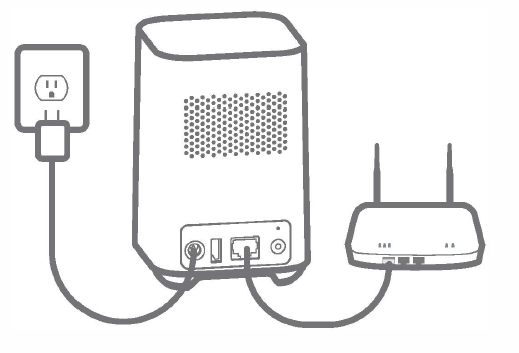
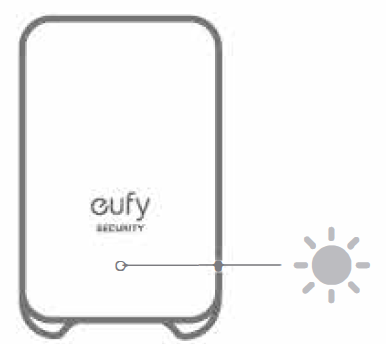
The LED indicator turns blue (this may take up to one minute) when HomeBase 2 is ready for setup.
CHARGING
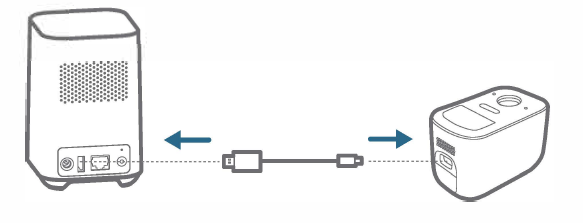
Charge eufyCam 2C Pro
Method 1
Method 2
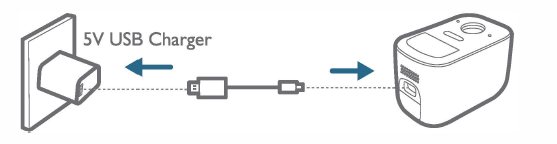
- LED indication
- Charging: Steady blue
- Fully charged: Off
- Charging time:5 hours
Warranty
I2-month limited warranty
Troubleshooting and Support for eufy Cam 2C Pro
Common issues and solutions for the eufy Cam 2C Pro include:
- Connection Issues: Restart the camera and HomeBase, then try reconnecting.
- Low Battery Life: Adjust motion detection sensitivity or use a solar panel for charging.
- Preventive Measures: Regularly update firmware and ensure proper placement.
For further assistance, eufy Security offers comprehensive support through their official website and customer service channels.
Pros & Cons of eufy Cam 2C Pro Wire-Free 2K Security Camera Set
Pros
- High Resolution: Offers crisp 2K video quality.
- No Monthly Fees: Cost-effective for long-term use.
- Advanced AI Features: Includes human detection and facial detection.
- Weatherproof: IP67 rating ensures durability in harsh conditions.
Cons
- Higher Upfront Cost: May be more expensive than similar models.
- Resolution Limitation with HomeKit: Only supports 1080p with HomeKit integration.
Customer Reviews and Feedback for eufy Cam 2C Pro
Customers praise the **eufy Cam 2C Pro** for its ease of installation, high-quality video, and reliable motion detection. Common complaints include the higher upfront cost and limited integration with some smart home systems. Overall, users rate it highly for its value and performance, with many recommending it for its balance of features and cost.
Star Rating: 4.5/5 stars based on user testimonials.
Faqs
How do I set up the eufy Cam 2C Pro Wire-Free 2K Security Camera Set for the first time?
What should I do if the eufy Cam 2C Pro Wire-Free 2K Security Camera Set is not syncing with the HomeBase 2?
Can the eufy Cam 2C Pro Wire-Free 2K Security Camera Set be used without a monthly subscription?
How do I optimize the placement of my eufy Cam 2C Pro Wire-Free 2K Security Camera Set for best wireless signal and motion detection?
What are the key features of the eufy Cam 2C Pro Wire-Free 2K Security Camera Set that enhance home security?
How do I troubleshoot poor video quality or connectivity issues with the eufy Cam 2C Pro Wire-Free 2K Security Camera Set?
Is the eufy Cam 2C Pro Wire-Free 2K Security Camera Set compatible with smart home systems like Alexa or Google Assistant?
How often should I charge and maintain the eufy Cam 2C Pro Wire-Free 2K Security Camera Set batteries for optimal performance?
More eufy manuals
Leave a Comment