
How to Operate: Eufy Security Indoor Cam C220 User Manual
Content
Eufy Security Indoor Cam C220
Introduction
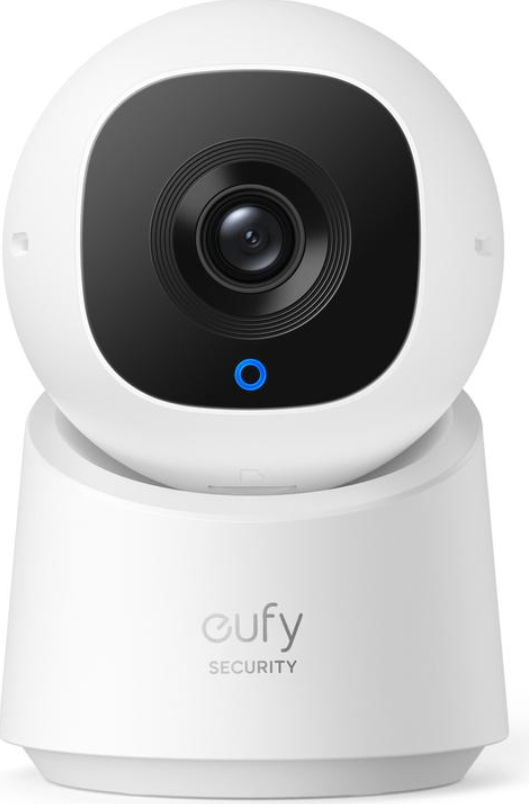
The eufy Security Indoor Cam C220 is a cutting-edge indoor security camera designed to provide comprehensive home surveillance with advanced features tailored for modern smart homes. Featuring 2K resolution video clarity and 360° pan and tilt capabilities, this camera ensures no blind spots within your monitored space, offering crystal-clear visuals whether day or night. Its AI-powered human detection and motion tracking enable precise monitoring by automatically following activity, reducing false alerts, and enhancing security reliability.
This camera excels with its local storage options, supporting microSD cards up to 128 GB, meaning no monthly cloud fees and greater privacy control. Integrated two-way audio allows real-time communication with family members or visitors, while compatibility with Alexa and Google Assistant makes voice control and smart home integration effortless.
Designed for homeowners, parents, pet owners, and small office managers seeking affordable yet premium indoor surveillance, the eufy Security Indoor Cam C220 suits diverse use cases such as monitoring children, pets, or general home security. It typically retails in the range of $50 to $70 and is widely available through eufy’s official website, major online retailers, and electronics stores.
What's in the Box
Specifications and Key Features of eufy Security Indoor Cam C220
- Video Resolution: 2K (2560×1440) QHD for highly detailed footage
- Field of View: 100° lens with 360° horizontal pan and 96° vertical tilt for full-room coverage
- AI Motion Detection: Advanced human figure recognition and AI tracking to follow movement automatically
- Storage Options: Supports local microSD card storage (up to 128 GB) and Homebase 3 compatibility for expanded storage
- Night Vision: Infrared and color night vision with illumination up to 10 meters
- Two-Way Audio: Built-in microphone and speaker for real-time communication
- Smart Home Integration: Works with Amazon Alexa and Google Assistant for voice commands
- Privacy Features: Privacy mode with preset camera lens direction to disable recording instantly
- Connectivity: Dual-band Wi-Fi (2.4GHz/5GHz)
- Dimensions: Compact design facilitating versatile placement
- Power: USB-C powered with included adapter
Compared to similar indoor cameras like the original eufy Indoor Cam E or other budget models, the C220 offers superior resolution and a wider pan/tilt range, making it a more versatile option for users needing detailed, panoramic indoor security coverage.
Overview
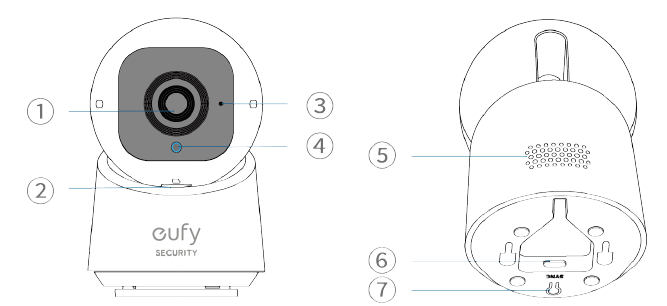
- Lens
- microSD Card Slot
- Insert a microSD card* (not included) to store recordings
Use at least a Class 10 microSD card with a maximum of 128GB.
- Insert a microSD card* (not included) to store recordings
- Microphone
- LED Indicator
- Speaker
- Power Input
- SYNC Button
Setting up the System
Download and install the eufy Security app, then sign up or create an account.

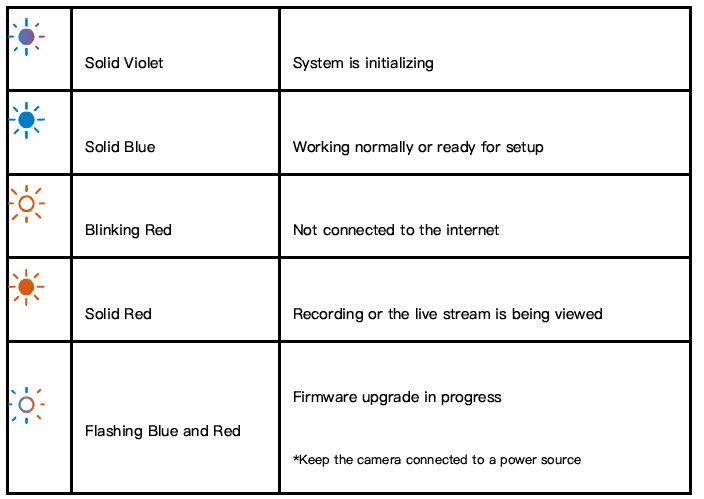
Connect the camera to a power source and wait until the status LED turns solid blue.
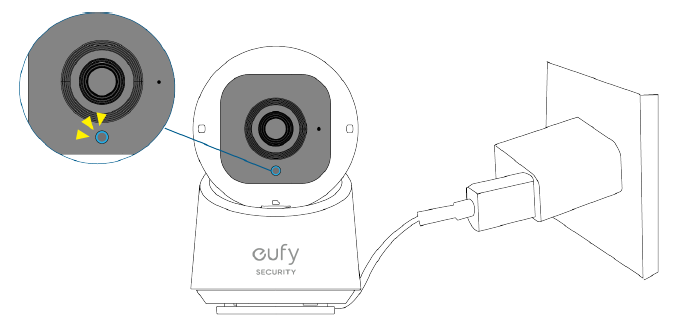
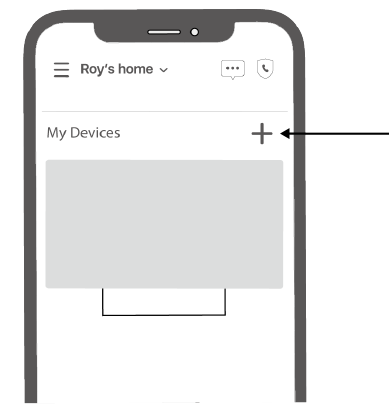
Tap + in the app and follow the in-app instructions to add your camera.
LED Light Guide
Installing your Camera
Choose a Location
The camera can be placed on a table or shelf, or mounted on a wall or ceiling. Choose a location and height that achieves your desired view and is within reach of a power outlet.
Keep the camera at least 10 in (25 cm) away from any objects or walls to avoid infrared reflections that can impact night vision performance.
Camera Field of View
On a Table or Shelf
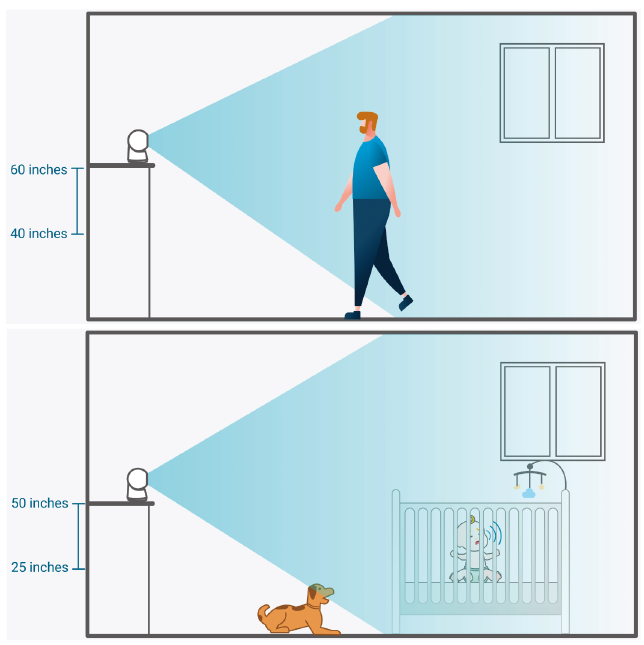
If you do not have children or pets to monitor, you can place your camera at a height of 40-60 in (100-150 cm). If you do have children or pets to monitor, you can place your camera at a height of 25-50 in (60-120 cm).
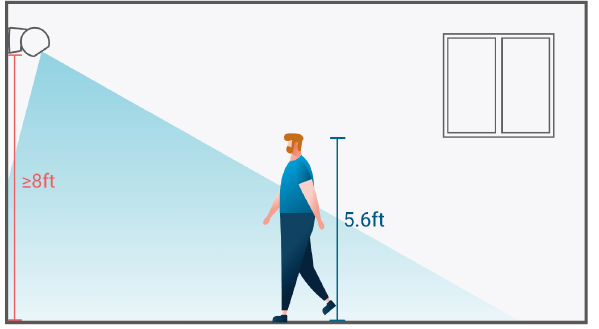
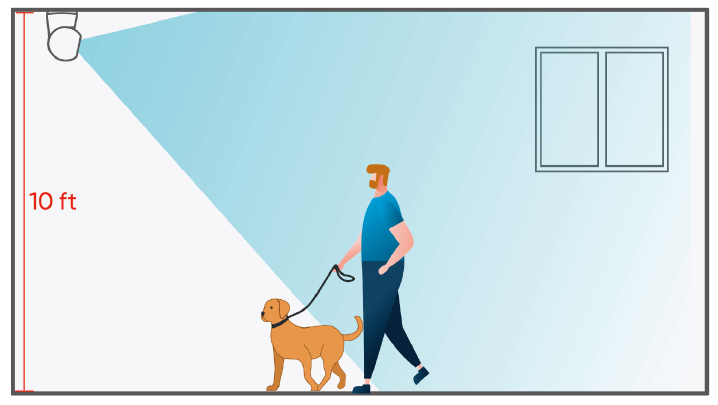
For the best results, we recommend mounting your camera on a side wall that is at least 8 ft (2.4 m) high.
On the Ceiling
If you must install it on the ceiling, we recommend mounting it more than 10 ft (3 m) above the floor and as close to the wall as possible to ensure that the monitored objects are clearly visible.
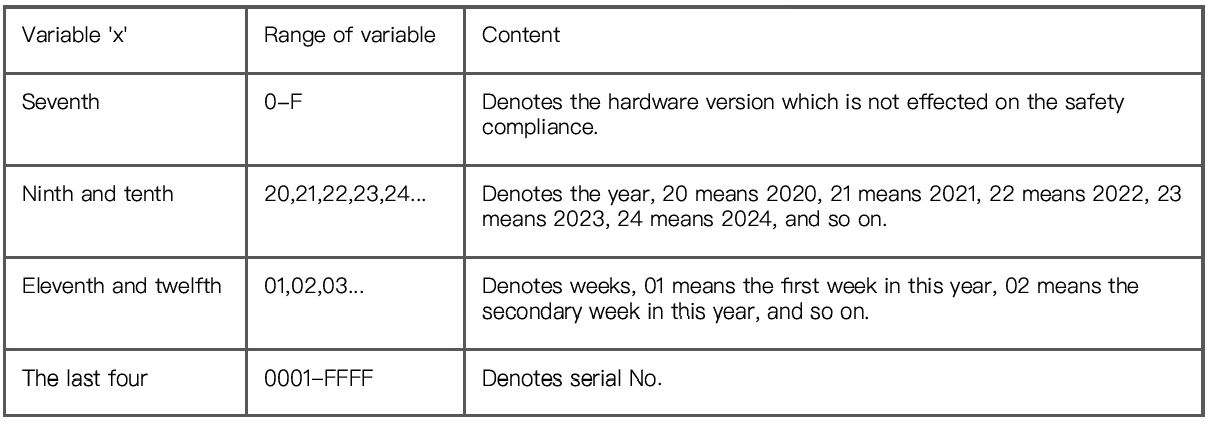
Note: The 'x' of SN Code: xxxxxxxxxxxxxxxx is a variable, see table below.
Troubleshooting Common Issues with the eufy Security Indoor Cam C220
- Camera Not Connecting to Wi-Fi: Ensure correct Wi-Fi password entry; reboot router and camera; place camera within range of router.
- Motion Detection Not Triggering: Check AI detection settings in the eufy Security app; update firmware; adjust activity zones to optimize alerts.
- Video Quality is Poor or Lagging: Switch streaming resolution in app settings; verify a strong Wi-Fi signal; close background apps competing for bandwidth.
- Two-Way Audio Not Working: Confirm microphone and speaker permissions in the app; try restarting the camera and mobile device.
- Error Codes: Specific error codes appear in the app if storage or connection issues occur; refer to eufy support for detailed fixes.
Preventive measures include regularly updating the camera’s firmware, maintaining a stable Wi-Fi environment, and configuring motion zones to avoid false alarms. The product comes with a standard one-year warranty covering defects, and eufy offers customer support via their official website and helpdesk.
For assistance, contact eufy Security Support.
Pros and Cons of the eufy Security Indoor Cam C220
Pros
- High-Resolution 2K Video: Sharper image quality than many competitors in the same price range ensures detailed monitoring.
- Comprehensive 360° Pan and Tilt: Eliminates blind spots, allowing full-room coverage without multiple cameras.
- AI-Powered Human Detection and Tracking: Reduces false alerts by focusing on significant movement.
- No Monthly Fees: Local storage option avoids recurring cloud subscription costs.
- Smart Home Compatibility: Seamless integration with Alexa and Google Assistant enhances usability.
Cons
- Limited Advanced AI Features: Unlike some higher-end models, it does not yet support pet detection or HomeKit integration.
- Requires Stable Wi-Fi: Performance depends on a reliable network for lag-free streaming.
- Limited Cloud Storage: Optional cloud backup requires a subscription; local storage is preferred but has capacity limits.
Overall, the eufy Security Indoor Cam C220 offers excellent value with strong features for its price, particularly for users prioritizing privacy and local storage.
Customer Reviews and Ratings for eufy Security Indoor Cam C220
The eufy Security Indoor Cam C220 generally receives positive feedback from users, with many praising its sharp 2K video quality, effective AI tracking, and smooth 360° pan/tilt functionality. Customers appreciate the user-friendly eufy Security app and the convenience of two-way audio for interacting remotely with family or pets.
Common complaints include occasional connectivity issues in areas with weak Wi-Fi and the absence of advanced AI features like pet detection found in pricier models. Some users also note that cloud storage requires an additional subscription, which contrasts with the strong appeal of local storage.
Star ratings typically average around 4 to 4.5 out of 5 stars. Several testimonials recommend the camera for indoor home security, baby monitoring, and pet surveillance due to its clear footage and responsive alerts.
Faqs
How do I set up eufy Security Indoor Cam C220 for the first time?
What should I do if eufy Security Indoor Cam C220 is not working properly?
Can I use eufy Security Indoor Cam C220 with voice assistants like Alexa or Google Assistant?
What are the key features that make eufy Security Indoor Cam C220 different?
How often should I maintain eufy Security Indoor Cam C220?
Can I use eufy Security Indoor Cam C220 without a Wi-Fi connection?
How do I reset the eufy Security Indoor Cam C220 to its factory settings?
Is the eufy Security Indoor Cam C220 compatible with both iOS and Android devices?
Tags
More eufy manuals
- Setup & Usage: Eufy X10 Pro Omni Robot Vacuum User Manual
- Eufy Robot Vacuum Cleaner G40+ User Guide
- How to Use: Eufy Cam 2C Pro Wire-Free 2K Security Camera Set Instruction Manual
- Eufy RoboVac Cleaner T2108Y11 Instruction Manual | Specs
- Setup: Eufy Video Doorbell 2K User Manual
- Eufy RoboVac 11S Cleaner T2108Y11 Instruction Manual
Leave a Comment