
Setup & Usage: Eufy X10 Pro Omni Robot Vacuum User Manual
Content
eufy X10 Pro Omni Robot Vacuum
Introduction
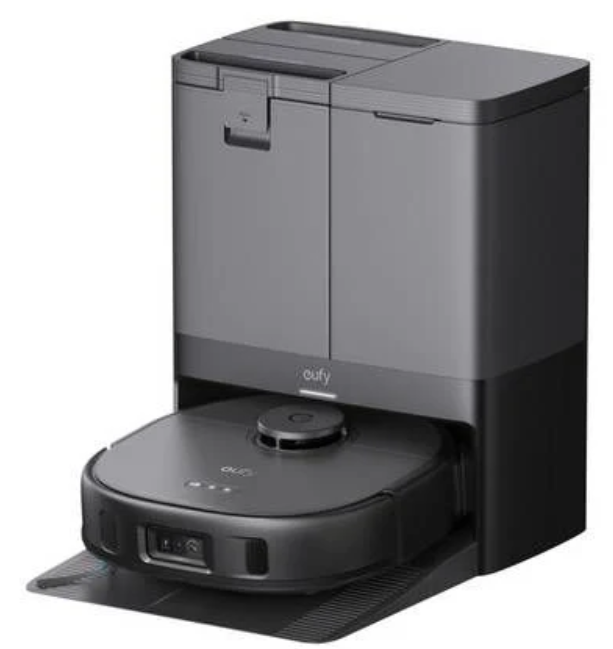
The eufy X10 Pro Omni Robot Vacuum is an advanced robotic cleaning solution designed to deliver superior vacuuming and mopping performance for modern homes. Featuring powerful 8,000 Pa suction and a fully integrated mop system, this flagship robot vacuum mop combo offers a hands-free cleaning experience with smart AI navigation and obstacle avoidance technology. Its unique self-emptying base station not only empties debris automatically but also washes and dries the mop pads, minimizing manual maintenance.
Ideal for busy households, pet owners, and technology enthusiasts, the eufy X10 Pro Omni excels on various floor types,, including hardwood, tiles, carpets, and vinyl. The robot utilizes LiDAR navigation, a single camera with LED sensors, and AI to recognize and avoid over 100 common household obstacles, ensuring efficient coverage even in complex layouts. Additional features include carpet boost settings, multi-level mapping, virtual barriers, and remote live video monitoring for pet owners.
With a sleek D-shaped design measuring just 11.35cm in height and weighing 4.56kg, this robot vacuum integrates seamlessly into your home environment. The package typically retails in the $700 to $900 range, positioning it competitively among premium robot vacuums with comparable features. Available from major electronics retailers and online stores, the eufy X10 Pro Omni offers a robust, smart cleaning solution tailored for comprehensive floor care with minimal user effort.
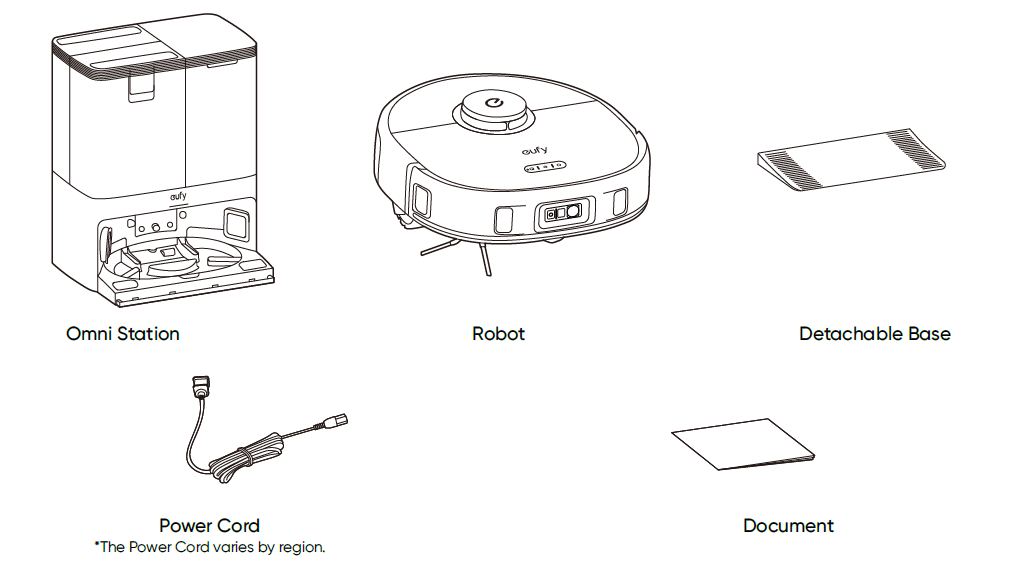
What's in the box
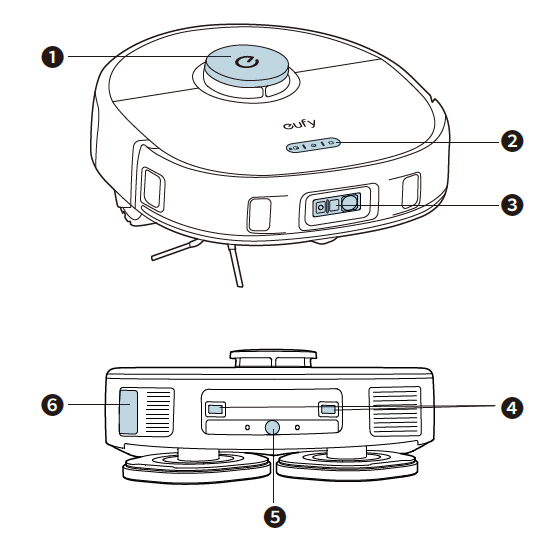
Overview
- Navigation Lidar
- Buttons
- RGB Camera+ LED Light
- Charging Contact Pins (×2)
- Water Injection Port
- Dust Collection Port
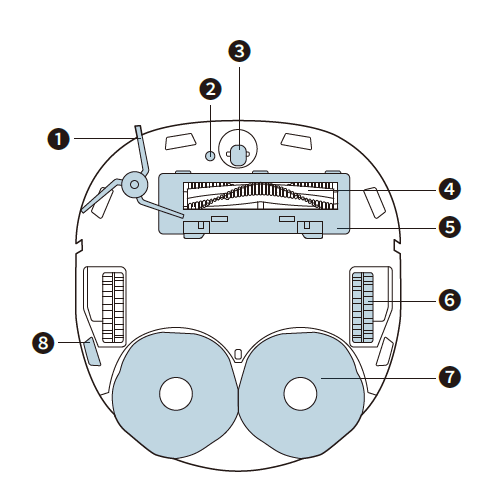
- Side Brush
- Carpet Detection Sensor
- Swivel Wheel
- Anti-DetanglingRolling Brush
- Brush Guard
- Wheels (×2)
- Detachable Mopping Pads (×2)
- Drop Sensors (×6)
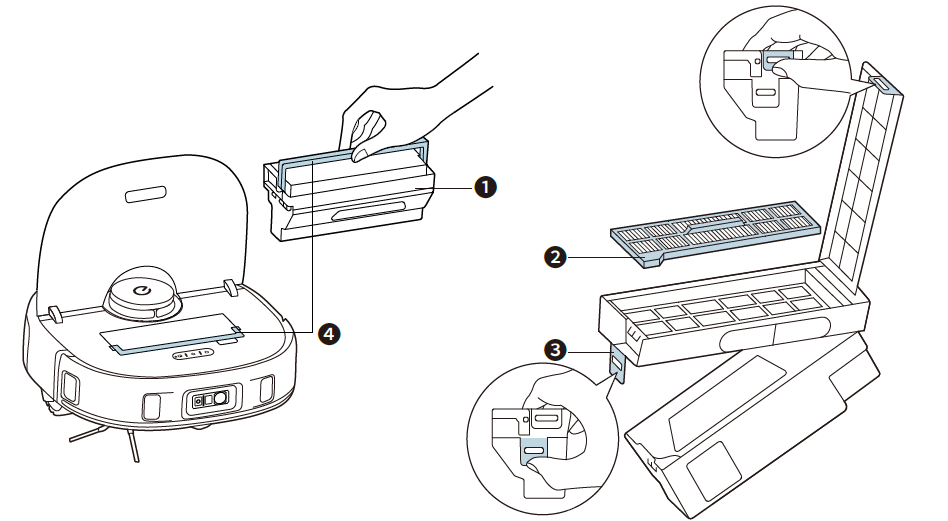
- Dust Box
- Filter
- Release Latch
- Handle
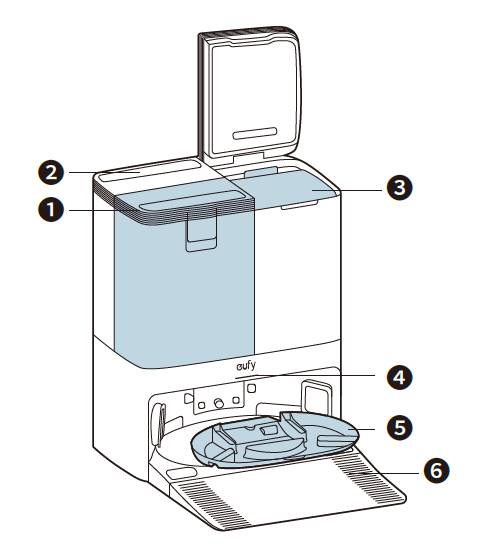
- Clean Water Tank
- Dirty Water Tank
- Disposable Dust Bag
- LED Indicator
- Detachable Mopping Pads Cleaning Tray
- Detachable Base
Install the Omni Station
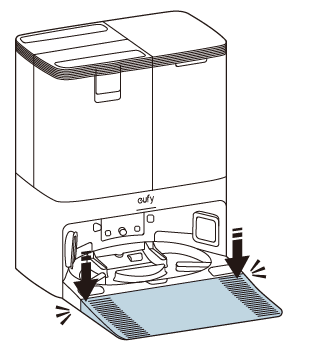
- Install the detachable base by pressing down both sides of it firmly.
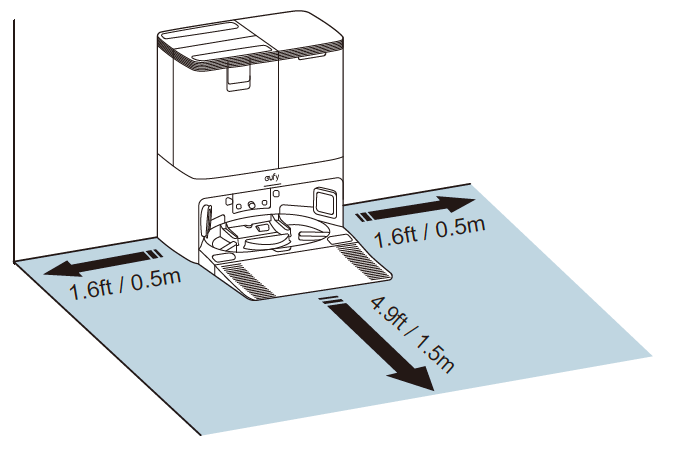
- Place the Omni Station in a location that has a strong Wi-Fi signal and that RoboVac can easily access. It is recommended to place it against a wall and on a hard, level surface.
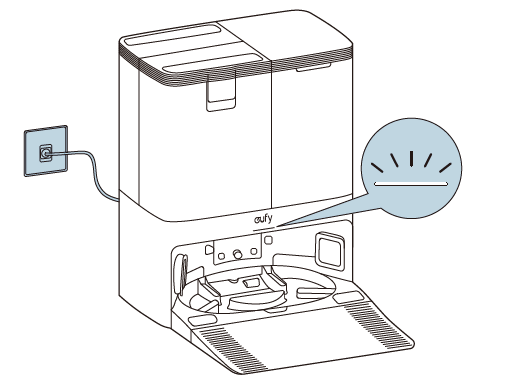
- Connect the power cord to the Omni Station and a wall outlet.
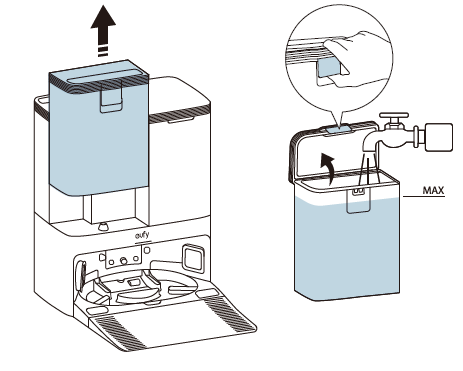
When the Omni Station connects to AC power, the LED indicator on the Omni Station is steady white. Always keep the Omni Station plugged in to ensure the infrared connection between RoboVac and the Omni Station is successful; otherwise,, RoboVac will not automatically return to it. - Take out the clean water tank. Add clean water until it reaches the MAX water line.
- Please do not add hot water to the tank to avoid shortening its service life.
- Only use the cleaning solution designated by eufy; otherwise,, it may affect the cleaning effect and damage the device.
Cleaning and Maintenance
- Prior to cleaning and maintaining, power off the device and unplug the power adapter. Any other servicing should be performed by an authorized service representative.
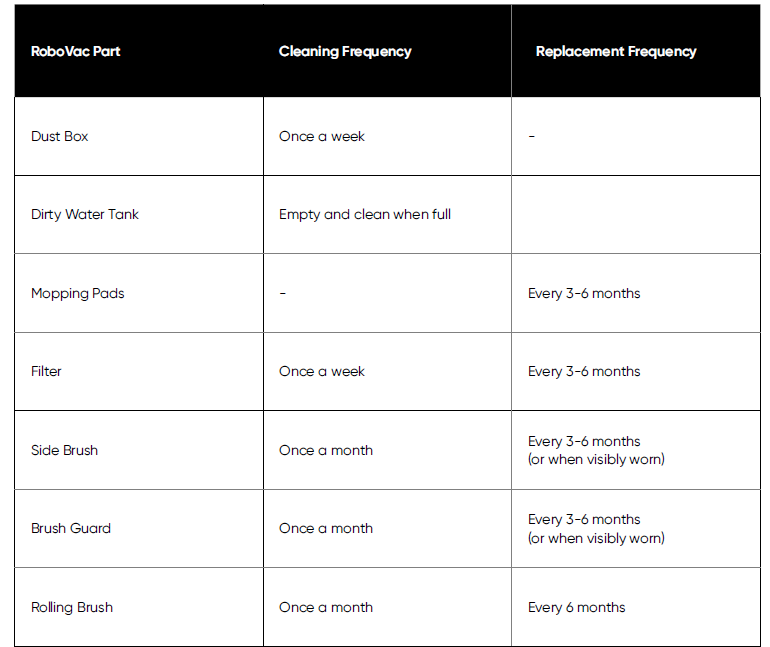
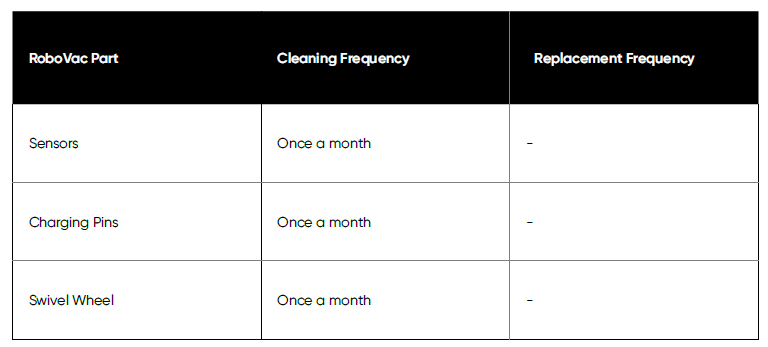
- For optimal performance, follow the instructions below to clean and maintain regularly. The cleaning and replacement frequency will depend on your usage habits.
- Recommended Cleaning and Replacement Frequency
Troubleshooting
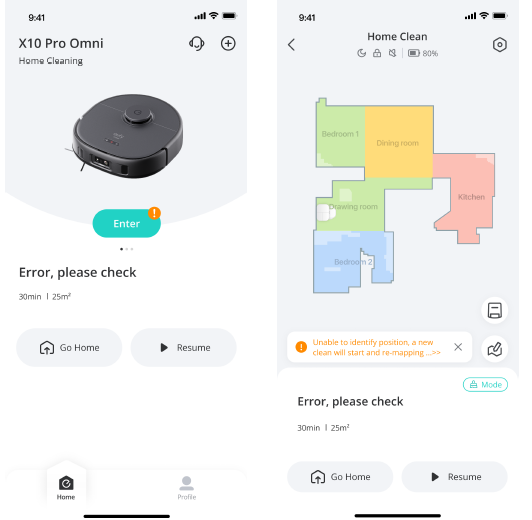
When an error occurs, please refer to the in-app instructions for solutions.
- You can also click the link below to view our FAQs for a quick fix.
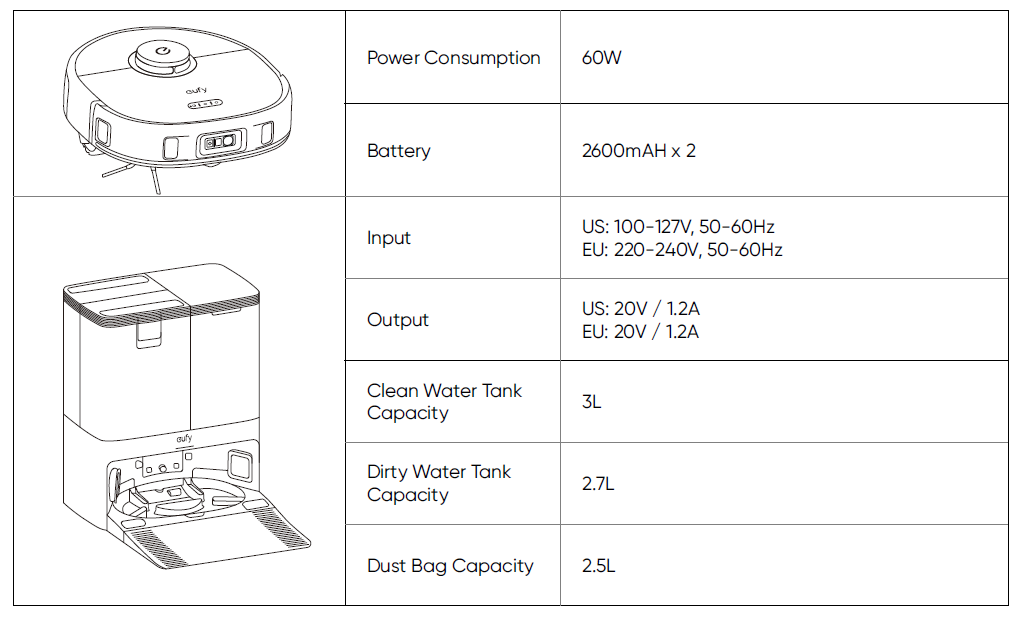
Specifications
Warranty
The product's warranty period is determined by the seller and may vary according to different sales channels and local legal requirements, but the minimum warranty period shall not be less than 12 months.
Note: The 12-month warranty covers the main unit (including the battery) and the Omni Station, not applicable to consumables like rolling brush, side brush, mopping pads, etc.
This limited warranty provided by the manufacturer does in no way affect a potential statutory warranty provided by law.
Hereby, Anker Innovations Limited declares that this device complies with The Product Security and Telecommunications Infrastructure (Security Requirements for Relevant Connectable Products) Regulations 2023. For the Statement of Compliance, visit the website
Pros & Cons of the eufy X10 Pro Omni Robot Vacuum
Pros
- Powerful Suction and Mopping: Offers 8,000 Pa suction with dynamic mop capabilities,, es including carpet lift to prevent wetting carpets.
- Self-Cleaning Base Station: Automatically empties debris, washes, and dries mop pads, reducing manual upkeep significantly.
- Advanced AI Obstacle Avoidance: Recognizes and navigates around 100+ household objects,, including pet hair and small items.
- Multi-Level Mapping and Virtual Barriers: Supports complex home layouts with customizable no-go zones via app control.
- Long Battery Life: Up to 210 minutes of cleaning per charge, suitable for large homes.
Cons
- Mopping Performance: While effective for light cleaning, the mopping function may require occasional manual touch-ups for stubborn stains.
- Price Point: Positioned at a premium price, which might be high compared to simpler models lacking advanced features.
- Bin Capacity: The robot’s onboard dust bin is 410ml, which is average and requires periodic emptying despite the self-empty station.
- Cleaning Solution CostThe : The Proprietary cleaning solution is relatively expensive, though it is diluted for longer use.
- App Complexity: Some users report a learning curve with app navigation and customization features.
Compared to alternatives like the Roborock S7+ or iRobot Roomba Combo j7+, the eufy X10 Pro Omni offers a compelling balance of advanced obstacle avoidance and automated maintenance at a competitive price, making it a strong contender for tech-savvy users seeking comprehensive smart cleaning.
Customer Reviews of the eufy X10 Pro Omni Robot Vacuum
The eufy X10 Pro Omni Robot Vacuum has received an overall positive reception from users, with an average rating of 4.5 out of 5 stars across major retail platforms. Customers praise its powerful suction, effective obstacle avoidance, and the convenience of the self-emptying and self-cleaning station, which dramatically reduces maintenance efforts.
Many users highlight the robot’s ability to handle pet hair and navigate cluttered environments intelligently. However, some reviews mention that the mopping function is best for maintenance cleaning rather than deep scrubbing, requiring occasional manual intervention. A few users also note the higher initial cost but agree that the value for money is justified by the feature set and performance.
Common complaints include occasional app connectivity issues and the relatively small onboard dust bin, but these are generally outweighed by the overall functionality. Most customers recommend the eufy X10 Pro Omni to those seeking a premium robot vacuum and mop combo with smart features and automated maintenance advantages.
More eufy manuals
- How to Use: Eufy Cam 2C Pro Wire-Free 2K Security Camera Set Instruction Manual
- How to Operate: Eufy Security Indoor Cam C220 User Manual
- Setup: Eufy Video Doorbell 2K User Manual
- Eufy Robot Vacuum Cleaner G40+ User Guide
- Setup: Eufy Motion Sensor User Manual
- Eufy RoboVac Cleaner T2108Y11 Instruction Manual | Specs
Leave a Comment