
How To Operate: Eufy Cam 2 Pro HD Security Camera Set User Manual
Content
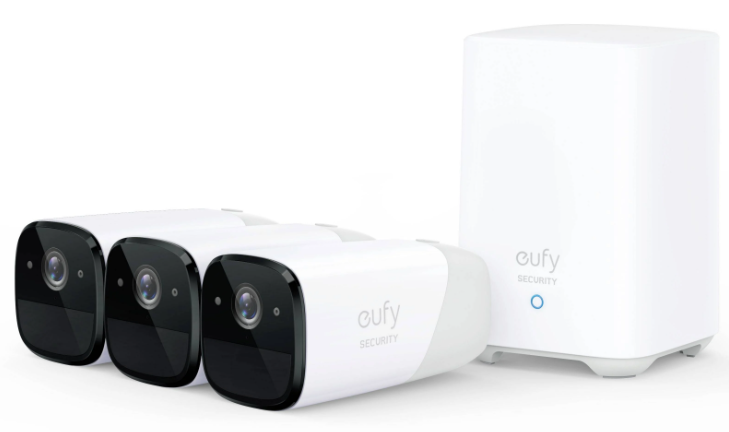
eufy Cam 2 Pro HD Security Camera Set
Introduction
The eufy Cam 2 Pro HD Security Camera Set is a state-of-the-art wireless home security system designed for homeowners and renters seeking reliable, high-resolution surveillance without recurring fees. Featuring a stunning 2K video resolution and an expansive 140° field of view, these cameras deliver crystal-clear footage both day and night, utilizing advanced night vision technology.
Key benefits include an impressive 365-day battery life per charge, IP67-rated weatherproof durability, and smart AI-powered human and facial detection to reduce false alarms. With no monthly fees, local storage of up to three months’ footage on a secure 16GB HomeBase 2 unit, and seamless integration with Amazon Alexa, Google Assistant, and Apple HomeKit, the eufy Cam 2 Pro caters well to tech-savvy users prioritizing privacy and convenience.
Ideal for residential security, monitoring entrances, backyards, or vacation homes, this camera set supports two-way audio, instant mobile alerts, and customizable activity zones to keep your property safe and accessible from anywhere. Pricing typically ranges around $350 for a three-camera kit, available through major retailers and online platforms.
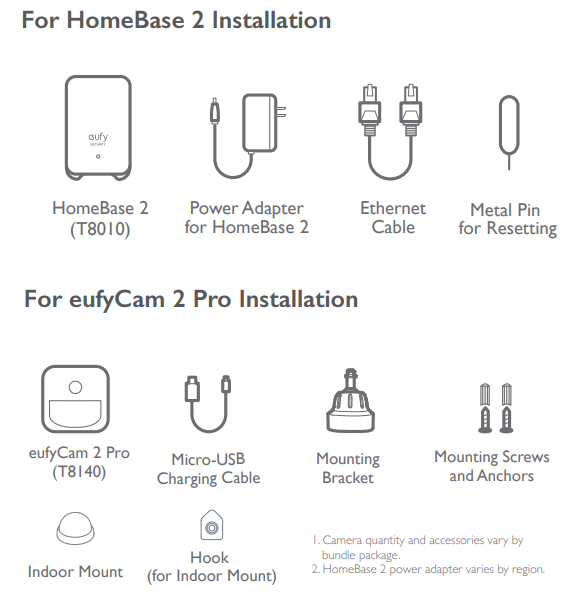
INCLUDED
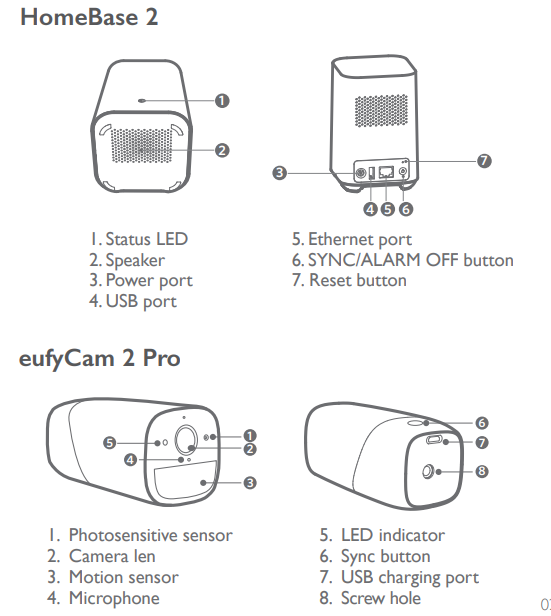
OVERVIEW
MOUNTING THE CAMERA
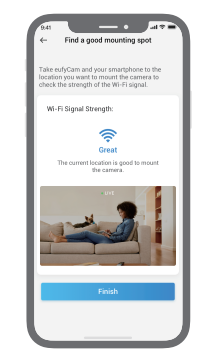
Find a Good Mounting Spot
To find a spot to mount the eufyCam 2 Pro, you need to test the wireless signal strength.
- Open the Eufy Security app, go to Camera Settings > Mounting Guide.
- To test the wireless signal strength, take your camera and phone to the location where you want to mount the camera.
- Move the camera as close to the HomeBase 2 as possible if the wireless signal strength is poor.
Select Height and Location
Hang eufyCam 2 Pro 7-10 ft (2-3 m) above the ground. This height maximizes the detection range of the motion sensor of eufyCam 2 Pro. Avoid placing the eufyCam 2 Pro under direct sunlight.
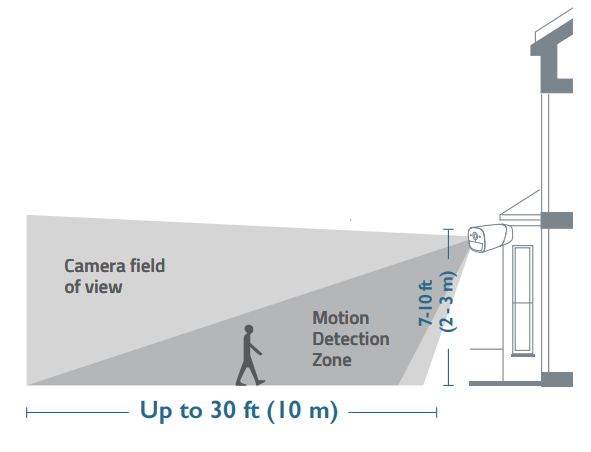
Mount the Camera Outdoors
The camera can be mounted both indoors and outdoors.
Turn the knob of the mounting bracket clockwise to loosen and disassemble it.
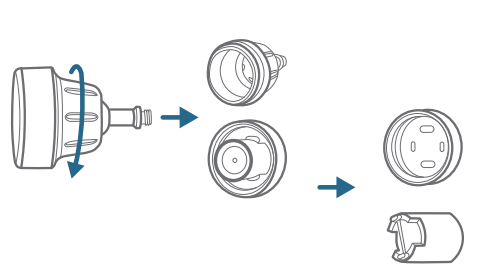
Drill holes with a 15/64 inch (5.95mm) drill bit, then insert the anchors into the holes; anchors are necessary for walls that are made out of hard materials such as concrete, brick, or stucco.
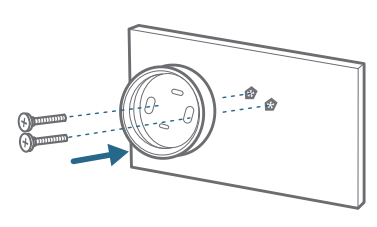
Firmly screw the base of the mounting bracket onto the wall. Fasten the ball knob of the bracket to the base of the bracket.
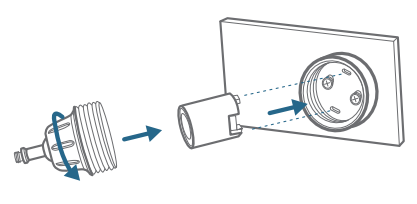
Tighten the ufyCam 2 Pro to the mounting bracket and adjust the viewing angle by checking the live stream feed in the Eufy Security app.
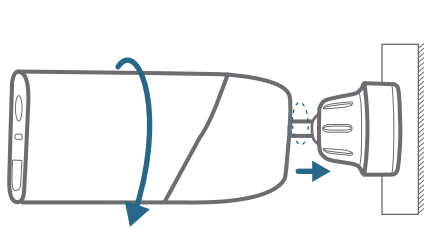
Tips:
- The Homebase 2 pairs up to 16 cameras; you can repeat the steps mentioned above to add more eufyCam 2 Pro cameras to meet different needs of use.
- For troubleshooting, check Help on the Eufy Security App. Refer to the App page for LED indicator status.
Mount the Camera Indoors
Stick the camera directly to any flat surface made out of iron. Or you can use the indoor mount to mount the camera:
Drill a hole. Use the included anchor if it’s drywall and fasten the hook.
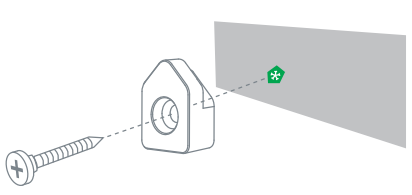
Hang the indoor mount on the hook.
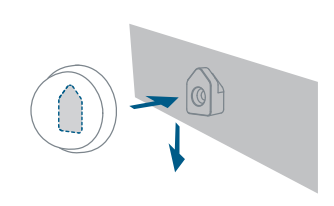
Attach eufyCam 2 Pro to the indoor mount and adjust the viewing angle.
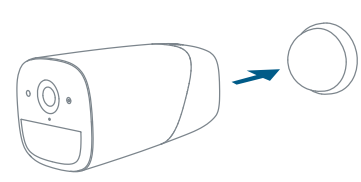
Technical Specifications and Key Features of eufy Cam 2 Pro HD Security Camera Set
- Video Resolution: 2K (2560 x 1440 pixels) with H.265/H.264 video encoding
- Field of View: 140° wide-angle lens for broad coverage
- Battery Life: Up to 365 days on a single rechargeable battery charge
- Weatherproof Rating: IP67, suitable for harsh outdoor conditions
- Storage: 16GB internal eMMC storage on HomeBase 2, supporting up to 3 months of local video storage
- Smart Features: AI-powered human detection, facial recognition, anti-theft alarm, customizable activity zones
- Connectivity: HomeBase 2 connects via Ethernet or 2.4 GHz Wi-Fi, acting as both storage hub and Wi-Fi repeater
- Audio: Built-in microphone and speaker for two-way communication
- Security: AES-128 data encryption to protect user privacy
- Compatibility: Works seamlessly with Alexa, Google Assistant, and Apple HomeKit (1080p limitation on HomeKit)
Compared to competitors like Arlo Pro 3, the eufy Cam 2 Pro offers similar video quality without subscription fees and longer battery life, making it a cost-effective solution for long-term home security
Troubleshooting Guide for eufy Cam 2 Pro HD Security Camera Set
- Camera Not Connecting to HomeBase: Ensure HomeBase 2 is powered and connected to the router via Ethernet or Wi-Fi. Restart both devices and verify Wi-Fi network compatibility (2.4 GHz required).
- Low Battery Alerts: Replace or recharge the camera battery as prompted. Battery life may vary with usage and environmental factors.
- No Video Feed or Delayed Alerts: Check Wi-Fi signal strength; consider repositioning HomeBase 2 to improve range. Use the Wi-Fi repeater function for extended coverage.
- False Motion Alerts: Customize activity zones and enable human/facial detection filters in the app to reduce unnecessary notifications.
- Error Codes: Refer to the eufy app for specific error messages; common fixes include firmware updates and resetting cameras.
Preventive tips include keeping firmware updated, regularly checking battery status, and ensuring cameras and HomeBase 2 are installed within an optimal range. The product comes with a one-year warranty backed by eufy’s customer support, reachable via their official website or support hotline for assistance
Pros & Cons of the eufy Cam 2 Pro HD Security Camera Set
- Pros:
- Outstanding 2K video clarity with a wide 140° lens for comprehensive coverage
- Exceptional 365-day battery life significantly reduces maintenance
- No monthly subscription fees due to local 16GB storage on HomeBase 2
- Robust IP67 weatherproof rating suitable for all climates
- Advanced AI detection minimizes false alerts and improves security accuracy
- Two-way audio enables direct communication through the cameras
- Integrates well with major smart home ecosystems, including Alexa, Google Assistant, and HomeKit
- Cons:
- Higher upfront cost (~$350) compared to some 1080p competitors
- HomeKit users are limited to 1080p resolution instead of full 2K
- Limited internal storage without cloud backup may require manual data management
- Wi-Fi range can be affected by home layout; optimal placement of HomeBase 2 is essential
This set offers excellent value for money for users focused on privacy and long-term savings versus subscription-based systems. It stands out against alternatives like Arlo Pro 3 by combining high resolution, robust battery life, and local storage
Customer Reviews and Feedback on eufy Cam 2 Pro HD Security Camera Set
Users consistently praise the eufy Cam 2 Pro HD Security Camera Set for its sharp 2K video quality and the remarkable battery longevity, often exceeding the claimed 365 days under typical use. Many appreciate the no-subscription model, citing the local storage as a major privacy plus. The two-way audio and smart AI detection are frequently highlighted features enhancing the home security experience.
Common complaints include occasional Wi-Fi connectivity challenges, especially in larger homes requiring strategic HomeBase 2 placement. Some HomeKit users note the downgrade to 1080p video resolution as a limitation. Overall, ratings average around 4.5 out of 5 stars, with recommendations focusing on users who prioritize privacy, ease of use, and long battery life without monthly fees
Faqs
How do I set up the eufy Cam 2 Pro HD Security Camera Set for the first time?
What can I do if my eufy Cam 2 Pro HD Security Camera Set is not syncing with the HomeBase 2?
Can I connect the eufy Cam 2 Pro HD Security Camera Set to a smart home system like Alexa or Google Home?
What are the optimal placement tips for maximizing performance of the eufy Cam 2 Pro HD Security Camera Set?
How do I maintain and clean my eufy Cam 2 Pro HD Security Camera Set for long-term use?
What should I do if the eufy Cam 2 Pro HD Security Camera Set battery drains quickly?
Does the eufy Cam 2 Pro HD Security Camera Set support local storage and cloud storage?
How can I optimize the Wi-Fi network for better connectivity with the eufy Cam 2 Pro HD Security Camera Set?
Tags
More eufy manuals
- How to Operate: Eufy Video Baby Monitor 720P User Manual
- Setup: Eufy Motion Sensor User Manual
- How to Use: Eufy Security Floodlight Cam E340 User Manual
- Setup: Eufy Video Doorbell 2K User Manual
- Setup: Eufy Omni E28 Cleaning System User Manual
- How to Use: Eufy Cam 2C Pro Wire-Free 2K Security Camera Set Instruction Manual
Leave a Comment