
How to Use: Fitbit Inspire 2 Fitness Tracker User Manual
Content
Fitbit Inspire 2 Fitness Tracker
Introduction
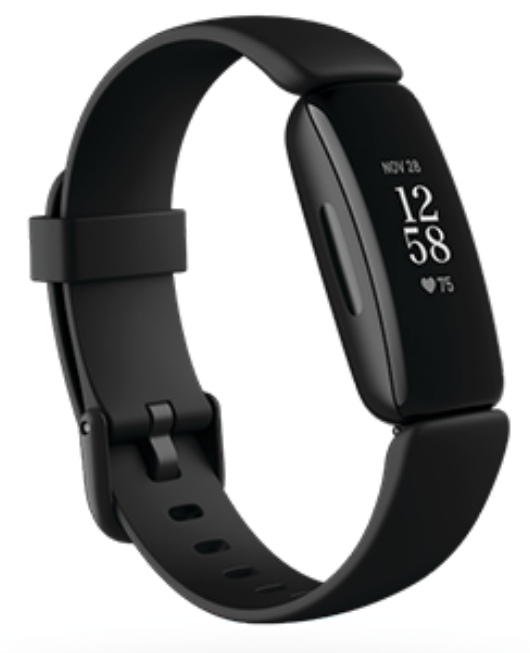
The Fitbit Inspire 2 Fitness Tracker is a sleek and user-friendly device designed to help you stay on top of your fitness goals. With features like 24/7 heart rate monitoring, Active Zone Minutes, and sleep tracking, this tracker is perfect for anyone looking to maintain a healthy lifestyle without the bulk of a smartwatch. Key benefits include up to 10 days of battery life and water resistance up to 50 meters, making it ideal for daily wear and various activities like swimming or hiking. The Fitbit Inspire 2 is targeted towards fitness enthusiasts and those seeking a straightforward, affordable fitness companion. It is typically priced between $50 and $100, depending on promotions and bundle deals. Available online and in-store at major retailers, this tracker is a great choice for both beginners and experienced fitness enthusiasts.
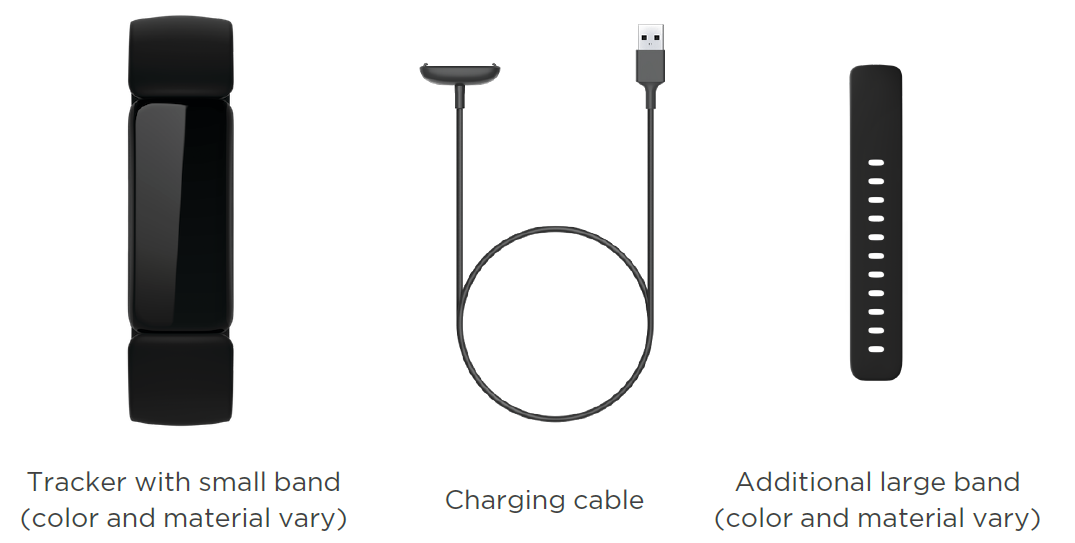
What's in the box
Your Inspire 2 box includes:
General Info and Specifications
- Sensors and Components
Fitbit Inspire 2 contains the following sensors and motors:- Optical heart-rate tracker
- 3-axis accelerometer, which tracks motion patterns
- Vibration motor
- Materials
The Inspire 2 classic band is made of a flexible, durable elastomer material similar to that used in many sports watches. The housing and buckle on the Inspire 2 are plastic. - Wireless technology
Inspire 2 contains a Bluetooth 4.2 radio transceiver. - Haptic feedback
Inspire 2 contains a vibration motor for alarms, goals, notifications, reminders, and apps. - Battery
Inspire 2 contains a rechargeable lithium-polymer battery. - Memory
Inspire 2 stores your data, including daily stats, sleep information, and exercise history, for 7 days. See your historical data in the Fitbit app. - Display
Inspire 2 has a PMOLED display. - Band size
Band sizes are shown below. Note that accessory bands sold separately may vary slightly.- Small band: Fits a wrist between 5.5 - 7.1 inches (140 mm - 180 mm) in circumference
- Large band: Fits a wrist between 7.1 - 8.7 inches (180 mm - 220 mm) in circumference
- Environmental conditions
- Operating temperature: 14° to 113° F (-10° to 45° C)
- Non-operating temperature: -4° to 14° F (-20° to -10° C) 113° to 140°F(45° to 60° C)
- Charging temperature: 32° to 109° F (0° to 43° C)
- Water resistance: Water resistant up to 50 meters
- Maximum operating altitude: 28,000 feet (8,534 m)
Set up Inspire 2
Use the Fitbit app for iPhones and Android phones.
To create a Fitbit account, you're prompted to enter your birthdate, height, weight, and sex to calculate your stride length and to estimate distance, basal metabolic rate, and calorie burn. After you set up your account, your first name, last initial, and profile picture are visible to all other Fitbit users. You have the option to share other information, but most of the information you provide to create an account is private by default.
Charge your tracker
A fully-charged Inspire 2 has a battery life of 10 days. Battery life and charge cycles vary with use and other factors; actual results will vary.
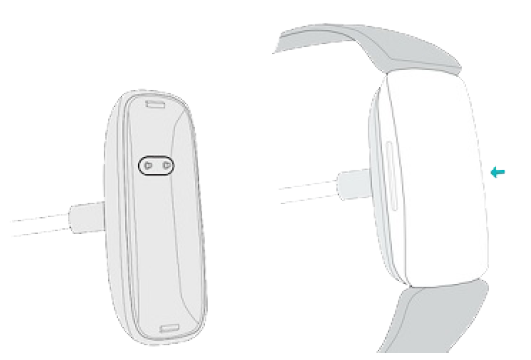
To charge Inspire 2:
- Plug the charging cable into the USB port on your computer, a UL-certified USB wall charger, or another low-energy charging device.
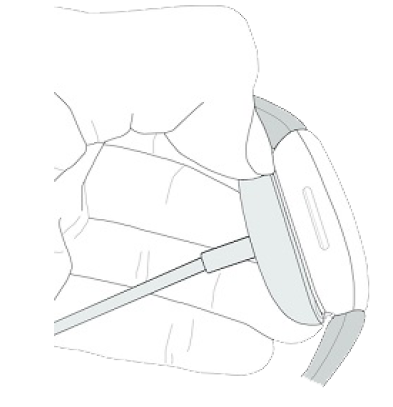
- Align the pins on the other end of the charging cable with the gold contacts on the back of the Inspire 2. Gently press Inspire 2 into the charger until it snaps into place.
To remove Inspire 2 from the charging cable:
- Hold the Inspire 2 and slide your thumbnail between the charger and the back of the tracker on one of the corners.
- Gently press down on the charger until it separates from the tracker.
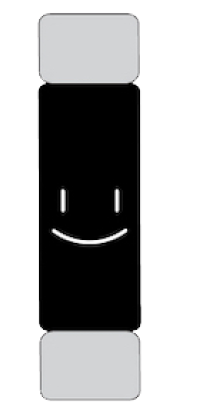
Charging fully takes about 1-2 hours. While the tracker charges, you can press the buttons to check the battery level. A fully-charged tracker shows a solid battery icon with a smile.
Set up with your pho..ne
Set up Inspire 2 with the Fitbit app for iPhones and iPads or Android phones. The Fitbit app is compatible with most popular phones. See fitbit.com/devices to check if your phone is compatible.

To get started:
- Download the Fitbit app:
- Apple App Store for iPhones
- Google Play Store for Android phones
- Install the app, and open it.
- Tap Sign in with Google, and follow the on-screen instructions to set up your device.
When you're done with setup, read through the guide to learn more about your new tracker and then explore the Fitbit app.
For more information, see the related help article.
See your data in the Fitbit app.
Open the Fitbit app on your phone to see your health metrics, activity, and sleep data, choose a workout or mindfulness session, and more.
Unlock Fitbit Premium
Fitbit Premium is your personalized resource in the Fitbit app that helps you stay active, sleep well, and manage stress. A Premium subscription includes programs tailored to your health and fitness goals, personalized insights, hundreds of workouts from fitness brands, guided meditations, and more.
- Customers can redeem a Fitbit Premium trial subscription in the Fitbit app.
- For more information, see the related help article.
Troubleshooting
If Inspire 2 isn't working properly, see our troubleshooting steps below.
Heart-rate signal missing
Inspire 2 continuously tracks your heart rate while you're exercising and throughout the day. If the heart-rate sensor on your tracker has difficulty detecting a signal, dashed lines appear.
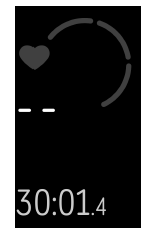
If your tracker doesn't detect a heart-rate signal, first make sure heart-rate tracking is turned on in the Settings app on your tracker. Next, make sure you're wearing your tracker correctly, either by moving it higher or lower on your wrist or by tightening or loosening the band. Inspire 2 should be in contact with your skin. After holding your arm still and straight for a short time, you should see your heart rate again.
For more information, see the related help article.
GPS signal missing
Environmental factors, including tall buildings, dense forest, steep hills, and thick cloud cover, can interfere with your phone's ability to connect to GPS satellites. If your phone is searching for a GPS signal during an exercise, a connection appears at the top of the screen.
For best results, wait for your phone to find the signal before you start your workout.
Other issues
If you experience any of the following issues, restart your tracker:
- Won't sync
- Won't respond to taps, swipes, or button presses
- Won't track steps or other data
- Won't show notifications
Return policy and warranty
Find warranty information and the fitbit.com return policy on our website.
Pros and Cons of the Fitbit Inspire 2 Fitness Tracker
Below are the pros and cons of the Fitbit Inspire 2, providing a balanced view of its advantages and disadvantages.
Pros
- Long Battery Life: Offers up to 10 days of battery life on a single charge, making it convenient for extended use.
- Comprehensive Fitness Tracking: Includes step counting, heart rate monitoring, and Active Zone Minutes to track your progress effectively.
- Value for Money: Priced competitively, offering a great balance of features and affordability.
- Lightweight Design: Its slim design makes it comfortable for daily wear.
Cons
- No Built-in GPS: Requires a connected GPS via a smartphone for location tracking, which may be inconvenient for some users.
- Basic Display: The grayscale OLED display, while functional, lacks the vibrancy of color screens found in other models.
- Limited Smart Features: Compared to more advanced smartwatches, it lacks comprehensive smart features like on-device music control or voice assistants.
Customer Reviews and Feedback
Users of the Fitbit Inspire 2 Fitness Tracker generally praise its ease of use and long battery life. Many appreciate the guided breathing sessions and comprehensive activity tracking features. However, some users have noted the lack of built-in GPS as a drawback. Overall, the device is rated highly for its value and user experience.
- Star Rating: 4.2/5 stars
- Testimonials: "A great choice for those starting their fitness journey," says one user. Another praises it for being "lightweight and easy to use."
Purchase Recommendation
If you're looking for a simple, affordable fitness tracker with robust activity tracking features, the **Fitbit Inspire 2 Fitness Tracker** is an excellent choice. For those who prioritize GPS capabilities or more advanced smart features, alternatives like the Fitbit Inspire 3 might be worth considering.
Faqs
How do I set up my fitbit Inspire 2 Fitness Tracker for the first time?
What should I do if my fitbit Inspire 2 Fitness Tracker is not syncing with my phone?
How do I use the exercise tracking features on fitbit Inspire 2 Fitness Tracker?
Can the fitbit Inspire 2 Fitness Tracker connect to both iPhone and Android devices?
How can I optimize battery life on my fitbit Inspire 2 Fitness Tracker?
What maintenance is required to keep my fitbit Inspire 2 Fitness Tracker working properly?
How does the fitbit Inspire 2 Fitness Tracker automatically detect exercises, and can I customize this feature?
Why is my fitbit Inspire 2 Fitness Tracker not showing connected GPS data during workouts?
More fitbit manuals
- How to Use: Fitbit Luxe Wrist Watch User Manual
- How to Use: Fitbit Inspire HR Wristband User Manual
- How to Connect: Fitbit One Wireless Activity Sleep Tracker User Manual
- How to Use: Fitbit Versa Lite Edition Wrist Watch User Manual
- Setup & Usage: Fitbit Sense Wrist Watch User Guide
- How to Use: Fitbit Versa 3 Wrist Watch User Manual
Leave a Comment