
Setup & Usage: Fitbit Sense Wrist Watch User Guide
Content
Fitbit Sense Wrist Watch
Introduction: Discover Advanced Health and Wellness Tracking
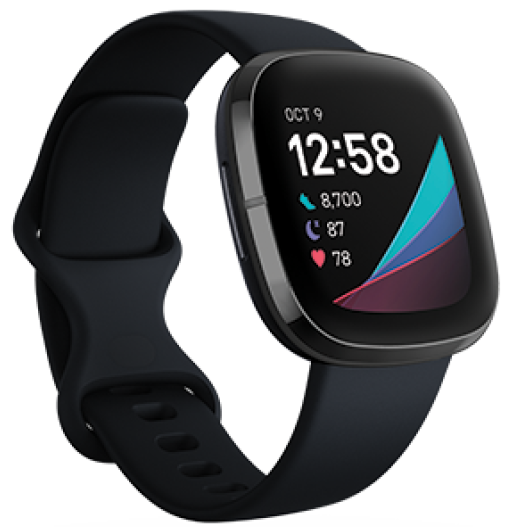
The Fitbit Sense Wrist Watch is a premium smartwatch designed for users who want to take control of their health, fitness, and well-being. Combining advanced sensors with intuitive software, this wearable device offers a holistic approach to wellness, making it ideal for fitness enthusiasts, health-conscious individuals, and anyone seeking actionable insights into their daily habits.
Unique among Fitbit models, the Sense stands out with features such as 24/7 heart rate monitoring, SpO2 blood oxygen tracking, skin temperature variation analysis, and an electrodermal activity (EDA) sensor for stress management. These tools help users spot trends, manage stress, improve sleep quality, and track key health metrics—all from the convenience of their wrist.
The Fitbit Sense Wrist Watch acts as a personal health coach, offering personalized guidance, workout maps with heart rate intensity, and a robust suite of activity and sleep tracking tools. With built-in GPS, water resistance up to 50 meters, and a vibrant AMOLED touchscreen, it’s as suited for swimming and outdoor adventures as it is for daily commutes and office life.
Designed for both Android and iOS users, the Sense syncs seamlessly with your smartphone, delivering notifications, Bluetooth calls, and voice assistant support (Google or Alexa). The device is available globally, typically retailing between $250 and $300, depending on region and retailer, and is often bundled with a trial of Fitbit Premium for deeper insights and guided programs.
Target users include active professionals, athletes, and anyone interested in proactive health management. Whether you’re training for a marathon, managing stress, or simply aiming to sleep better, the Fitbit Sense Wrist Watch delivers the data and motivation you need to reach your goals.
What's in the box
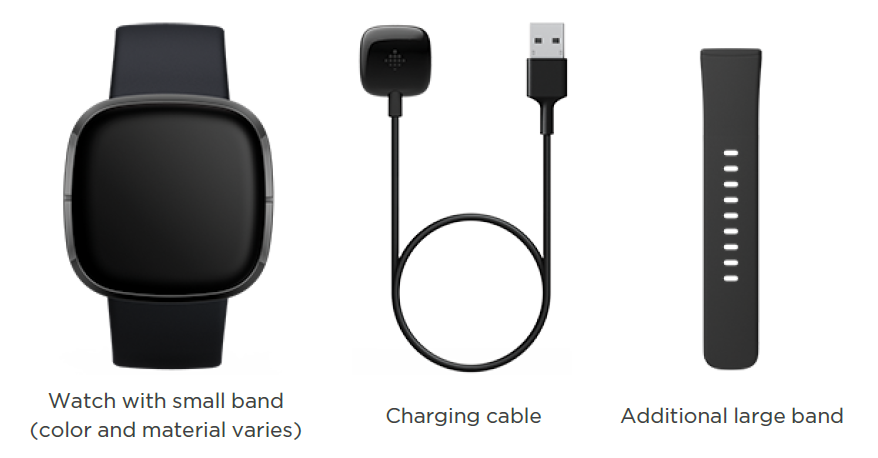
Your Sense box includes:
General Info and Specifications
- Sensors and Components
Fitbit Sense contains the following sensors and motors:- Multi-path optical heart rate tracker
- Multipurpose electrical sensors compatible with the ECG app and EDA Scan app
- Gyroscope
- An altimeter, which tracks altitude changes
- 3-axis accelerometer, which tracks motion patterns
- On-wrist skin temperature sensor
- Ambient light sensor
- Built-in GPS receiver + GLONASS, which tracks your location during a workout
- Vibration motor
- Speaker
- Microphone
- Materials
- The band that comes with Sense is made of a flexible, durable elastomer material similar to that used in many sports watches.
- The housing and buckle on Sense are made of anodized aluminum. While anodized aluminum can contain traces of nickel, which can cause an allergic reaction in someone with nickel sensitivity, the amount of nickel in all Fitbit products meets the European Union's stringent Nickel Directive.
- Our products may contain trace amounts of acrylates and methacrylates from adhesives used in those products, but we work to ensure our products adhere to rigorous design specifications and meet extensive requirements to minimize the potential for reaction to these adhesives.
- Wireless technology
Sense contains a Bluetooth 5.0 radio transceiver, Wi-Fi chip, and NFC chip. - Haptic feedback
Sense contains a vibration motor for alarms, goals, notifications, reminders, and apps. - Battery
Sense contains a rechargeable lithium-polymer battery. - Memory
Sense stores your data, including daily stats, sleep information, and exercise history, for 7 days. See your historical data in the Fitbit app. - Display
Sense has a color AMOLED display. - Band size
Band sizes are shown below. Note that accessory bands sold separately may vary slightly.- Small band: Fits a wrist between 5.5 - 7.1 inches (140 mm - 180 mm) in circumference
- Large band: Fits a wrist between 7.1 - 8.7 inches (180 mm - 220 mm) in circumference
- Environmental conditions
- Operating temperature: 14° to 113° F (-10° to 45° C)
- Non-operating temperature: -4° to 14° F (-20° to -10° C) 113° to 140°F(45° to 60° C)
- Charging temperature: 32° to 95° F (0° to 35° C)
- Water resistance: Water resistant up to 50 meters
- Humidity range: While Fitbit Sense can operate in humidity conditions between 0% and 100%, we recommend not operating in conditions over 60% for prolonged periods of time.
- Maximum operating altitude: 28,000 feet(8,534 m)
Charge your watch
A fully-charged Sense has a battery life of 6+ days. Battery life and charge cycles vary with use and other factors; actual results will vary.
To charge Sense:
- Plug the charging cable into the USB port on your computer, a UL-certified USB wall charger, or another low-energy charging device.
- Hold the other end of the charging cable near the port on the back of the watch until it attaches magnetically. Make sure the pins on the charging cable align with the port on the back of your watch.
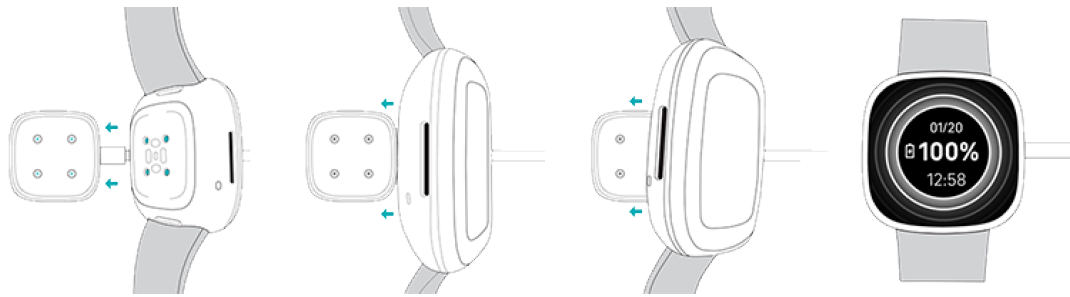
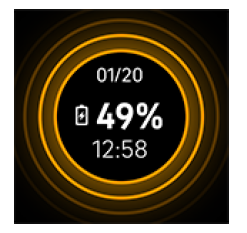
Charge Sense for 12 minutes for 24 hours of battery life. While the watch charges, tap the screen twice or press the button to turn the screen on. The battery level appears for several seconds, then disappears so you can use your watch while it charges. Charging fully takes about 1-2 hours.
Set up Sense
Set up Sense with the Fitbit app for iPhones and iPads or Android phones. The Fitbit app is compatible with most popular phones. See fitbit.com/devices to check if your phone is compatible.

To get started:
- Download the Fitbit app:
- Apple App Store for iPhones
- Google Play Store for Android phones
- Install the app, and open it.
- Tap Sign in with Google, and follow the on-screen instructions to set up your device.
When you're done with setup, read through the guide to learn more about your new watch and then explore the Fitbit app.
For more information, see the related help article.
Connect to Wi-Fi
- During setup, you're prompted to connect Sense to your Wi-Fi network. Sense uses Wi-Fi to more quickly download apps from the Fitbit Gallery and for faster, more reliable OS updates.
- Sense can connect to open, WEP, WPA personal, and WPA2 personal Wi-Fi networks. Your watch won't connect to 5GHz, WPA Enterprise, or public Wi-Fi
networks that require more than a password to connect—for example, logins, subscriptions, or profiles. If you see fields for a username or domain when connecting to the Wi-Fi network on a computer, the network isn't supported. - For best results, connect Sense to your home Wi-Fi network. Make sure you know the network password before connecting.
- For more information, see the related help article.
See your data in the Fitbit app.
Open the Fitbit app on your phone to see your health metrics, activity, and sleep data, choose a workout or mindfulness session, and more.
Unlock Fitbit Premium
Fitbit Premium is your personalized resource in the Fitbit app that helps you stay active, sleep well, and manage stress. A Premium subscription includes programs tailored to your health and fitness goals, personalized insights, hundreds of workouts from fitness brands, guided meditations, and more.
- Customers can redeem a Fitbit Premium trial subscription in the Fitbit app.
- For more information, see the related help article.
Update, Restart, and Erase
Some troubleshooting steps may require you to restart your watch, while erasing it is useful if you want to give Sense to another person. Update your watch to receive new Fitbit OS updates.
Update Sense
Update your watch to get the latest feature enhancements and product updates.
When an update is available, a notification appears in the Fitbit app. After you start the update, follow the progress bars on Sense and in the Fitbit app until the update is complete. Keep your watch and phone close to each other during the update.
Updating Sense takes several minutes and may be demanding on the battery. We recommend plugging your watch into the charger before starting the update.
For more information, see the related help article.
Restart Sense
- If you can’t sync Sense or you have trouble with tracking your stats or receiving notifications, restart your watch from your wrist:
- To restart your watch, press and hold the button for 10 seconds until you see the Fitbit logo on the screen, and then release the button.
- Restarting your watch doesn't delete any data.
- Sense has small holes on the device for the altimeter, speaker, and microphone. Don’t attempt to restart your device by inserting any items, such as paper clips, into these holes, as you can damage Sense.
Troubleshooting
If Sense isn't working properly, see our troubleshooting steps below.
Heart-rate signal missing
Sense continuously tracks your heart rate while you're exercising and throughout the day. If the heart-rate sensor on your watch has difficulty detecting a signal, dashed lines appear.
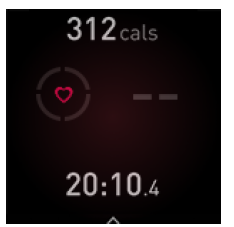
If your watch doesn't detect a heart-rate signal, make sure you're wearing your watch correctly, either by moving it higher or lower on your wrist or by tightening or loosening the band. Sense should be in contact with your skin. After holding your arm still and straight for a short time, you should see your heart rate again.
For more information, see the related help article.
GPS signal missing
Environmental factors,s including tall buildings, dense forest, steep hills, and thick cloud cover , er can interfere with your watch's ability to connect to GPS satellites. If your watch is searching for a GPS signal during an exercise, you’ll see “ connecting ” appear at the top of the screen. If Sense can't connect to a GPS satellite, the watch stops trying to connect until the next time you start a GPS exercise.
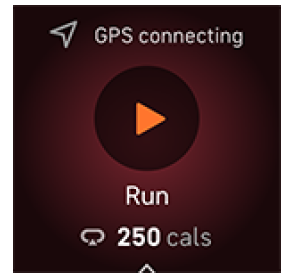
For best results, wait for Sense to find the signal before you start your workout.
If Sense loses the GPS signal during your workout, "GPS lost signal" appears at the top of the screen. Your watch will attempt to reconnect.
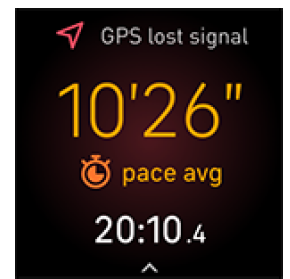
For more information, see the related help article.
Can't connect to Wi-Fi
If Sense can't connect to Wi-Fi, you might have entered an incorrect password, or the password might have changed:
- From the Today tab
 in the Fitbit app, tap the icon in the top left Sense tile.
 - Tap Wi-Fi Settings Next.
- Tap the network you want to use. Remove.
- Tap Add Network and follow the on-screen instructions to reconnect the Wi- Fi network.
To check if your Wi-Fi network is working correctly, connect another device to your network; if it connects successfully, try again to connect your watch.
If Sense still won't connect to Wi-Fi, make sure that you're attempting to connect your watch to a compatible network. For best results, use your home Wi-Fi network. Sense can't connect to 5GHz Wi-Fi, WPA enterprise, or public networks that require logins, subscriptions, or profiles. For a list of compatible network types, see "Connect to Wi-Fi" on page 9.
After you verify the network is compatible, restart your watch and try connecting to Wi-Fi again. If you see other networks appear in the list of available networks, but not your preferred network, move your watch closer to your router.
For more information, see the related help article.
Phone disconnected
When your Fitbit device isn’t connected to your phone, the phone disconnected icon appears for 3 seconds at the top of your clock face when you turn on the screen. You might have trouble syncing and receiving notifications from your phone. If your phone is nearby, follow the troubleshooting steps in the related help article.
Other issues
If you experience any of the following issues, restart your watch:
- Won't sync
- Won't respond to taps, swipes, or button presses
- Won't track steps or other data
- Won't show notifications
Return policy and warranty
Find warranty information and the fitbit.com return policy on our website.
Pros & Cons: Balanced Assessment of the Fitbit Sense Wrist Watch
Advantages
- Comprehensive Health Tracking: Advanced sensors for heart rate, SpO2, skin temperature, and EDA provide a 360-degree view of your wellness.
- Long Battery Life: Up to 6+ days on a single charge, with fast charging that delivers a full day’s use in just 12 minutes.
- Built-in GPS and Water Resistance: Accurate workout mapping for runners and swimmers, with 50-meter water resistance for pool and open water activities.
- Smart Features: Notifications, Bluetooth calls, voice assistant integration, and app ecosystem enhance daily convenience.
- Sleep and Stress Insights: Detailed sleep stage tracking and stress management tools promote better rest and mental well-being.
Limitations
- Heart Rate Accuracy: Some users report that heart rate tracking, while generally reliable, may not match the precision of specialized sports watches.
- Limited SpO2 Functionality: Blood oxygen monitoring is primarily available during sleep, not on demand.
- Premium Features Locked Behind Subscription: Deeper insights and guided programs require a Fitbit Premium subscription.
- No Third-Party App Support (in Sense 2): The original Sense supports third-party apps and music, but the Sense 2 lacks these features.
- Bulkier Design: Compared to some competitors, the Sense may feel slightly larger on smaller wrists.
Value for Money: For users seeking advanced health metrics and smart features at a mid-range price, the Fitbit Sense Wrist Watch offers strong value. However, those requiring the absolute best in sports tracking or seamless third-party integration may want to consider alternatives like Apple Watch or Garmin devices.
Customer Reviews: Real User Experiences with the Fitbit Sense Wrist Watch
Users consistently praise the Fitbit Sense Wrist Watch for its comprehensive health insights, comfortable fit, and user-friendly app experience. Many highlight the sleep tracking accuracy, stress management tools, and long battery life as standout features. For example, one reviewer noted, “The sleep and stress data really helped me make positive lifestyle changes—I didn’t realize how much my habits affected my well-being.”
Common complaints include occasional inaccuracies in heart rate during intense workouts, the need for a Premium subscription to unlock all features, and limited SpO2 on-demand tracking. Some users also mention the device’s bulkier feel compared to other smartwatches.
Overall, the Fitbit Sense Wrist Watch earns an average star rating of 4 to 4.5 out of 5 on major retail sites. Most recommend it for users who prioritize health metrics and want a reliable, feature-rich wearable without the premium price tag of top-tier alternatives.
Frequently mentioned issues: Battery life may decrease over time, and some users experience syncing delays. However, software updates and Fitbit’s customer support are generally responsive, helping address these concerns.
Technical Specifications of the Fitbit Sense Wrist Watch
- Display: 1.58-inch AMOLED touchscreen (336 x 336 pixels)
- Dimensions: 40.5mm x 40.5mm x 12.4mm
- Weight: 45.9g (with band)
- Battery Life: Up to 6+ days, fast charging supported
- Water Resistance: Up to 50 meters
- Sensors: PurePulse 2.0 heart rate, SpO2, skin temperature, EDA, 3-axis accelerometer, gyroscope, altimeter, ambient light
- Connectivity: Bluetooth LE, Wi-Fi, NFC
- Compatibility: Android 7.0+, iOS 12.2+
- Storage: 4GB (2.5GB available for music)
- Operating System: Fitbit OS
Fitbit Sense Wrist Watch: Who Should Buy It?
The Fitbit Sense Wrist Watch is best suited for individuals who want to monitor their health holistically, track fitness progress, and benefit from smart features without the complexity and cost of high-end competitors. It’s an excellent choice for those focused on sleep quality, stress management, and overall wellness, offering actionable insights and motivation to lead a healthier lifestyle.
Faqs
How do I set up my fitbit Sense Wrist Watch for first-time use?
What should I do if my fitbit Sense Wrist Watch is not charging properly?
Why is the heart rate on my fitbit Sense Wrist Watch showing lower readings during workouts?
Can I use the fitbit Sense Wrist Watch with both Android and iOS devices?
How can I fix the fitbit Sense Wrist Watch if it’s freezing or the touchscreen is unresponsive?
How do I optimize battery life on my fitbit Sense Wrist Watch for longer usage?
What maintenance steps should I follow to keep my fitbit Sense Wrist Watch in good condition?
Why does my fitbit Sense Wrist Watch show incorrect time, and how can I fix it?
Tags
More fitbit manuals
- How to Use: Fitbit Sense 2 Wrist Watch User Guide
- How to Connect: Fitbit One Wireless Activity Sleep Tracker User Manual
- How to Use: Fitbit Versa 4 Wrist Watch Owner Guide
- How to Use: Fitbit Luxe Wrist Watch User Manual
- Usage: Fitbit Inspire 3 Fitness Tracker Owner Manual
- How to Use: Fitbit Inspire 2 Fitness Tracker User Manual
Leave a Comment