
Usage: Fitbit Inspire 3 Fitness Tracker Owner Manual
Content
Fitbit Inspire 3 Fitness Tracker
Introduction
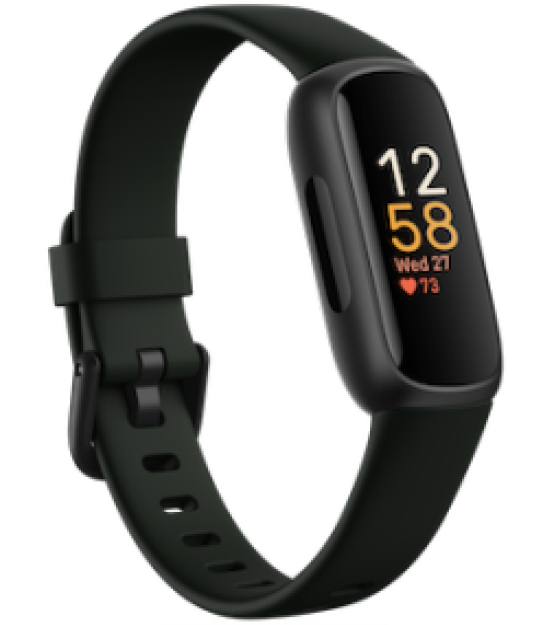
The Fitbit Inspire 3 Fitness Tracker is a sleek, lightweight wearable designed to support everyday health and fitness goals with advanced tracking features. It offers continuous 24/7 heart rate monitoring, sleep stage analysis, SpO2 (blood oxygen) tracking, and stress management tools, making it a comprehensive wellness companion for users of all activity levels. Ideal for beginners and fitness enthusiasts alike, the Inspire 3 provides personalized guidance through Active Zone Minutes, Daily Readiness Scores, and real-time exercise tracking with connected GPS when paired to your smartphone.
With its vibrant AMOLED color touchscreen and durable water resistance up to 50 meters, the Inspire 3 suits a variety of use cases—from casual step counting and sleep monitoring to structured workouts such as running, cycling, and strength training. Users can select up to six workout shortcuts from 21 available exercise modes, enabling easy access to tailored metrics during activity sessions.
Available in stylish colors like Midnight Zen, Lilac Bliss, and Morning Glow, the Fitbit Inspire 3 combines functionality with personalization. The estimated price range is typically under $100, making it an affordable option widely available through major retailers and online platforms. This fitness tracker is a smart choice for anyone seeking an all-around health monitoring device that balances cost, features, and ease of use.
What's in the box
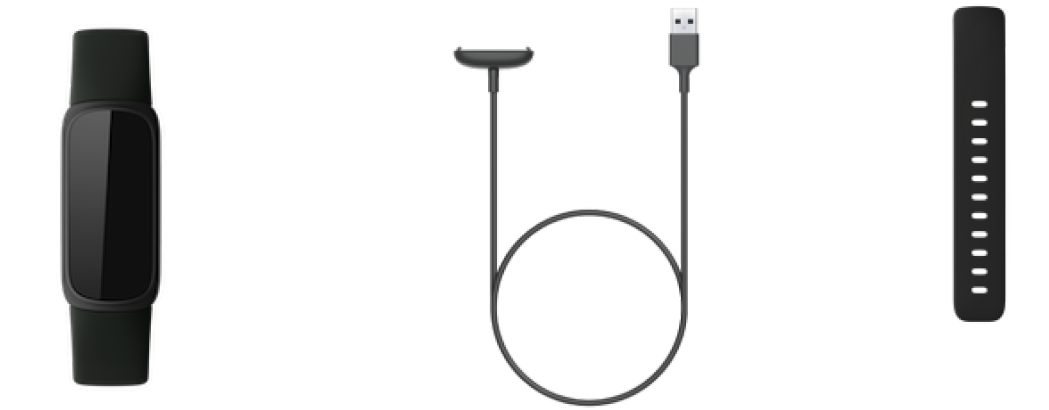
Your Inspire 3 box includes:
Charge your tracker
A fully-charged Inspire 3 has a battery life of up to 10 days. Battery life and charge cycles vary with use and other factors; actual results will vary.
Note: The Inspire 2 charger doesn't work with Inspire 3.
To charge Inspire 3:
- Plug the charging cable into the USB port on your computer, a UL-certified USB wall charger, or another low-energy charging device.
- Align the pins on the other end of the charging cable with the gold contacts on the back of Inspire 3. Gently press Inspire 3 into the charger until it snaps into place
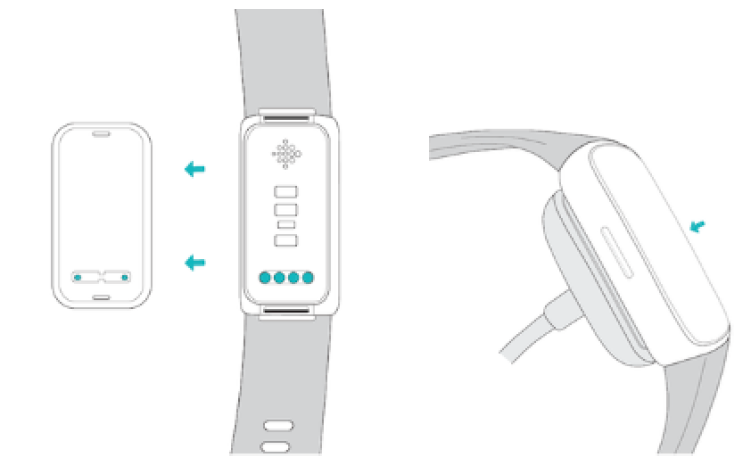
To remove Inspire 3 from the charging cable:
- Hold Inspire 3 and slide your thumbnail between the charger and the back of the tracker on one of the corners.
- Gently press down on the charger until it separates from the tracker.
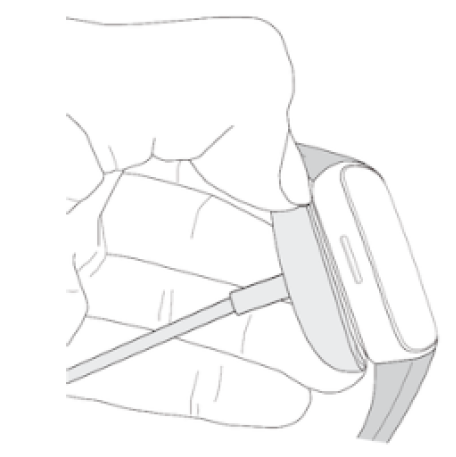
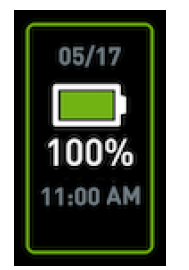
Charging fully takes about 1-2 hours. While Inspire 3 charges, double-tap the screen to turn it on and check the battery level. Swipe right on the battery screen to use Inspire 3. A fully charged tracker shows a solid battery icon.
Set up Inspire 3
Set up Inspire 3 with the Fitbit app for iPhones and iPads or Android phones. The Fitbit app is compatible with most popular phones. See fitbit.com/devices to check if your phone is compatible.

To get started:
- Download the Fitbit app:
- Apple App Store for iPhones
- Google Play Store for Android phones
- Install the app, and open it.
- Tap Sign in with Google, and follow the on-screen instructions to set up your device.
When you're done with setup, read through the guide to learn more about your new tracker and then explore the Fitbit app.
For more information, see the related help article.
See your data in the Fitbit app
Open the Fitbit app on your phone to see your health metrics, activity and sleep data, choose a workout or mindfulness session, and more.
General Info and Specifications
Sensors and Components
Fitbit Inspire 3 contains the following sensors and motors:
Fitbit Inspire 3 contains the following sensors and motors:
- Optical heart-rate tracker
- Red and infrared sensors for oxygen saturation (SpO2) monitoring
- 3-axis accelerometer, which tracks motion patterns
- Ambient light sensor
- Vibration motor
Materials
The Inspire 3 classic band is made of a flexible, durable silicone similar to that used in many sports watches. The housing and buckle on Inspire 3 are plastic.
Wireless technology
Inspire 3 contains a Bluetooth 5.0 radio transceiver.
Haptic feedback
Inspire 3 contains a vibration motor for alarms, goals, notifications, reminders, and apps.
Battery
Inspire 3 contains a rechargeable lithium-polymer battery.
Memory
Inspire 3 stores your data, including daily stats, sleep information, and exercise history, for 7 days. See your historical data in the Fitbit app.
Display
Inspire 3 has a color AMOLED display
Band size
- Small band: Fits a wrist between 5.5 - 7.1 inches (140 mm - 180 mm) in circumference
- Large band: Fits a wrist between 7.1 - 8.7 inches (180 mm - 220 mm) in circumference
Environmental conditions
- Operating temperature: 32° to 104° F(0° to 40° C)
- Storage temperature: for 3 months -4° to 104° F (-20° to 40° C)
- Water resistance: Water resistant up to 50 meters
- Maximum operating altitude: 28,000 feet(8,534 m)
Troubleshooting
If Inspire 3 isn't working properly, see our troubleshooting steps below.
Heart-rate signal missing
Inspire 3 continuously tracks your heart rate while you're exercising and throughout the day. If the heart-rate sensor on your tracker has dificulty detecting a signal, dashed lines appear.
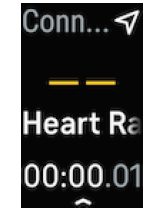
If your tracker doesn't detect a heart-rate signal, first make sure heart-rate tracking is turned on in the Settings app  on your tracker and Inspire 3 is set to WORN on Wrist. Next, make sure you're wearing your tracker correctly, either by moving it higher or lower on your wrist or by tightening or loosening the band. Inspire 3 should be in contact with your skin. After holdingyour arm still and straight for a short time, you should see your heart rate again.
For more information, see the related help article.
GPS signal missing
Environmental factors, including tall buildings, dense forest, steep hills, and thick cloud cover, can interfere with your phone's ability to connect to GPS satellites. If your phone is searching for a GPS signal during an exercise, connecting appears at the top of the screen.
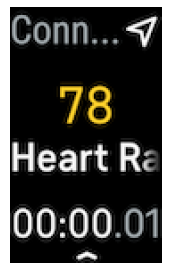
For best results, wait for your phone to find the signal before you start your workout.
Other issues
If you experience any of the following issues, restart your tracker:
- Won't sync
- Won't respond to taps, swipes, or button press
- Won't track steps or other data
- Won't show notifications
Pros & Cons of the Fitbit Inspire 3 Fitness Tracker
Pros
- Comprehensive Health Tracking: Monitors heart rate, sleep stages, SpO2, and stress levels continuously, providing a detailed wellness overview.
- Connected GPS Support: Uses phone GPS to map outdoor activities without requiring built-in GPS, saving device battery and cost.
- Long Battery Life: Offers up to 10 days of use on a single charge, ideal for continuous tracking without frequent recharging.
- Water Resistant: Suitable for swimming and water-based workouts with 50-meter water resistance rating.
- Customizable & Stylish: Interchangeable silicone bands in multiple colors to match personal style.
- Value for Money: Combines essential fitness features at an affordable price below $100, outperforming some pricier competitors.
Cons
- No Built-in GPS: Dependent on smartphone for GPS tracking, which may inconvenience users who prefer device-only tracking.
- Small Touchscreen: Limited screen size can make navigation and data viewing during workouts less convenient, especially with sweaty hands.
- Basic Workout Metrics: Lacks advanced training features such as detailed interval analysis or coaching found in higher-end trackers.
- Limited Smart Features: Notifications are basic and do not support app replies or music controls.
Compared to alternatives like the Fitbit Charge 5 or Garmin Vivosmart 5, the Inspire 3 offers excellent entry-level fitness tracking but is less suited for serious athletes requiring built-in GPS and sophisticated workout analytics.
Customer Reviews & Feedback on Fitbit Inspire 3 Fitness Tracker
Users consistently praise the Fitbit Inspire 3 Fitness Tracker for its accurate heart rate monitoring and sleep tracking capabilities, often noting that it provides valuable insights into their daily wellbeing and sleep quality. Many appreciate the device’s lightweight design and comfortable fit, which encourages 24/7 wear.
Common compliments include the long battery life and effective tracking of steps, calories, and exercise modes like running and cycling. Reviewers highlight the motivational aspects such as Active Zone Minutes and weekly exercise goals as helpful for maintaining fitness routines.
On the downside, some customers report that the small touchscreen can be fiddly and less responsive during intense or sweaty workouts. Others mention the inconvenience of relying on smartphone GPS for outdoor route mapping. Despite these minor issues, the overall star rating averages around 4 to 4.5 stars out of 5, with frequent recommendations for beginners and casual fitness users seeking an affordable, reliable tracker.
Several reviewers suggest purchasing the Inspire 3 as a cost-effective alternative to pricier fitness wearables, especially for users prioritizing health monitoring over smartwatch features.
Faqs
How do I set up my Fitbit Inspire 3 Fitness Tracker for the first time?
What should I do if my Fitbit Inspire 3 Fitness Tracker is not syncing with my phone?
Can the Fitbit Inspire 3 Fitness Tracker track my blood oxygen levels and skin temperature?
Is the Fitbit Inspire 3 Fitness Tracker compatible with both iPhone and Android devices?
How can I optimize battery life on my Fitbit Inspire 3 Fitness Tracker?
What steps should I take to clean and maintain my Fitbit Inspire 3 Fitness Tracker?
How do I change the watch face on my Fitbit Inspire 3 Fitness Tracker?
What should I do if my Fitbit Inspire 3 Fitness Tracker screen is unresponsive or frozen?
More fitbit manuals
- How to Use: Fitbit Charge 6 Fitness Tracker User Manual
- How to Use: Fitbit Versa 4 Wrist Watch Owner Guide
- Usage: Fitbit Alta HR Fitness Tracker User Manual
- How to Use: Fitbit Sense 2 Wrist Watch User Guide
- How to Use: Fitbit Ace Fitness Tracker User Guide
- Setup & Usage: Fitbit Sense Wrist Watch User Guide
Leave a Comment