
How to Use: Fitbit Ace Fitness Tracker User Guide
Content
Fitbit Ace Fitness Tracker
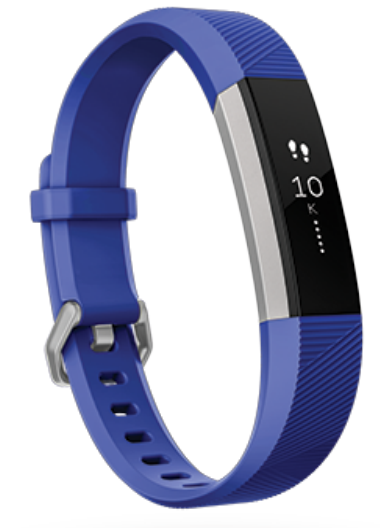
Introduction to Fitbit Ace Fitness Tracker
The Fitbit Ace Fitness Tracker is a specialized wearable designed to encourage children aged 7 and up to develop healthy activity habits through fun and engaging fitness tracking. It combines durable, child-friendly materials with advanced sensors to monitor daily steps, active minutes, and sleep patterns, making it an ideal companion for kids and parents focused on wellness and activity motivation.
Key benefits include its intuitive OLED tap display that celebrates activity goals with vibrations and colorful flashes, promoting positive reinforcement. The tracker features a flexible elastomer wristband and surgical-grade stainless steel clasp, ensuring comfort and durability for active youngsters. Its Bluetooth 4.0 connectivity allows seamless syncing with smartphones to share progress and unlock rewards.
This fitness tracker targets parents seeking a safe, motivating device to track their child's physical activity without the distractions of a smartphone. Use cases range from daily step challenges and sleep monitoring to encouraging outdoor play and family fitness goals. The Fitbit Ace is available in various wristband sizes to accommodate growing children, fitting wrists from 5.0 to 6.9 inches in circumference.
The estimated price for the Fitbit Ace (non-LTE version) typically ranges from $70 to $100, depending on the retailer and included accessories. It's widely available online and in major retail stores, offering an affordable, kid-friendly entry point into wearable fitness technology.
Get started
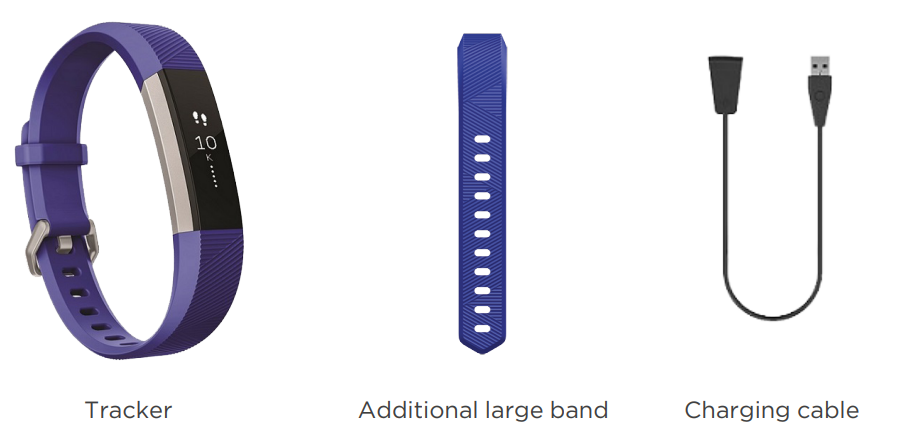
What's in the box
Set up Ace
Install the Fitbit app on the primary phone or tablet your child will use with Ace. Open the Fitbit app, and follow the instructions in the related help article to set up your device.
To set up an account, you’re prompted to enter information such as your child’s height and age to help calculate their activity.
Charge your tracker
A fully-charged Ace has a battery life of 5 days. Battery life and charge cycles vary with use and other factors; actual results will vary.
To charge Ace:
- Plug the charging cable into the USB port on your computer, a UL-certified USB wall charger, or another low-energy charging device.
- Clip the other end of the charging cable to the port on the back of Ace. The pins on the charging clip must lock securely with the gold contacts on the back of the tracker. Ace vibrates, and a battery icon appears on the screen.
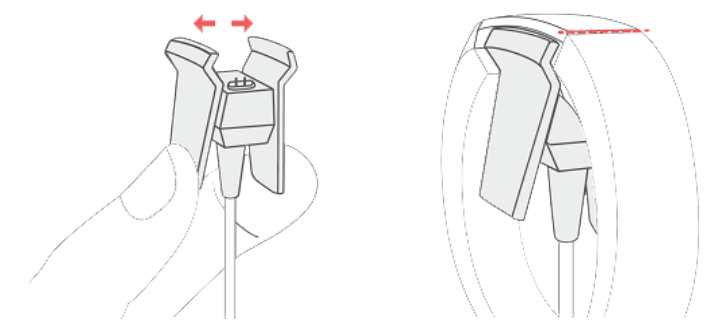
Charging fully takes up to 2 hours. While the tracker charges, tap it to check the battery level. A fully-charged tracker shows a solid battery icon. If you haven't set up Ace yet, you'll see a message instructing you to set up your tracker.
See your data in the Fitbit app.
- Open the Fitbit app on your phone to see your activity and sleep data, and more.
- Each time you open the Fitbit app, Ace syncs automatically when it's nearby. You can also use the Sync Now option in the app.
- For more information, see the related help article.
Wear Ace
Place Ace around your wrist. The top of the tracker is the side with the charging port. The top of the tracker should be on the outside or top of your wrist. If you purchased an accessory band, you'll find instructions in "Change the band" on page 8.
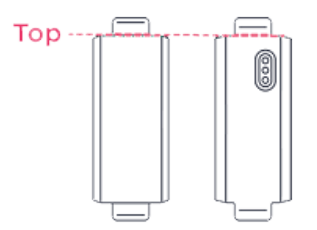
Placement
Wear Ace a finger's width above your wrist bone.
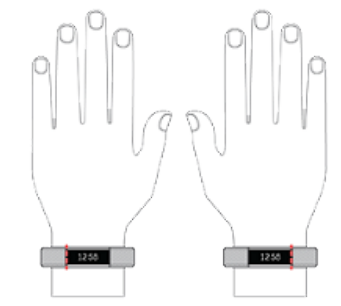
Handedness
For greater accuracy, you must specify whether you wear Ace on your dominant or non-dominant hand. Your dominant hand is the one you use for writing and eating. To start, the Wrist setting is set to non-dominant. If you wear Ace on your dominant hand, change the Wrist setting in the Fitbit app:
From the Today tab in the Fitbit app, tap the icon in the top left >Ace tile> Wrist> Dominant.
Wear and care tips
- Clean your band and wrist regularly with a soap-free cleanser.
- If your tracker gets wet, remove and dry it completely after your activity.
- Take your tracker off from time to time.
For more information, visit the Fitbit Wear & Care page.
Change the band
Ace comes with an extra small band attached and an additional large bottom band in the box. Both the top and bottom bands can be swapped with accessory bands, sold separately on fitbit For band measurements, see "Band size" on page 19.
Remove a band
- Turn Ace over and find the band latches.
- To release the latch, press down on the flat metal button on the strap.
- Slide the band up to release it from the tracker.
- Repeat on the other side.
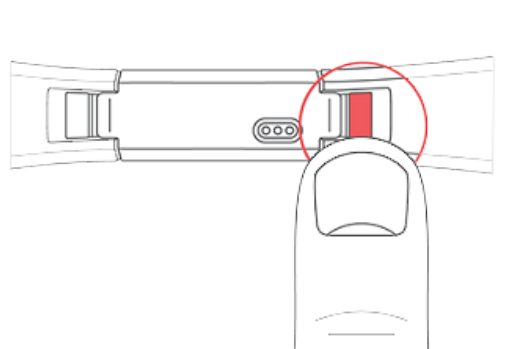
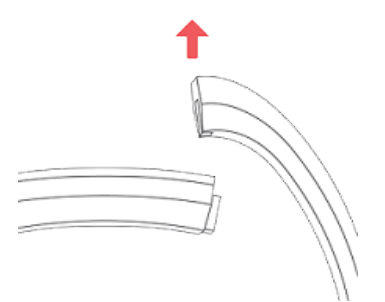
If you're having trouble removing the band or if it feels stuck, gently move the wrist band back and forth to release it.
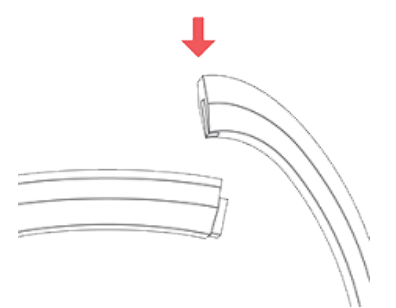
Attach a new band
- Before you attach a new band, first identify the top and bottom bands. The top band has a buckle on it and should be attached to the side closest to the charging port. The bottom band has notches in it.
- To attach a band, slide it down on the end of the tracker until it snaps into place.
General Info and Specifications
Sensors and Components
Materials
The band that comes with Ace is made of a flexible, durable elastomer material similar to that used in many sports watches.
The clasp and housing on Ace are made of surgical-grade stainless steel. While all stainless steel contains traces of nickel and can cause an allergic reaction in someone with nickel sensitivity, the amount of nickel in all Fitbit products meets the European Union's stringent Nickel Directive.
Wireless technology
Ace contains a Bluetooth 4.0 radio transceiver.
Haptic feedback
Ace contains a vibration motor for alarms, goals, notifications, and reminders.
Ace contains a rechargeable lithium-polymer battery.
Memory
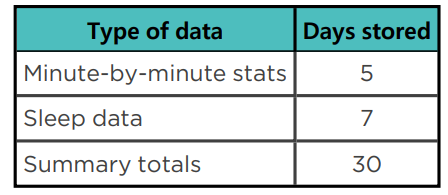
Refer to the following table for information on how long Ace stores stats and data in between the times when it syncs.
Display
Ace has an OLED display.
Band size
Band sizes are shown below. Note that accessory bands sold separately may vary slightly.
Extra small band
Fits a wrist between 5.0 and 6.1 inches (125 mm - 155 mm) in circumference
Large band
Fits a wrist up to 6.9 inches (177 mm) in circumference
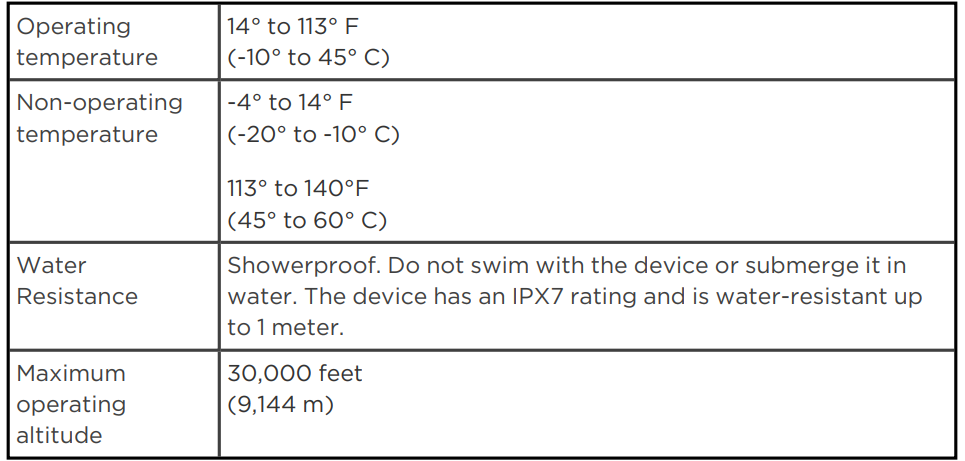
Environmental conditions
Return policy and warranty
Find warranty information and the Fitbit. Return policy on our website.
Pros & Cons of the Fitbit Ace Fitness Tracker
- Pros:
- Simple, kid-friendly interface with OLED tap display and engaging goal celebrations to motivate activity.
- Durable materials, including an elastomer band and a stainless steel clasp suitable for active children.
- Long data storage capability: stores minute-by-minute stats for 5 days, sleep data for 7 days, and summary totals for 30 days.
- Affordable price point compared to advanced smartwatches, offering excellent value for basic activity tracking.
- Encourages healthy habits without overwhelming children with complex metrics or calorie counting.
- Cons:
- Lacks advanced sensors like a heart rate monitor and GPS, limiting detailed fitness insights found in higher-end models.
- Bluetooth 4.0 connectivity may be less robust than newer versions, potentially affecting syncing speed.
- Display size and features are minimal compared to smartwatch alternatives, which may limit user engagement for some kids.
- Does not support music or app integrations, unlike more expensive kids’ smartwatches such as the Fitbit Ace LTE.
- Comparison with Alternatives:
- Compared to the Fitbit Ace LTE, the standard Fitbit Ace lacks LTE connectivity, calling, messaging, and GPS features,s but comes at a significantly lower price.
- Other kids' fitness trackers may offer heart rate or smartwatch functions, but often at a higher cost and complexity.
- Fitbit Ace is a solid choice for parents prioritizing simplicity, durability, and motivational activity tracking without smartphone distractions.
Customer Reviews and Feedback on Fitbit Ace Fitness Tracker
Customers frequently praise the Fitbit Ace Fitness Tracker for its child-friendly design and reliability in tracking daily steps and sleep. Many reviewers highlight the motivating goal celebration feature, which excites children to stay active. The durable wristband and comfortable fit receive positive mentions for withstanding rough play and daily wear.
Common complaints include the absence of heart rate monitoring and the lack of GPS, which some parents desire for more comprehensive fitness tracking. A few users note syncing delays with older Bluetooth versions, though this does not significantly impact the overall experience. The simple display and minimal app features are sometimes seen as limitations, but are often appreciated by those wanting a distraction-free device for kids.
Overall, the Fitbit Ace receives an average rating of around 4 out of 5 stars, with many recommending it as a great value for money fitness tracker for children starting their wellness journey.
Tags
More fitbit manuals
- How to Use: Fitbit Ace 2 Fitness Tracker User Guide
- Usage: Fitbit Alta HR Fitness Tracker User Manual
- How to Use: Fitbit Ace 3 Fitness Tracker User Guide
- How to Use: Fitbit Charge 6 Fitness Tracker User Manual
- How to Use: Fitbit Alta Fitness Tracker User Manual
- Usage: Fitbit Inspire 3 Fitness Tracker Owner Manual
Leave a Comment