
Usage: Fitbit Alta HR Fitness Tracker User Manual
Content
Fitbit Alta HR Fitness Tracker
Introduction
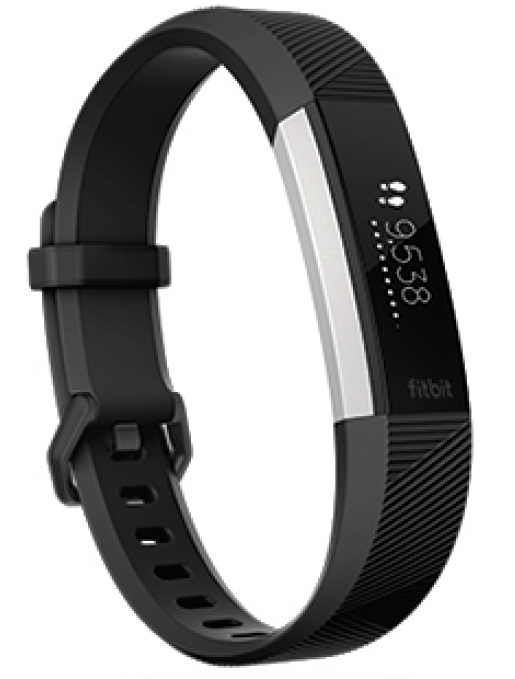
The Fitbit Alta HR Fitness Tracker is a sleek, lightweight wearable designed to help users monitor and improve their health and fitness effortlessly. Featuring a slim design with a 1.1-inch monochrome OLED touchscreen, this tracker offers real-time heart rate monitoring, step counting, sleep tracking, and calorie burn monitoring, making it an essential companion for anyone interested in maintaining an active lifestyle.
One of the standout benefits of the Fitbit Alta HR is its SmartTrack technology, which automatically detects and records certain exercises like walking, running, and biking without manual input, ensuring accurate workout tracking. With a battery life lasting up to seven days and quick charging within two hours, users enjoy long-term convenience and minimal downtime. Its compatibility with both iOS and Android devices ensures seamless syncing via Bluetooth, while reminders to move encourage consistent activity throughout the day.
The Fitbit Alta HR is ideal for health-conscious individuals ranging from casual walkers to fitness enthusiasts who prefer a minimalist design without sacrificing core tracking features. It suits everyday wear as well as sleep monitoring, with detailed sleep stage analysis (light, deep, REM) to promote better rest habits. The tracker is splash-proof but not water-resistant for swimming, so it is best suited for daily wear rather than aquatic workouts.
Currently priced around $100 to $130, depending on band size and retailer, the Fitbit Alta HR offers strong value for money in the entry-level fitness tracker segment. It is widely available through major online and brick-and-mortar retailers, making it accessible for those looking to upgrade from basic step counters or smartwatches lacking fitness features.
What's in the box
Your Alta HR box includes:
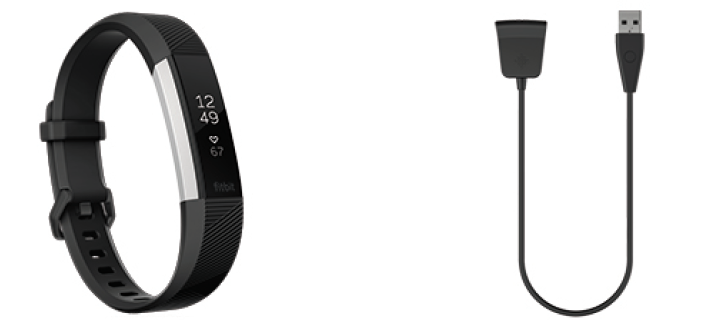
The detachable bands on Alta HR come in a variety of colors and materials, sold separately.
General Info and Specifications
Sensors
Fitbit Alta HR contains the following sensors and motors:
- A MEMS 3-axis accelerometer, which tracks motion patterns
- A vibration motor
- An optical heart-rate tracker
Materials
The band that comes with Alta HR is made of a flexible, durable elastomer material similar to that used in many sports watches. It does not contain latex. Accessory bands are available in genuine leather.
The clasp and housing on Alta HR are made of surgical-grade stainless steel. While all stainless steel contains traces of nickel and can cause an allergic reaction in someone with nickel sensitivity, the amount of nickel in all Fitbit products meets the European Union's stringent Nickel Directive.
Wireless technology
Alta HR contains a Bluetooth 4.0 radio transceiver.
Haptic feedback
Alta HR contains a vibration motor for alarms, goals, notifications, and reminders.
Battery
Alta HR contains a rechargeable lithium-polymer battery.
Memory
Refer to the following table for information on how long Alta HR stores stats and data in between the times when it syncs. Stored data consists of steps, distance, calories burned, active minutes, heart rate, sleep, and stationary vs. active hours.
| Type of data | Days stored |
|---|---|
| Minute-by-minute stats | 7 |
| Sleep data | 7 |
| Sleep stages | 5 |
| SmartTrack data | 7 |
| Summary totals | 30 |
Display
Alta HR has an OLED tap display.
Band size
Band sizes are shown below. Note that accessory wristbands sold separately may vary slightly.
- Small band Fits: a wrist between 5.5 - 6.7 inches (140 mm - 170 mm) in circumference
- Large band Fits: a wrist between 6.7 - 8.1 inches (170 mm - 206 mm) in circumference
- Extra large band: Fits a wrist between 8.1 - 9.3 inches (206 mm - 236 mm) in circumference
Environmental conditions
- Operating Temperature: 14° to 113° F (-10° to 45° C)
- Non-operating Temperature: -4° to 140° F (-20° to 60° C)
- Water Resistance: Splash proof. Do not shower or swim with the device.
- Maximum: 30,000 feet
- Operating Altitude:(9,144 m)
Charge your tracker
A fully-charged Alta HR has a battery life of up to 7 days. Battery life and charge cycles vary with use and other factors; actual results will vary.
To charge Alta HR:
- Plug the charging cable into the USB port on your computer, or a UL-certified USB wall charger, or another low-energy charging device.
Clip the other end of the charger into the port on the back of Alta HR. The pins of the charging cable must be lined up with the charging port on Alta HR and securely locked into place. You'll know the connection is secure when the tracker vibrates and you see a battery icon on the screen.
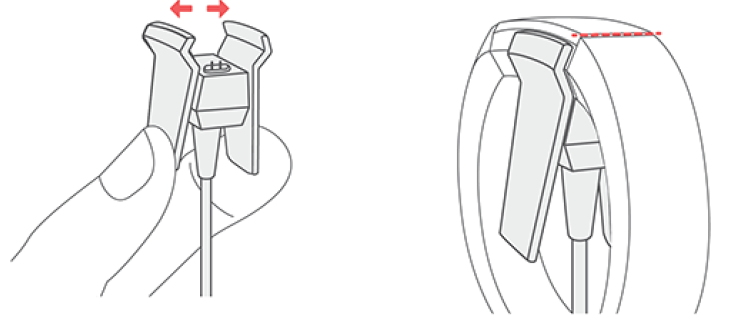
Charging fully takes up to 2 hours. While the tracker charges, tap it to check the battery level. A fully charged tracker shows a solid battery icon.
Set up with your phone
Set up Alta HR with the Fitbit app for iPhones and iPads or Android phones. The Fitbit app is compatible with most popular phones and tablets. For more information, see fitbit.com/devices.
To get started:
- Download the Fitbit app:
- Apple App Store for iPhones
- Google Play Store for Android phones
- Install the app, and open it.
- If you already have a Fitbit account, log in to your account > tap the Today tab
 > your profile picture > Set Up a Device.
 - If you don't have a Fitbit account, tap Join Fitbit to be guided through a series of questions to create a Fitbit account.
- If you already have a Fitbit account, log in to your account > tap the Today tab
- Continue to follow the on-screen instructions to connect Alta HR to your account.
Wear Alta HR
Place Alta HR around your wrist. If you purchased another band, see the instructions in "Change the band" on the facing page.
Placement for all-day wear vs. exercise
When you're not exercising, wear Alta HR a finger's width above your wristbone.
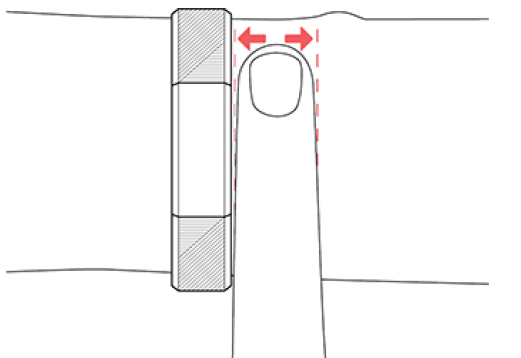
For optimized heart-rate tracking while exercising:
During a workout, experiment with wearing the device higher on your wrist (3 finger widths) for an improved fit. Many exercises such as bike riding or weight lifting cause you to bend your wrist frequently, which could interfere with the heart-rate signal if the watch is lower on your wrist.
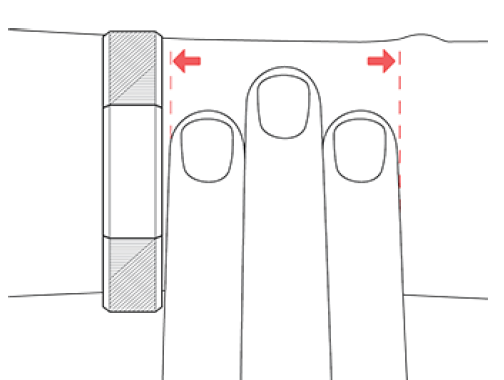
- Wear your Fitbit device on top of your wrist, and make sure the back of the device is in contact with your skin.
- Consider tightening your band before a workout and loosening it when you’re done. The band should be snug but not constricting (a tight band restricts blood flow, potentially affecting the heart-rate signal).
Basics
Learn how best to navigate, check the battery level, and care for your tracker.
Navigate Alta HR
Alta HR has an OLED tap display that can be oriented horizontally or vertically. You can choose from several clock faces, each with a unique design. Single-tap the display to flip through your stats.
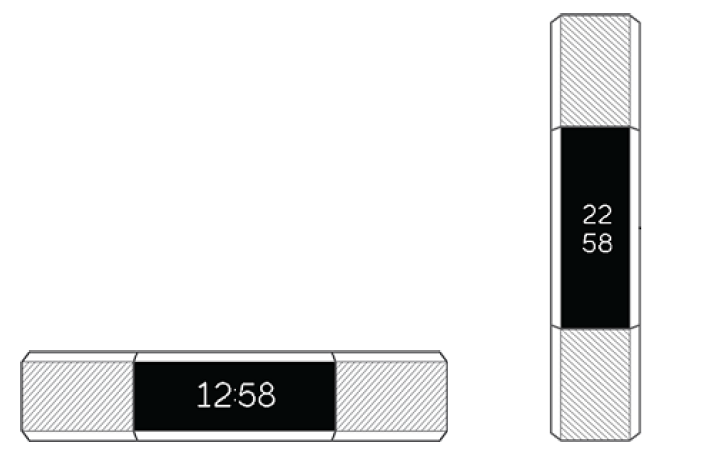
When you’re not using Alta HR the display is dimmed. To wake it up:
- Double-tap your tracker.
- Turn your wrist towards you. This behavior, known as Quick View, can be turned off in your tracker settings.
Troubleshooting
If Alta HR isn't working properly, see our troubleshooting steps below. Visit help.fitbit.com for more information.
Heart-rate signal missing
Alta HR continuously tracks your heart rate while you're exercising and throughout the day. If the heart-rate sensor on your tracker has difficulty detecting a signal, dashed lines appear.
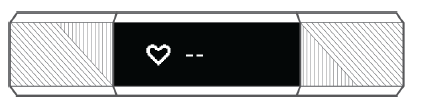
If your device doesn't detect a heart-rate signal, first check the Heart Rate setting in the Fitbit app and make sure it’s set to On or Auto. Next, make sure you're wearing your tracker correctly, either by moving it higher or lower on your wrist or by tightening or loosening the band. Alta HR should be in contact with your skin. After holding your arm still and straight for a short time, you should see your heart rate again.
For more information, see help.fitbit.com.
Other issues
If you experience any of the following issues, restart your tracker:
- Won't sync
- Won't track steps or other data
- Won't respond to taps
To restart your tracker:
- Plug the charging cable into the USB port on your computer or a UL-certified USB wall charger.
- Clip the other end of the charging cable to the port on the back of the tracker. The pins on the charging cable must lock securely with the port. You’ll know the connection is secure when the tracker vibrates and you see a battery icon on your tracker’s display. The battery icon disappears after three seconds.
- Press the button on your charging cable 3 times within 8 seconds, briefly pausing between presses. The button is on the end of the charging cable that is plugged into the computer. When you see the Fitbit logo and the tracker vibrates, this means the tracker has restarted.
Return policy and warranty
Find warranty information and the fitbit.com return policy at fitbit.com/legal/returns-and-warranty.
Pros & Cons of the Fitbit Alta HR Fitness Tracker
Pros
- Automatic Exercise Recognition: SmartTrack technology simplifies workout logging by detecting activities like runs and bike rides without manual start.
- Heart Rate Monitoring: Continuous optical heart rate tracking provides accurate data for calorie burn and fitness zones, enhancing workout insights.
- Long Battery Life: Up to 7 days per charge reduces frequent charging interruptions, with a fast 2-hour recharge time.
- Lightweight and Stylish: Slim profile and customizable bands fit comfortably for all-day wear, including sleep tracking.
- Cross-Platform Compatibility: Syncs with both Android and iOS devices via Bluetooth 4.0, supporting comprehensive health data management in the Fitbit app.
Cons
- No Built-in GPS: Requires phone GPS for accurate distance tracking during runs or hikes, limiting standalone outdoor workout tracking.
- Limited Workout Options: Only run, hike, and walk can be manually started; other activities like cycling or weight training aren’t directly supported on-device.
- Splash Proof, Not Waterproof: Unsuitable for swimming or full water immersion, restricting use in aquatic environments.
- Basic Display: OLED monochrome touchscreen offers limited interface sophistication compared to higher-end models.
- Value Comparison: Competitors like Fitbit Charge 2 offer more features (e.g., GPS, multi-sport modes) at a slightly higher price point, making Alta HR best suited for entry-level users.
Customer Reviews of Fitbit Alta HR Fitness Tracker
Users commonly praise the Fitbit Alta HR for its comfortable fit and reliable heart rate monitoring, with many appreciating the effortless activity and sleep tracking features. The SmartTrack auto-detection is frequently highlighted as a convenient tool that reduces manual logging, enhancing the user experience. Star ratings average around 4 out of 5 stars, reflecting overall satisfaction.
However, some customers report issues with the lack of built-in GPS, noting the inconvenience of needing to carry a smartphone for accurate distance tracking. Others desire more workout variety and complain that the device does not support swimming or weight training tracking. Display brightness and size also receive mixed feedback, with some users wishing for a more vibrant screen.
Despite these drawbacks, the Fitbit Alta HR is widely recommended for those new to fitness tracking or those seeking a stylish, straightforward device focused on heart rate and step monitoring. It offers solid value for money, especially when compared to basic trackers lacking a heart rate sensor.
More fitbit manuals
- How to Use: Fitbit Ace Fitness Tracker User Guide
- How to Use: Fitbit Charge 6 Fitness Tracker User Manual
- How to Use: Fitbit Ace 2 Fitness Tracker User Guide
- Usage: Fitbit Inspire 3 Fitness Tracker Owner Manual
- How to Use: Fitbit Ace 3 Fitness Tracker User Guide
- How to Use: Fitbit Versa 4 Wrist Watch Owner Guide
Leave a Comment