
How to Use: Fitbit Ace 2 Fitness Tracker User Guide
Content
Fitbit Ace 2 Fitness Tracker
Introduction
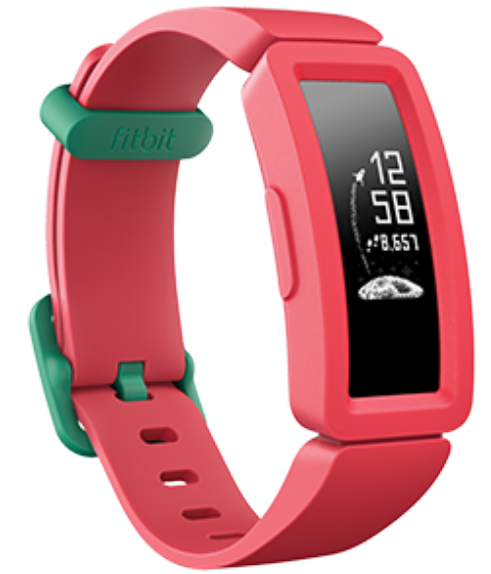
The Fitbit Ace 2 Fitness Tracker is a kid-friendly activity tracker designed specifically for children aged 6 and above. It encourages healthy habits through fun, engaging features like step counting, active minutes tracking, and sleep monitoring. With its durable, swim-proof design and adjustable clasp, the Ace 2 comfortably fits growing wrists, making it an ideal companion from early childhood through pre-teens.
Featuring an easy-to-use OLED touchscreen and vibrant animated clock faces, the Fitbit Ace 2 offers an interactive experience that motivates children to stay active. Parents can manage family accounts with built-in parental controls, allowing them to approve friends, monitor activity levels, and promote safe social connections. The device supports over 200 Android, iOS, and Windows devices, ensuring compatibility across platforms.
This fitness tracker boasts a battery life of up to 5 days, reducing downtime and keeping kids moving all day long. Available in playful colors like Night Sky with Neon Yellow clasp and Watermelon with Teal clasp, it also offers customizable bands sold separately to suit any child's personality. The Fitbit Ace 2 is priced affordably, typically ranging between $25 and $30, making it a great value for families seeking to foster healthy habits early on.
What's in the box
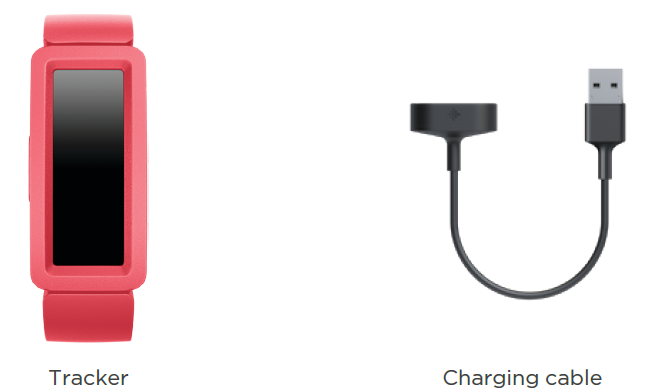
Your Ace 2 box includes:
General Info and Specifications
- Sensors and Components
Fitbit Ace 2 contains a MEMS 3-axis accelerometer, which tracks motion patterns. - Materials
The housing on Ace 2 is plastic. The Ace 2 classic band is made of a flexible silicone similar to that used in many sports watches and includes a plastic buckle. - Wireless technology
Ace 2 contains a Bluetooth 4.0 radio transceiver. - Haptic feedback
Ace 2 contains a vibration motor for alarms, goals, notifications, and reminders. - Battery
Ace 2 contains a rechargeable lithium-polymer battery. - Memory
Ace 2 stores your data, including daily stats, sleep information, and activity history, for 7 days. See your historical data in the Fitbit app. - Display
Ace 2 has an OLED display. - Band size
The band size is shown below. Note that accessory bands sold separately may vary slightly. - One-size band
Fits a wrist between 4.6 and 6.6 inches (116 mm - 168 mm) in circumference - Environmental conditions
- Operating temperature: 14° to 113° F (-10° to 45° C)
- Non-operating temperature: -4° to 14° F (-20° to -10° C) 113° to 140°F (45° to 60° C)
- Water resistance: Water resistant up to 50 meters
- Maximum operating altitude: 28,000 feet (8,534 m)
Set up Ace 2
Install the Fitbit app on the primary phone or tablet your child will use with Ace 2. Open the Fitbit app, and follow the instructions in the related help article to set up your device.
To set up an account, you’re prompted to enter information such as your child’s height and age to help calculate their activity.
Charge your tracker
A fully-charged Ace 2 has a battery life of up to 5 days. Battery life varies with use and other factors; animated clock faces require more frequent charging.
To charge Ace 2:
- Plug the charging cable into the USB port on your computer, a UL-certified USB wall charger, or another low-energy charging device.
- Hold the other end of the charging cable near the port on the back of the tracker until it attaches magnetically. Make sure the pins on the charging cable align with the port on the back of your tracker.
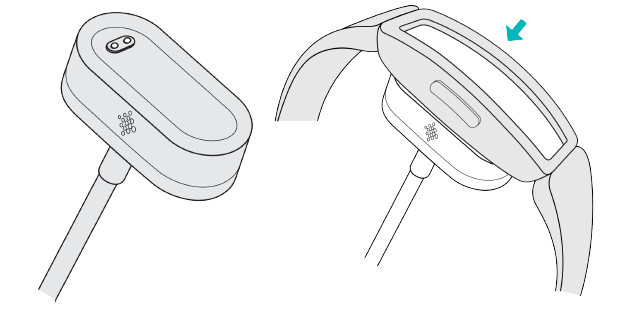
Charging fully takes about 1-2 hours. While the tracker charges, you can press the buttons to check the battery level. A fully-charged tracker shows a solid battery icon with a smile.
See your data in the Fitbit app..
- Open the Fitbit app on your phone to see your activity and sleep data, and more.
- Each time you open the Fitbit app, Ace 2 syncs automatically when it's nearby. You can also use the Sync Now option in the app.
- For more information, see the related help article.
Change the band
Ace 2 comes with a kid's band attached. The band can be swapped with accessory bands, sold separately on fitbit.com. For band measurements, see "Band size" on page 27. Note that for larger sizes or different styles, Ace 2 is compatible with Inspire and Inspire HR classic accessory bands.
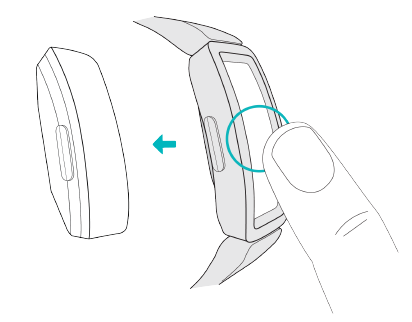
Remove a band
- Hold the tracker with the screen facing you and the button on the left.
- Gently push the top of the tracker through the back opening in the band.
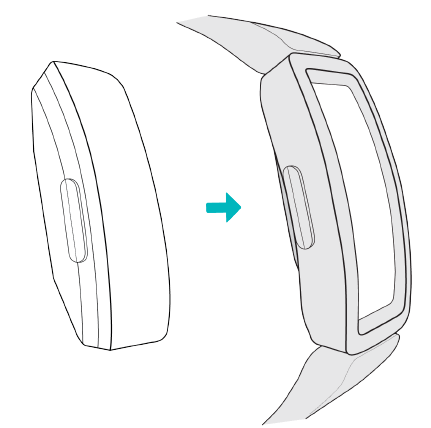
Attach a new band
- Hold the tracker with the back facing you and the button on the right.
- Hold the band with the back opening facing you and the button insert on the right.
- Place the top of the tracker into the flexible band opening and gently push the bottom of the tracker into place. Ace 2 is secure when all edges of the band lie flat against the tracker.
Basics
Learn how to navigate, check the battery level, and care for your tracker.
Navigate Ace 2
Ace 2 has an OLED touchscreen display and 1 button.
Navigate Ace 2 by tapping the screen, swiping up and down, or pressing the buttons. To preserve battery, the tracker’s screen turns off when not in use.
Basic navigation
The home screen is the clock.
- Swipe down to scroll through the apps on Ace 2. Tap an app to open it.
- Swipe up to see your daily stats.

Update, Restart, and Erase
Learn how to update, restart, and erase Ace 2.
Update Ace 2
Update your tracker to get the latest feature enhancements and product updates.
When an update is available, a notification appears in the Fitbit app. After you start the update, follow the progress bars on Ace 2 and in the Fitbit app until the update is complete. Keep your tracker and phone close to each other during the update.
Updating Ace 2 takes several minutes and may be demanding on the battery. We recommend plugging your tracker into the charger before starting the update.
For more information, see the related help article.
Restart Ace 2
If you can't sync Ace 2, don’t see your stats, or your tracker is unresponsive, restart your device:
- Connect Ace 2 to the charging cable. For instructions, see "Charge your tracker " on page 6.
- Press and hold the buttons on your tracker for 5 seconds. Release the buttons. When you see a smiley face and Ace 2 vibrates, the tracker restarts.
Restarting your tracker doesn't delete any data.
Erase Ace 2
If you want to give Ace 2 to another person or wish to return it, first clear your personal data:
Troubleshooting
If Ace 2 isn't working properly, see our troubleshooting steps below.
Unresponsive device
If you experience any of the following issues, restart your tracker:
- Won't sync
- Won't respond to taps, swipes, or button presses
- Won't track steps or other data
- Won't show notifications
Return policy and warranty
Find warranty information and the fitbit.com return policy on our website.
Pros & Cons of Fitbit Ace 2 Fitness Tracker
Pros
- Kid-friendly design: Durable, swim-proof with a protective bumper, suited for active children.
- Parental controls: Family account setup allows parents to monitor activity and approve social connections safely.
- Long battery life: Up to 5 days of use means less frequent charging and more active time.
- Engaging features: Animated clock faces, customizable avatars, and step challenges keep kids motivated.
- Cross-platform compatibility: Connects to 200+ devices across Android, iOS, and Windows systems.
Cons
- Limited advanced tracking: Lacks heart rate monitoring and GPS found in adult Fitbit models.
- Small screen size: The 0.8-inch OLED display offers limited display space for stats.
- Parental setup required: Requires family account creation and parental consent for use under age 13.
- Basic sleep tracking: Sleep insights are rudimentary compared to higher-end trackers.
- Alternative options: Competitors like Garmin Vivofit Jr. offer similar features with different app ecosystems.
Customer Reviews & Feedback on Fitbit Ace 2 Fitness Tracker
The Fitbit Ace 2 receives generally positive feedback from parents and kids alike, averaging around 4 out of 5 stars in major retail outlets. Users praise its durable, swim-proof design and ease of use for children as young as six. Many highlight the device's motivating features,, like step challenges and fun clock faces that encourage kids to stay active throughout the day.
Common praises include the long battery life of up to 5 days and the helpful parental controls enabling family-wide health tracking. However, some users note that the limited display size can make navigation slightly challenging for younger children. A few parents express a desire for more detailed sleep data and advanced fitness metrics.
Overall, reviewers recommend the Fitbit Ace 2 as a valuable, affordable tool for promoting fitness in kids, especially those new to wearable trackers. Many emphasize the benefit of starting healthy habits early with a device designed specifically for children's needs and safety.
Faqs
How do I set up the Fitbit Ace 2 Fitness Tracker for the first time?
What should I do if my Fitbit Ace 2 Fitness Tracker is not syncing with the app?
Can the Fitbit Ace 2 Fitness Tracker be used on the dominant wrist, and how does that affect accuracy?
Is the Fitbit Ace 2 Fitness Tracker waterproof and suitable for swimming?
What are the key features of the Fitbit Ace 2 Fitness Tracker for kids?
How do I change or replace the wristband on the Fitbit Ace 2 Fitness Tracker?
How can I optimize the battery life of my Fitbit Ace 2 Fitness Tracker?
What maintenance steps should I follow to keep my Fitbit Ace 2 Fitness Tracker in good condition?
More fitbit manuals
- How to Use: Fitbit Ace 3 Fitness Tracker User Guide
- How to Use: Fitbit Ace Fitness Tracker User Guide
- How to Use: Fitbit Alta Fitness Tracker User Manual
- Usage: Fitbit Alta HR Fitness Tracker User Manual
- How to Use: Fitbit Wireless Activity Wristband User Manual
- How to Use: Fitbit Charge 6 Fitness Tracker User Manual
Leave a Comment