
How to Use: Fitbit Ace 3 Fitness Tracker User Guide
Content
Fitbit Ace 3 Fitness Tracker
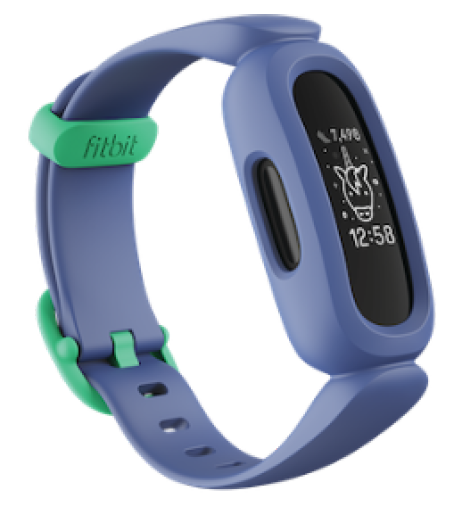
Introduction: The Ultimate Activity Tracker for Kids
The Fitbit Ace 3 Fitness Tracker is a feature-packed wearable designed to make fitness fun for children aged 6 and up. As part of the Google family, this kid-friendly device combines playful design with serious health-tracking capabilities, helping families build active, healthy routines together. With animated clock faces, virtual badges, and family challenges, the Fitbit Ace 3 motivates kids to set goals, stay moving, and develop lifelong healthy habits.
Key benefits include all-day activity tracking, sleep monitoring, bedtime reminders, silent alarms, and swimproof durability up to 50 meters—making it ideal for active kids who love to run, swim, and play. The Fitbit Ace 3 is not just a step counter; it tracks active minutes, offers timer and stopwatch functions, and syncs wirelessly with the Fitbit app for both kid and parent views. Parents can monitor their child’s progress, while kids enjoy a sense of independence with easy-to-use touchscreen navigation.
Designed for comfort and durability, the Ace 3 features a flexible, adjustable silicone band and a secure clasp, fitting wrists from 4.8 to 6.8 inches (122–173 mm). Its PMOLED touchscreen delivers up to 8 days of battery life on a single charge—far longer than most smartwatches—thanks to an energy-efficient black-and-white display.
The Fitbit Ace 3 Fitness Tracker is widely available at major retailers, with an estimated price range of $60–$80 USD, offering excellent value for families seeking a reliable, engaging, and safe activity tracker for kids.
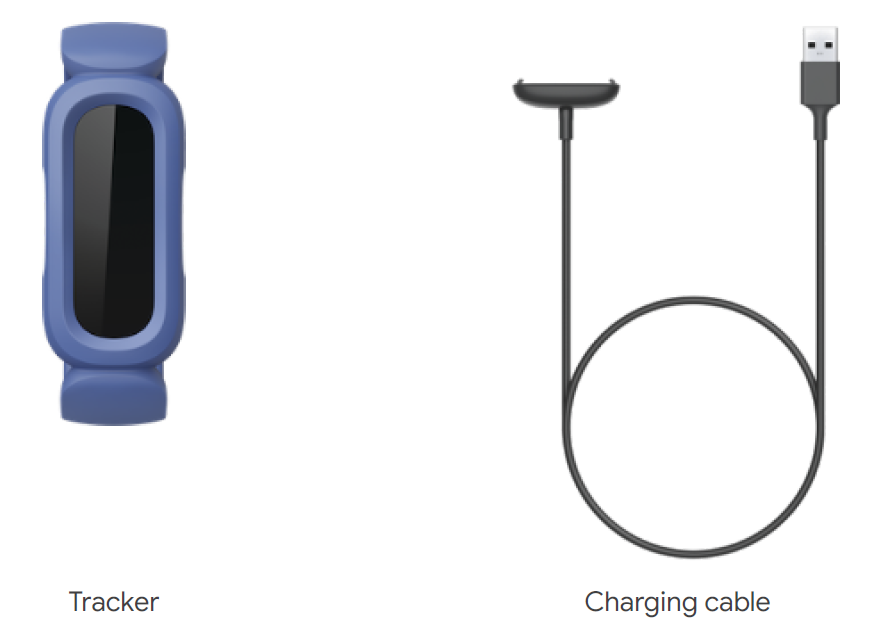
What's in the box
Your Ace 3 box includes:
General Info and Specifications
- Sensors and Components
Fitbit Ace 3 contains the following sensors and motors:- 3-axis accelerometer, which tracks motion patterns
- Vibration motor
- Materials
The Ace 3 classic band is made of a flexible, durable elastomer material similar to that used in many sports watches. The housing and buckle on Ace 3 are plastic.
The Ace 3 classic band is made of a flexible, durable silicone similar to that used in many sports watches. The housing and buckle on Ace 3 are plastic. - Wireless technology
Ace 3 contains a Bluetooth 4.2 radio transceiver. - Haptic feedback
Ace 3 contains a vibration motor for alarms, goals, notifications, reminders, and apps. - Battery
Ace 3 contains a rechargeable lithium-polymer battery. - Memory
Ace 3 stores your data, including daily stats, sleep information, and activity history, for 7 days.
See your historical data in the Fitbit app. - Display
Ace 3 has a PMOLED display. - Band size
One-size band fits a wrist between 4.8 and 6.8 inches (121 mm - 172 mm) in circumference - Environmental conditions
- Operating temperature: 14° to 113° F (-10° to 45° C)
- Non-operating temperature: -4° to 14° F (-20° to -10° C)113° to 140°F(45° to 60° C)
- Charging temperature: 32° to 109° F (0° to 43° C)
- Water resistance: Water resistant up to 50 meters
- Maximum operating altitude:28,000 feet(8,534 m)
Set up Ace 3
Install the Fitbit app on the primary phone or tablet your child will use with Ace 3. Open the Fitbit app, and follow the instructions in the related help article to set up your device.
To set up an account, you’re prompted to enter information such as your child’s height and age to help calculate their activity.
Change the band
Ace 3 comes with a kid's band attached. The band can be swapped with accessory bands, sold separately. For band measurements, see Band size. Note that for larger sizes or different styles, Ace 3 is compatible with Inspire 2 classic accessory bands.
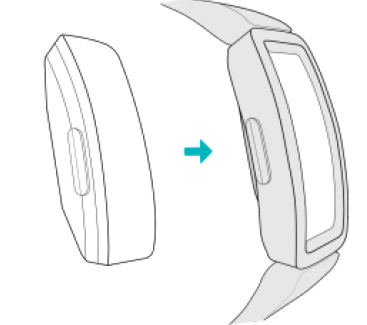
Remove a band
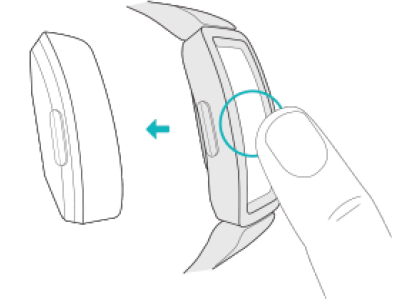
- Hold the tracker with the screen facing you.
- Gently push the top of the tracker through the back opening in the band.
Attach a new band
- Hold the tracker with the back facing you. Make sure the time isn't upside down.
- Hold the band with the back opening facing you and the strap buckle on the top.
- Place the top of the tracker into the flexible band opening and gently push the bottom of the tracker into place. Ace 3 is secure when all edges of the band lie flat against the tracker.
Basics
Learn how to navigate, check the battery level, and care for your tracker.
Navigate Ace 3
Ace 3 has a PMOLED touchscreen display and 2 buttons.
Navigate Ace 3 by tapping the screen, swiping up and down, or pressing the buttons. To preserve battery, the tracker’s screen turns o when not in use.
Basic navigation
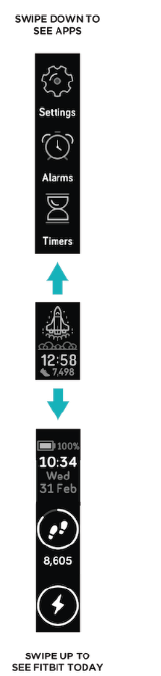
The home screen is the clock
- Swipe down to scroll through the apps on Ace 3. Tap an app to open it.
- Swipe up to see your daily stats..
Update, Restart, and Erase
Learn how to update, restart, and erase Ace 3.
Update Ace 3
Update your tracker to get the latest feature enhancements and product updates.
When an update is available, a notification appears in the Fitbit app. After you start the update, follow the progress bars on Ace 3 and in the Fitbit app until the update is complete. Keep your tracker and phone close to each other during the update.
Updating Ace 3 takes several minutes and may be demanding on the battery. We recommend plugging your tracker into the charger before starting the update.
Troubleshooting
If you experience any of the following issues, restart your tracker:
- Won't sync
- Won't respond to taps, swipes, or button presses
- Won't track steps or other data
- Won't show notifications
For instructions, see Restart Ace 3.
Return policy and warranty
Find warranty information and the fitbit.com return policy on our website.
Pros & Cons: Balanced Assessment of the Fitbit Ace 3 Fitness Tracker
Advantages
- Kid-Friendly Design: Durable, swimproof construction (up to 50m), comfortable silicone band, and secure clasp make it ideal for active children.
- Long Battery Life: Up to 8 days on a single charge reduces the need for frequent recharging, a major plus for busy families.
- Comprehensive Tracking: Tracks steps, active minutes, sleep duration, and offers bedtime reminders and silent alarms—all visible on a simple touchscreen interface.
- Motivational Features: Virtual badges, animated clock faces, and family challenges encourage kids to stay active and engaged.
- Parental Controls: Syncs with the Fitbit app for parental oversight, while kids enjoy independence with their own view.
Limitations
- No GPS or Distance Tracking: Unlike some fitness trackers, the Ace 3 does not measure distance walked or run, focusing instead on steps and active minutes.
- No Heart Rate Monitoring: Lacks a heart rate sensor, which limits detailed fitness insights compared to some adult models.
- Basic Display: The black-and-white PMOLED screen is energy-efficient but lacks the color and detail of higher-end smartwatches
- Limited Smart Features: While it supports call alerts and basic notifications, it does not offer full smartwatch capabilities like messaging or apps.
Value for Money: The Fitbit Ace 3 Fitness Tracker delivers strong value, especially for families prioritizing durability, battery life, and kid-friendly features over advanced metrics or smart features. It compares favorably to other kids’ trackers by offering robust activity and sleep tracking in a swimproof, long-lasting package.
Customer Reviews: What Families Are Saying
Parents and kids consistently praise the Fitbit Ace 3 Fitness Tracker for its durability, ease of use, and motivational features. Many highlight how the device has helped their children become more active, with kids enjoying the virtual rewards and family challenges. The long battery life is a frequent favorite, as it allows children to wear the tracker for days without worrying about recharging.
Common praises include the swimproof design, comfortable band, and the ability for kids to customize their experience with different clock faces. The parental controls and app integration are also well-received, giving adults peace of mind while fostering healthy habits.
Some users note minor drawbacks, such as the lack of distance tracking and the basic display, but these are generally outweighed by the tracker’s core strengths. The Fitbit Ace 3 typically earns 4 to 4.5 out of 5 stars in customer reviews, with most families recommending it as a top choice for young, active kids.
Purchase Recommendation: The Fitbit Ace 3 Fitness Tracker is an excellent choice for families seeking a durable, engaging, and easy-to-use activity tracker for children. It’s especially suited for kids who are rough on devices or participate in water activities. While it’s not a full-featured smartwatch, its focus on health, fitness, and fun makes it a standout in the kids’ wearable category.
Faqs
How do I set up the Fitbit Ace 3 Fitness Tracker for the first time?
What should I do if my Fitbit Ace 3 Fitness Tracker is not syncing with the app?
Can the Fitbit Ace 3 Fitness Tracker be used with both iPhone and Android devices?
How do I change the wrist setting on the Fitbit Ace 3 Fitness Tracker for accurate tracking?
What is the average battery life of the Fitbit Ace 3 Fitness Tracker and how do I charge it?
How can I keep the Fitbit Ace 3 Fitness Tracker clean and well maintained?
What features make the Fitbit Ace 3 Fitness Tracker suitable for kids?
How do I troubleshoot common problems like the Fitbit Ace 3 screen not turning on?
More fitbit manuals
- How to Use: Fitbit Alta Fitness Tracker User Manual
- How to Use: Fitbit Ace 2 Fitness Tracker User Guide
- How to Use: Fitbit Wireless Activity Wristband User Manual
- How to Use: Fitbit Ace Fitness Tracker User Guide
- Fitbit Alta Fitness Tracker FB406 User Manual
- Usage: Fitbit Alta HR Fitness Tracker User Manual
Leave a Comment