
How to Use: Fitbit Versa 3 Wrist Watch User Manual
Content
Fitbit Versa 3 Wrist Watch
Introduction
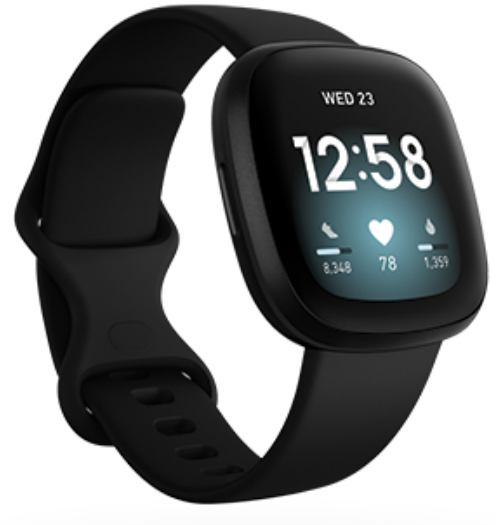
The Fitbit Versa 3 Wrist Watch is a cutting-edge smartwatch designed for fitness enthusiasts and everyday users alike. With its sleek design and robust features, it offers a compelling blend of health tracking, GPS, and smart functionality. Key benefits include built-in GPS for accurate distance tracking, SpO2 monitoring for blood oxygen levels, and a long-lasting battery that provides up to six days of use. The Versa 3 is ideal for those seeking a reliable fitness companion that also supports Google Assistant and Alexa, making it a versatile choice for both health monitoring and smart home control. Priced competitively, it falls within the estimated range of $200-$300 and is widely available across major retailers.
Get started
What's in the box
Charge your watch
- Plug the charging cable into the USB port on your computer, a UL-certified USB wall charger, or another low-energy charging device.
- Hold the other end of the charging cable near the port on the back of the watch until it attaches magnetically. Make sure the pins on the charging cable align with the port on the back of your watch.
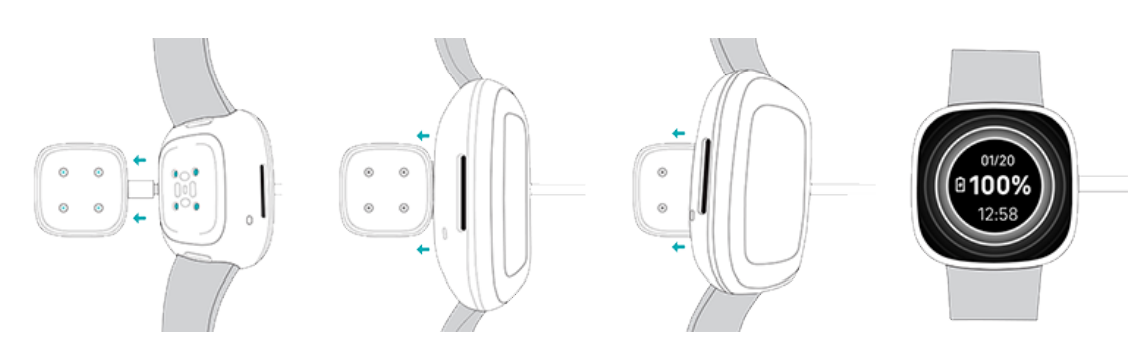
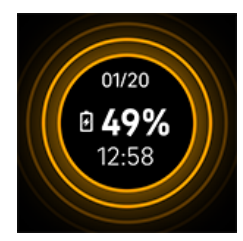
Charge Versa 3 for 12 minutes for 24 hours of battery life. While the watch charges, tap the screen twice or press the button to turn the screen on. The battery level appears for several seconds, then disappears so you can use your watch while it charges. Charging fully takes about 1-2 hours.
Set up Versa 3
Set up Versa 3 with the Fitbit app for iPhones and iPads or Android phones. The Fitbit app is compatible with most popular phones.
To get started:
- Download the Fitbit app:
Apple App Store for iPhones
Google Play Store for Android phones - Install the app, and open it.
- Tap Sign in with Google, and follow the on-screen instructions to set up your device.
When you're done with setup, read through the guide to learn more about your new watch and then explore the Fitbit app.
For more information, see the related help article.
Connect to Wi-Fi
- During setup, you're prompted to connect Versa 3 to your Wi-Fi network. Versa 3 uses Wi-Fi to more quickly download apps from the Fitbit Gallery and for faster, more reliable OS updates.
- Versa 3 can connect to open, WEP, WPA personal, and WPA2 personal Wi-Fi networks. Your watch won't connect to 5GHz, WPA enterprise, or public Wi-Fi networks that require more than a password to connect—for example, logins, subscriptions, or profiles. If you see fields for a username or domain when connecting to the Wi-Fi network on a computer, the network isn't supported.
- For best results, connect Versa 3 to your home Wi-Fi network. Make sure you know the network password before connecting.
- For more information, see the related help article.
- See your data in the Fitbit app.p
- Open the Fitbit app on your phone to see your health metrics, activity, type, and sleep data, choose a workout or mindfulness session, and more.
Unlock Fitbit Premium
- Fitbit Premium is your personalized resource in the Fitbit app that helps you stay active, sleep well, and manage stress. A Premium subscription includes programs tailored to your health and fitness goals, personalized insights, hundreds of workouts from fitness brands, guided meditations, and more.
- Customers can redeem a Fitbit Premium trial subscription in the Fitbit app.
- For more information, see the related help article.
Wear Versa 3
Wear Versa 3 around your wrist. If you need to attach a different size band, or if you purchased another band, see the instructions in "Change the band" on page 15.
Placement for all-day wear vs. exercise
When you're not exercising, wear Versa 3 a finger's width above your wrist bone.
In general, it's always important to give your wrist a regular checkup by removing your watch for around an hour after extended wear. We recommend removing your watch while you shower. Although you can shower while wearing your watch, not doing so reduces the potential for exposure to soaps, shampoos, and conditioners, which can cause long-term damage to your watch and may cause skin irritation.
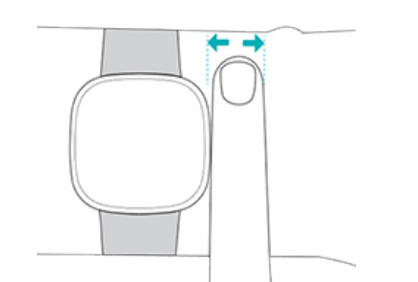
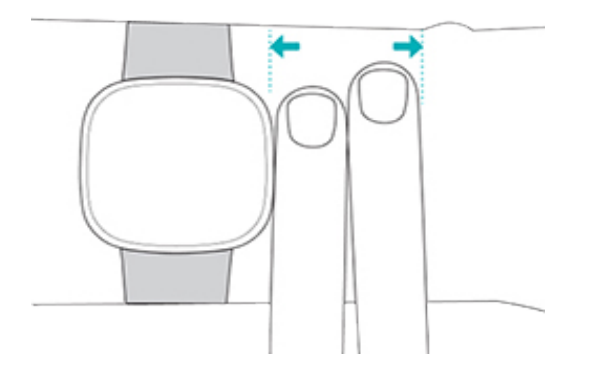
For optimized heart-rate tracking while exercising:
- During workouts, try moving the band higher on your wrist to get a better fit. If you experience any discomfort, loosen the band, and if it persists, give your wrist a break by taking it off.
- Wear your watch on top of your wrist, and make sure the back of the device is in contact with your skin.
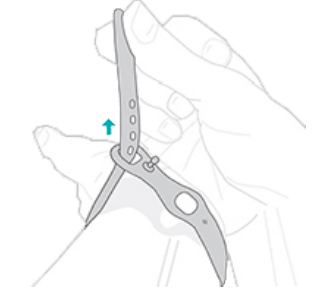
Fasten the band
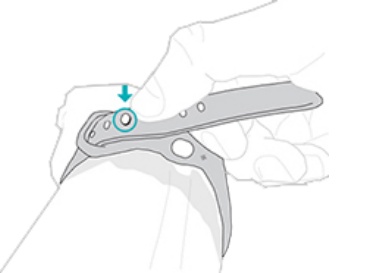
- Place Versa 3 around your wrist.
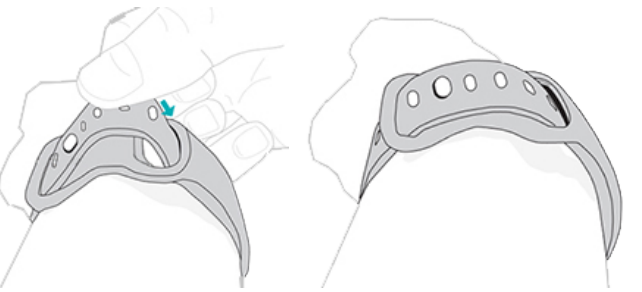
- Slide the bottom band through the first loop in the top band.
- Tighten the band until it fits comfortably, and press the peg through one of the holes in the band.
- Slide the loose end of the band through the second loop until it lies flat on your wrist. Make sure the band isn’t too tight. Wear the band loosely enough that it can move back and forth on your wrist.
Handedness
For greater accuracy, you must specify whether you wear Versa 3 on your dominant or non-dominant hand. Your dominant hand is the one you use for writing and eating. To start, the Wrist setting is set to non-dominant. If you wear Versa 3 on your dominant hand, change the Wrist setting in the Fitbit app:
From the Today tab in the Fitbit app, tap the icon in the top left >Versa 3 tile> Wrist >Dominant.
Wear and care tips
- Clean your band and wrist regularly with a soap-free cleanser.
- If your watch gets wet, remove it and dry it completely after your activity.
- Take your watch off from time to time.
- If you notice skin irritation, remove your watch and contact customer support. For more information, see fitbit.productcare.
For more information, visit the Fitbit Wear & Care page.
Change the band
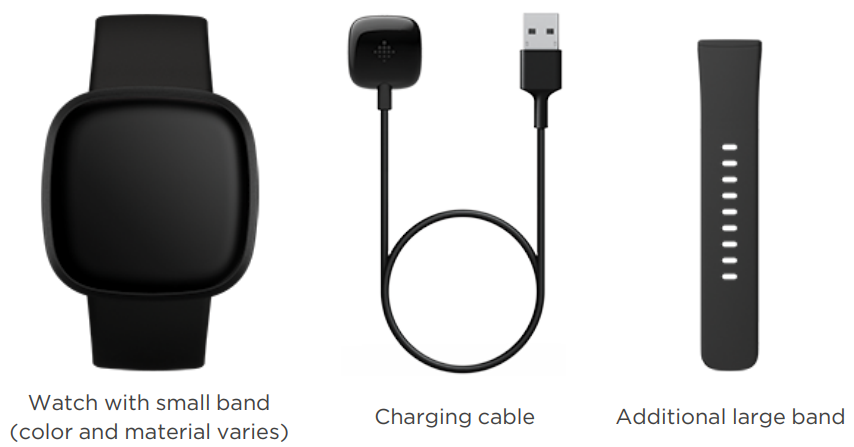
Versa 3 comes with a small band attached and an additional large, bottom band in the box. Both the top and bottom bands can be swapped with accessory bands, sold separately on Fitbit.. For band measurements, see "Band size" on page 72.
Fitbit Sense bands are compatible with Versa 3.
Remove a band
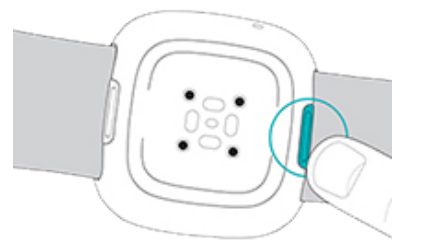
- Turn over Versa 3 and find the band latches.
- To release the latch, slide the flat button toward the band.
- Gently pull the band away from the watch to release it.
- Repeat on the other side.
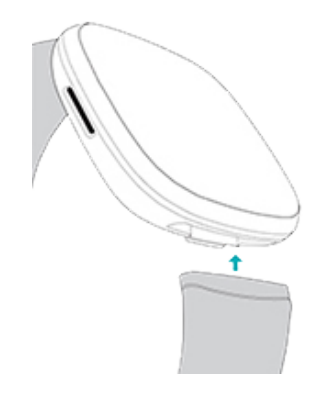
Attach a band
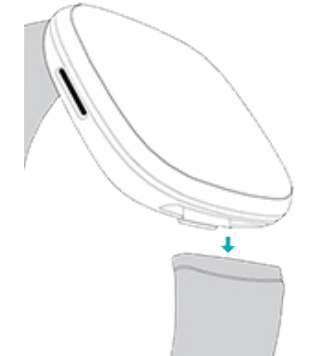
To attach a band, press it into the end of the watch until you hear a click, and it snaps into place. The band with the loops and peg attaches to the top of the watch.
Troubleshooting
If Versa 3 isn't working properly, see our troubleshooting steps below.
Heart-rate signal missing
Versa 3 continuously tracks your heart rate while you're exercising and throughout the day. If the heart-rate sensor on your watch has difficulty detecting a signal, dashed lines appear.
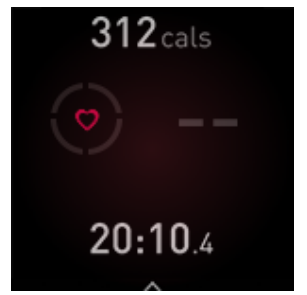
If your watch doesn't detect a heart-rate signal, make sure you're wearing your watch correctly, either by moving it higher or lower on your wrist or by tightening or loosening the band. Versa 3 should be in contact with your skin. After holding your arm still and straight for a short time, you should see your heart rate again.
For more information, see the related help article.
GPS signal missing
Environmental factors,, including tall buildings, dense forest, steep hills, and thick cloud cover, can interfere with your watch's ability to connect to GPS satellites. If your watch is searching for a GPS signal during an exercise, you’ll see “
GPS connecting appears at the top of the screen. If Versa 3 can't connect to a GPS satellite, the watch stops trying to connect until the next time you start a GPS exercise.
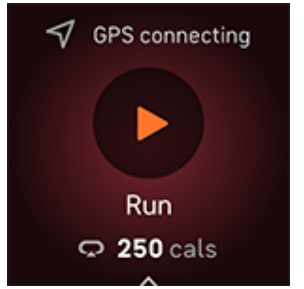
For best results, wait for Versa 3 to find the signal before you start your workout.
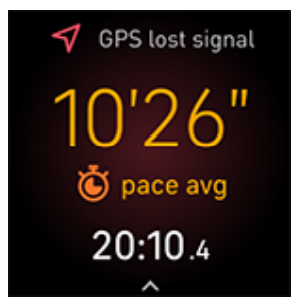
If Versa 3 loses the GPS signal during your workout, "GPS lost signal" appears at the top of the screen. Your watch will attempt to reconnect.
For more information, see the related help article.
Can't connect to Wi-Fi
If Versa 3 can't connect to Wi-Fi, you might have entered an incorrect password, or the password might have changed:
- From the Today tab in the Fitbit app, tap the icon in the top left Versa 3 tile.
- Tap Wi-Fi Settings Next.
- Tap the network you want to use. Remove.
- Tap Add Network and follow the on-screen instructions to reconnect the Wi-Fi network.
To check if your Wi-Fi network is working correctly, connect another device to your network; if it connects successfully, try again to connect your watch.
If Versa 3 still won't connect to Wi-Fi, make sure that you're attempting to connect your watch to a compatible network. For best results, use your home Wi-Fi network. Versa 3 can't connect to 5GHz Wi-Fi, WPA enterprise, or public networks that require logins, subscriptions, or profiles.
For a list of compatible network types, see "Connect to Wi-Fi" on page 9.
- After you verify the network is compatible, restart your watch and try connecting to Wi-Fi again. If you see other networks appear in the list of available networks, but not your preferred network, move your watch closer to your router.
- For more information, see the related help article.
- Phone disconnected
When your Fitbit device isn’t connected to your phone, the phone disconnected icon  appears for 3 seconds at the top of your clock face when you turn on the screen. You might have trouble syncing and receiving notifications from your phone. If your phone is nearby, follow the troubleshooting steps in the related help article.
Other issues
If you experience any of the following issues, restart your watch:
- Won't sync
- Won't respond to taps, swipes, or button press
- Won't track steps or other data
- Won't show notifications
General Info and Specifications
Sensors and Components
Fitbit Versa 3 contains the following sensors and motors:
- Optical heart-rate tracker
- An altimeter, which tracks altitude changes
- 3-axis accelerometer, which tracks motion patterns
- Ambient light sensor
- Built-in GPS receiver + GLONASS, which tracks your location during a workout
- Device temperature sensor (skin temperature variation available through Premium only)
- Vibration motor
- Speaker
- Microphone
Materials
The band that comes with Versa 3 is made of a flexible, durable elastomer material similar to that used in many sports watches.
The housing and buckle on Versa 3 are made of anodized aluminum. While anodized aluminum can contain traces of nickel, which can cause an allergic reaction in someone with nickel sensitivity, the amount of nickel in all Fitbit products meets the European Union's stringent Nickel
Directive.
Our products may contain trace amounts of acrylates and methacrylates from adhesives used in those products, but we work to ensure our products adhere to rigorous design specifications and meet extensive test requirements to minimize the potential for reaction to these adhesives.
Wireless technology
Versa 3 contains a Bluetooth 5.0 radio transceiver, Wi-Fi chip, and NFC chip.
Haptic feedback
Versa 3 contains a vibration motor for alarms, goals, notifications, reminders, and apps.
Battery
Versa 3 contains a rechargeable lithium-polymer battery.
Memory
Versa 3 stores your data, including daily stats, sleep information, and exercise history, for 7 days. See your historical data in the Fitbit app.
Display
Versa 3 has a color AMOLED display.
Band size
Band sizes are shown below. Note that accessory bands sold separately may vary slightly.
- Small band
Fits a wrist between 5.5 - 7.1 inches (140 mm - 180 mm) in circumference - Large band
Fits a wrist between 7.1 - 8.7 inches (180 mm - 220 mm) in circumference
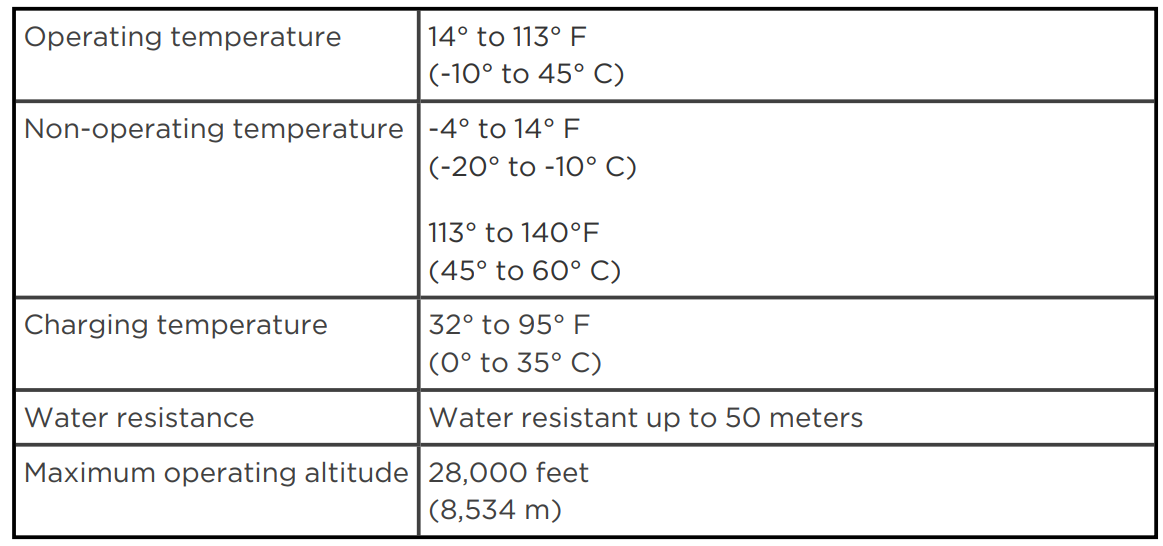
Environmental conditions
Return policy and warranty
Find warranty information at athe Fitbit returnrnn policy on our website.
Pros and Cons of the Fitbit Versa 3
Pros
- Accurate Health Tracking: Offers 24/7 heart rate monitoring, sleep tracking, and SpO2 monitoring.
- GPS Capabilities: Built-in GPS allows for precise distance tracking without needing a phone.
- Long Battery Life: Provides up to six days of use, making it suitable for extended trips.
- Smart Features: Supports Google Assistant and Alexa for hands-free control.
Cons
- Limited Advanced Health Features: Lacks ECG monitoring found in higher-end models like the Fitbit Sense.
- Comfort Issues: Some users report discomfort during workouts requiring forearm movement.
Customer Reviews
Users generally praise the Versa 3 for its accurate health tracking and long battery life. Common praises include its ease of use and smart features like Google Assistant support. However, some users note that it lacks advanced health features compared to the Fitbit Sense. Overall, it receives a **4.5-star rating** from customers, with many recommending it for its value for money and robust feature set. As one user noted, "It's perfect for tracking my daily activities and sleep, and the GPS is very accurate."
For those seeking a comprehensive smartwatch without the hefty price tag of more advanced models, the Fitbit Versa 3 is a solid choice. While it may not offer the most advanced health features, it provides a well-rounded experience for fitness tracking and smart home integration.
More fitbit manuals
- How to Use: Fitbit Versa Lite Edition Wrist Watch User Manual
- How to Use: Fitbit Versa 2 Wrist Watch User Manual
- How to Use: Fitbit Inspire HR Wristband User Manual
- How to Use: Fitbit Versa Wrist Watch User Manual
- How to Use: Fitbit Inspire 2 Fitness Tracker User Manual
- Setup & Usage: Fitbit Surge Fitness Super Watch User Manual
Leave a Comment