
Fujifilm Finepix Series 6000 Digital Camera User Manual
Content
fujifilm Finepix Series 6000 Digital Camera Manual and Product Guide
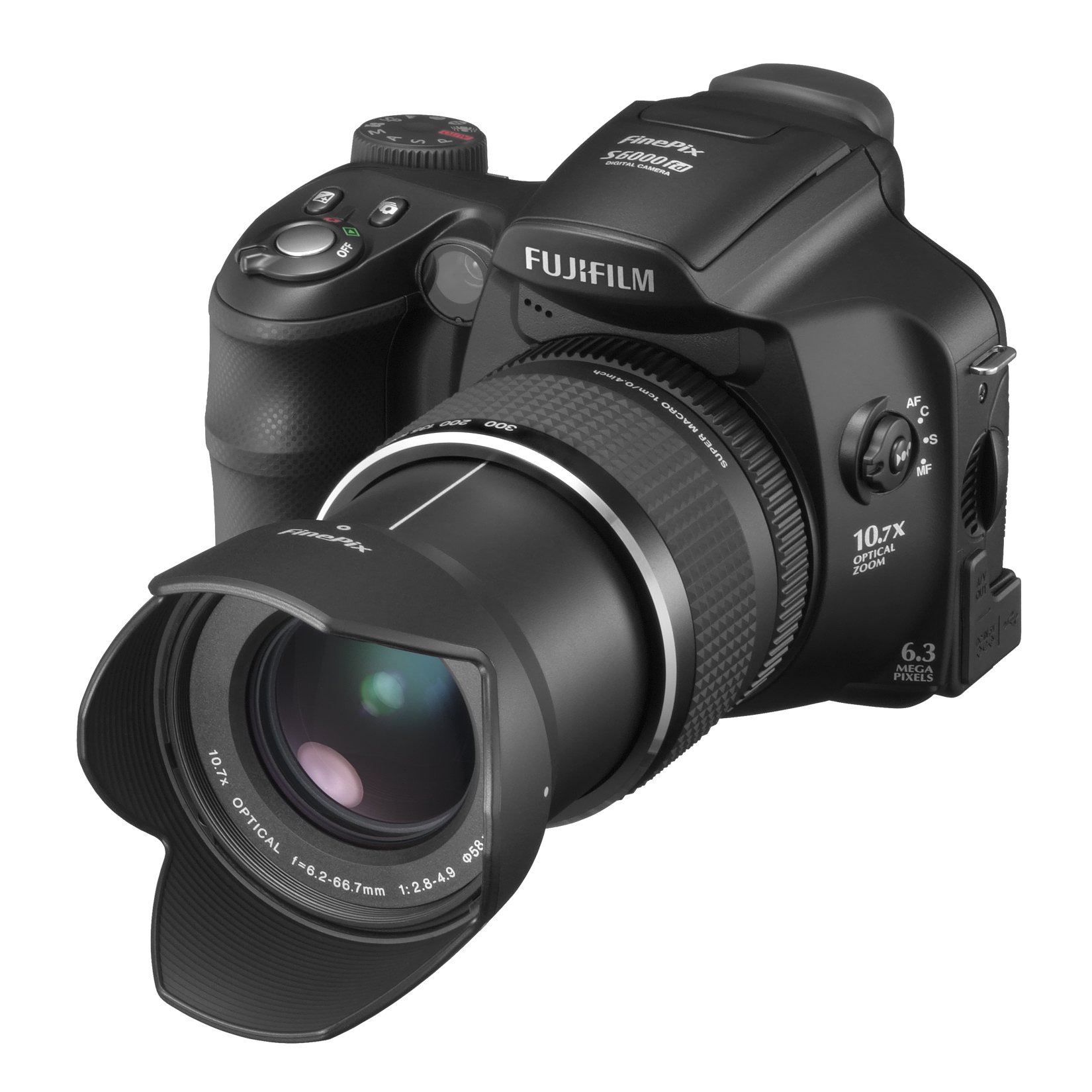
Introduction: Fujifilm FinePix S6000fd Digital Camera Overview
The Fujifilm FinePix Series 6000 Digital Camera, commonly known as the FinePix S6000fd, is a powerful bridge-style digital camera built for users who want DSLR-like handling without switching to interchangeable lenses. It combines a long 10.7x optical zoom lens, a 6.3-megapixel Super CCD sensor, and Fujifilm’s face detection technology to deliver versatile performance for travel, portrait, wildlife, and everyday photography. Its 28–300mm equivalent zoom range makes it especially appealing for users who need one camera that can handle wide landscapes and distant subjects with ease.
This model is best suited for hobbyists, beginners moving up from compact cameras, and photographers who want manual control in a single all-in-one body. The electronic viewfinder, 2.5-inch LCD, RAW support, and full manual exposure modes add flexibility for creative shooting. For its era, the camera stood out for strong low-light tuning, solid color reproduction, and a comfortable grip that feels more like a serious camera than a pocket compact.
Because the Fujifilm FinePix Series 6000 Digital Camera is discontinued, availability is now limited to used, refurbished, or collector markets. Typical resale pricing usually falls in the low-cost vintage camera range, often around budget-friendly used-camera pricing depending on condition, battery health, and included accessories. For buyers who want an affordable superzoom classic, it remains an interesting option.
Specifications: Fujifilm FinePix Series 6000 Digital Camera Technical Details
- Sensor: 1/1.7-inch CCD sensor with 6.3 million total pixels and 6.1 effective megapixels.
- Resolution: Up to 2848 x 2136 pixels, with 3:2 and lower-resolution shooting modes.
- Lens: 10.7x optical zoom, 28–300mm equivalent focal length.
- Aperture Range: F2.8–4.9, giving better flexibility for portraits and daylight zoom shots.
- ISO Range: Auto, 100, 200, 400, 800, 1600, and 3200.
- Shutter Speed: 30 seconds to 1/4000 second, depending on shooting mode.
- Display: 2.5-inch LCD with approximately 235,000 dots.
- Viewfinder: 0.33-inch electronic viewfinder for framing in bright light.
- Storage: Internal memory plus xD-Picture Card support.
- Video: VGA movie recording at 640 x 480 at 30 fps with sound.
- Power: Uses 4 AA batteries, which makes it convenient for travel and backup power.
- Weight and Size: Roughly 601 g, with a DSLR-like body size that improves stability.
Compared with entry-level compact cameras of the same period, the Fujifilm FinePix Series 6000 Digital Camera offers far more zoom reach, stronger manual control, and a more advanced shooting experience. Against similar bridge cameras, it is especially valued for its long lens, RAW capability, and face detection features.
Pros & Cons: Fujifilm FinePix Series 6000 Digital Camera Review
Pros
- Excellent zoom range: The 28–300mm equivalent lens is ideal for travel, events, and distant subjects.
- Manual control options: Aperture, shutter, and focus controls give more creative freedom than typical point-and-shoot cameras.
- Comfortable handling: The large grip and SLR-style body make it easier to steady during long zoom shots.
- Good feature set for its class: RAW capture, face detection, and VGA video were strong selling points.
- AA battery support: Easy to power on the go, especially for travelers and casual users.
Cons
- Older sensor technology: Image quality is limited by modern standards, especially in low light and at higher ISO settings.
- xD-Picture Card dependence: Storage format is dated and less convenient than SD cards.
- Bulky design: It is not a pocket camera and takes up more space than compact alternatives.
- No modern connectivity: Lacks Wi-Fi, Bluetooth, and current smartphone integration.
- Used-market only: Value depends heavily on condition, making careful buying important.
For buyers looking for a budget-friendly vintage superzoom, the Fujifilm FinePix Series 6000 Digital Camera still offers strong value. However, users seeking modern image quality or convenience may prefer newer mirrorless or compact zoom alternatives.
Customer Reviews: What Users Say About the Fujifilm FinePix S6000fd
Customer feedback for the Fujifilm FinePix Series 6000 Digital Camera is generally positive among enthusiasts who appreciate its zoom reach and classic Fujifilm color rendering. Typical ratings from long-time owners often fall around 4 out of 5 stars for usability and feature set in its class.
- Praise: “The zoom range is fantastic for travel and outdoor photography.”
- Praise: “It feels more like a real camera than a compact model, and the manual controls are useful.”
- Complaint: “Image quality drops in low light, especially at higher ISO settings.”
- Complaint: “Finding xD cards and compatible accessories can be difficult today.”
- Recommendation: Best for collectors, hobbyists, and users wanting an inexpensive superzoom camera with vintage appeal.
Many users recommend it as a fun, capable used camera rather than a primary everyday shooter. If you want an affordable bridge camera with strong zoom and classic handling, the Fujifilm FinePix Series 6000 Digital Camera remains a practical choice.
Faqs
How do I set up the fujifilm Finepix Series 6000 Digital Camera for the first time?
Why is my fujifilm Finepix Series 6000 Digital Camera not turning on, and what should I check first?
How do I get the best image quality from the fujifilm Finepix Series 6000 Digital Camera?
What memory cards are compatible with the fujifilm Finepix Series 6000 Digital Camera?
How do I transfer photos from the fujifilm Finepix Series 6000 Digital Camera to a computer?
Why are my pictures blurry on the fujifilm Finepix Series 6000 Digital Camera, and how can I fix it?
How should I clean and maintain the fujifilm Finepix Series 6000 Digital Camera safely?
What should I do if the fujifilm Finepix Series 6000 Digital Camera shows card errors or freezes during shooting?
More fujifilm manuals
Leave a Comment