
Setup: Fujifilm Instax Mini Evo Instant Camera F1038 User Guide
Content
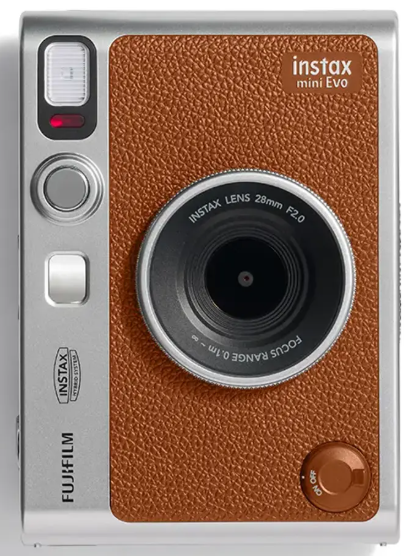
Fujifilm Instax Mini Evo Instant Camera F1038
Introduction
The Fujifilm Instax Mini Evo Instant Camera F1038 is a revolutionary addition to the Instax family, combining the nostalgia of instant film with modern technological advancements. This camera is designed for those who love the immediacy of physical photos and the creative freedom of digital controls. Launched in 2022, the Instax Mini Evo is priced around $200, making it an affordable and fun option for photography enthusiasts and casual users alike.
The Instax Mini Evo serves multiple purposes, from capturing everyday moments to creating artistic photographs. It is perfect for parties, travels, and any occasion where you want to preserve memories in a tangible form. With its sleek design and user-friendly interface, this camera is ideal for both beginners and experienced photographers.
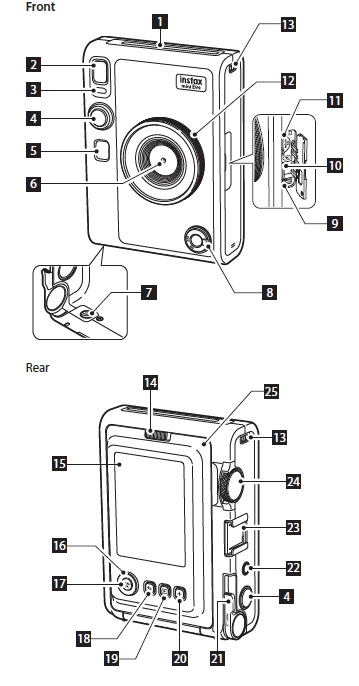
Part Names
- Film ejection slot
The exposed film is ejected from the film ejection slot during printing. - Flash
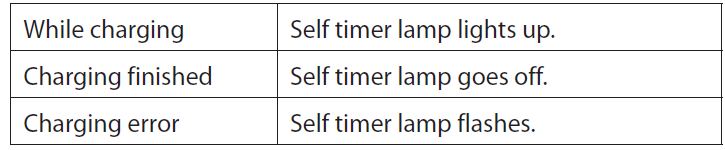
The flash operates depending on the setting. You can also set the flash to not operate. - Self-timer lamp/Charging lamp
The self-timer lamp/charging lamp blinks when you take a photo with the self-timer. It also lights up during charging and turns off when charging is complete. - Shutter button
Press the shutter button halfway to focus on the subject. Keeping the shutter button pressed halfway, press it fully to operate the camera shutter and take a photo. Press the shutter button in playback mode to switch to shooting mode. - Selfie mirror
You can see yourself in the selfie mirror to check the composition of the photo, and ensure you are in the shot. - Lens
This is the lens used to take photos. Make sure that your fingers or other body parts do not obstruct the lens during shooting. 7 Tripod hole
You can attach a tripod by using this hole. - Power switch
Turn the power switch clockwise to turn on the power. Turn it counter-clockwise to turn off the power. - Reset button *1
If the camera is not operating properly, press this button to force the camera to turn off. After pressing the reset button, turn the power switch off and then on again to start the camera. Do not use the reset button while the camera is operating normally. Doing so may cause the photo data to be erased. - USB Type-C port
This is the USB port for charging the camera. The USB port cannot be used for data transfer. - Micro SD card slot
This is the slot for a micro SD card. - Lens dial *2
Turn the lens dial to switch between 10 different lens effects. 13 Strap hook
Pass the cord on the strap through the strap hook to attach the strap to the camera. - Film door lock
Slide the film door lock to unlock the film door so that it can be lifted open. - LCD Screen
You can see the subject to be photographed during shooting and check the photos you have taken on the LCD Screen. You can also view and select the menus on the LCD Screen. - Select buttons (
 )
)
Use the select buttons to select menu items and to use the functions displayed on the LCD Screen. - MENU/OK button
During shooting or playback, press the MENU/OK button to display the menu on the LCD Screen. This button is also used to confirm menu items.  (Back) button
Press the (Back) button to return to the previous screen. This button is also used to cancel photo printing.
- (Playback) button
Press the (Playback) button to display the photos you have taken on the LCD Screen. When in shooting mode, this button is also used to switch to playback mode. - +(Function) button
Press the +(Function) button in shooting mode to check the current effect on the LCD Screen. You can also save and recall effects. - Print lever
Print the image displayed on the LCD Screen. - Effect reset button
Return both the lens and film effects to normal.
Accessory shoeAttach camera accessories using the accessory shoe. - Film dial *3
Turn the film dial to switch between 10 different film effects. - Film door
When loading/unloading a film pack, slide the film door lock to unlock the film door and lift it open. Do not open the film door until you have used up the film.
Charging the Battery
- Turn off the camera before charging the battery. The battery will not charge if the camera is turned on.
Connect the camera using the supplied dedicated charging cable to a USB AC adapter (supplied with your smartphone),, then connect the USB AC adapter to an indoor power outlet.- Charging time is approximately 2 to 3 hours.
- The power delivered by the charger must be between min 0.4 Watts required by the radio equipment, and max 2.5 Watts to achieve the maximum charging speed.
Charging Status Indication
When charging from a PC:
- Connect the camera directly to the PC, not through a USB hub or keyboard.
- If the PC goes into hibernation (sleep mode) while charging, charging will be stopped. To continue charging, wake up the PC from hibernation (sleep mode) and reconnect the supplied dedicated charging cable.
- Depending on your PC’s specifications, settings, or condition, it may not be possible to charge the battery.
- It is not possible to remove the battery.
- The battery has not been fully charged at the factory. Be sure to charge the battery before using the camera.
- Please refer to “Simple Camera Care” for precautions regarding the battery. (p. 27)
Using the Memory Card
The camera's internal memory can store about 45 still images, but you can store more images by using a memory card. You will also need a memory card to upgrade the firmware. Please prepare a memory card in advance.
Precautions Regarding Memory Cards
- This camera is compatible with micro SD cards and micro SDHC cards. Using other types of memory cards may cause damage to the camera.
- Memory cards are small and may be accidentally swallowed by infants. Keep them out of the reach of infants. In the unlikely event that an infant swallows a memory card, consult a physician immediately.
- Do not turn off the camera or remove the memory card during formatting or while recording/deleting data . . The memory card may be damaged..
- Do not use or store memory cards in an environment that is prone to strong static electricity or electrical noise.
- Inserting a memory card charged with static electricity into the camera may cause the camera to malfunction. If this happens, turn the camera off and then on again.
- Do not carry a memory card in the pocket of your pants. A strong force may be applied when you sit down, which may cause the memory card to break.
- The memory card may become hot to the touch after prolonged use, but this is not a fault.
- Do not put any labels on memory cards. If the label comes off, it may cause the camera to malfunction.
Precautions Regarding Using a Memory Card on a PC
- Always format an unused memory card or a memory card that has been used on a PC or other device before using it in the camera.
- When a memory card is formatted in the camera and used for shooting and recording, folders are automatically created. Do not use your PC to rename or delete folders or files on the memory card. Doing so may make the memory card in the camera unusable.
- Do not use your PC to delete images on the memory card. Always use the camera.
- If you want to edit an image file, copy or move the image file to a hard disk or similar device, and then edit the copied or moved image file.
Inserting a Memory Card
- Pen the card slot coveInsertrt the memory card all the way in the correct orientation as shown until you hear a “click.
- Close the card slot cover..
- To remove the memory card, push the card in with your finger and then release your finger gently. The card will be unlocked and ready to be removed.
- If you suddenly release your finger while removing the memory card, the card may pop out. Release your finger gently.
Specifications
Camera Function
- Image sensor: 1/5-inch CMOS with primary color filter
- Number of recorded pixels: 2560 × 1920
- Storage med: Internal memory, microSD/microSDHC memory card
- Storage capacity: Approximately 45 images in internal memory, approximately 850 images perimages per 111 GB in microSD/microSDHC memory card
- Recording method: DCF compliant Exif Ver 2.3
- Focus distance: f = 28 mm (35 mm film equivalent)
- Aperture: F2.0
- Auto focus: Single AF (with AF Illuminator)
- Shooting distance: 10 cm to ∞
- Shutter speed: 1/4 second to 1/8000 second (automatic switching)
- Shooting sensitivity: ISO100 to 1600 (automatic switching)
- Exposure Control: Program AE
- Exposure compensation: −2.0 EV to +2.0 EV (1/3 EV step)
- Metering method: TTL 256 split metering, multi metering
- White balance : Auto, Fine, Shade, Fluorescent, ,1 Fluorescent 2, Fluorescent 3 , Incandescent
- Flash: AUTO FLASH/FORCED FLASH/ SUPPRESSFLASH Shooting range with flash: Approximately 5000 cm to 1.5 m
- Self-time,r, approximately: 2 seconds / approximately 10 seconds
- Image effects: 10 lens effects, 10 film effects,, Total of 100 effects by multiplying the above
Print function
- Exposure pixel count1600 × 600 dots(800 × 600 dots when printed from smartphone app)
- Exposure resolution 25 dots/mm × 12.5 dots/mm (635 × 318 dpi, 40 x 80 μm dot pitch)12.5 dots/mm when printed from smartphone app(318 dpi, 80 μm dot pitch)
- Exposure gradation RGB gradation of 256 colors
- Interface Standard compliance: Bluetooth Ver. 4.2 (BLE)
- Printable image formatJPEG images taken with this unit
- Print output time:: Approximately 16 seconds * Plus 7 seconds when printed using Instax-Richh Mode immediately after startup.
- Print function: Images in the internal memory and images in the memory card can be printed
- Reprint: Reprint is possible for images stored in print history (up to 50)
Other
- Smartphone app linked functions:: Smartphone image print function, remote shooting function, print image transfer function, firmware upgrade function..
- LCD screen: 3.0-inch TFT color LCD screen Pixel count: Approximately 460,000 dots
- External interface: USB Type-C port (for charging only)
- Power supply: Lithium-ion battery (internal type: not removable)
- Charging function: Built-in
- Possible number of printed images: Approximately 100 (from full charge)* The number of prints depends on the usage conditions.
- Charging time: Approximately 2 to 3 hours * Charging time depends on the temperature.
- Maiunit dimensions: 87 mm × 122.9 mm × 36 mm excluding projecting parts)
- Main unit weight is: approximately 285 g
- Operating environment
Temperature: 5°C to 40°C
Humidity: 20% to 80% (no condensation) - Film used : FUJIFILM instant film “instax mini” (sold separately)
- The above specifications are subject to change for better performance.
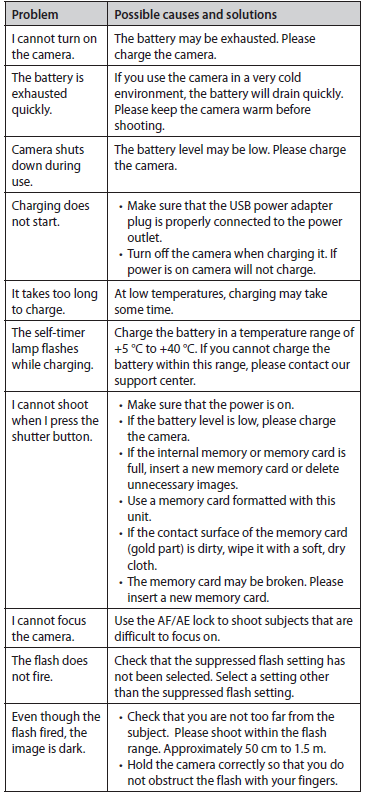
Troubleshooting
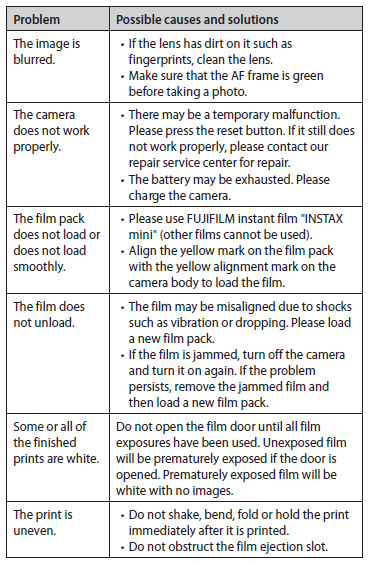
- Please check the following items before considering a problem to be a malfunction. If the problem persists even after taking action, please contact our service center for repair or visit the website below.
- FUJIFILM website: https://global.fujifilm.com/.. If the following problem occurs
IMPORTANT SAFETY NOTICE
This product has been designed to ensure the safety of the user when handled correctly in accordance with the User’s Guide and the instructions provided. It is important that both the product and the “instax mini” film are handled properly and used only to print pictures as instructed in the User’s Guide and in the “instax mini” film instructions. For future reference,, keep the User’s Guide in a safe, easy place.
WARNING
- This symbol indicates danger, which could result in injury or death. Please follow these instructions.
WARNING
- If any of the following instances occur, immediately unplug the dedicated charging cable, turn the camera ,, off and ceasecease.e use.
- The camera becomes hot, emits smoke, emits a burnt smellsmell,l, or is functioning abnormally.
- The camera is dropped into the water. What foreign objects enter the ca?ra..
This device contains a built-in battery . . Do not subject it to heat, throw it into an open fire, drop or subject it to impact . . Doing so could cause the camera to explode.
WARNING
- Never attempt to take this product apart. You may be injured. If the camera is not functioning correctly, to avoid injury,, t do not attempt to repair it yourself.
- If this product is dropped or damaged so that the internals are visible, do not touch it. Contact your FUJIFILM dealer.
- Do not touch any parts within the inside of the back cover. This may cause injury.
- Never get this product wet or handle it with wet hands. Doing so may result in an electric shock.
- Promptly unplug the dedicated charging cable once the battery is fully charged.
- Keep out of the reach of small children. This product could cause injury in the hands of a child.
- Do not cover or wrap the camera or the AC power adapter in a cloth or blanket. This can cause heat to build up and distort the casing or cause a fire.
- The “CE” mark certifies that this product satisfies the requirements of the EU (European Union) regarding safety, public health, environment an,, and consumer protection. (“CE” is the abbreviation of Conformité Européenne.)
- Hereby, FUJIFILM declares that the radio equipment type “FI019” is compliant with Directive 2014/53/EU.
For more information, access the website below.
https://instax.com/mini_evo/en/spec.html - The “UKCA” mark certifies that this product satisfies the requirements of Great Britain (England, Scotland, Wales) regarding safety, public health, environment an, and consumer protection.
*UKCA: UK Conformity Assessed.
Simple Camera Care
Handling the Camera and Battery
- CAUTION: Do not expose to excessive heat su, such as sunshine, fire or t,, he like, which can result in an explosion or the leakage of flammable liquid or gas during use, storage or transportation or d,, disposal.
- CAUTION: Do not dispose of a battery in a fire or a hot oven, or mechanically crush or cut the battery, as this may result in an explosion.
- CAUTION: Do not subject to extremely low air pressure at high altitude that may result in an explosion or the leakage of flammable liquid or gas.
- Do not open the film door until all film exposures have been used, d;; doing so will prematurely expose the remaining film and render it unusable..
- Your camera is a fragile object. Do not expose it to water, sand or,, gritty materials.
- Do not use a strap made for cellular phones or other similar electronic products. These straps are usually too weak to hold your camera securely. For safety, only use straps designed for your camera, and use only as specifically intended and instructed.
- Do not use solvents such as thinner or alcohol to remove dirt.
- Do not leave your camera in direct sunlight or hot places such as the inside of a car. Do not leave the camera in damp places for prolonged periods.
- Moth repellent gases,, such as naphthalene, affect your camera and prints. Take care to keep your camera and prints in a safe, dry place.
- Note that the temperature range within which your camera can be used is +5°C to +40°C.
- Take great care to ensure that printed materials do not violate copyright, image rights, privacy or,, other personal rights and do not offend public decency. Actions that violate the rights of others, are contrary to public decency , or, constitute a nuisance may be punishable by law or otherwise legally actionable.
Handling the LCD Screen
- As the LCD Screen can be easily scratched or damaged by sharp or solid objects, we recommend that u attach a protective sheet (commercially available) onto the LCD Screen.
Charging the Battery
- The battery has not been charged during manufacture. . Please charge the battery fully before first use..
- Charge the battery using the supplied dedicated charging cable. Charging times will increase at ambient temperatures below 10°C or above +35°C. Do not attempt to charge the battery at temperatures above +40°C or at temperatures below +5°C as,, the battery will not charge.
Battery Life
- At normal temperatures, the battery can be recharged about 300 times. A noticeable decrease in the length of time the battery will hold a charge indicates that it has reached the end of its service life.
Caution: Handling the Battery
- The battery and camera body may become warm to the touch after extended use. This is normal.
- Certification marks are located inside the film chamber
- Cautions During Printing
“instax mini” Film and Print Care
- See FUJIFILM Instant Film “instax mini” packaging for film use instructions. Follow all instructions for safe and proper use.
- Keep the film in a cool place. Do not leave the film in a place where the temperature is extremely high (e.g., in a closed car) for many hours.
- Do not puncture, tear, or cut the film. If the filter becomes damaged, do not use it.
- When you load a film pack, use the film as soon as possible.
- If the film has been kept in a place where the temperature is extremely high or low, bring it to room temperature before starting to print pictures.
- Be sure to use the film before the expiration or “Use Before” date.
- Avoid airport checked luggage scanning and other strong X-ray exposure. The effect of fogging, etc. ma,,y appear on unused film. We recommend that you carry the camera and/or the film onto the aircraft as carry-on luggage. (Check with each airport for more information.)
- Avoid strong light, and keep the developed prints in a cool and dry place.
- Do not puncture or cut the film as it contains a small amount of caustic paste (high alkaline). Never let children or animals put the film into their mouths, so ensure that the paste does not come into contact with skin or clothes.
- Should the paste inside the film come into contact or clothes, immediately wash off with plenty of water. If the paste comes into contact with the eyes or mouth, immediately wash the area with plenty of water and contact a doctor. Note that the alkaline inside the film remains for about 10 minutes after the picture has been printed.
- Cautions on Handling the Film and Prints
- For details, refer to the instructions and warnings on the packaging of the FUJIFILM Instant Film “instax mini”.
Bluetooth® Devices: Cautions
- Use only as part of a Bluetooth network
FUJIFILM does not accept liability for damages resulting from unauthorized use. Do not use in applications requiring a high degree of reliability, for example in,, medical devices or other systems that may directly or indirectly impact human life. When using the device in comcomputersd other systems that demand a greater degree of reliability than Bluetooth networks, be sure to take all necessary precautions to ensure safety and prevent malfunction. - Use only in the country in which the device was purchased..This device conforms to regulations governing Bluetooth devices in the country in which it was purchased. Observe all location regulations when using the device. FUJIFILM does not accept liability for problems arising from use in other jurisdictions.
- Wireless data (images) may be intercepted by third parties Th... The security of data transmitted over wireless networks is not guaranteed.
- Do not use the device in locations subject to magnetic fields, static electricity, or radio interference..
- Do not use the transmitter in the vicinity of microwave ovens or in other locations subject to magnetic fields, static electricity, or radio interference that may prevent reception of wireless signals. Mutual interference may occur when the transmitter is used in the vicinity of other wireless devices operating in the 2.4 GHz band.
- The Bluetooth transmitter operates in the 2.4 GHz band.. The maximum radio-frequency power is 6.79 mW
- This device operates on the same frequency as commercial, educational, and medical devices and wireless transmitters It . . also operates on the same frequency as licensed transmitters and special unlicensed low-voltage transmitters used in radio-frequency identification tracking systems for assembly lines and in other similar applications.
- To prevent interference with the above devices, observe the following precautions.
Confirm that the radio-frequency identification transmitter is not in operation before using this device. If you notice that this device causes interference in low-voltage radio-frequency identification tracing systems, contact a FUJIFILM representative. - The following may be punishable by law:
- Disassembly or modification of this device.
- Removal of device certification labels.
- Trademark Information
The Bluetooth® word mark and logos are registered trademarks owned by the Bluetooth SIG, Inc., and any use of such marks by FUJIFILM is under license.
Pros & Cons
Pros:
- Compact and lightweight design.
- Multiple creative effects and modes.
- Rechargeable battery for long-lasting use.
- Bluetooth connectivity for additional app features.
- High-quality instant prints.
Cons:
- Higher cost compared to some other instant cameras.
- Instax Mini film can be expensive over time.
- Some users may find the app features limited.
- No built-in flash for low-light conditions.
Customer Reviews
Customers have praised the Fujifilm Instax Mini Evo for its ease of use, creative features, and high-quality prints. Many appreciate the ability to pair it with their smartphones for additional functionality. However, some users have noted that the cost of the camera and the ongoing expense of Instax Mini film can be a drawback.
A common complaint is the lack of a built-in flash, which can make it challenging to take photos in low-light conditions. Despite this, the overall consensus is that the Instax Mini Evo is a fun and versatile instant camera suitable for a wide range of users.
Faqs
What is the estimated price of the Fujifilm Instax Mini Evo Instant Camera F1038?
When was the Fujifilm Instax Mini Evo Instant Camera F1038 launched?
What type of film does the Fujifilm Instax Mini Evo use?
Does the Fujifilm Instax Mini Evo have Bluetooth connectivity?
Is the battery of the Fujifilm Instax Mini Evo rechargeable?
Can I store digital copies of my photos with the Fujifilm Instax Mini Evo?
What are some common issues with the Fujifilm Instax Mini Evo and how can I troubleshoot them?
Does the Fujifilm Instax Mini Evo have a built-in flash?
How do I set up the Fujifilm Instax Mini Evo for first use?
What are some creative features available on the Fujifilm Instax Mini Evo?
Tags
More fujifilm manuals
Leave a Comment