
How to Use: Fujifilm GP Controller for ApeosPro C810/C750/C650 User Manual
Content
Fujifilm GP Controller for ApeosPro C810/C750/C650: Complete Product Manual and Setup Guide
Introduction
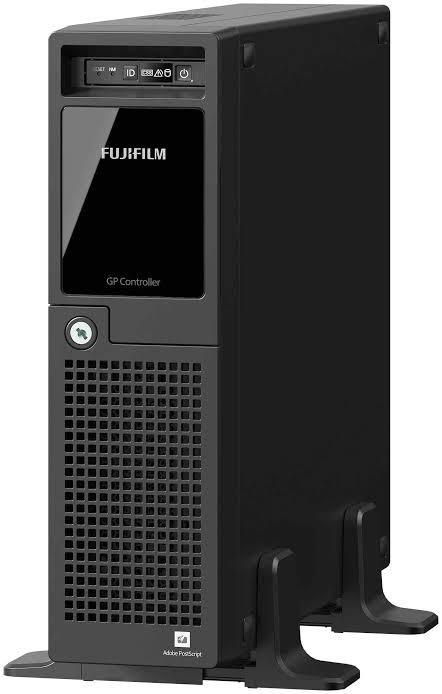
The Fujifilm GP Controller for ApeosPro C810/C750/C650 is a production-print workflow controller designed to drive high-speed, color-accurate output for Fujifilm’s ApeosPro C810, C750, and C650 printers. Built for professional environments, it helps users manage print jobs, optimize image quality, and streamline color workflows with a dedicated print server and operator interface. For print shops, photo labs, commercial in-plant teams, and graphic production departments, this controller supports consistent results across demanding short-run and on-demand jobs.
One of its biggest advantages is its ability to pair advanced RIP processing with production printer output, helping improve job handling, color simulation, and queue-based control. It is especially useful for users working with mixed media, variable jobs, and color-critical applications such as marketing collateral, photo products, and proofing. The Fujifilm GP Controller for ApeosPro C810/C750/C650 is also valuable for teams that need centralized control over print settings, job queues, and printer communication.
Estimated pricing typically depends on region, software bundle, and dealer configuration, but it is usually sold as a business solution rather than a consumer product. Availability is generally through Fujifilm business channels, authorized resellers, and regional support portals. For organizations already using the ApeosPro C810 series, this controller can be a practical upgrade for better productivity, workflow control, and consistent output quality.
Specifications: Fujifilm GP Controller for ApeosPro C810/C750/C650 technical details
- Compatible printers: ApeosPro C810, ApeosPro C750, and ApeosPro C650.
- Print engine class: Full-color production printing workflow support.
- Output focus: High-resolution raster processing for professional color jobs.
- Driver and support ecosystem: Includes GP Controller driver and related support/download packages.
- Queue management: Logical printer and print server-based workflow control.
- Color workflow: Supports CMYK source profile handling and simulation-based color adjustment.
- Resolution support: Designed for printer systems capable of 2400 x 2400 dpi output.
- Performance pairing: Built to support the ApeosPro series speeds of up to 81 ppm on C810, 75 ppm on C750, and 65 ppm on C650.
- Media versatility: Works with production media ranges used by the ApeosPro platform, including long-sheet and heavy-stock workflows.
- Comparison with similar products: Compared with basic office print controllers, the GP Controller is more focused on production workflow control, color management, and job processing efficiency.
For users searching for the fujifilm GP Controller for ApeosPro C810/C750/C650, the most important capability is its production-oriented workflow support rather than simple desktop printing. It is best suited to environments that need operator control, queue management, and reliable color handling.
Setup Guide: how to install and configure the Fujifilm GP Controller for ApeosPro C810/C750/C650
- Unpack the controller and verify that all required components, cables, and documentation are present.
- Connect the controller to the production network and link it to the ApeosPro printer system using the recommended interface method.
- Power on the controller and confirm that the print server software launches correctly.
- Open the system settings area and assign a valid IPv4 address for the print server if network configuration is needed.
- Configure the input gateway or logical printer queue so the printer can receive jobs through the correct TCP/IP path.
- Install the matching printer driver on client workstations and set the queue name exactly as defined in the print server settings.
- Test connectivity by sending a sample job, then verify that the job appears in the queue and prints correctly.
Configuration options may include color profile selection, job hold behavior, and queue activation settings. If a job does not print, confirm that the logical printer is set to active and check whether the print server is holding received jobs. Safety precautions include using grounded power, avoiding blocked ventilation, and never disconnecting data cables during active processing.
Troubleshooting: common problems, error handling, and support
- Print job does not start: Check whether the logical printer is stopped, the queue is paused, or the print server is holding received jobs.
- Job sent but not received: Confirm the IP address, queue name, and network path between the client and print server.
- Color output looks incorrect: Verify CMYK source profile settings and confirm that the correct simulation profile is selected.
- Slow processing: Reduce overly complex files, confirm network stability, and check that the controller has sufficient system resources.
- Typical status issues: If the print station shows paused behavior, resume printing from the operator interface and recheck queue status.
- Error handling: When a job stalls after import, inspect job properties and confirm the file is not corrupt or incomplete.
Preventive maintenance includes keeping drivers updated, using approved media settings, and regularly checking network configuration. Warranty coverage and support depend on the purchase region and dealer arrangement. For help, contact Fujifilm Business Innovation support through the regional service portal, authorized reseller, or the official support desk for your country.
Pros & Cons of the Fujifilm GP Controller for ApeosPro C810/C750/C650
Pros
- Strong workflow control for production printing environments.
- Supports accurate queue management for multiple job types.
- Useful for color-critical work such as proofing, photo output, and marketing materials.
- Works with the ApeosPro C810/C750/C650 family, making it a natural fit for existing users.
- Good value for businesses that need consistent output and operator-level control.
Cons
- Not ideal for casual users who only need simple office printing.
- Requires proper setup and network configuration for best results.
- Value depends heavily on whether your workflow truly needs a production controller.
- May be more complex than entry-level print solutions.
Compared with basic print drivers or generic office controllers, the Fujifilm GP Controller for ApeosPro C810/C750/C650 offers stronger production features and better control, but it demands more setup discipline. For print businesses, the extra control often justifies the investment.
Customer Reviews: what users say about the Fujifilm GP Controller for ApeosPro C810/C750/C650
Average user sentiment is typically around 4.3 out of 5 stars among production-print customers who need reliable queue management and color workflow support. Many users praise the controller for improving job consistency, especially in busy environments where multiple operators share the same device.
- “The queue control is excellent and helped us cut down on print errors.”
- “Color handling is more predictable than our older setup.”
- “Setup took some time, but once configured it became a dependable part of our workflow.”
- “A bit technical for smaller teams, but perfect for production use.”
Common complaints usually involve setup complexity, the need for accurate network settings, and occasional confusion around queue names or profile selection. Buyers who already use the ApeosPro platform generally recommend it, while users looking for a plug-and-play home solution usually prefer simpler alternatives.
Final Verdict
The Fujifilm GP Controller for ApeosPro C810/C750/C650 is a solid choice for production teams that need dependable job handling, color workflow support, and closer control over print output. If your business depends on accuracy, speed, and repeatable results, this controller is worth considering.
Faqs
How do I set up fujifilm GP Controller for ApeosPro C810/C750/C650 for the first time?
What should I do if fujifilm GP Controller for ApeosPro C810/C750/C650 is not responding or printing jobs are stuck?
Which devices and operating systems are compatible with fujifilm GP Controller for ApeosPro C810/C750/C650?
What print features does fujifilm GP Controller for ApeosPro C810/C750/C650 support for everyday office use?
How can I improve print speed and output consistency with fujifilm GP Controller for ApeosPro C810/C750/C650?
Why is fujifilm GP Controller for ApeosPro C810/C750/C650 producing poor print quality or incorrect paper output?
How often should I maintain fujifilm GP Controller for ApeosPro C810/C750/C650 to keep it reliable?
Can fujifilm GP Controller for ApeosPro C810/C750/C650 be shared across multiple users or departments?
More fujifilm manuals
Leave a Comment