
Garmin Dash Cam Mini 3 User Manual
Content
Garmin Dash Cam Mini 3 Review and Product Manual
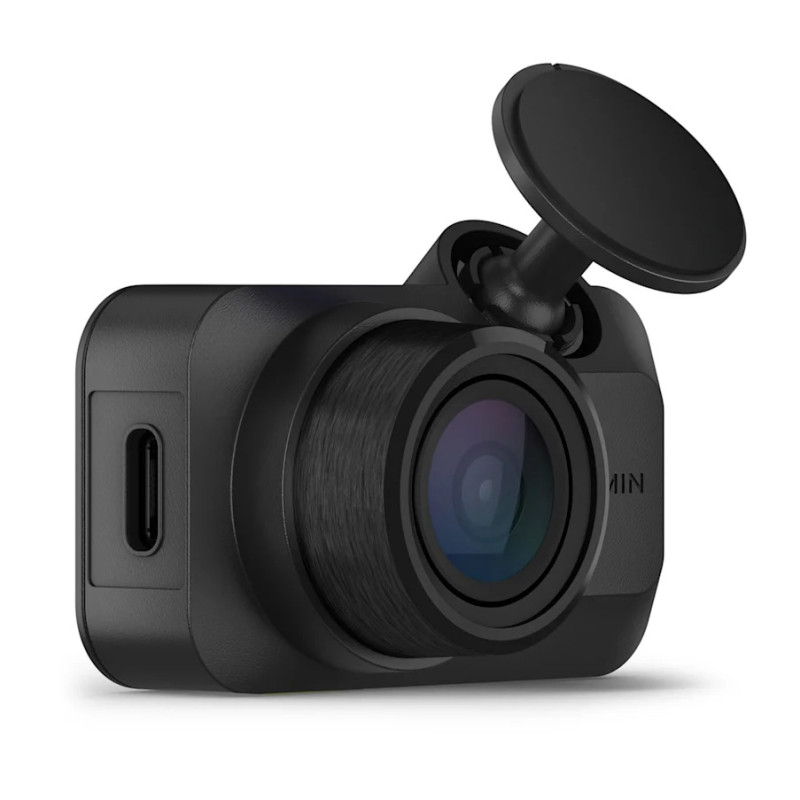
Introduction: Ultra-Compact 1080p Dash Cam for Everyday Driving
The garmin Dash Cam Mini 3 is a compact, windshield-mounted dash cam designed for drivers who want reliable incident recording without a bulky screen or distracting hardware. Its ultra-small footprint makes it easy to hide behind the rearview mirror, while its 1080p video capture, 140-degree field of view, and Garmin Clarity polarizer help deliver clear footage with reduced windshield glare. For commuters, rideshare drivers, fleet operators, and anyone who wants simple protection on the road, this model offers a practical balance of size, performance, and ease of use.
One of the biggest advantages of the garmin Dash Cam Mini 3 is its discreet design. With no display and no battery, it uses a supercapacitor for improved durability in hot cabin conditions and a cleaner, more dependable long-term setup. It also supports voice control, Wi-Fi connectivity, and the Garmin Drive app for viewing, saving, and sharing clips. Parking mode is available with constant power, making it useful for monitoring your vehicle while parked. This makes it a strong choice for drivers who want a compact dash camera with modern features and minimal installation hassle.
In terms of price, the garmin Dash Cam Mini 3 generally sits in the mid-range category, with an estimated retail price around $149.99 in the US and similar pricing in other major markets, depending on sales and bundles. Availability is typically broad through Garmin, electronics retailers, and automotive accessory stores.
Specifications: Garmin Dash Cam Mini 3 Features and Technical Details
Below is a quick breakdown of the main specifications and capabilities of the garmin Dash Cam Mini 3 :
- Video resolution: 1080p Full HD recording
- Field of view: 140-degree diagonal wide-angle lens
- Dimensions: approximately 5.21 x 3.16 x 2.03 cm
- Weight: about 30 g
- Power source: supercapacitor, no internal battery
- Storage: supports microSD cards up to 512 GB; Class 10 or faster recommended
- Mounting: adhesive mount only
- Connectivity: Wi-Fi for app access and file management
- Special optics: Garmin Clarity polarizer to reduce glare
- Display: none, screenless compact design
- Parking support: available with constant power cable
- Voice control: supported in compatible setups
Compared with many budget dash cams that include larger bodies or built-in displays, the garmin Dash Cam Mini 3 focuses on simplicity and discretion. It is less feature-heavy than dual-channel 4K models, but it is smaller, easier to conceal, and often more practical for drivers who prefer a clean windshield and dependable front-facing recording.
Pros and Cons of Garmin Dash Cam Mini 3
Pros
- Extremely compact design: Ideal for hiding behind the rearview mirror, especially in vehicles where a low-profile setup matters.
- Clear 1080p footage: Good for everyday driving, incident capture, and license plate visibility in normal conditions.
- Glare reduction: The built-in polarizer helps reduce reflections from dashboards and bright sunlight.
- Durable power design: The supercapacitor is better suited to heat than a standard battery.
- Easy app integration: Wi-Fi and Garmin Drive support make it simple to review and transfer clips.
Cons
- No screen: Setup and review rely on the mobile app, which may not suit users who prefer an onboard display.
- No GPS: Unlike some competing models, it does not add location tracking to recordings.
- Single-camera only: It records the front view only, so it is not ideal for full rear coverage.
- Parking mode requires extra accessories: Constant power setup and related features can increase total cost.
- Value depends on priorities: Drivers seeking 4K resolution or dual-channel recording may find better alternatives in larger models.
Overall, the garmin Dash Cam Mini 3 offers strong value for drivers who want a premium compact dash cam rather than the most advanced feature set. If your priority is discretion, reliability, and simple front-road recording, it competes well against bulkier alternatives.
Customer Reviews: What Drivers Say About the Garmin Dash Cam Mini 3
Customer feedback is generally positive, with many users praising the tiny form factor, clear daytime footage, and easy concealment behind the mirror. The garmin Dash Cam Mini 3 has also received a solid average rating from retail buyers, often landing around 4.1 out of 5 stars based on hundreds of reviews. Many owners describe it as “easy to forget it’s there” and appreciate the uncluttered windshield view.
Common complaints include the lack of a built-in screen, the need for a separate power solution for parking mode, and the fact that it records only in 1080p rather than 2K or 4K. Some users also wish for GPS support. Even so, buyers who want a dependable, compact dash cam for daily commuting often recommend it as a strong purchase, especially if they value Garmin’s software ecosystem and discreet installation.
- Typical rating: about 4.1/5 stars
- Common praise: compact size, clear footage, glare reduction
- Common issue: no screen and no GPS
- Best for: commuters, city drivers, and users who want a hidden front dash cam
Who Should Buy the Garmin Dash Cam Mini 3?
The garmin Dash Cam Mini 3 is best for drivers who want a compact, dependable dash cam with minimal visual impact. It is especially well suited to commuters, rideshare drivers, and owners of smaller cars where windshield space is limited. If you want a front-facing dash cam with good image quality, a durable supercapacitor, and a discreet design, this model is an excellent fit.
If you need rear recording, GPS logging, or 4K resolution, a larger dual-camera alternative may be a better choice. For everyone else, this is a smart, easy-to-use option that keeps the dashboard clean while still delivering essential road protection.
Faqs
How do I set up garmin Dash Cam Mini 3 for the first time?
What microSD card does garmin Dash Cam Mini 3 need, and why does card choice matter?
Why is my garmin Dash Cam Mini 3 not recording video properly?
How does garmin Dash Cam Mini 3 work without a screen?
Does garmin Dash Cam Mini 3 support parking mode or parking guard features?
Can garmin Dash Cam Mini 3 connect to the Garmin Drive app and sync with other cameras?
How can I improve video quality on garmin Dash Cam Mini 3 at night or in glare?
How should I maintain garmin Dash Cam Mini 3 for long-term reliability?
More garmin manuals
- Garmin VARIA-Vue 4K Video Camera And Smart Bike Headlight User Manual
- Garmin BOUNCE kids Smartwatch A03804 User Manual
- Garmin VIVOFIT JR. 3 Fitness & Activity Tracker User Manual
- Garmin INSTINCT E Rugged GPS Watch User Manual
- Garmin VENU 2 Series GPS Smartwatch User Manual
- Garmin Forerunner 735XT Gps Smartwatch User Manual
Leave a Comment