
Garmin VARIA-Vue 4K Video Camera And Smart Bike Headlight User Manual
Content
Garmin Varia Vue 4K Video Camera And Smart Bike Headlight: Complete Product Manual
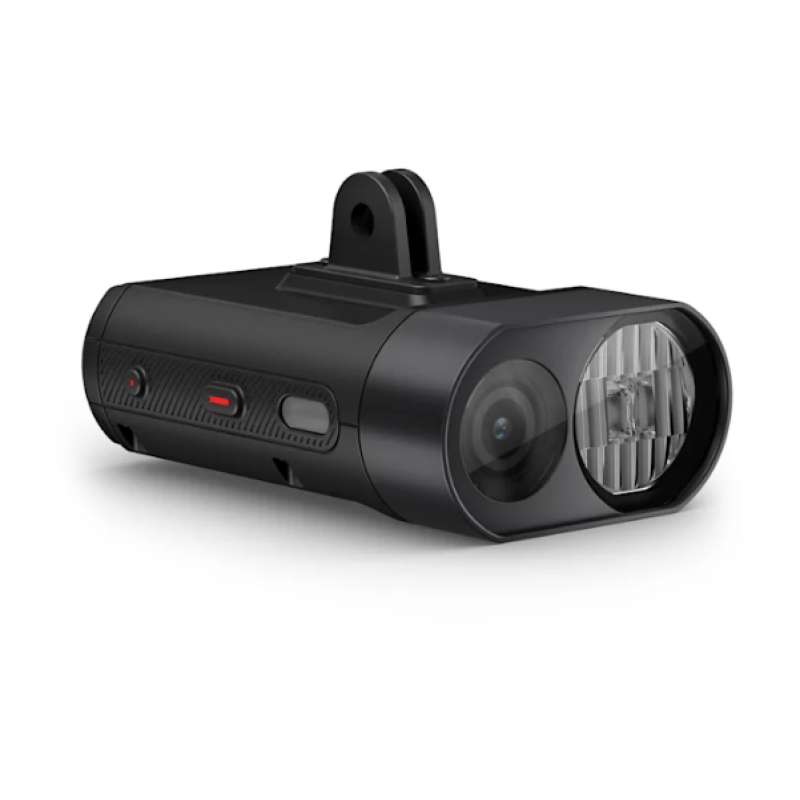
Introduction: What Is the Garmin Varia Vue and Who Is It For?
The Garmin Varia Vue 4K Video Camera And Smart Bike Headlight is a premium front-mounted cycling accessory that combines a powerful bike light with a built-in dash cam for riders who want visibility and evidence in one device. Designed for road cyclists, commuters, endurance riders, and safety-focused e-bike users, it delivers bright daytime and nighttime illumination while recording front-facing rides in 4K or 1080p. This dual-purpose design makes it especially valuable for riders who commute in traffic, train in low-light conditions, or want added protection in the event of an incident.
One of its biggest selling points is the integration of lighting, video capture, and smart controls in a single compact unit. Riders can use the headlight in multiple brightness modes, including day flash, night flash, high, medium, and low settings, while the camera records automatically in the background. The device supports ANT+ and Bluetooth connectivity, Wi-Fi, and compatibility with Garmin cycling ecosystems, making it a strong fit for users already invested in Garmin bike computers and sensors.
In terms of availability, the Garmin Varia Vue 4K Video Camera And Smart Bike Headlight is positioned as a high-end product with an estimated price range around the premium cycling-accessory tier, typically in the several-hundred-dollar range depending on region and retailer. It is widely available through major cycling and electronics retailers, though stock can vary. For riders seeking a front light with incident recording, smart functionality, and reliable weather resistance, this model stands out as a serious all-in-one safety upgrade.
Specifications: Garmin Varia Vue 4K Video Camera And Smart Bike Headlight Features
- Video resolution: 4K recording and 1080p30 recording for flexible video quality options.
- Battery life: Up to 1.25 hours in 4K recording at high mode, up to 6 hours in camera-only use; up to 1.5 hours in 1080p30 high mode, up to 9 hours in camera-only use.
- Light output: 140 to 600 lumens depending on mode, with day flash reaching the highest output for visibility.
- Light modes: High, medium, low, night flash, and day flash.
- Dimensions: 92 x 60 x 33 mm, or approximately 3.6 x 2.4 x 1.3 inches.
- Weight: 200 g, or about 7 oz.
- Water resistance: IPX7 rating for protection against rain and wet conditions.
- Wireless connectivity: ANT+, Bluetooth, and Wi-Fi support for smart control and device pairing.
- Battery type: Rechargeable lithium-ion battery with USB charging support.
- Operating temperature: -15°C to 45°C, suitable for a wide range of riding conditions.
- Storage: microSD card support for video capture.
Compared with similar front bike lights with cameras, the Garmin Varia Vue offers stronger ecosystem integration and higher-end smart features, while alternatives often focus on either lighting or recording rather than both. Riders who want a dedicated bike camera and a smart bike headlight in one device will find its feature set especially compelling.
Pros & Cons: Garmin Varia Vue 4K Video Camera And Smart Bike Headlight Review
Pros
- All-in-one safety device: Combines a front headlight and bike camera, reducing handlebar clutter and simplifying setup.
- High-quality recording: 4K video captures clear details, while 1080p mode extends battery life for longer rides.
- Strong visibility: Up to 600 lumens in day flash mode helps riders stand out in traffic.
- Smart connectivity: ANT+, Bluetooth, and Wi-Fi make it easy to control and pair with compatible cycling gear.
- Weather-ready: IPX7 water resistance adds confidence for commuting and all-season riding.
Cons
- Premium price: The Garmin Varia Vue 4K Video Camera And Smart Bike Headlight is expensive compared with standard headlights or standalone action cameras.
- Battery trade-offs: Recording in 4K reduces runtime significantly, especially when using high-intensity light modes.
- Heavier than basic lights: At 200 g, it is bulkier than a typical bike headlight.
- Best for Garmin users: Riders outside the Garmin ecosystem may not benefit as much from its advanced integration.
For value for money, this device makes the most sense for riders who want both front illumination and ride documentation in a single premium accessory. If you only need a light or only need a camera, cheaper alternatives may be better. If you want both, the Garmin Varia Vue 4K Video Camera And Smart Bike Headlight offers a more polished and integrated experience than many competing products.
Customer Reviews: What Riders Say About the Garmin Varia Vue
Overall user feedback tends to be positive, with many riders rating it around 4 out of 5 stars for its convenience, brightness, and video quality. Commuters often praise the peace of mind that comes from having a front-facing camera on every ride, while endurance cyclists appreciate the smart light modes and compatibility with cycling computers.
- Common praise: “Bright enough for daily commuting, and the camera gives me confidence in traffic.”
- Common praise: “The 4K footage is sharp, and I like not needing separate devices on the bars.”
- Common complaint: “Battery life drops quickly in the highest light and recording mode.”
- Common complaint: “It is pricey, but the feature set justifies it for safety-focused riders.”
Purchase recommendation: choose it if you regularly ride in traffic, want incident documentation, or already use Garmin cycling gear. Riders looking for the best budget option may prefer a separate light and camera, but those wanting a streamlined premium solution will likely find the Garmin Varia Vue worth the investment.
Frequently Asked Questions About the Garmin Varia Vue 4K Video Camera And Smart Bike Headlight
What makes the Garmin Varia Vue different from a standard bike light?
It combines a front bike light with a built-in 4K and 1080p camera, so you get visibility and ride recording in one device.
Is the Garmin Varia Vue suitable for commuting?
Yes. Its bright flash modes, weather resistance, and video recording features make it especially useful for commuters riding in traffic.
Does it work in rain?
Yes. The IPX7 rating means it is designed to handle wet conditions and road spray.
Is it worth buying for casual riders?
It is best suited to riders who value safety, documentation, and smart cycling features. Casual riders who only need basic lighting may not need this level of functionality.
Faqs
How do I set up the garmin VARIA-Vue 4K Video Camera And Smart Bike Headlight for the first time?
Why is my garmin VARIA-Vue 4K Video Camera And Smart Bike Headlight not recording video?
Which devices are compatible with the garmin VARIA-Vue 4K Video Camera And Smart Bike Headlight?
How does incident detection work on the garmin VARIA-Vue 4K Video Camera And Smart Bike Headlight?
How do I improve battery life on the garmin VARIA-Vue 4K Video Camera And Smart Bike Headlight?
What video settings should I use on the garmin VARIA-Vue 4K Video Camera And Smart Bike Headlight?
How do I mount and aim the garmin VARIA-Vue 4K Video Camera And Smart Bike Headlight correctly?
How should I clean and maintain the garmin VARIA-Vue 4K Video Camera And Smart Bike Headlight?
More garmin manuals
Leave a Comment