
Garmin DRIVEASSIST 51 GPS Navigator User Manual
Content
Garmin DriveAssist 51 GPS Navigator Review and Manual
Introduction
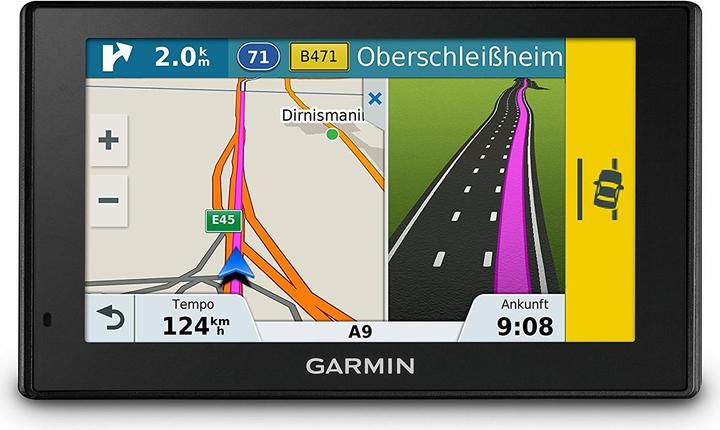
The Garmin DriveAssist 51 GPS Navigator is a 5-inch sat nav and dash cam combo designed for drivers who want more than basic turn-by-turn navigation. It combines dependable Garmin mapping with a built-in camera that records the road, helping users capture incidents, improve driving awareness, and reduce clutter on the windshield by merging two devices into one. The result is a practical all-in-one solution for commuters, family drivers, rideshare users, and anyone upgrading from a standard GPS navigator.
One of the biggest strengths of the Garmin DriveAssist 51 GPS Navigator is its safety-focused feature set. In addition to navigation, it offers driver alerts such as forward collision warnings, lane departure warnings, and forward motion alerts that help support safer driving habits. Voice control and hands-free Bluetooth calling make it easier to stay focused on the road, while live services and traffic support add convenience for daily use and long trips.
This model is especially useful for drivers who want a compact GPS with dash cam functionality without installing separate devices. It is commonly found through online retailers and marketplace listings, with pricing that typically falls in the mid-range used and refurbished segment, while new or old-stock units can vary depending on availability. For shoppers looking for a Garmin dash cam GPS navigator with safety features, the Garmin DriveAssist 51 GPS Navigator remains a compelling choice.
Specifications: Garmin DriveAssist 51 GPS Navigator Features and Technical Details
- Display: 5.0-inch diagonal touchscreen, 480 x 272 resolution, WQVGA color TFT with white backlight.
- Physical size: 5.5 x 3.3 x 0.8 inches, or 14.0 x 8.4 x 2.1 cm; depth increases to about 1.0 inch including the camera module.
- Weight: 6.75 oz, or 191.4 g.
- Internal storage: 16 GB.
- Battery: Rechargeable lithium-ion battery with up to 30 minutes of runtime.
- Camera: Built-in dash cam for road recording and incident capture.
- Memory card support: microSD card support for video storage; a minimum 4 GB card may be included depending on package.
- Connectivity: Bluetooth support for hands-free calling and device pairing.
- Navigation tools: Voice control, lane guidance, traffic-aware routing, and driver alerts.
- Target use: Daily commuting, road trips, fleet use, and driver safety monitoring.
Compared with a standard 5-inch GPS navigator, the Garmin DriveAssist 51 GPS Navigator stands out because it adds an integrated dash cam and active driver-assistance alerts. Against simpler alternatives like entry-level Garmin Drive models, it offers stronger safety features, though newer Garmin units may provide more modern software, larger displays, or updated connectivity. For drivers prioritizing screen clarity, camera integration, and dependable navigation in one device, its hardware remains highly practical.
Pros and Cons of the Garmin DriveAssist 51 GPS Navigator
Pros
- All-in-one design reduces windshield clutter by combining navigation and dash cam functionality.
- Useful safety alerts such as lane departure and forward collision warnings add confidence on busy roads.
- Voice control and Bluetooth hands-free calling support safer, more convenient operation.
- Compact 5-inch form factor fits well in most vehicles without blocking the driver’s view.
- Strong value for drivers who want a GPS navigator with built-in video recording.
Cons
- Battery life is short, so it is designed primarily for vehicle-powered use.
- The 480 x 272 display is functional, but not as sharp as newer high-resolution navigators.
- Some users may prefer a separate premium dash cam and a more modern GPS unit.
- Availability can be limited because this is an older model, which may affect price and replacement options.
For value-conscious shoppers, the Garmin DriveAssist 51 GPS Navigator offers a smart balance of navigation, recording, and safety assistance. Drivers comparing it with newer all-in-one devices should consider whether they need updated map software or a larger screen, but as a practical used or refurbished option, it remains appealing.
Customer Reviews: What Drivers Say About the Garmin DriveAssist 51 GPS Navigator
User feedback is generally positive, with many drivers praising the clear navigation prompts, reliable road recording, and helpful safety features. A common rating pattern for the broader DriveAssist 51 family is around 4.3 out of 5 stars, reflecting strong satisfaction among buyers who want a GPS navigator and dash cam in one device.
- “Great for daily commuting. The alerts are helpful, and I like having the dash cam built in.”
- “The screen is easy to read, but I wish the resolution were higher.”
- “Excellent convenience for the price, especially compared with buying two separate devices.”
- “Battery life is short, but that is not a major issue since it stays plugged in.”
Frequent complaints include older hardware, limited battery runtime, and occasional preference for newer map interfaces. Most owners still recommend it for drivers who want dependable Garmin navigation, built-in recording, and solid everyday usability. If you need a practical dash cam GPS combo rather than a cutting-edge infotainment system, the Garmin DriveAssist 51 GPS Navigator is still worth considering.
Faqs
How do I set up the Garmin DriveAssist 51 GPS Navigator for the first time?
What should I do if my Garmin DriveAssist 51 GPS Navigator is not getting a GPS signal?
How does the built-in dash cam on the Garmin DriveAssist 51 GPS Navigator work?
Can the Garmin DriveAssist 51 GPS Navigator receive live traffic and route around delays?
Is the Garmin DriveAssist 51 GPS Navigator compatible with my smartphone and Bluetooth calls?
How do I update maps and software on the Garmin DriveAssist 51 GPS Navigator?
Why does my Garmin DriveAssist 51 GPS Navigator keep freezing or responding slowly?
How should I clean and maintain the Garmin DriveAssist 51 GPS Navigator safely?
More garmin manuals
- Garmin TACTIX 8 Series GPS Watch User Manual
- Garmin VENU 2 Series GPS Smartwatch User Manual
- Garmin Instinct Crossover Series GPS Smartwatch User Manual
- Garmin VIVOFIT JR. 3 Fitness & Activity Tracker User Manual
- Garmin Speed & Cadence Sensor 2 User Manual
- Garmin VARIA-Vue 4K Video Camera And Smart Bike Headlight User Manual
Leave a Comment