
Garmin Forrunner 570 Series Watch User Manual
Content
Garmin Forerunner 570 Series Watch Manual and Product Overview
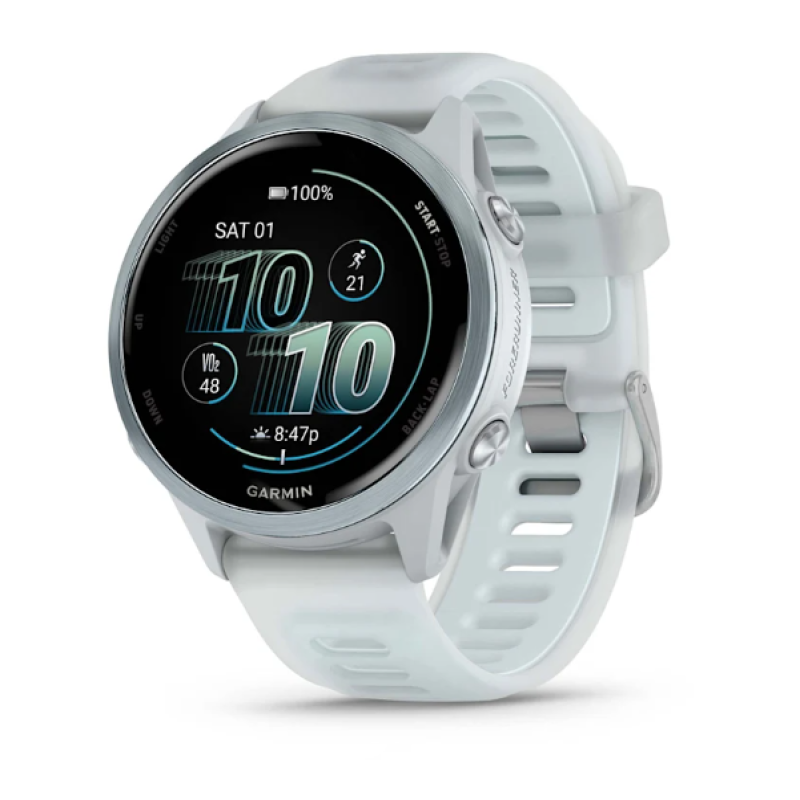
The Garmin Forerunner 570 Series Watch is a premium GPS running watch designed for athletes who want advanced training insights, accurate navigation, and everyday smartwatch convenience. Available in 42 mm and 47 mm sizes, it combines a bright AMOLED display, multiband GNSS positioning, built-in speaker and microphone, and strong health and fitness tracking in a lightweight design. The result is a versatile sports watch that works well for runners, triathletes, fitness enthusiasts, and anyone who wants detailed performance metrics without moving to a full multisport flagship.
One of the biggest strengths of the Garmin Forerunner 570 Series Watch is its balance of training tools and daily usability. It supports advanced running features, heart rate tracking, sleep monitoring, smartphone notifications, Wi-Fi syncing, and music storage. The watch is also swim-rated to 5 ATM, making it suitable for pool workouts and everyday wear in wet conditions. Its aluminum bezel and Gorilla Glass 3 lens give it a more refined feel than many midrange sport watches, while the AMOLED screen improves readability in bright sunlight and indoor environments.
For buyers, the estimated price range is around $549.99 in the United States, with regional pricing varying by market and retailer. Availability is generally through Garmin and major electronics retailers, often in multiple color and size options. If you want a running watch that feels more modern than older Forerunner models and offers strong performance for structured training, the Garmin Forerunner 570 Series Watch is a compelling choice.
Specifications and Key Features of Garmin Forerunner 570 Series Watch
- Display: AMOLED touchscreen in 1.2-inch or 1.4-inch sizes
- Case sizes: 42 mm and 47 mm
- Weight: approximately 42 g for the 42 mm version and 50 g for the 47 mm version
- Thickness: 12.9 mm
- Water resistance: 5 ATM, suitable for swimming
- Storage: up to 8 GB for music and watch data
- Connectivity: Bluetooth, ANT+, and Wi-Fi
- GNSS: multiband GPS with support for major satellite systems
- Sensors: heart rate, pulse oximeter, compass, thermometer, and more
- Battery life: up to 10 to 11 days in smartwatch mode, depending on size; GPS use reduces runtime significantly
- Materials: aluminum bezel, Corning Gorilla Glass 3 lens, silicone strap
- Extras: speaker, microphone, always-on display, and training features for running and multisport use
Compared with older midrange models like the Forerunner 265, the Garmin Forerunner 570 Series Watch adds a richer feature set, stronger voice and call support, and a more premium build. It sits below the highest-end triathlon flagships, but offers enough advanced training functions for serious athletes who do not need every elite race feature.
Detailed Description: How the Garmin Forerunner 570 Series Watch Works
The Garmin Forerunner 570 Series Watch works by combining satellite positioning, onboard motion sensors, and health tracking algorithms to produce detailed workout and recovery data. During runs, rides, swims, or gym sessions, it measures pace, distance, heart rate, elevation, and training load, then turns those inputs into actionable guidance through Garmin’s fitness ecosystem. The AMOLED display makes metrics easy to read at a glance, and the touchscreen interface allows fast access to menus, widgets, and workout summaries.
In real-world use, the watch is well suited for interval training, long-distance running, daily step tracking, and recovery monitoring. The built-in speaker and microphone support phone functions and voice-related features when paired with a compatible smartphone, while Wi-Fi and Bluetooth make syncing and software updates simple. The aluminum bezel improves durability without adding unnecessary weight, and the silicone band keeps the watch comfortable during long sessions.
For users who train several times a week, the Garmin Forerunner 570 Series Watch feels responsive, polished, and practical. It is especially appealing for runners who want detailed metrics without the bulk of a larger outdoor watch.
Setup Guide for Garmin Forerunner 570 Series Watch
Start by charging the watch fully before first use. Once powered on, choose your language and follow the on-screen prompts to pair it with the Garmin Connect app on your smartphone. Bluetooth pairing is the fastest setup method, and Wi-Fi can be added later for updates and music syncing.
- Step 1: Charge the watch using the included Garmin charging cable.
- Step 2: Power on the watch and select your preferences on the touchscreen.
- Step 3: Install Garmin Connect on your phone and sign in or create an account.
- Step 4: Pair the watch using Bluetooth and confirm the pairing code.
- Step 5: Configure health tracking, notifications, and activity profiles.
- Step 6: Connect Wi-Fi for faster syncing, software updates, and music transfers.
- Step 7: Customize watch faces, data fields, and training screens.
If pairing fails, restart both the watch and phone, then ensure Bluetooth is enabled and the app has permission to access nearby devices. Avoid exposing the watch to extreme heat during charging, and do not charge it outside the recommended temperature range. For best accuracy, wear the watch snugly but comfortably above the wrist bone.
Troubleshooting Garmin Forerunner 570 Common Problems
If GPS takes too long to lock, move to an open area away from tall buildings and trees, then wait for the signal to stabilize before starting your activity. If heart rate readings seem inconsistent, clean the sensor, tighten the strap slightly, and make sure the watch is positioned correctly on the wrist.
- Problem: Watch will not pair with phone. Solution: Restart both devices, update the app, and clear the old pairing from Bluetooth settings.
- Problem: Battery drains too quickly. Solution: Reduce screen brightness, disable always-on display, and shorten GPS use when possible.
- Problem: Music will not sync. Solution: Check Wi-Fi connection, storage space, and account permissions in Garmin Connect.
- Problem: Touchscreen feels unresponsive. Solution: Dry the screen, clean it gently, and remove any moisture or gloves interference.
- Problem: Activity data looks inaccurate. Solution: Update software, confirm correct profile settings, and recalibrate where applicable.
There are no widely reported public-facing error codes that define common user issues, so most fixes rely on rebooting, updating, and reconfiguring the watch. Preventive care includes regular software updates, proper charging habits, and cleaning the sensor area after sweaty workouts. Garmin support, warranty service, and registered product assistance are available through official customer support channels and regional service centers.
Pros and Cons of the Garmin Forerunner 570 Series Watch
Pros
- Bright AMOLED display that is easy to read indoors and outdoors
- Strong GPS and multiband satellite support for more reliable tracking
- Lightweight design that stays comfortable during long training sessions
- Useful running and recovery metrics for structured workouts
- Built-in speaker and microphone add convenience for everyday use
- Premium materials like aluminum and Gorilla Glass improve durability
Cons
- Battery life is good but not class-leading for the price
- Higher cost than older midrange Forerunner models
- Feature set may overlap with cheaper Garmin alternatives for casual runners
- Some users may prefer the simpler interface of older watches
In terms of value for money, the Garmin Forerunner 570 Series Watch is best for buyers who want a refined running watch with premium styling and advanced training tools. Compared with alternatives such as the Forerunner 265, it offers more modern hardware and convenience features, but it is not the most affordable option in Garmin’s lineup.
Customer Reviews and Buyer Feedback
Typical customer feedback for the Garmin Forerunner 570 Series Watch is strongly positive among runners and fitness-focused users. Many reviewers praise the display quality, comfortable fit, and accurate tracking, often describing it as a dependable daily training partner. A common rating pattern is around 4.4 to 4.7 out of 5 stars, especially from users who value Garmin’s training ecosystem.
- “The screen is gorgeous and easy to read during outdoor runs.”
- “It feels lighter than expected and disappears on the wrist.”
- “Battery life is solid, but I would like a little more for the price.”
- “The running metrics are exactly what I needed for marathon training.”
Common complaints usually focus on cost and the fact that some athletes may not need every feature. For most buyers, though, the Garmin Forerunner 570 Series Watch is a strong recommendation if you want a premium GPS running watch with modern design, detailed fitness tracking, and reliable everyday performance.
Faqs
How do I set up garmin Forrunner 570 Series Watch for the first time?
Why is my garmin Forrunner 570 Series Watch not pairing with my phone?
What features make garmin Forrunner 570 Series Watch useful for runners and triathletes?
Can garmin Forrunner 570 Series Watch work without a phone, and what features need a connection?
How do I fix inaccurate GPS tracking on garmin Forrunner 570 Series Watch?
How much battery life should I expect from garmin Forrunner 570 Series Watch in daily use and GPS mode?
How do I connect sensors and accessories to garmin Forrunner 570 Series Watch?
How should I clean and maintain garmin Forrunner 570 Series Watch for long-term use?
More garmin manuals
- Garmin Drivecam 76 All-In-One Gps Car Navigator User Manual
- Garmin Edge 510 GPS Cycling Computer User Manual
- Garmin Drivesmart 66 GPS Navigation System User Manual
- Garmin Tactix Bravo GPS Smartwatch User Manual
- Garmin Forerunner 735XT Gps Smartwatch User Manual
- Garmin VÍVOMOVE Hybrid Smartwatches 3/3S User Manual
Leave a Comment