
Garmin Drivesmart 66 GPS Navigation System User Manual
Content
Garmin DriveSmart 66 GPS Navigation System Review and Manual
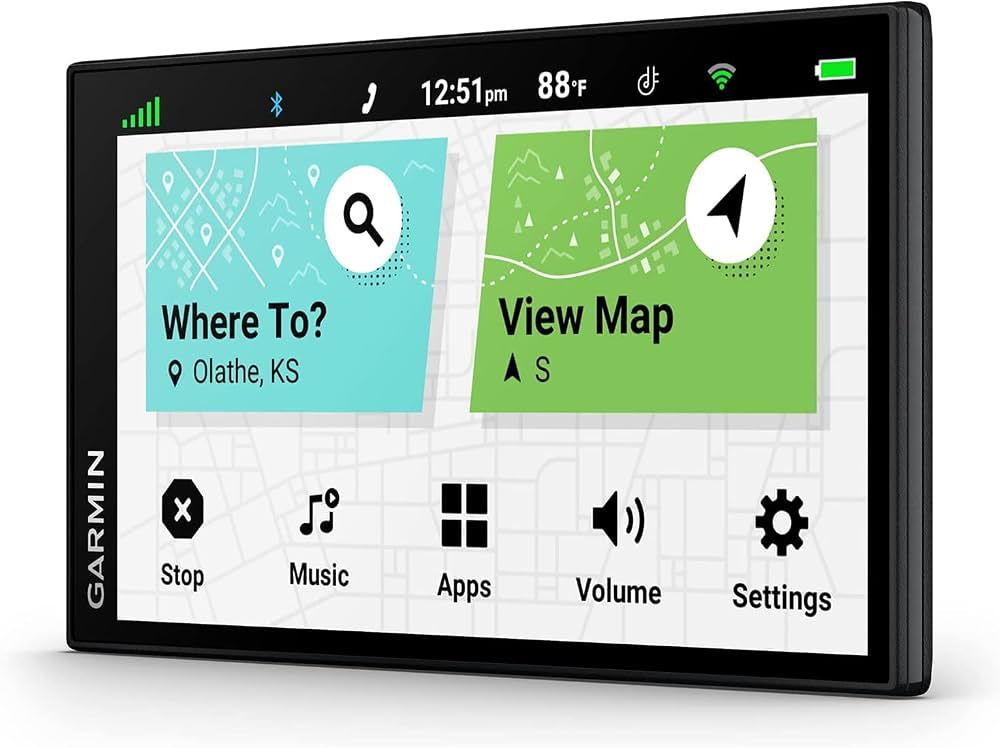
Introduction to the Garmin DriveSmart 66 GPS Navigation System
The Garmin DriveSmart 66 GPS Navigation System is a feature-rich 6-inch car navigator built for drivers who want clear guidance, smart connectivity, and an easy-to-read display on the road. It combines high-resolution mapping, voice assistance, Bluetooth hands-free calling, and Wi-Fi updates to create a dependable in-car navigation experience for daily commutes, long road trips, ride-sharing, and family travel. With its bright 1280 x 720 touchscreen, the device is designed to improve visibility and reduce distraction, making route guidance easier in both daylight and night driving conditions.
One of its biggest strengths is convenience. The DriveSmart 66 supports wireless map and software updates, smartphone pairing, real-time traffic features through compatible apps, and hands-free voice commands. It is especially useful for drivers who want a dedicated GPS unit instead of relying only on a phone app, since it offers a larger screen, mount-based placement, and built-in vehicle-focused alerts. The Garmin DriveSmart 66 GPS Navigation System also stands out for its balance of usability and premium features, making it a practical choice for commuters, road trippers, delivery drivers, and older drivers who prefer a simplified navigation interface.
As of current market listings, the estimated price range is typically around $180 to $250, with occasional sales outside that range depending on retailer and bundle options. Availability is generally broad through major electronics stores, online marketplaces, and specialty retailers. For buyers searching for a reliable portable car navigation device with modern connectivity and strong everyday performance, the Garmin DriveSmart 66 remains one of the most appealing options in its class.
Specifications: Garmin DriveSmart 66 Features and Technical Details
- Display size: 6-inch widescreen touchscreen for easy viewing while driving.
- Display resolution: 1280 x 720 pixels for sharper maps and menus.
- Touch technology: Multi-touch, color TFT display with backlight.
- Wireless connectivity: Bluetooth and Wi-Fi for pairing, updates, and connected features.
- Storage: 16 GB internal memory with microSD expansion support on some retail listings.
- Battery life: Up to 1 hour on battery, with vehicle power recommended for regular use.
- Dimensions: Approximately 6.0 x 3.4 x 0.7 inches.
- Weight: About 6.17 oz. for a lightweight portable design.
- Operating temperature: From -20°C to 55°C, suitable for a wide range of driving conditions.
- Charging temperature: From 0°C to 45°C.
- Power: Vehicle-powered via USB-C style automotive charging accessories in many bundles.
- Comparison: Compared with smaller budget GPS units, the DriveSmart 66 offers a larger, higher-resolution screen and more advanced smart features; compared with premium alternatives like larger DriveSmart models, it is more compact and easier to mount.
Detailed Description of the Garmin DriveSmart 66 GPS Navigation System
The Garmin DriveSmart 66 GPS Navigation System is a dedicated vehicle navigator that focuses on clarity, convenience, and dependable route guidance. It works by combining satellite positioning with onboard maps and connected smartphone services to provide turn-by-turn directions, lane guidance, traffic-aware routing, and driver alerts. The device’s 6-inch HD touchscreen gives users enough space to view intersections, route previews, and map details without crowding the dashboard.
In real-world use, this GPS navigator is helpful for commuting through unfamiliar cities, navigating highway exits, finding fuel stops, and planning scenic road trips. Drivers also benefit from voice assistance, which allows hands-free interaction for safer operation while driving. The build quality feels sturdy and travel-ready, with a compact housing designed for dashboard or windshield mounting. The screen uses durable glass-style construction and a bright backlit panel that improves readability in changing light.
User experience is one of its strongest points. Menus are simple, route recalculation is quick, and pairing with a smartphone enables useful connected features. For drivers who want a stable, easy-to-use navigation system that does not depend entirely on mobile signal or a phone battery, this model delivers a practical and polished experience.
Setup Guide for Garmin DriveSmart 66 GPS Navigation System
- Unbox the device, mount, power cable, and documentation, then inspect all parts for damage.
- Attach the suction mount to the windshield or a secure dashboard location with a clear driving view.
- Connect the GPS unit to vehicle power using the supplied cable before first use.
- Power on the device and complete the on-screen setup, including language, region, and time settings.
- Connect to Wi-Fi for map and software updates, or pair the navigator with a smartphone for connected features.
- Enable Bluetooth on your phone if you want hands-free calling, traffic features, or app-based services.
- Set up preferred route options such as fastest route, avoid tolls, avoid highways, or fuel-efficient routing.
- Run a test destination search to confirm GPS lock, voice guidance, and map display are working properly.
For safety, never configure settings while driving. Pull over before entering long destinations or changing navigation preferences. If the device fails to power on, check the USB connection and vehicle outlet first. If pairing does not work, restart both the GPS unit and the phone, then re-enable Bluetooth. Keep the unit out of extreme heat when parked, and avoid blocking the driver’s view with the mount.
Troubleshooting Common Garmin DriveSmart 66 Problems
- Problem: Device will not turn on. Fix: Check the power cable, vehicle outlet, and charging connection; try a different power source if available.
- Problem: GPS signal is slow to lock. Fix: Move the device to an unobstructed windshield area and allow a few minutes for satellite acquisition.
- Problem: Bluetooth pairing fails. Fix: Delete the pairing from both devices, restart them, and pair again from scratch.
- Problem: Maps seem outdated. Fix: Connect to Wi-Fi and run a software/map update through the device menu.
- Problem: Screen is dim or unreadable. Fix: Adjust brightness and check for direct glare; clean the screen with a soft microfiber cloth.
- Problem: Frequent route errors. Fix: Verify that the destination address is entered correctly and update map data.
Preventive maintenance includes regular updates, safe storage, and keeping the mount secure. Garmin products typically include a limited warranty, and support is available through Garmin’s customer service channels, product manuals, and online support resources. If persistent issues continue after resets and updates, contact the retailer or Garmin support for warranty assistance.
Pros and Cons of the Garmin DriveSmart 66 GPS Navigation System
Pros
- Large 6-inch HD display makes maps and prompts easy to read.
- Bluetooth and Wi-Fi add modern convenience without relying entirely on a phone.
- Voice assistance supports hands-free navigation and safer driving.
- Compact and portable design works well in multiple vehicles.
- Strong value for drivers who want a dedicated GPS instead of a smartphone app.
Cons
- Battery life is short, so vehicle power is usually required.
- Premium features may be more than casual drivers need.
- Some alternatives offer larger screens or built-in dashcam functions.
- Initial setup and updates can take time if maps are not current.
Overall, the Garmin DriveSmart 66 GPS Navigation System offers excellent everyday value for drivers who prioritize reliability, visibility, and dedicated navigation hardware. It compares favorably with basic budget GPS units and remains easier to use on the road than many phone-based navigation setups, though drivers wanting advanced all-in-one features may prefer higher-end alternatives.
Customer Reviews Summary for Garmin DriveSmart 66
Customer feedback for the Garmin DriveSmart 66 is generally positive, with many users praising the bright screen, easy interface, and dependable route guidance. Common ratings trend around 4 out of 5 stars, especially among road travelers and commuters who appreciate the larger display and simple menu system. One recurring compliment is that it reduces phone distraction during driving.
Frequent complaints usually focus on short battery life, occasional Bluetooth pairing hiccups, and the need to keep maps updated. Typical user comments include praise such as “the display is crystal clear and easy to follow” and “setup was simple and it works great on long trips.” Buyers looking for a reliable portable car GPS with strong smart features are often satisfied, while users wanting a fully phone-independent or multi-function dash system may want to compare alternatives first.
Faqs
How do I set up garmin Drivesmart 66 GPS Navigation System for the first time?
Why is my garmin Drivesmart 66 GPS Navigation System not getting GPS signal or finding my location correctly?
How do I update maps and software on garmin Drivesmart 66 GPS Navigation System without using a computer?
What should I do if garmin Drivesmart 66 GPS Navigation System is not pairing with my phone?
Does garmin Drivesmart 66 GPS Navigation System work with live traffic, weather, and fuel prices?
How do I improve voice commands and hands-free calling on garmin Drivesmart 66 GPS Navigation System?
Is garmin Drivesmart 66 GPS Navigation System compatible with backup cameras and other accessories?
How should I maintain and care for garmin Drivesmart 66 GPS Navigation System to keep it working properly?
More garmin manuals
Leave a Comment