
Garmin INDEX BPM Blood Pressure Monitor BP707 User Manual
Content
Garmin Index BPM Blood Pressure Monitor BP707: Product Manual and Complete Guide
Introduction
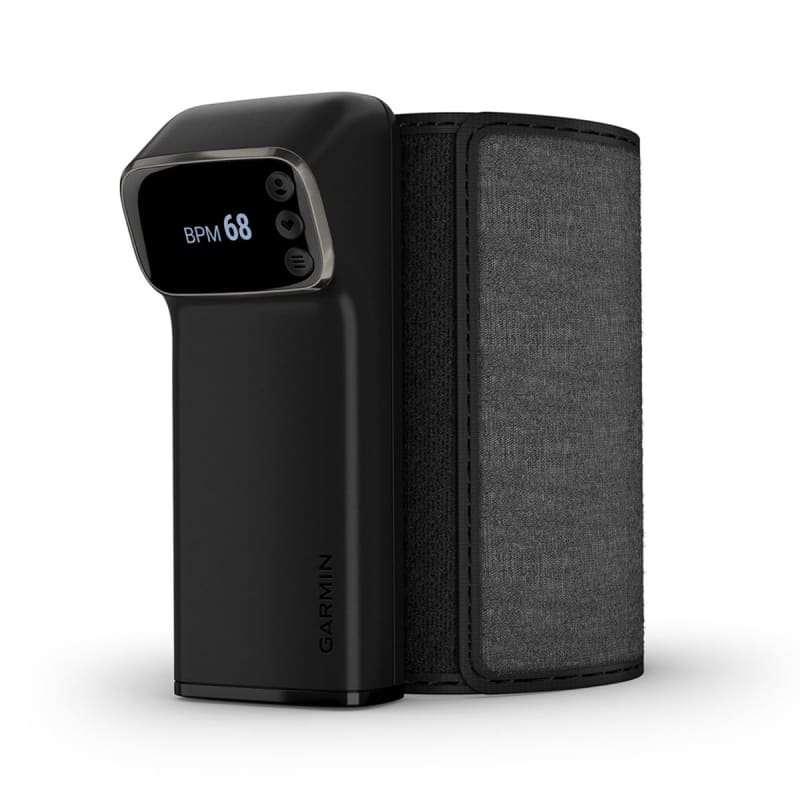
The garmin INDEX BPM Blood Pressure Monitor BP707 is a smart upper-arm blood pressure monitor designed for users who want accurate home readings with simple wireless syncing to the Garmin ecosystem. It measures systolic blood pressure, diastolic blood pressure, and pulse rate using an oscillometric method, making it suitable for routine wellness tracking, long-term health monitoring, and sharing results with family members or healthcare providers. Its built-in OLED display, easy cuff setup, and support for Wi‑Fi and Bluetooth Low Energy make it especially appealing for users who want a modern blood pressure monitor that works both as a standalone device and as a connected health accessory.
One of the biggest advantages of the garmin INDEX BPM Blood Pressure Monitor BP707 is its convenience. You can take a reading right out of the box without pairing it to a phone first, then sync your results later for digital recordkeeping. It supports upper arms from 22 to 42 cm, offers a measurement range suitable for a wide range of users, and includes battery-powered portability for everyday use at home or while traveling. This makes it a strong option for adults who want a reliable blood pressure cuff monitor with smart features.
Estimated pricing typically falls in the mid-premium range, often around $150 to $200 depending on retailer availability, promotions, and region. Availability may vary by country and sales channel, including major online retailers, Garmin channels, and medical equipment stores. For users searching for a connected home blood pressure monitor with Garmin integration, the garmin INDEX BPM Blood Pressure Monitor BP707 stands out for ease of use, portability, and health data tracking.
Specifications
- Product type: Upper-arm smart blood pressure monitor
- Measurement method: Oscillometric
- Readings: Systolic blood pressure, diastolic blood pressure, and pulse rate
- Display: 3.3 cm (1.3 in.) OLED screen
- Cuff pressure range: 0 to 280 mmHg
- Measurement range: Systolic 60 to 250 mmHg; diastolic 40 to 180 mmHg
- Accuracy: Blood pressure ± 3 mmHg or ± 2%; pulse ± 5%
- Arm circumference support: 22 to 42 cm
- Dimensions: 150 x 60 x 80 mm
- Weight: 280 g without batteries
- Power: 4 AAA batteries, DC 6 V
- Battery life: Up to 9 months
- Connectivity: Bluetooth Low Energy 5.0 and Wi‑Fi 802.11 b/g/n
- Operating temperature: 10°C to 40°C
- Use case: Home blood pressure tracking and wireless health data sync
Compared with basic digital blood pressure monitors, the garmin INDEX BPM Blood Pressure Monitor BP707 offers stronger connected-health capabilities and a cleaner OLED interface. Compared with many smartphone-only wellness cuffs, it works independently first and syncs later, which is useful for users who want fast readings without constant app dependence. Its arm cuff range and medical-style measurement approach make it a practical choice for daily monitoring.
Troubleshooting
If the monitor does not power on, check that all four AAA batteries are installed correctly and have enough charge. If readings seem inconsistent, make sure the cuff is positioned on the upper arm, tightened properly, and used while seated with the arm supported at heart level. Movement, talking, or taking a reading too soon after exercise can also cause inaccurate results.
If syncing fails, confirm that Bluetooth and Wi‑Fi are enabled and that the device is within range of the network. Rebooting the monitor, replacing weak batteries, or reconnecting through the Garmin app can often resolve communication problems. If the display is difficult to read, move to a brighter location or check for moisture, dirt, or low battery warnings.
Common error codes may indicate cuff issues, unstable readings, or connection problems. A cuff-related warning usually means the cuff is too loose, too tight, or placed incorrectly. A measurement error often improves by resting for several minutes and repeating the test under calmer conditions. To prevent recurring issues, keep the cuff clean, store the device in a dry environment, and avoid bending the hose or dropping the unit.
Warranty coverage and support options are typically available through Garmin support channels, product registration, and regional service centers. For help, contact Garmin customer support through the official Garmin Support website or the support line listed in your region’s product documentation. If a medical or measurement concern persists, consult a healthcare professional.
Pros and Cons
Pros
- Accurate upper-arm blood pressure monitoring with medical-style oscillometric measurement
- Works immediately without phone pairing, which is helpful for quick daily checks
- Wi‑Fi and Bluetooth connectivity make long-term tracking easier
- OLED display is clear and simple to read
- Supports a wide cuff range from 22 to 42 cm
- Battery life up to 9 months reduces maintenance
- Good value for users already invested in Garmin health tracking
Cons
- Higher price than many basic standalone blood pressure cuffs
- Requires AAA batteries instead of a rechargeable battery pack
- Best experience depends on using the Garmin ecosystem
- Not ideal for users who want advanced clinical reporting or multi-user medical workflows
- Less affordable than entry-level monitors from Omron, Beurer, or Withings alternatives
Overall, the garmin INDEX BPM Blood Pressure Monitor BP707 delivers strong value for users who want a smart blood pressure monitor with reliable home readings and wireless syncing. It is especially appealing for Garmin fitness and wellness users, while budget-focused buyers may prefer a simpler alternative.
Customer Reviews
Average user sentiment for the garmin INDEX BPM Blood Pressure Monitor BP707 is generally positive, with many owners giving it 4 to 5 stars for convenience, accuracy, and easy setup. Users frequently praise the clear display, comfortable upper-arm fit, and the ability to take readings without opening an app first. One common testimonial theme is that it feels like a premium home health device rather than a basic cuff monitor.
Common complaints include the price, the need to replace AAA batteries, and occasional sync or connectivity issues when Wi‑Fi settings are inconsistent. Some users also mention that repeated measurements can vary if the cuff is not positioned carefully. For buyers who want a connected blood pressure monitor with Garmin integration, it is often recommended. For shoppers mainly looking for the lowest price, a more basic monitor may be a better fit.
Typical user rating summary: 4.4 out of 5 stars. Many reviews highlight the smooth user experience, while the most frequent criticisms focus on cost and app dependency for full data tracking. If you want a smart upper-arm monitor for regular home health monitoring, this model is a strong purchase consideration.
Faqs
How do I set up garmin INDEX BPM Blood Pressure Monitor BP707 for the first time?
What should I do if garmin INDEX BPM Blood Pressure Monitor BP707 is not pairing with Garmin Connect?
How do I get more accurate readings from garmin INDEX BPM Blood Pressure Monitor BP707 at home?
Why does garmin INDEX BPM Blood Pressure Monitor BP707 show an error code during measurement?
Is garmin INDEX BPM Blood Pressure Monitor BP707 compatible with all smartphones?
What arm size does garmin INDEX BPM Blood Pressure Monitor BP707 support?
How do I reset garmin INDEX BPM Blood Pressure Monitor BP707 and reconnect it after problems?
How should I clean and maintain garmin INDEX BPM Blood Pressure Monitor BP707 for long-term use?
More garmin manuals
Leave a Comment