
Garmin APPROACH S70 Premium GPS Golf Smartwatch User Manual
Content
Garmin Approach S70 Premium GPS Golf Smartwatch Review and Manual
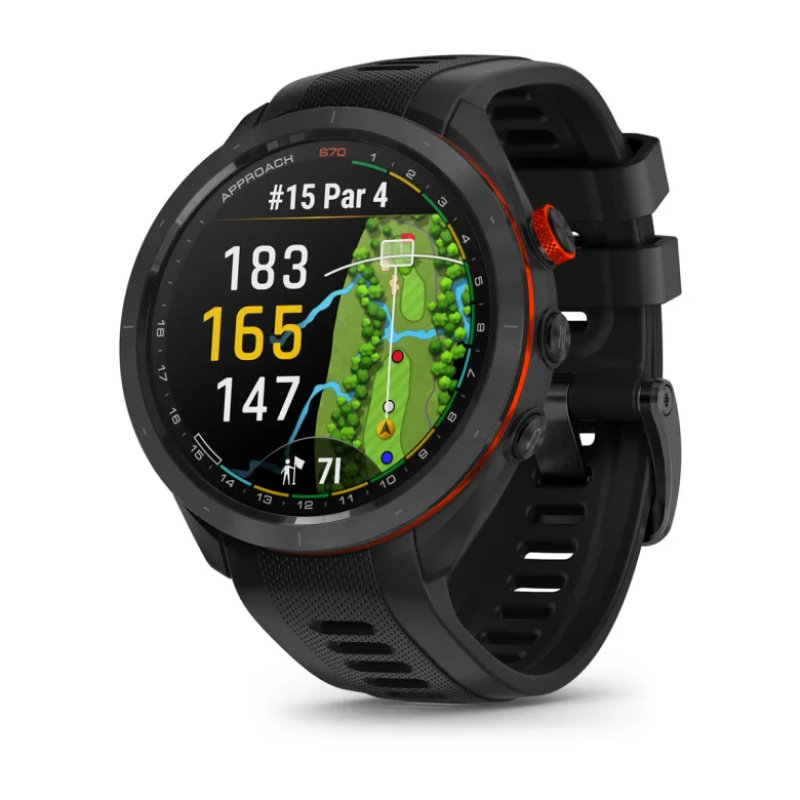
The Garmin Approach S70 Premium GPS Golf Smartwatch is a high-end golf wearable designed for players who want premium course data, advanced shot tracking, and everyday smartwatch functionality in one device. Built for golfers who value accuracy and convenience, it combines a bright AMOLED display, detailed hole maps, long battery life, and robust health and fitness features. The Garmin Approach S70 Premium GPS Golf Smartwatch is especially appealing to serious amateurs, competitive golfers, and frequent players who want a watch that performs on the course and still looks refined off it.
One of its biggest strengths is the crisp AMOLED screen, which makes yardages, hazards, and green contours easy to read in sunlight. It also comes preloaded with more than 43,000 golf courses worldwide, giving users broad coverage whether they play locally or travel often. In addition to golf tools, the watch supports everyday smartwatch features such as notifications, activity tracking, and connectivity with Bluetooth, ANT+, and Wi‑Fi. Available in 42 mm and 47 mm sizes, it typically sells in the premium range, with pricing commonly around $649.99 to $699.99 depending on size and region. The Garmin Approach S70 Premium GPS Golf Smartwatch is widely available through Garmin and major golf retailers, making it a strong choice for buyers seeking a premium golf GPS watch with advanced features and strong build quality.
Specifications for Garmin Approach S70 Premium GPS Golf Smartwatch
- Display: AMOLED touchscreen with Always-On mode option
- Sizes: 42 mm and 47 mm case options
- Resolution: 42 mm model uses 390 x 390 pixels; 47 mm model uses 454 x 454 pixels
- Materials: Corning Gorilla Glass 3 lens, ceramic bezel, silicone band
- Water resistance: 5 ATM
- Battery life: Up to 10 days in smartwatch mode on the 42 mm model, up to 16 days on the 47 mm model
- GPS mode battery: Up to 15 hours on the 42 mm model, up to 20 hours on the 47 mm model
- Storage: 16 GB memory/history
- Connectivity: Bluetooth, ANT+, Wi‑Fi
- Golf data: Preloaded with more than 43,000 courses
- Tracking features: AutoShot detection, club sensor support, shot distance tracking
- Compatibility: Works with Garmin Approach CT10 club tracking sensors and compatible smartphones
- Weight: About 44 g for the 42 mm version and 56 g for the 47 mm version
Compared with many standard golf GPS watches, the Approach S70 stands out for its premium materials, bright AMOLED display, and broader smartwatch functionality. It competes closely with other premium golf wearables, but its display quality and course presentation are among its strongest selling points.
Detailed Description of the Garmin Approach S70 Golf Smartwatch
The Garmin Approach S70 Premium GPS Golf Smartwatch blends golf-first technology with a polished everyday design. On the course, it provides detailed yardages, hazard information, green views, and shot tracking tools that help golfers make faster, better decisions. The device also supports AutoShot round analysis, and when paired with compatible sensors, it can give a more complete picture of club performance and shot tendencies.
Its build quality is a major advantage. The ceramic bezel gives the watch a premium look, while Gorilla Glass 3 adds durability for regular play. The AMOLED screen is especially useful in bright conditions because it delivers strong contrast and sharp graphics. In real-world use, golfers can quickly glance at distances to the front, middle, and back of the green, then plan club selection with less guesswork. Off the course, the watch functions as a capable smartwatch for notifications, activity tracking, and general wear.
For golfers who travel, the preloaded worldwide course map library is a major benefit. It reduces setup time and makes the watch practical for destination rounds, weekend tournaments, and casual local play. Overall, the Garmin Approach S70 Premium GPS Golf Smartwatch feels like a premium sports instrument rather than a simple golf accessory.
Setup Guide: How to Set Up Garmin Approach S70 Premium GPS Golf Smartwatch
- Charge the watch fully before first use with the included Garmin charging cable.
- Power on the device and select your preferred language, time format, and measurement units.
- Download the Garmin Golf app and pair the watch with your smartphone via Bluetooth.
- Sign in to your Garmin account or create one if you are a first-time user.
- Allow location, notification, and health permissions so golf and smartwatch features work correctly.
- Sync course data and update the watch software before your first round.
- Configure golf preferences such as club tracking, scorecard settings, and shot detection sensitivity.
- Set wrist orientation, display brightness, and Always-On screen behavior based on your preference.
If pairing fails, restart both the watch and phone, then confirm Bluetooth is enabled and the Garmin app has permission to run in the background. For best results, keep the watch charged and update course data regularly before a round. Avoid exposing the device to harsh chemicals, and rinse it gently after wet or muddy play. Do not attempt to charge the watch while the port is wet.
Troubleshooting Garmin Approach S70 Common Problems and Fixes
- Problem: Watch will not pair with phone. Solution: Turn Bluetooth off and on, restart both devices, and reinstall the companion app if needed.
- Problem: GPS takes too long to lock. Solution: Move to an open outdoor area, wait for a stronger satellite signal, and update software.
- Problem: Battery drains faster than expected. Solution: Reduce brightness, disable Always-On mode when not needed, and shorten display timeout settings.
- Problem: Course data looks outdated. Solution: Sync the watch with Wi‑Fi or the mobile app before the round.
- Problem: Touchscreen is not responsive. Solution: Clean the display, remove moisture, and restart the device.
- Problem: Shot tracking seems inaccurate. Solution: Check club sensor pairing, confirm AutoShot is enabled, and verify your swing is being detected properly.
There are no widely reported user-facing error codes tied to routine use, so most issues are resolved through syncing, restarting, or updating the device. Preventive care includes regular software updates, proper charging habits, and keeping the watch clean and dry after play. Warranty support is handled through Garmin’s standard product support channels and authorized retailers, which can help with repairs, replacements, and technical assistance.
Pros and Cons of Garmin Approach S70 Premium GPS Golf Smartwatch
Pros
- Bright AMOLED display that is easy to read in sunlight and indoors
- Premium ceramic bezel and durable Gorilla Glass 3 construction
- Excellent battery life for both smartwatch use and GPS rounds
- Preloaded with more than 43,000 courses for broad global coverage
- Advanced golf tools such as shot tracking, hazard views, and green mapping
- Works well as both a golf watch and an everyday smartwatch
Cons
- Higher price than entry-level golf GPS watches
- Premium feature set may be more than casual golfers need
- 47 mm version may feel large on smaller wrists
- Some advanced golf features rely on optional accessories or app syncing
For value for money, the watch makes the most sense for golfers who play often and want premium course detail, a better display, and long battery life. Compared with lower-cost alternatives, it offers a more refined experience and stronger smartwatch appeal, but buyers focused only on basic yardages may find simpler models more economical.
Customer Reviews for Garmin Approach S70 Premium GPS Golf Smartwatch
Average user sentiment is generally very positive, with many buyers rating it around 4.5 to 5 stars for display quality, battery life, and course visualization. Golfers frequently praise the sharp AMOLED screen, accurate distance readings, and premium feel. One common testimonial style comment is, “The screen is incredibly clear, and I can read yardages instantly without squinting.” Another frequent positive note is that the watch feels like a serious upgrade from basic golf GPS models.
Common complaints usually focus on price and the larger case size of the 47 mm version. Some users also mention that setup takes a little time because of the number of options and syncing steps. Despite that, many buyers recommend it for regular golfers who want a dependable premium golf smartwatch. For frequent players, the Garmin Approach S70 Premium GPS Golf Smartwatch is often considered a worthwhile purchase because it combines performance, durability, and everyday usability in one polished package.
Faqs
How do I set up garmin APPROACH S70 Premium GPS Golf Smartwatch for the first time?
Why is my garmin APPROACH S70 Premium GPS Golf Smartwatch not connecting to my phone?
What should I do if garmin APPROACH S70 Premium GPS Golf Smartwatch cannot find nearby golf courses?
Which features make garmin APPROACH S70 Premium GPS Golf Smartwatch useful for course management?
Is garmin APPROACH S70 Premium GPS Golf Smartwatch compatible with iPhone and Android phones?
How can I improve battery life on garmin APPROACH S70 Premium GPS Golf Smartwatch during long golf rounds?
How do I clean and maintain garmin APPROACH S70 Premium GPS Golf Smartwatch without damaging it?
What should I check if garmin APPROACH S70 Premium GPS Golf Smartwatch shows wrong distances or inaccurate GPS readings?
More garmin manuals
Leave a Comment