
Garmin Approach S62 Gps Watch User Manual
Content
Garmin Approach S62 GPS Watch Review and User Manual
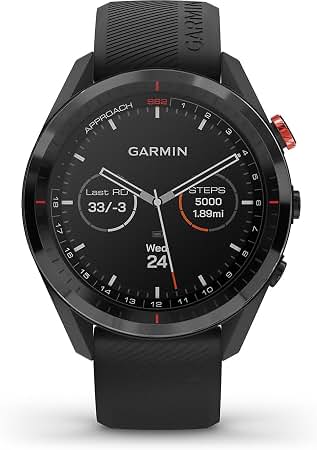
The Garmin Approach S62 GPS watch is a premium golf smartwatch designed for players who want advanced course data, reliable GPS performance, and everyday wearability in one device. It combines a large 1.3-inch color touchscreen, a durable ceramic bezel, and a sunlight-readable MIP display to deliver clear yardages and easy navigation in bright outdoor conditions. For golfers who rely on precise distances, hazard mapping, and smart features, the Garmin Approach S62 GPS Watch stands out as a strong all-in-one option.
This model is especially useful for frequent golfers, competitive players, and anyone looking for a premium golf GPS watch with smartwatch functionality. Key benefits include up to 20 hours of GPS use, up to 14 days in smartwatch mode, and support for features such as virtual caddie assistance, course mapping, and shot tracking. It also works well as a daily watch thanks to its fitness and health tracking features, Bluetooth connectivity, and interchangeable QuickFit bands. The device is built for the course, but it also fits into everyday routines without looking overly sporty.
In terms of price, the Garmin Approach S62 GPS Watch typically sits in the premium category at around $450 to $500, depending on retailer, bundle, and promotions. It is widely available through Garmin and major electronics and golf retailers. For buyers who want a high-end golf watch with reliable battery life and strong readability, it remains one of the most recognizable options in its class.
Specifications for Garmin Approach S62 GPS Watch
- Display: 1.3-inch color touchscreen, 260 x 260 resolution, sunlight-visible transflective MIP screen
- Case Size: 47 x 47 x 14.8 mm
- Weight: 61 g
- Materials: Corning Gorilla Glass 3 lens, ceramic bezel, silicone strap
- Battery Life: Up to 14 days in smartwatch mode; up to 20 hours in GPS mode
- Water Rating: 5 ATM
- Memory: 1 GB
- Connectivity: Bluetooth and ANT+ support
- Band Compatibility: QuickFit 22 mm bands
- Navigation: GPS-enabled golf mapping with course data and hazard views
- Comparison: Larger and more feature-rich than the Approach S42, while more golf-focused than many general-purpose smartwatches
Compared with similar golf watches, the S62 offers a larger screen and more advanced on-course tools than midrange models, but it also costs more. It is best suited to golfers who value premium features over entry-level simplicity.
Detailed Description of the Garmin Approach S62 GPS Watch
The Garmin Approach S62 GPS Watch is built to help golfers make better decisions on every shot. It uses preloaded course data and GPS positioning to show distances to the front, middle, and back of the green, along with hazards and layup points. Its virtual caddie-style guidance can suggest club selection and help users manage strategy more effectively during a round.
The watch feels solid and durable thanks to its ceramic bezel and Gorilla Glass protection, yet it remains light enough for extended wear. The 1.3-inch display is easy to read outdoors, and the touchscreen interface is supported by physical buttons for better control in wet or active conditions. In real-world use, the device is ideal for golfers who want quick yardages without pulling out a phone or handheld GPS unit.
Beyond golf, it also works as a daily smartwatch for fitness tracking, notifications, and general wear. The build quality and premium materials make it feel more refined than many sport watches, while the battery performance keeps it practical for repeated rounds before recharging.
Setup Guide for Garmin Approach S62 GPS Watch
- Charge the watch fully using the included charging cable before first use.
- Power on the device and follow the on-screen prompts to select language, region, and basic preferences.
- Download and install the Garmin Connect app on your smartphone.
- Pair the watch with your phone through Bluetooth and confirm the pairing code when prompted.
- Sign in or create a Garmin account to sync course data, settings, and activity history.
- Set up golf preferences such as club tracking, scoring format, and measurement units.
- Update the watch software and course database before your first round.
For better results, keep Bluetooth enabled when syncing and make sure the watch is close to the phone during setup. If pairing fails, restart both devices and try again. Avoid charging the watch in extreme heat or moisture, and do not submerge it while connected to power. Because this is a precision GPS golf device, allow it to acquire satellite lock outdoors before starting a round.
Troubleshooting the Garmin Approach S62 GPS Watch
- Problem: Watch will not power on. Fix: Charge for at least 20 to 30 minutes, then try a soft restart.
- Problem: Bluetooth pairing fails. Fix: Remove the watch from the phone’s Bluetooth list, restart both devices, and pair again through the Garmin app.
- Problem: GPS lock is slow. Fix: Move to an open outdoor area and wait for a stronger signal before beginning play.
- Problem: Battery drains faster than expected. Fix: Reduce screen brightness, limit notifications, and check for firmware updates.
- Problem: Touchscreen is unresponsive. Fix: Clean and dry the screen, then use the physical buttons if conditions are wet or cold.
Preventive care includes regular software updates, proper charging habits, and cleaning the watch after sweaty or muddy rounds. The Garmin Approach S62 GPS Watch is backed by a limited warranty, and support is available through Garmin’s customer service channels, online help resources, and authorized retailers. If the device shows repeated errors or freezes, a factory reset may be necessary after backing up data.
Pros and Cons of the Garmin Approach S62 GPS Watch
Pros
- Large, easy-to-read 1.3-inch touchscreen improves visibility on the course.
- Excellent battery life for a premium golf watch, with up to 20 hours in GPS mode.
- Durable construction with Gorilla Glass 3 and a ceramic bezel.
- Advanced golf tools such as yardages, hazard views, and virtual caddie features.
- Works well as both a golf GPS watch and an everyday smartwatch.
Cons
- Higher price than entry-level and midrange golf watches.
- Premium size may feel large on smaller wrists.
- MIP display is highly practical outdoors, but less vivid than AMOLED alternatives.
- Some golfers may not use all advanced features often enough to justify the cost.
Overall, the value for money is strong for serious golfers who want a premium experience. Compared with alternatives like the Approach S42, the S62 offers more advanced functionality, while competing smartwatches may offer better lifestyle features but less golf-specific depth.
Customer Reviews of Garmin Approach S62 GPS Watch
Customer feedback for the Garmin Approach S62 GPS Watch is generally very positive, with many users praising its clear display, dependable battery life, and helpful golf features. Common ratings often fall around 4.5 out of 5 stars, especially among golfers who play regularly and appreciate precise on-course information.
Typical testimonials mention that the watch makes course management easier and reduces the need to check a phone or rangefinder constantly. One recurring compliment is the readability of the screen in bright sunlight. Common complaints usually focus on the premium price and the fact that some users do not need every advanced feature.
For golfers who want a premium GPS watch with strong reviews and reliable performance, the Garmin Approach S62 GPS Watch is a recommended buy. It is especially appealing to players who want a long-lasting, feature-rich device for both practice rounds and competitive play.
Faqs
How do I set up Garmin Approach S62 Gps Watch for the first time?
Why is my Garmin Approach S62 Gps Watch not finding golf courses?
How do I connect Garmin Approach S62 Gps Watch to my smartphone?
What should I do if my Garmin Approach S62 Gps Watch keeps disconnecting from Bluetooth?
How can I improve battery life on Garmin Approach S62 Gps Watch?
Is Garmin Approach S62 Gps Watch compatible with Approach CT10 sensors?
How do I fix the wrong language or wrong units on Garmin Approach S62 Gps Watch?
How should I clean and care for Garmin Approach S62 Gps Watch?
More garmin manuals
Leave a Comment