
Garmin Vivomove Trend Smartwatch User Manual
Content
Garmin Vivomove Trend Smartwatch Review and User Manual
Introduction: Why the Garmin Vivomove Trend Smartwatch Stands Out
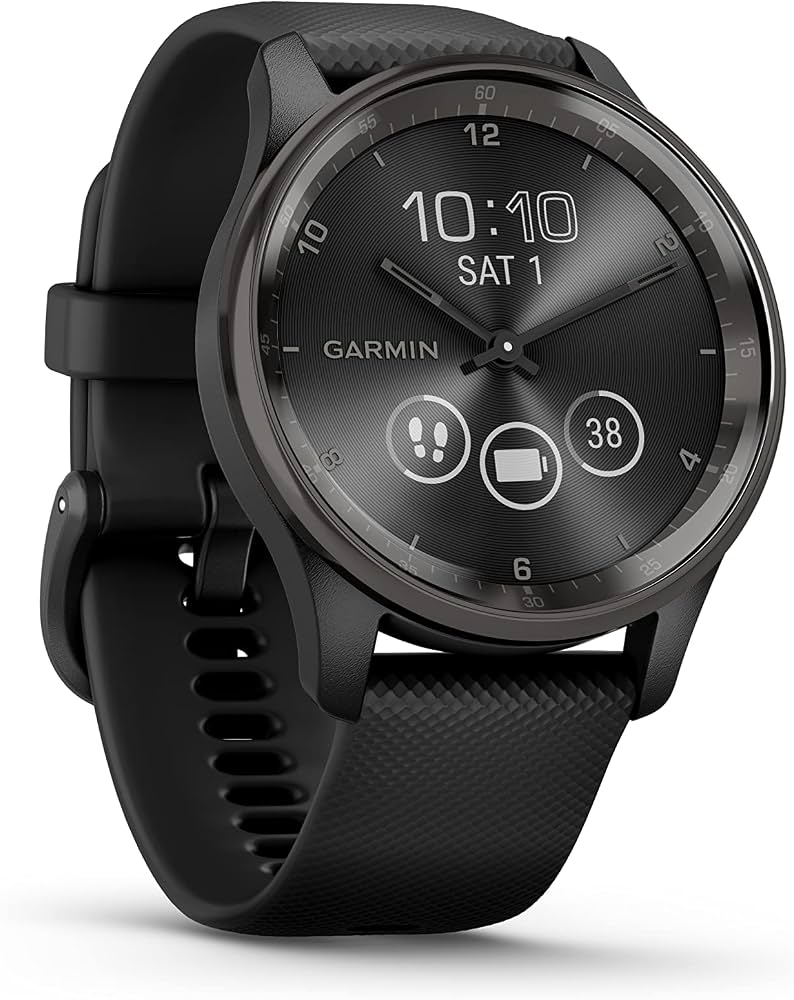
The Garmin Vivomove Trend Smartwatch blends the timeless look of an analog timepiece with the convenience of modern smartwatch features. Designed for users who want a more refined, fashion-forward wearable, it offers a hidden touchscreen display beneath traditional hands, giving it a clean and sophisticated profile. This makes the Garmin Vivomove Trend Smartwatch especially appealing to professionals, style-conscious buyers, and everyday users who want health tracking without the bulk of a sport watch.
Key benefits include heart rate monitoring, sleep tracking, stress tracking, pulse oximetry, smart notifications, Garmin Pay, and connected GPS when paired with a smartphone. Wireless charging adds extra convenience, while the 5 ATM water rating makes it suitable for daily wear, workouts, and casual swimming. The compact 40 mm case and lightweight build also help it feel comfortable throughout the day.
The Garmin Vivomove Trend Smartwatch is a strong choice for hybrid-watch buyers who want a balance of design and functionality. It works well for commuting, office wear, fitness tracking, and all-day wellness monitoring. The estimated price range is typically around $250 to $300 depending on color and retailer, with broad availability through Garmin and major electronics and sporting goods stores. For users comparing the Garmin Vivomove Trend Smartwatch with full touchscreen sport watches, this model delivers a more premium, understated look without sacrificing essential smart features.
Specifications: Garmin Vivomove Trend Smartwatch Technical Details
- Case size: 40.4 x 40.4 x 11.9 mm
- Weight: 28.3 g case only; about 43.3 g with silicone strap
- Display: 1.01 x 0.74 in touchscreen, 254 x 346 pixel resolution
- Display type: Liquid crystal hidden hybrid screen
- Lens material: Chemically strengthened glass
- Bezel material: Stainless steel
- Case material: Fiber-reinforced polymer
- Band: 20 mm quick-release silicone strap
- Battery life: Up to 4 to 5 days in smartwatch mode, plus about 1 additional day in watch mode
- Charging: Proprietary clip charger and compatible Qi-certified wireless charging pads
- Water resistance: 5 ATM
- Connectivity: Bluetooth support and smartphone pairing
- Health tracking: Heart rate, sleep, stress, pulse ox, calories, steps, and activity tracking
- Smart features: Notifications, Garmin Pay, calendar alerts, calls/text alerts, and GPS support when connected to a phone
Compared with similar hybrid smartwatches, the Garmin Vivomove Trend Smartwatch offers a stronger premium finish than many budget models, while remaining less bulky than advanced sport watches. It is best positioned between fashion-first hybrids and fully featured fitness watches, making it ideal for users who value everyday practicality over deep training metrics.
Pros and Cons of the Garmin Vivomove Trend Smartwatch
Pros
- Elegant hybrid design: The analog hands and hidden display create a classic watch look that works in both casual and formal settings.
- Wireless charging support: The ability to charge on compatible Qi pads is a major convenience for daily use.
- Comfortable and lightweight: The compact 40 mm size makes it easy to wear all day.
- Solid wellness tracking: Heart rate, sleep, stress, and pulse oximeter features cover the essentials well.
- Good value for style-focused buyers: It delivers premium materials and useful smart features without the bulk of a full sports watch.
Cons
- Limited battery life: Battery performance is good for a hybrid, but shorter than many non-touch fitness watches.
- Smaller display: The hidden screen is functional, but not as easy to read as a larger AMOLED smartwatch display.
- Not a training powerhouse: It lacks the advanced performance depth of Garmin’s higher-end sport models.
- Connected GPS only: Outdoor route tracking depends on a paired smartphone.
For value, the Garmin Vivomove Trend Smartwatch is strongest when style matters as much as features. Buyers who want maximum battery life or advanced athletic analytics may prefer alternatives such as Garmin Forerunner or Venu models, but users seeking a refined hybrid watch will find this model compelling.
Customer Reviews: What Buyers Say About Garmin Vivomove Trend Smartwatch
Customer feedback for the Garmin Vivomove Trend Smartwatch is generally positive, with many users praising the stylish design, comfortable fit, and convenient wireless charging. A common rating pattern is around 4 out of 5 stars, especially among buyers looking for a smartwatch that does not look overly sporty.
Typical praise includes comments like: “It looks like a real watch but still tracks everything I need,” and “The wireless charging makes it much easier to keep charged every day.” Frequent complaints mention the smaller display, shorter battery life than expected, and the fact that it is not ideal for users who want advanced workout data. Some users also note that connected GPS is less convenient than built-in GPS.
For most buyers, the Garmin Vivomove Trend Smartwatch is an easy recommendation if the priority is design, everyday health tracking, and smart notifications. If the main goal is running metrics, long battery life, or detailed navigation, a dedicated sports smartwatch may be a better fit.
Frequently Asked Questions About Garmin Vivomove Trend Smartwatch
- Is the Garmin Vivomove Trend Smartwatch good for everyday wear? Yes, it is designed for all-day use and suits work, travel, and casual fitness.
- Does it support wireless charging? Yes, it works with Garmin’s charger and most Qi-certified wireless charging pads.
- Is the Garmin Vivomove Trend Smartwatch waterproof? It has a 5 ATM water rating, which is suitable for rain, showers, and swimming in shallow water.
- Does it have built-in GPS? No, it uses connected GPS through a paired smartphone.
- Who should buy it? Buyers who want a stylish hybrid smartwatch with core health tracking and smart features.
Faqs
How do I set up garmin Vivomove Trend Smartwatch for the first time?
Why is my garmin Vivomove Trend Smartwatch not syncing with Garmin Connect?
Which phones are compatible with garmin Vivomove Trend Smartwatch?
How does connected GPS work on garmin Vivomove Trend Smartwatch?
Why is the battery on my garmin Vivomove Trend Smartwatch draining faster than expected?
What should I do if the touchscreen on garmin Vivomove Trend Smartwatch stops responding?
How do I use Garmin Pay on garmin Vivomove Trend Smartwatch?
How should I care for and maintain garmin Vivomove Trend Smartwatch?
More garmin manuals
Leave a Comment