
Garmin SWIM 2 Gps Watch User Manual
Content
Garmin Swim 2 GPS Watch: Complete Product Manual and Buying Guide
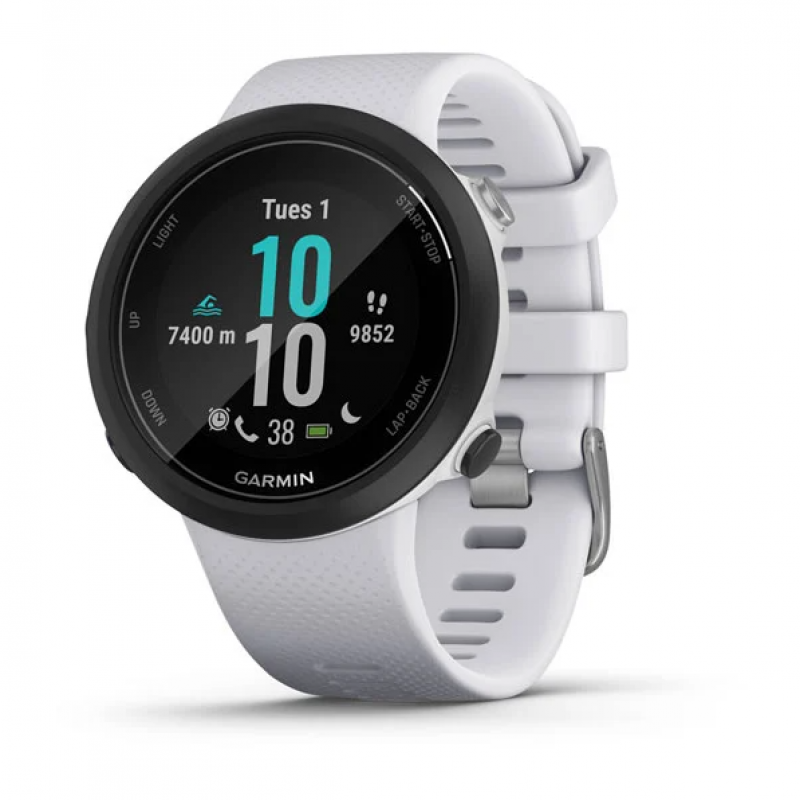
The Garmin Swim 2 GPS Watch is a purpose-built swim training watch designed for pool swimmers, open-water athletes, triathletes, and fitness users who want detailed swim metrics in a lightweight wearable. It combines GPS tracking, wrist-based heart rate monitoring, and advanced swim analytics in a compact 42 mm design, making it especially appealing for athletes who need a dedicated swimming watch rather than a general-purpose smartwatch. The watch is built to track distance, pace, stroke count, stroke type, SWOLF, rest intervals, and heart rate in and out of the water, giving users a fuller picture of performance during training sessions.
One of its biggest strengths is versatility. In pool mode, it automatically detects intervals and stroke efficiency, while open-water mode uses GPS to record routes and distance. Daily smartwatch features such as smart notifications and activity tracking add convenience for users who want one device for training and everyday wear. The Garmin Swim 2 GPS Watch is also known for its strong battery life, with up to 7 days in smartwatch mode and up to 14 hours in GPS mode, depending on settings and usage. Its 5 ATM water resistance makes it suitable for swimming and general water exposure, while the lightweight silicone band helps it stay comfortable during long sessions.
As of current market listings, the Garmin Swim 2 GPS Watch typically falls in the mid-range swim watch category, with an estimated price range of about $200 to $250 depending on retailer, color, and availability. It is commonly available through Garmin, major electronics stores, and online marketplaces. For swimmers who want reliable training data, simple controls, and a focused feature set, the Garmin Swim 2 GPS Watch remains a strong value option.
Specifications for Garmin Swim 2 GPS Watch
- Display: 1.04-inch color display with 208 x 208 pixel resolution
- Case size: 42 x 42 x 11.4 mm
- Weight: Approximately 36 g
- Water rating: 5 ATM, suitable for swimming and water-based training
- Battery life: Up to 7 days in smartwatch mode; up to 14 hours in GPS mode; up to 72 hours in pool and optical heart rate mode in some regional listings
- Battery type: Rechargeable built-in lithium-ion battery
- Connectivity: Bluetooth and ANT+ sensor support
- Heart rate tracking: Wrist-based optical heart rate monitoring
- Memory/history: Up to 50 hours of activity data
- Operating temperature: -20°C to 60°C
- Charging method: Garmin proprietary plug charger
Key performance features include pool swim tracking, open-water GPS navigation, stroke detection, pace alerts, rest interval tracking, and compatibility with accessories such as external heart rate sensors. Compared with general fitness watches, the Garmin Swim 2 GPS Watch offers more swim-specific training tools. Compared with multisport watches like the Forerunner series, it is more specialized and easier to use for swimmers who do not need advanced running or cycling metrics.
Detailed Garmin Swim 2 GPS Watch Description
The Garmin Swim 2 GPS Watch is designed around the needs of swimmers first. In pool mode, it records lap count, stroke type, distance, pace, SWOLF, and rest periods, helping users analyze technique and endurance. In open-water mode, GPS adds route tracking and distance measurement, which is especially useful for triathletes and outdoor swimmers training in lakes, bays, or coastal water.
The watch uses a lightweight polymer case and silicone band, which helps reduce drag in the water and improves comfort during long sessions. The compact build makes it feel less bulky than many multisport watches, and the simple five-button layout is easier to use than touch-only devices when hands are wet. Its design is practical rather than flashy, which suits athletes who value function over style.
In real-world use, the Garmin Swim 2 GPS Watch works well for interval training, race preparation, and performance tracking. It can also serve as a daily activity tracker, making it a good fit for users who want one device that covers both training and everyday wear. The overall user experience is straightforward, with a clean interface, quick access to swim modes, and dependable data capture.
Setup Guide: How to Set Up the Garmin Swim 2 GPS Watch
Start by charging the watch fully before first use. Connect the proprietary charging cable to a power source and allow the battery to reach 100 percent. After charging, power on the device by pressing and holding the Light button. Follow the on-screen prompts to choose language, units, and basic profile settings such as age, weight, and wrist preference.
Next, pair the watch with the Garmin Connect app on your smartphone. Enable Bluetooth on the phone, open the app, and follow the pairing instructions. Once connected, sync time, install updates, and configure workout profiles. For swim training, choose pool length, preferred units, and heart rate preferences. If using open-water mode, make sure GPS is enabled and wait for a strong signal before starting the session.
Before swimming, confirm the watch is set to the correct mode and that the strap fits securely but comfortably. Do not press buttons underwater unless the manual specifically instructs you to do so. Avoid exposing the device to temperatures outside the recommended range, and rinse it with fresh water after saltwater use. If pairing fails, restart Bluetooth on the phone, power-cycle the watch, and try syncing again.
Troubleshooting Garmin Swim 2 GPS Watch Problems
If the watch does not track laps correctly, verify that the pool length is set accurately and that you are swimming consistent strokes. Incorrect pool settings are one of the most common causes of distance errors. If GPS is slow to lock, move to an open area away from tall buildings, tree cover, or indoor locations, then wait for signal acquisition before beginning the workout.
If heart rate readings seem inconsistent, adjust the watch so it sits snugly above the wrist bone. Wet skin, loose fit, or rapid arm movement can affect optical sensor accuracy. If the device freezes or becomes unresponsive, restart it using the button combination described in the user manual. In many cases, a restart clears temporary software issues.
The Garmin Swim 2 GPS Watch does not rely on traditional error codes for most user issues, so troubleshooting is usually based on symptoms such as failed syncing, poor GPS reception, or inaccurate lap counts. Preventive maintenance includes regular firmware updates, rinsing after pool or ocean use, and avoiding impacts that could damage the case or strap. For support, Garmin provides online help resources, product manuals, and regional customer service through its support channels and warranty process.
Pros and Cons of the Garmin Swim 2 GPS Watch
Pros
- Excellent swim-specific tracking: Tracks laps, stroke type, SWOLF, pace, and rest intervals with strong accuracy in pool training.
- Open-water GPS support: Useful for triathletes and outdoor swimmers who need route and distance data.
- Lightweight and comfortable: The slim case and silicone band reduce bulk during long swim sessions.
- Good battery life: Reliable for daily wear and extended training use without frequent charging.
- Simple controls: Physical buttons are easy to use in wet conditions.
Cons
- Limited smartwatch features: It is less feature-rich than premium general-purpose smartwatches.
- No touchscreen: Some users may prefer a more modern interface.
- Specialized focus: Best for swimmers, but less versatile than Garmin multisport models for runners and cyclists.
- Price vs. basic trackers: More expensive than entry-level fitness bands, though the swim metrics justify the cost for serious users.
For value for money, the Garmin Swim 2 GPS Watch is strongest for athletes who swim regularly and want reliable training data. Compared with alternatives like general fitness watches or cheaper swim trackers, it offers more advanced swim analytics and better open-water support.
Customer Reviews of the Garmin Swim 2 GPS Watch
Customer feedback is generally positive, with many users praising the lightweight feel, accurate pool tracking, and easy-to-read swim metrics. Common ratings often fall around 4 to 4.5 out of 5 stars, especially among swimmers who use it for structured training. One frequent compliment is that the watch “just works” for lap swimming without unnecessary complexity.
Common complaints include the lack of touchscreen controls, occasional GPS delay in open water, and the fact that it is not designed as a full-featured smartwatch. Some users also mention that the design is more functional than stylish. Overall, it is a strong purchase recommendation for swimmers, triathletes, and fitness users who want dependable swim tracking rather than a fashion-focused wearable.
Frequently mentioned highlights include dependable battery life, comfortable wear, and useful training data. Frequently mentioned issues include limited non-swim features and the need to configure pool settings carefully for the best results.
Faqs
How do I set up garmin SWIM 2 Gps Watch for the first time?
Why is my garmin SWIM 2 Gps Watch not syncing with Garmin Connect?
What swim metrics can garmin SWIM 2 Gps Watch track in pool and open water?
Does garmin SWIM 2 Gps Watch work without a phone during open-water swims?
How do I fix inaccurate distance or pace on garmin SWIM 2 Gps Watch?
Can garmin SWIM 2 Gps Watch monitor heart rate while swimming?
How long does the battery last on garmin SWIM 2 Gps Watch in real use?
How should I clean and maintain garmin SWIM 2 Gps Watch after swimming?
More garmin manuals
- Garmin Approach S62 Gps Watch User Manual
- Garmin Vivomove Trend Smartwatch User Manual
- Garmin APPROACH S70 Premium GPS Golf Smartwatch User Manual
- Garmin Speed & Cadence Sensor 2 User Manual
- Garmin INDEX BPM Blood Pressure Monitor BP707 User Manual
- Garmin Instinct Crossover Series GPS Smartwatch User Manual
Leave a Comment