
How to Use: Garmin Inreach Mini 2 Satellite Communicator User Manual
Content
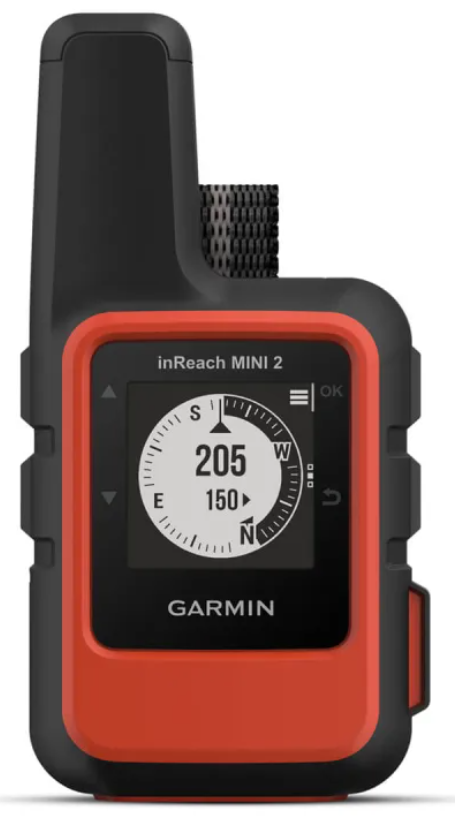
Garmin inReach Mini 2 Satellite Communicator
Introduction
The Garmin inReach Mini 2 Satellite Communicator is a compact, lightweight device designed to keep adventurers connected no matter where their travels take them. Weighing just 3.5 ounces (approximately 100 grams) and measuring roughly 4" x 2" x 1", this rugged communicator offers global satellite messaging, two-way text communication, and an interactive SOS feature via the Iridium satellite network, independent of cellular coverage. Its durable, waterproof (IPX7) construction makes it ideal for outdoor enthusiasts such as hikers, backpackers, climbers, and remote workers venturing off the grid.
Key benefits of the Garmin inReach Mini 2 include its exceptional battery life, lasting up to 14 days with regular tracking and up to 30 days in power-saving mode, and its enhanced navigation features like TracBack routing for safe return trips. The device also pairs seamlessly with Garmin's Explore and Messenger smartphone apps, enabling intuitive message composition, weather checks, and location sharing. These features make it an essential tool for safety, communication, and navigation in remote environments.
Targeted primarily at outdoor adventurers and professionals who require reliable emergency communication and tracking, the Garmin inReach Mini 2 also suits travelers and solo explorers concerned about safety in areas without mobile coverage. Pricing typically ranges around €325 or USD $350-$400, with additional subscription plans required for satellite service, making it a valuable investment for peace of mind in extreme conditions. Availability is broad, including major outdoor retailers and Garmin’s official channels worldwide.
Getting Started
When using your device for the first time, you should complete these tasks to set it up and get to know the basic features.
- Press and hold to turn on the device.
- Follow the on-screen instructions to select your language and begin activating your device.
- Download the Garmin Messenger™ app to your phone, and follow the on-screen instructions to pair and activate your device (Pairing Your Phone and Activating the Device, page 4).
You can use the Garmin Messenger app to compose and send messages using your phone. - Download the Garmin Explore™ app to your phone, and log in with the account information you used to activate a service plan.
You can use the Garmin Explore app for planning adventures, navigating, and sharing data with friends and family. - Sync your device with the Garmin Messenger or Garmin Explore app (Syncing inReach Data, page 5). 6 Test your device before you begin your trip (Testing the Device, page 6).
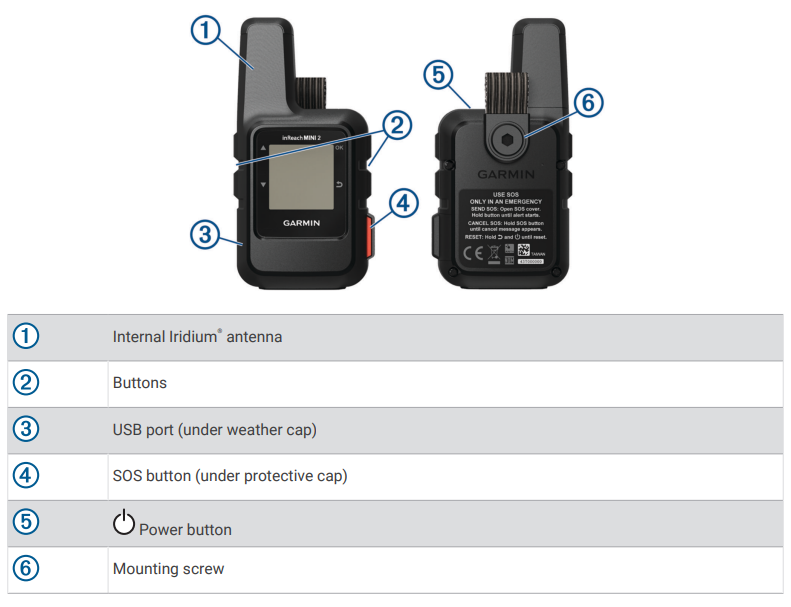
Device Overview
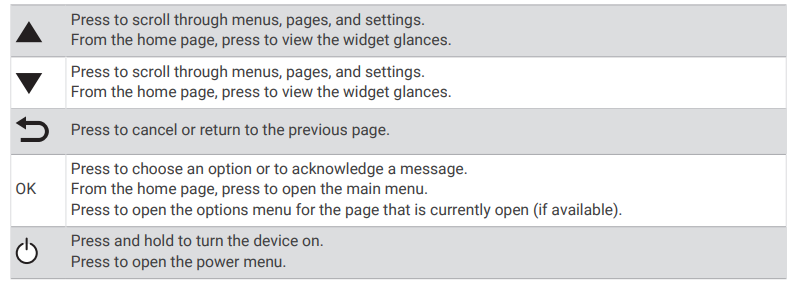
Buttons
Pairing Your Phone and Activating the Device
WARNING
Before you can use the inReach features of your device, including messaging, SOS, tracking, and inReach Weather, you must have an active satellite subscription. Always test your device before you use it outdoors.
The inReach device works best when it is paired with the Garmin Messenger app. The app allows you to compose and send messages using your phone, and to sync contacts and check-in messages with your device.
- Turn on the inReach device.
- Bring your compatible phone within 10 m (33 ft.) of your device.
- From the app store on your phone, download the Garmin Messenger app, and follow the on-screen instructions to complete the pairing process.
- Follow the on-screen instructions to activate a subscription service plan.
After the devices are paired, they connect automatically when they are turned on and within Bluetooth® range.
Garmin Messenger App
WARNING
Before you can use certain inReach features of the Garmin Messenger app, including SOS, tracking, and inReach Weather, you must have an active satellite subscription and a connected inReach device. Always test the app before you use it outdoors.
With an inReach subscription and a connected inReach device, you can use the Garmin Messenger app for tracking, SOS, inReach Weather, and managing your service plan. You can also use the app to message other inReach device users, as well as friends and family. The app works over both the Iridium satellite network and the internet (using a wireless connection or cellular data on your phone). Messages sent using a wireless connection or cellular data on your phone do not incur data charges or additional charges on your inReach subscription. Messages received may incur charges if message delivery is attempted over both the Iridium satellite network and the internet. Standard text messaging rates for your cellular data plan apply.
Without an inReach subscription, the app also provides a messaging experience for friends and family. Anyone can download the app and connect their phone, allowing them to communicate with other app users over
the internet (no login is required). App users can also create group messaging threads with other SMS phone numbers. New members added to the group message can download the app to see what others are saying.
Garmin Explore
The Garmin Explore website and app allow you to plan trips and use cloud storage for your waypoints, courses, and collections. They offer advanced planning both online and offline, allowing you to share and sync data with your compatible Garmin® device. You can use the app to download maps for offline access, and then navigate anywhere without using your cellular service
Iridium Satellite Network
Your device requires a clear view of the sky to transmit messages and track points over the Iridium satellite network. Without a clear view of the sky, your device attempts to send the information until it acquires satellite signals.
TIP: For the best connection with satellites, place the device with the antenna pointed toward the sky.
Bluetooth Connected Features
- Your device has several Bluetooth-connected features for your compatible phone using the Garmin Explore and Garmin Messenger apps.
- Downloadable Features: View downloaded maps, such as aerial imagery and USGS quadrangle maps, on your phone in the Garmin Explore app. You should download maps and charts before going on your trip.
- Sync: Both the Garmin Explore and Garmin Messenger apps can sync data with your device, such as plan changes, contacts, and messages.
- Messages: Both the Garmin Explore and Garmin Messenger apps allow you to read and write messages and access the contacts list on your phone. Messages appear on both devices.
- NOTE: You can have only one phone paired with your inReach device at a time.
Syncing inReach Data
After you make changes to your data, such as plan changes, contacts, or check-in messages, you must sync your device using the app.
- Open the paired Garmin Messenger or Garmin Explore app.
- Wait while your data syncs.
TIP: You can check the connection status on the Device tab in the app.
Testing the Device
You should test the device outdoors before using it on a trip to ensure your satellite subscription is active.
- From the home page, press OK to open the main menu.
- Select Service Plan > Test Service.
- Press OK.
- Select Begin Test.
Wait while the device sends a test message. When you receive a confirmation message, your device is ready to use
Cleaning the Device
- Wipe the device using a cloth dampened with a mild detergent solution.
- Wipe it dry.
- After cleaning, allow the device to dry completely.
Troubleshooting
Maximizing Battery Life
- Reduce the backlight timeout (System Settings, page 19).
- Reduce the frequency of the tracking Send Interval setting (Tracking Settings, page 17).
- Use the Standard level of detail for activity recordings (Tracking Settings, page 17).
- Turn off Bluetooth wireless technology (Phone Settings, page 18).
- Turn off ANT+ wireless technology (inReach Remote Settings, page 18).
Resetting All Default Settings
Before you reset your device, you should sync your device with the Garmin Explore app to upload your activity data.
You can reset all device settings to the factory default values.
- From the home page, press OK to open the main menu.
- Select Settings > System > Reset Device.
- Select an option:
- To reset all of the device settings to the factory default values and save all user-entered information and activity history, select Reset Default Settings.
- To reset all of the device settings to the factory default values and delete all user-entered information and activity history, select Delete Data and Reset Settings.
My device is in the wrong language.
You can change the device language selection, if you have accidentally selected the wrong language on the device.
- From the home page, press OK.
- Scroll down to the last item in the list, and select it.
- Scroll down to the last item in the list, and select it.
- Select the first item in the list.
- Select your language.
Charging the inReach Device
Specifications of Garmin inReach Mini 2 Satellite Communicator
- Dimensions: 5.17 x 9.9 x 2.61 cm (2.04" x 3.9" x 1")
- Weight: 99-100 grams (3.5 oz)
- Display: 1" x 1" (23 x 23 mm), 176 x 176 pixels color screen
- Battery: Rechargeable lithium-ion, 1250 mAh capacity; up to 14 days at 10-minute tracking, 30 days in power-saving mode
- Water Resistance: IPX7 rating, withstands immersion up to 1 meter for 30 minutes
- Operating Range: -20° to 60°C (-4° to 140°F)
- Connectivity: Bluetooth, ANT+
- Satellite Network: Global Iridium® network for worldwide coverage
- Navigation: Multi-band GNSS support including GPS, Galileo, QZSS, BeiDou, IRNSS
- Features: Two-way text messaging, SOS with 24/7 monitoring via Garmin IERCC, TracBack routing, digital compass, weather forecasts, location sharing via MapShare™
- Security: AES 256-bit encryption, FIPS 140-3 compliant for secure messaging
- Storage: Supports up to 100 courses and 1000 waypoints
Compared with its predecessor, the original inReach Mini, the Mini 2 offers a refined user interface, longer battery life (up to three times longer), and improved routing features such as TracBack. Its enhanced multi-GNSS support improves location accuracy in challenging environments
Pros & Cons of Garmin inReach Mini 2 Satellite Communicator
Pros
- Compact and Lightweight: Perfect for minimalists and weight-conscious adventurers, weighing just 3.5 oz.
- Global Satellite Coverage: Offers reliable two-way messaging and SOS functionality anywhere worldwide via the Iridium network.
- Long Battery Life: Up to 14 days typical off-call use and extends to 30 days in power-saving mode, ideal for extended trips.
- Advanced Navigation: Multi-GNSS support and TracBack routing help prevent getting lost and assist in route retracing.
- Rugged & Waterproof: IPX7 water rating and military standard durability ensure reliability in harsh outdoor conditions.
- Secure Messaging: AES 256 encryption and FIPS compliance provide secure communication, essential for sensitive or government use.
Cons
- Small Screen: The 1-inch display can be difficult to read or navigate, especially for users with vision impairments.
- Subscription Required: Monthly or annual satellite service fees add ongoing costs beyond the device purchase price.
- Limited Standalone Messaging: Many features require pairing with a smartphone app, which may be inconvenient for some users.
- Price Point: Higher upfront cost compared to some simpler satellite messengers, although justified by the feature set.
Overall, the Garmin inReach Mini 2 offers excellent value for those needing reliable global satellite communication in a durable and compact form, outperforming many alternatives with its combination of battery life, navigation, and safety features[
Customer Reviews of Garmin inReach Mini 2 Satellite Communicator
Users praise the Garmin inReach Mini 2 Satellite Communicator for its dependable global connectivity and life-saving SOS feature, often citing peace of mind on solo or remote adventures. The compact design and lightweight form factor receive high marks from backpackers and hikers who carry minimal gear. Many appreciate the device’s intuitive interface improvements over the original Mini and the seamless smartphone app integration for messaging and weather updates.
Common complaints include the small screen size, which some find challenging to read, and the ongoing subscription costs required for satellite service. A few users have noted delays in weather updates under dense canopy or deep canyon conditions, though these are generally minor issues. Star ratings typically average around 4.5 out of 5, with frequent recommendations for outdoor enthusiasts who prioritize safety and communication in remote areas..
Faqs
How do I set up the garmin Inreach Mini 2 Satellite Communicator for the first time?
What should I do if my garmin Inreach Mini 2 Satellite Communicator is not sending messages?
Can I use the garmin Inreach Mini 2 Satellite Communicator with my smartphone and how do I pair them?
What are the key features of the garmin Inreach Mini 2 Satellite Communicator that enhance safety and communication?
How can I optimize the battery life of my garmin Inreach Mini 2 Satellite Communicator during extended trips?
What do I need to activate the garmin Inreach Mini 2 Satellite Communicator and how long does activation take?
How do I maintain and care for my garmin Inreach Mini 2 Satellite Communicator to ensure longevity?
Can the garmin Inreach Mini 2 Satellite Communicator be used worldwide without cellular coverage?
More garmin manuals
- Usage & Pairing: Garmin Epix Gen 2 Standard Pro Series Smartwatch User Manual
- Setup: Garmin Forerunner 55 Smartwatch User Manual
- Setup: Garmin Dēzl 760 GPS Navigator User Manual
- Pairing: Garmin Venu SQ Fitness & Sport Smartwatch User Manual
- Setup: Garmin Forerunner 970 Watch User Manual
- Installation: Garmin Wireless BC 40 Backup Camera User Manual
Leave a Comment