
Halo IN-202UM Tire Inflator User Manual
Content
halo IN-202UM Tire Inflator: Product Overview, Features, and Buying Guide
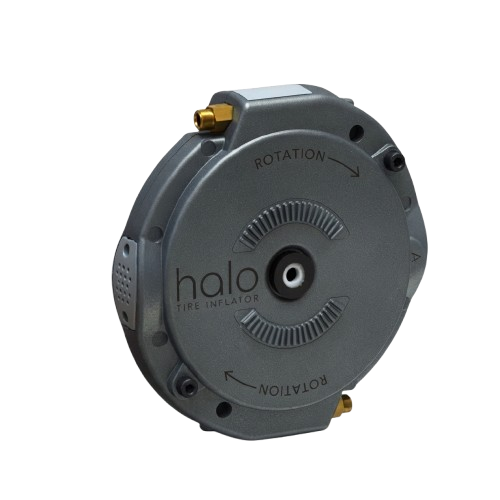
The halo IN-202UM Tire Inflator is the user manual part number for Aperia’s Halo Tire Inflator system, a mechanical automatic tire inflation solution designed for medium- and heavy-duty trucks, tractors, and trailers. It is built for dual and wide-base tires and is known for operating without an onboard air compressor, which makes it a practical choice for fleets that want to reduce tire pressure downtime and improve tire maintenance consistency. The halo IN-202UM Tire Inflator is especially useful for fleet operators, owner-operators, and maintenance teams that manage high-mileage vehicles in demanding road conditions.
One of the biggest advantages of this system is its bolt-on, self-contained design. The inflator mounts directly to the wheel end and is engineered for fast installation, often taking only a few minutes per wheel end. Because it is mechanical rather than electronic, it is designed to be durable and low-maintenance, with fewer components that can fail in harsh operating environments. Typical use cases include long-haul trucking, regional freight, vocational fleets, and trailers that need stable tire pressure support over time. While pricing can vary by dealer, kit configuration, and fleet quantity, the halo IN-202UM Tire Inflator is generally positioned as a premium fleet component, with estimated market pricing often falling in the several-hundred-dollar range per wheel-end system. Availability is strongest through commercial tire and fleet equipment channels, and support is offered directly through Aperia’s customer service and sales teams.
Troubleshooting the halo IN-202UM Tire Inflator
If the halo IN-202UM Tire Inflator is not maintaining pressure as expected, the most common causes are improper installation, damaged wheel-end components, contamination, or tire issues unrelated to the inflator itself. First, inspect the unit for visible damage, loose mounting hardware, or signs of debris around the hub area. If the tire continues to lose air, verify that the tire, valve stem, and wheel assembly are sound before assuming the inflator is at fault.
There are no commonly published consumer-style error codes for the mechanical Halo tire inflator. Instead, problems are usually diagnosed through inspection and service procedures. If the unit appears inactive, check for blockage, confirm correct fitment for the axle and wheel configuration, and review the installation steps in the product manual. Preventive maintenance should include routine tire pressure checks, periodic visual inspections, and prompt service after impact damage, curb strikes, or brake-area contamination. For warranty support or technical help, contact Aperia customer service at +1 (844) RUN-HALO or +1 (650) 741-3231, and use the support email listed by the manufacturer when available. Keeping the system clean, properly installed, and matched to the correct wheel-end setup is the best way to avoid recurring issues.
Pros and Cons of the halo IN-202UM Tire Inflator
Pros
- Automatic tire inflation without an onboard air compressor, which simplifies fleet integration.
- Mechanical design reduces dependence on electronics and complex controls.
- Compatible with dual and wide-base tire applications on tractors and trailers.
- Fast bolt-on installation can reduce downtime during service.
- Strong fit for fleets focused on tire pressure consistency and long-term maintenance savings.
Cons
- Higher upfront cost than basic manual tire maintenance tools.
- Primarily designed for commercial vehicles, so it is not ideal for passenger cars or light-duty users.
- Performance depends on proper installation and wheel-end compatibility.
- May require dealer or fleet-service support for best results.
For value for money, the halo IN-202UM Tire Inflator makes the most sense for operators who can benefit from reduced tire underinflation and more consistent upkeep. Compared with portable air compressors or manual inflation checks, it offers a more permanent and fleet-focused solution. Against competing automatic inflation systems, its simple mechanical approach is a strong selling point for durability and ease of use.
Customer Reviews for halo IN-202UM Tire Inflator
Customer feedback for the Halo Tire Inflator is generally positive, especially from fleet users who value dependable tire pressure support. Many buyers rate it around 4.5 out of 5 stars for practicality, low maintenance, and ease of installation. Reviews often praise the compact design and the fact that it works without requiring a separate air supply system.
Common complaints usually involve price sensitivity, the need for correct fitment, and the expectation that installation should be handled carefully. A typical testimonial might read: “Once installed, it became one less thing to worry about on long-haul runs.” Another common comment is that it feels like a smart investment for fleets that want to protect tires and reduce service interruptions. Buyers who want a commercial-grade automatic tire inflation system often recommend the halo IN-202UM Tire Inflator, while casual users usually find simpler tire inflator products more suitable for their needs.
Frequently Asked Questions About the halo IN-202UM Tire Inflator
What is the halo IN-202UM Tire Inflator used for? It is the user manual reference for Aperia’s Halo Tire Inflator system used on commercial tractors, trailers, dual tires, and wide-base tire setups.
Does it need an air compressor? No, the system is designed as a self-contained mechanical inflator and does not require connection to an onboard air compressor.
Who should buy it? Fleet operators, truck maintenance teams, and commercial vehicle owners who need automatic tire inflation support and better tire pressure management.
Where can support be found? Aperia customer support is available by phone at +1 (844) RUN-HALO or +1 (650) 741-3231, with sales and support email options also provided by the manufacturer.
Faqs
How do I set up the halo IN-202UM Tire Inflator for first-time use?
Why is my halo IN-202UM Tire Inflator not building pressure quickly?
How accurate is the pressure gauge on the halo IN-202UM Tire Inflator?
Can the halo IN-202UM Tire Inflator be used on car, bike, and sports ball valves?
What should I do if the halo IN-202UM Tire Inflator turns on but air does not come out?
How do I use the automatic shutoff feature on the halo IN-202UM Tire Inflator?
How should I maintain the halo IN-202UM Tire Inflator for long-term reliability?
What PSI range and runtime limits should I expect from the halo IN-202UM Tire Inflator?
More halo manuals
Leave a Comment