
Hisense 2.1CH Soundbar with Wireless Subwoofer HS218 User Manual
Content
Hisense HS218 2.1CH Soundbar with Wireless Subwoofer: Complete Product Manual
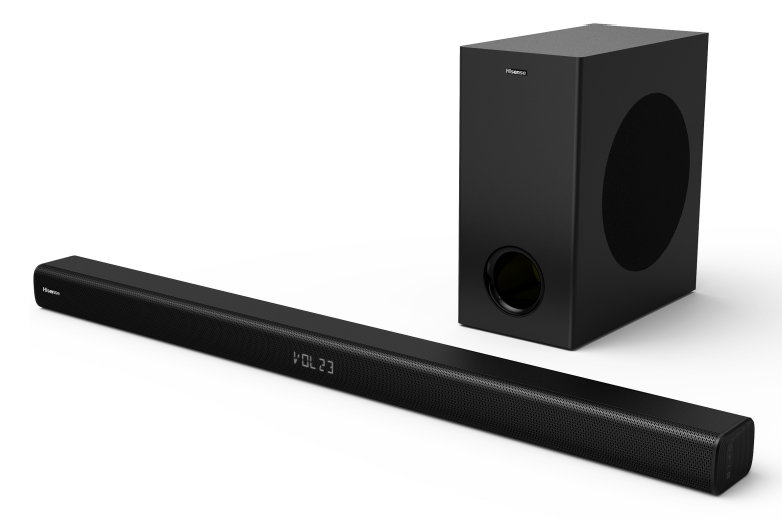
Introduction to the Hisense HS218 2.1CH Soundbar with Wireless Subwoofer
The Hisense HS218 2.1CH Soundbar with Wireless Subwoofer is a budget-friendly home audio upgrade designed to deliver fuller TV sound without the complexity of a multi-speaker surround setup. With 200W total output, Dolby Digital decoding, and a wireless 6.5-inch subwoofer, this soundbar system is built to improve dialogue clarity, add low-end impact, and create a more immersive viewing experience for movies, sports, and gaming. It is especially appealing to users who want a simple, compact solution with strong value for money.
The HS218 is a great fit for apartments, bedrooms, dorm rooms, and living rooms where space is limited but better sound is a priority. It supports HDMI ARC, optical, AUX, USB, and Bluetooth 4.2, making it easy to connect to TVs, phones, tablets, and media players. The wireless subwoofer reduces cable clutter and allows flexible placement for deeper bass performance. Hisense also includes easy TV remote control integration on many setups, which makes daily use more convenient.
In most markets, the Hisense HS218 soundbar typically falls into the entry-level to mid-budget price range, often around $100 to $180 depending on region, promotions, and retailer availability. It is widely sold through major electronics stores, online marketplaces, and Hisense channel partners, making it a practical choice for shoppers seeking an affordable soundbar with wireless subwoofer support and straightforward setup.
Specifications of the Hisense HS218 2.1CH Soundbar with Wireless Subwoofer
- Channel configuration: 2.1 channel soundbar system with wireless subwoofer
- Total power output: 200W total, typically 120W soundbar + 80W subwoofer
- Frequency response: Approximately 40Hz to 20kHz overall, with soundbar response around 120Hz to 20kHz
- Subwoofer size: 6.5-inch wireless woofer for improved bass output
- Audio decoding: Dolby Digital support for enhanced TV and movie playback
- Connectivity: HDMI ARC, optical input, coaxial input, AUX/3.5mm, USB, and Bluetooth 4.2
- Wireless performance: 2.4GHz wireless connection for the subwoofer
- Power consumption: About 30W operating power, under 0.5W in standby mode
- Dimensions: Soundbar approximately 37.8 x 2.3 x 3.2 inches; subwoofer approximately 6.7 x 13.5 x 12.3 inches
- Supported media formats: Common USB playback support for MP3, WMA, and WAV files
Compared with similar budget soundbars, the hisense 2.1CH Soundbar with Wireless Subwoofer HS218 offers strong output power and a fuller bass experience than many single-bar models in the same price bracket. It is not a premium Atmos system, but it delivers noticeably better everyday TV audio than basic stereo speakers.
Troubleshooting the Hisense HS218 Soundbar and Wireless Subwoofer
If the soundbar does not power on, check the AC connection, confirm the outlet is working, and verify that the power adapter is seated properly. If there is no sound, make sure the correct input is selected on the soundbar and TV, then test HDMI ARC or optical connections before switching to AUX or Bluetooth.
If the wireless subwoofer is not pairing, keep it within range of the soundbar, remove nearby interference from routers or cordless devices, and power-cycle both units. Reconnecting the subwoofer usually works after restarting the system and waiting for the link light to stabilize. If Bluetooth audio cuts out, reduce distance between the source device and the soundbar and avoid physical obstructions.
Common issues do not usually involve complex error codes on the display. Instead, most problems are connection-related, input-related, or caused by incorrect TV audio settings such as PCM versus bitstream output. For prevention, keep firmware and TV audio settings optimized, avoid overloading the USB port, and place the subwoofer on a stable surface.
For support, Hisense products are generally covered by a manufacturer warranty that varies by region and retailer. Customers should check the warranty card, purchase receipt, and local Hisense support website for service terms, replacement parts, and contact options. If local support is unavailable, contact the retailer where the unit was purchased for returns or escalation.
Pros and Cons of the Hisense HS218 2.1CH Soundbar with Wireless Subwoofer
Pros
- Affordable price makes it strong value for money for first-time soundbar buyers
- 200W output delivers a bigger and more cinematic sound than most TV speakers
- Wireless subwoofer adds bass impact for movies, music, and gaming
- Multiple input options make setup easy with modern and older TVs
- Compact design fits well under most televisions
- Dolby Digital support improves clarity and enhances home theater performance
Cons
- No true surround channels, so it cannot match premium multi-speaker systems
- Bluetooth 4.2 is functional but not as advanced as newer wireless standards
- Best suited for casual listening rather than audiophile-grade performance
- Subwoofer bass is good for the price, but not as refined as higher-end models
- Limited advanced tuning features compared with premium alternatives
Compared with alternatives from Samsung, JBL, or Sony in higher price tiers, the hisense 2.1CH Soundbar with Wireless Subwoofer HS218 focuses more on simplicity and affordability than premium sound precision. For shoppers who want an easy upgrade without overspending, it remains a very practical option.
Customer Reviews and User Feedback on the Hisense HS218 Soundbar
Customer feedback for the HS218 is generally positive, with many users rating it around 4 out of 5 stars for overall value, setup ease, and improved TV audio. Buyers commonly praise the stronger bass, clear dialogue, and simple wireless subwoofer pairing. A frequent compliment is that it makes movies and sports feel much more dynamic than built-in television speakers.
Some users mention that the soundstage is limited compared with larger sound systems and that the bass can feel less precise at higher volumes. Others note that Bluetooth streaming is convenient but not ideal for critical music listening. Still, most reviews recommend it for budget-conscious users who want a reliable soundbar with wireless subwoofer support.
Typical user sentiment: “Easy setup, big sound for the money, and much better than my TV speakers.” Another common view is: “Great for movies and everyday TV, but not a premium home theater system.”
For shoppers seeking a compact, affordable audio upgrade, this model is often recommended as a solid entry-level buy. The hisense 2.1CH Soundbar with Wireless Subwoofer HS218 is especially appealing for users who value ease of use, dependable performance, and a low-cost path to better TV sound.
Faqs
How do I set up the Hisense 2.1CH Soundbar with Wireless Subwoofer HS218 for the first time?
Why is my Hisense 2.1CH Soundbar with Wireless Subwoofer HS218 not connecting to my TV through HDMI ARC?
How do I fix weak or missing bass on the Hisense 2.1CH Soundbar with Wireless Subwoofer HS218?
What devices are compatible with the Hisense 2.1CH Soundbar with Wireless Subwoofer HS218?
Can I use different sound modes on the Hisense 2.1CH Soundbar with Wireless Subwoofer HS218 to improve movies, music, and news?
Why is there no sound from my Hisense 2.1CH Soundbar with Wireless Subwoofer HS218 even though the TV is on?
How can I improve dialogue clarity on the Hisense 2.1CH Soundbar with Wireless Subwoofer HS218?
How should I clean and maintain the Hisense 2.1CH Soundbar with Wireless Subwoofer HS218 for long-term use?
More hisense manuals
Leave a Comment