
Hisense 4K UHD Smart TV 50H8F User Manual
Content
Hisense 4K UHD Smart TV 50H8F: Complete Product Manual and Buying Guide
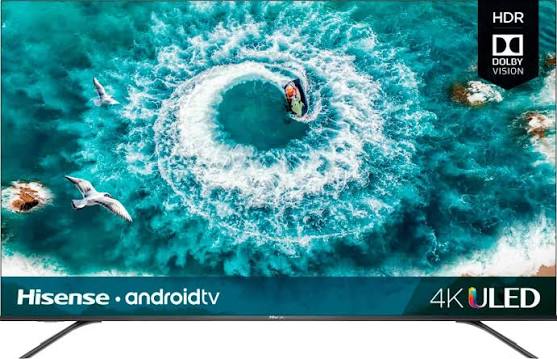
Introduction to the Hisense 4K UHD Smart TV 50H8F
The Hisense 4K UHD Smart TV 50H8F is a feature-rich 50-inch smart television designed for viewers who want strong picture quality, modern streaming support, and excellent value for money. Built around a 4K UHD panel with a native resolution of 3840 x 2160, this model delivers sharp detail, vibrant color, and smooth motion handling for movies, sports, gaming, and everyday TV use. It is especially appealing to shoppers looking for a premium-feeling large-screen TV without moving into high-end flagship pricing.
One of the main strengths of the Hisense 4K UHD Smart TV 50H8F is its combination of Full-Array Local Dimming, Dolby Vision HDR, HDR10 support, and up to 700 nits peak brightness. These features help improve contrast, highlight detail, and create a more immersive viewing experience in both bright and dark scenes. The Android smart TV platform also gives users access to popular streaming apps, voice control options, and easy casting from mobile devices.
This TV is a strong fit for families, casual movie watchers, sports fans, and gamers who want a responsive 4K display with useful connectivity options. It typically falls into the mid-range price category, with common market pricing historically around the $400 range, though availability and current cost may vary by retailer, region, and stock status. For buyers comparing the Hisense 4K UHD Smart TV 50H8F with similarly sized smart TVs, the model stands out for its value-driven feature set and strong all-around performance.
Specifications for Hisense 50H8F 4K UHD Smart TV
- Display size: 50-inch class with 49.5-inch actual diagonal screen size
- Resolution: 3840 x 2160 pixels, true 4K UHD
- Panel type: VA panel with Full-Array Local Dimming
- Backlight: DLED FALD with 32 local dimming zones
- HDR support: Dolby Vision HDR and HDR10
- Peak brightness: up to 700 nits
- Motion handling: Motion Rate 240
- Color performance: Wide Color Gamut with strong DCI-P3 coverage
- Smart platform: Android TV
- Audio output: 10W x 2 stereo speakers
- Wireless: Wi-Fi, Bluetooth, and Ethernet support
- Ports: 4 HDMI 2.0 inputs, 2 USB ports, LAN, composite input, optical audio output, and audio jack
- Power consumption: 120W typical with standby consumption under 0.5W
Compared with many other 50-inch 4K smart TVs in its class, the Hisense 4K UHD Smart TV 50H8F offers stronger HDR performance and more advanced local dimming than basic entry-level LED models. It is best viewed as a value-oriented alternative to higher-priced premium TVs rather than a budget-only option.
Troubleshooting Hisense 50H8F Smart TV Problems
If the TV will not power on, check the power cable, wall outlet, and remote batteries first. A soft reset by unplugging the TV for 60 seconds often clears temporary startup issues. If the screen is black but sound is present, verify the HDMI source, input selection, and backlight settings.
Common error symptoms on the Hisense 4K UHD Smart TV 50H8F usually involve network drops, app crashes, audio lag, or HDMI handshake problems rather than complicated hardware faults. If streaming apps freeze, restart the TV and router, clear the app cache, or reinstall the app. If a connected device is not detected, try a different HDMI port or cable and confirm the external device is set to the correct resolution.
Preventive care includes keeping firmware updated, using quality HDMI cables, allowing ventilation around the TV, and avoiding prolonged static images to reduce burn-in risk on connected devices. For support, use the official Hisense customer service channels, the product manual, and the retailer warranty if the unit is still covered. For faster help, keep the model number 50H8F, proof of purchase, and a description of the issue ready when contacting support.
Pros and Cons of the Hisense 4K UHD Smart TV 50H8F
Pros
- Excellent value for a 50-inch 4K UHD smart TV
- Full-Array Local Dimming improves contrast in dark scenes
- Dolby Vision HDR enhances compatibility with premium streaming content
- Android TV provides access to major streaming apps and voice features
- Multiple HDMI and USB ports make it easy to connect consoles, soundbars, and media devices
- Strong brightness and color performance for the price range
Cons
- Built-in audio is adequate but not ideal for home theater use
- Motion performance is good, but not as refined as premium high-refresh-rate TVs
- Smart TV responsiveness can vary depending on app load and firmware version
- Black levels and uniformity may not match more expensive OLED or Mini-LED alternatives
Overall, the Hisense 4K UHD Smart TV 50H8F is a strong choice for buyers seeking maximum features per dollar. It compares favorably with other mid-range 50-inch smart TVs, especially when HDR performance and local dimming matter more than ultra-premium gaming extras.
Customer Reviews of the Hisense 50H8F
Typical user feedback for the Hisense 4K UHD Smart TV 50H8F is positive, with many owners praising the sharp 4K picture, strong HDR effect, and easy streaming setup. A common rating pattern falls around 4 out of 5 stars, with users often describing it as a high-value purchase for living rooms and bedrooms.
Frequent compliments include good brightness, solid color quality, and a polished feature set for the price. Common complaints mention average built-in sound, occasional app sluggishness, and the need for occasional rebooting after updates. A typical testimonial might read: “Great picture for the money, easy to set up, and perfect for streaming and sports.” Another common comment is: “Sound is decent, but a soundbar makes a big difference.”
For shoppers comparing value-oriented 4K TVs, the Hisense 4K UHD Smart TV 50H8F is often recommended if picture quality and smart features matter more than premium-tier audio or advanced gaming features.
Frequently Asked Questions About Hisense 50H8F
- Is the Hisense 50H8F a true 4K TV? Yes, it uses a 3840 x 2160 resolution panel.
- Does it support HDR? Yes, it supports Dolby Vision HDR and HDR10.
- How many HDMI ports does it have? It includes four HDMI 2.0 inputs.
- Is it good for gaming? Yes, it is suitable for casual and console gaming, especially on a budget.
- Does it use Android TV? Yes, the smart platform is Android TV.
Faqs
How do I set up the Hisense 4K UHD Smart TV 50H8F for the first time?
Why is my Hisense 4K UHD Smart TV 50H8F not connecting to Wi-Fi?
What picture settings give the best 4K HDR performance on the Hisense 4K UHD Smart TV 50H8F?
How many HDMI and USB ports does the Hisense 4K UHD Smart TV 50H8F have?
Can I use Google Assistant or Alexa with the Hisense 4K UHD Smart TV 50H8F?
Why is the sound on my Hisense 4K UHD Smart TV 50H8F too low or unclear?
Does the Hisense 4K UHD Smart TV 50H8F work well for gaming consoles and streaming devices?
How should I clean and maintain the Hisense 4K UHD Smart TV 50H8F safely?
More hisense manuals
Leave a Comment